HD.MVX9-A9B. VER_1.5 Universal Board
HD.MVX9.A9B.VER_1.5 is an analog TV control board designed for the Asia-Pacific Market. The board has excellent performance and is mature. HD_MVX9_A9B.VER_1.5 can support LCD and LED panels; the maximum resolution supported is 1920×1080. It’s apt to drive an LCD or LED panel smaller than 26’ to get a cost-effective and high-performance, and popular flat-panel analog TV set.
HD-MVX9-A9B supports normal input types, such as HDMI, USB, AV, VGA, ATV, etc. HD.MVX9.A9B.VER_1.5 firmware files are given below for the technician’s support.
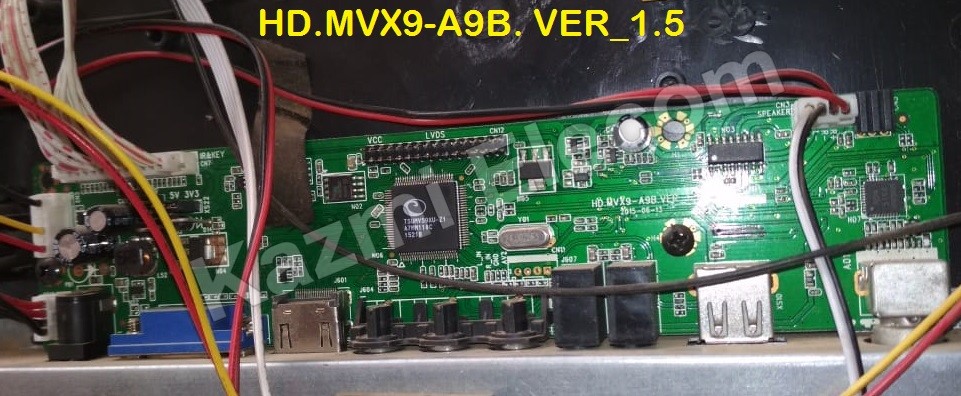
Basic Info:
Model No. HD.MVX9-A9B.VER_1.5
Main Chipset: TSUMV59
Screen Supported: 10-32″
Display Format: 1080P
Aspect Ratio: 4:3, 16:9 & 16:10
General Specifications:
TV System: PAL/SECAM/NTSC
Panel Interface: Single-channel or Dual-channel LVDS
Key Button Functions: CH-/CH+/MENU/VOL-/VOL+Source/Power
Multi-Language OSD: Yes (English/French/Spanish/Portuguese/Chinese)
Input/Output Ports: HDMI, VGA, AV, USB, RF TV interface, and Earphone Out
Audio O/P Power: 2 x 2.5 Watt (8 ohms)
Panel Voltage: 3.3V/5V/12V (jumper cap setting)
USB Port: Yes (Firmware Upgrade and Multimedia Playback Support)
Electrical Parameters:
Working Input Voltage: DC +12 Volt
Maximum Current: 2000mA (Without Panel)
Standby Power: <0.6W (for the mainboard only)
Maximum Current for USB: 500mA
Note: The following firmware is a backup file. Kazmi Elecom Team is not responsible for any type of damage/loss as a result of uploading/downloading the firmware. If you are new and do not have enough knowledge of loading or installing software/firmware or dump files then read here first.
How to Download Firmware Files:
Download all parts of the following firmware and then extract any one of them; you will get the folder. Now copy the files to the USB. For more details about the download process, watch the video Click Here
HD.MVX9-A9B.VER_1.5 Firmware files Free Download:

| S.NO. | BOARD/DESCRIPTION | DOWNLOAD LINK |
|---|---|---|
| 1 | HD.MVX9-A9B.VER_1.5_1024x768_Dump | Download |
| 2 | HD.MVX9-A9B.VER_1.5_1366x768_Dump | Download |
| 3 | HD.MVX9-A9B.VER_1.5_1920x1080_Dump | Download |
| 4 | HD.MVX9-A9B.VER_1.5_1920x1080_Generalgold_Dump | Download |
For video tutorials, visit “Kazmi Elecom” on my YouTube channel.

How to flash this firmware? It ain’t start flashing when I plug in to USB port. It shows only (red light) standby. Is there any techniques or combination? Thanks hoping you will help me
https://www.kazmielecom.tech/2021/08/26/how-to-load-firmware.html
pls HD.MVX9.A9C VER-2.5 is it the same A9B-ver 1.5 can one software work for both of them
not experienced