Tag Archives: kazmi elecom

VS.T596_V3.1-8 Software Free Download

VS.T596_V3.1-8 Universal Board

VS.T596_V3.1-8 is a Universal LCD/LED Driver Board.

Basic Info:

Model No. VS.T596_V3.1-8

Main Chipset: TSUMMV29LU/V59

Tuner:

Display Format: up to 1080
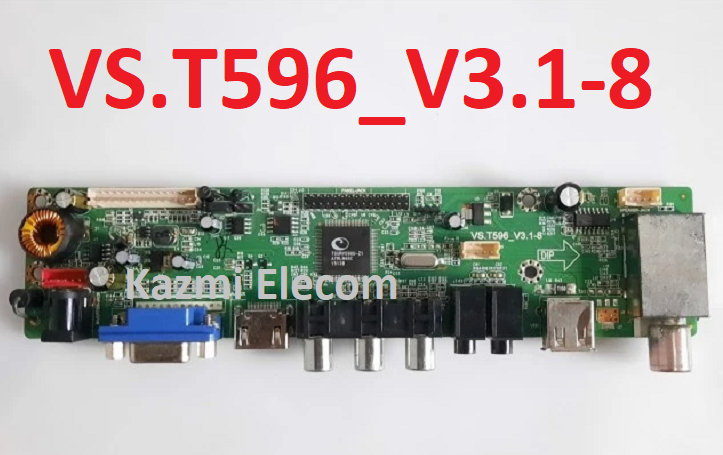
Vs.t596_V3.1-8

General Specifications:

TV System: PAL/SECAM/NTSC

Panel Interface: Single channel or Dual channel LVDS

Key Button Functions: CH-/CH+/MENU/VOL-/VOL+Souce/Power

Multi-Language OSD: Yes

Input/Output Ports: HDMI, VGA, AV, USB, RF TV interface and Earphone Out Jack

Audio O/P Power: 2 x 5 Watt (8 ohm)

Panel Voltage: +3.3V/+5V/+12V DC (jumping cap setting)

USB Port: Yes (Firmware Upgrade and Multimedia Playback Support)

USB File Format: Audio (Mp3, wma, m4a/aac), Video (avi, mp4, ts/trp, mkv/mov, mpg, dat, vob, rm/rmvb),                                                 Picture (Jpg, jpeg, bmp, png), Text (text)

IR Control: Yes (Controllable by Remote Control)

Electrical Parameters:

Working Input Voltage: DC +12 Volt

Maximum Current: 2000mA (Without Panel)

Standby Power: <0.2W (for the motherboard only)

Maximum Current for USB: 500mA

How to Upgrade Firmware:

  1. Copy the Required Firmware/software into the FAT32 USB Disk
  2. Plug the U disk into the Mainboard USB port of the LCD/LED TV
  3. Switch ON the power and Wait until even the IR indicator LED stops flashing
  4. Done. Unplug the U-disk (It will take max 1 min to upgrade firmware)

Factory Service Mode:

INPUT
MENU

Note: 

The following given Software is a backup Dump and can be written by a programming tool. Kazmi Elecom Team is not responsible for any type of damage/loss as a result of uploading/downloading the firmware. First Check the mainboard and then install the software. If you are new and do not have enough knowledge of loading or installing software/firmware or dump files then read here first.

VS.T596_V3.1-8 Firmware All resolutions Free Download :

Kazmi-Elecom

For video tutorials, visit “Kazmi Elecom” my YouTube channel.
VS.T596_V3.0-8 Software Free Download

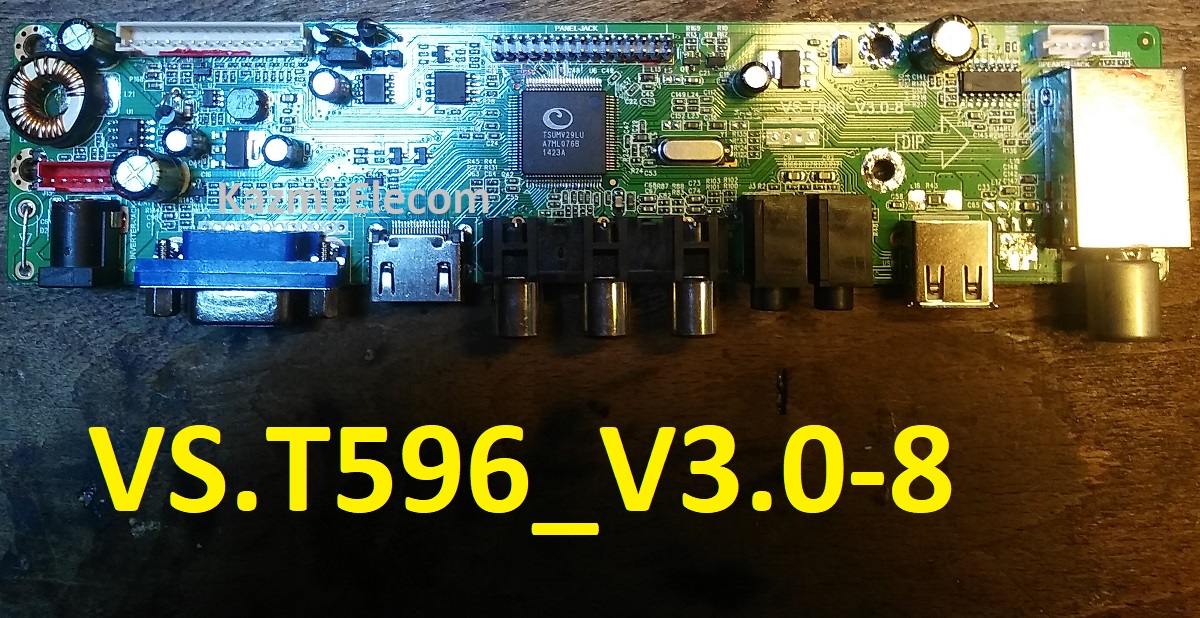
VS.T596_V3.0-8 Universal Board

VS.T596_V3.0-8 is a Universal LCD/LED Driver Board.

Basic Info:

Model No. VS.T596_V3.0-8

Main Chipset: TSUMMV29LU

Tuner:

Display Format: up to 1080

Vs.t596_V3.0-8

General Specifications:

TV System: PAL/SECAM/NTSC

Panel Interface: Single channel or Dual channel LVDS

Key Button Functions: CH-/CH+/MENU/VOL-/VOL+Souce/Power

Multi-Language OSD: Yes

Input/Output Ports: HDMI, VGA, AV, USB, RF TV interface and Earphone Out Jack

Audio O/P Power: 2 x 5 Watt (8 ohm)

Panel Voltage: +3.3V/+5V/+12V DC (jumping cap setting)

USB Port: Yes (Firmware Upgrade and Multimedia Playback Support)

USB File Format: Audio (Mp3, wma, m4a/aac), Video (avi, mp4, ts/trp, mkv/mov, mpg, dat, vob, rm/rmvb),                                                 Picture (Jpg, jpeg, bmp, png), Text (text)

IR Control: Yes (Controllable by Remote Control)

Electrical Parameters:

Working Input Voltage: DC +12 Volt

Maximum Current: 2000mA (Without Panel)

Standby Power: <0.2W (for the motherboard only)

Maximum Current for USB: 500mA

How to Upgrade Firmware:

  1. Copy the Required Firmware/software into the FAT32 USB Disk
  2. Plug the U disk into the Mainboard USB port of the LCD/LED TV
  3. Switch ON the power and Wait until even the IR indicator LED stops flashing
  4. Done. Unplug the U-disk (It will take max 1 min to upgrade firmware)

Factory Service Mode:

INPUT
MENU

Note: 

The following given Software is a backup Dump and can be written by a programming tool. Kazmi Elecom Team is not responsible for any type of damage/loss as a result of uploading/downloading the firmware. First Check the mainboard and then install the software. If you are new and do not have enough knowledge of loading or installing software/firmware or dump files then read here first.

VS.T596_V3.0-8 Firmware All resolutions Free Download :

Kazmi-Elecom

For video tutorials, visit “Kazmi Elecom” my YouTube channel.
VS.T596_V2.2-5 Software Free Download

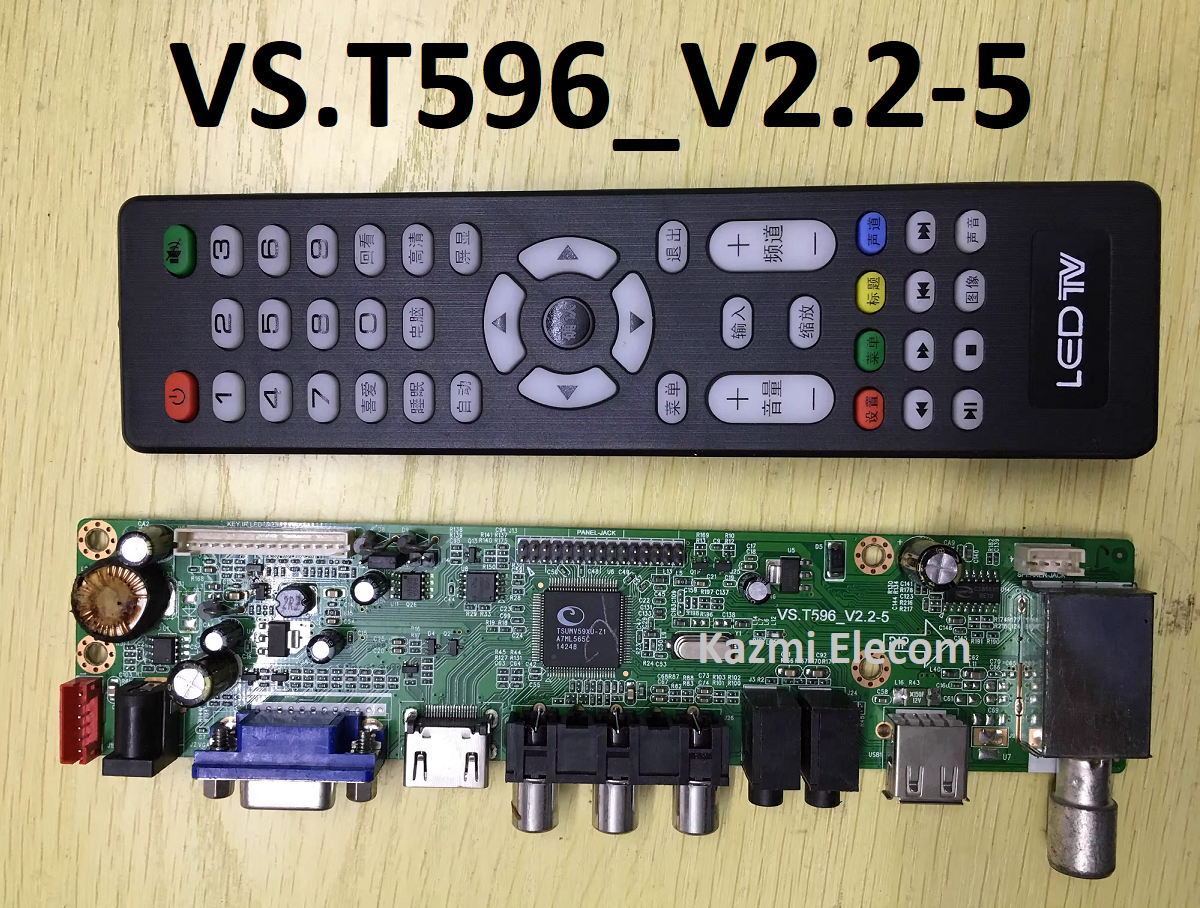
VS.T596_V2.2-5 Universal Board

VS.T596_V2.2-5 is a Universal LCD/LED Driver Board.

Basic Info:

Model No. VS.T596_V2.2-5

Main Chipset: TSUMMV29LU/TSUMV59XU-Z1

Tuner:

Display Format: up to 1080

Vs.t596_V2.2-5

General Specifications:

TV System: PAL/SECAM/NTSC

Panel Interface: Single channel or Dual channel LVDS

Key Button Functions: CH-/CH+/MENU/VOL-/VOL+Souce/Power

Multi-Language OSD: Yes

Input/Output Ports: HDMI, VGA, AV, USB, RF TV interface and Earphone Out Jack

Audio O/P Power: 2 x 5 Watt (8 ohm)

Panel Voltage: +3.3V/+5V/+12V DC (jumping cap setting)

USB Port: Yes (Firmware Upgrade and Multimedia Playback Support)

USB File Format: Audio (Mp3, wma, m4a/aac), Video (avi, mp4, ts/trp, mkv/mov, mpg, dat, vob, rm/rmvb),                                                 Picture (Jpg, jpeg, bmp, png), Text (text)

IR Control: Yes (Controllable by Remote Control)

Electrical Parameters:

Working Input Voltage: DC +12 Volt

Maximum Current: 2000mA (Without Panel)

Standby Power: <0.2W (for the motherboard only)

Maximum Current for USB: 500mA

How to Upgrade Firmware:

  1. Copy the Required Firmware/software into the FAT32 USB Disk
  2. Plug the U disk into the Mainboard USB port of the LCD/LED TV
  3. Switch ON the power and Wait until even the IR indicator led stops flashing
  4. Done. Unplug the U-disk (It will take max 1 min to upgrade firmware)

Factory Service Mode:

INPUT
MENU

Note: 

The following given Software is a backup Dump and can be written by a programming tool. Kazmi Elecom Team is not responsible for any type of damage/loss as a result of uploading/downloading the firmware. First Check the mainboard and then install the software. If you are new and do not have enough knowledge of loading or installing software/firmware or dump files then read here first.

VS.T596_V2.2-5 Firmware All resolutions Free Download :

Kazmi-Elecom

For video tutorials, visit “Kazmi Elecom” my youtube channel.

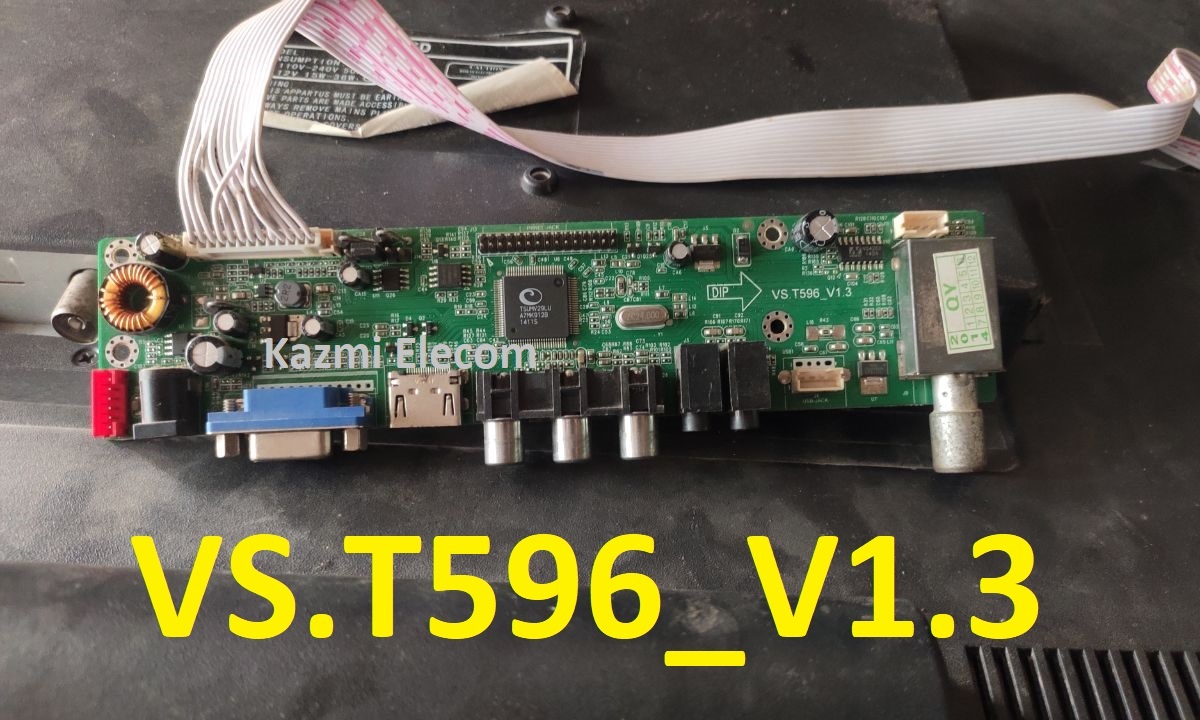
VS.T596_V1.3 Software Free Download

VS.T596_V1.3 Universal Board

VS.T596_V1.3 is a Universal LCD/LED Driver Board.

Basic Info:

Model No. VS.T596_V1.3

Main Chipset: TSUMMV29LU/TSUMV59XU-Z1

Tuner:

Display Format: up to 1080

Vs.t596_V1.3

General Specifications:

TV System: PAL/SECAM/NTSC

Panel Interface: Single channel or Dual channel LVDS

Key Button Functions: CH-/CH+/MENU/VOL-/VOL+Souce/Power

Multi-Language OSD: Yes

Input/Output Ports: HDMI, VGA, AV, USB, RF TV interface and Earphone Out Jack

Audio O/P Power: 2 x 5 Watt (8 ohm)

Panel Voltage: +3.3V/+5V/+12V DC (jumping cap setting)

USB Port: Yes (Firmware Upgrade and Multimedia Playback Support)

USB File Format: Audio (Mp3, wma, m4a/aac), Video (avi, mp4, ts/trp, mkv/mov, mpg, dat, vob, rm/rmvb),                                                 Picture (Jpg, jpeg, bmp, png), Text (text)

IR Control: Yes (Controllable by Remote Control)

Electrical Parameters:

Working Input Voltage: DC +12 Volt

Maximum Current: 2000mA (Without Panel)

Standby Power: <0.2W (for the motherboard only)

Maximum Current for USB: 500mA

How to Upgrade Firmware:

  1. Copy the Required Firmware/software into the FAT32 USB Disk
  2. Plug the U disk into the Mainboard USB port of the LCD/LED TV
  3. Switch ON the power and Wait until even the IR indicator led stops flashing
  4. Done. Unplug the U-disk (It will take max 1 min to upgrade firmware)

Factory Service Mode:

INPUT
MENU

Note: 

The following given Software is a backup Dump and can be written by a programming tool. Kazmi Elecom Team is not responsible for any type of damage/loss as a result of uploading/downloading the firmware. First Check the mainboard and then install the software. If you are new and do not have enough knowledge of loading or installing software/firmware or dump files then read here first.

VS.T596_V1.3 Firmware All resolutions Free Download :

Kazmi-Elecom

For video tutorials, visit “Kazmi Elecom” my youtube channel.

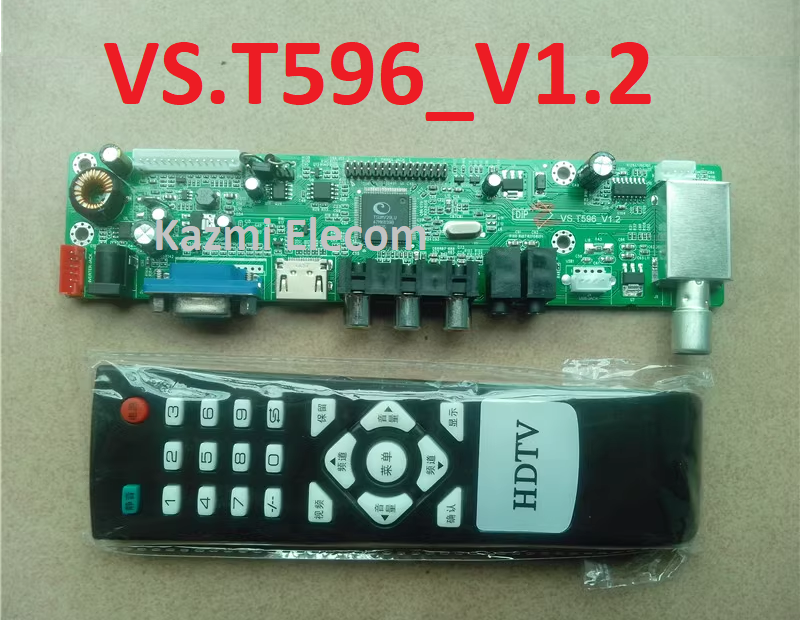
VS.T596_V1.2 Software Free Download

VS.T596_V1.2 Universal Board

VS.T596_V1.2 is a Universal LCD/LED Driver Board.

Basic Info:

Model No. VS.T596_V1.2

Main Chipset: TSUMMV29LU

Tuner:

Display Format: up to 1080

Vs.t596_V1.2

General Specifications:

TV System: PAL/SECAM/NTSC

Panel Interface: Single channel or Dual channel LVDS

Key Button Functions: CH-/CH+/MENU/VOL-/VOL+Souce/Power

Multi-Language OSD: Yes

Input/Output Ports: HDMI, VGA, AV, USB, RF TV interface and Earphone Out Jack

Audio O/P Power: 2 x 5 Watt (8 ohm)

Panel Voltage: +3.3V/+5V/+12V DC (jumping cap setting)

USB Port: Yes (Firmware Upgrade and Multimedia Playback Support)

USB File Format: Audio (Mp3, wma, m4a/aac), Video (avi, mp4, ts/trp, mkv/mov, mpg, dat, vob, rm/rmvb),                                                 Picture (Jpg, jpeg, bmp, png), Text (text)

IR Control: Yes (Controllable by Remote Control)

Electrical Parameters:

Working Input Voltage: DC +12 Volt

Maximum Current: 2000mA (Without Panel)

Standby Power: <0.2W (for the motherboard only)

Maximum Current for USB: 500mA

How to Upgrade Firmware:

  1. Copy the Required Firmware/software into the FAT32 USB Disk
  2. Plug the U disk into the Mainboard USB port of the LCD/LED TV
  3. Switch ON the power and Wait until even the IR indicator led stops flashing
  4. Done. Unplug the U-disk (It will take max 1 min to upgrade firmware)

Factory Service Mode:

INPUT
MENU

Note: 

The following given Software is a backup Dump and can be written by a programming tool. Kazmi Elecom Team is not responsible for any type of damage/loss as a result of uploading/downloading the firmware. First Check the mainboard and then install the software. If you are new and do not have enough knowledge of loading or installing software/firmware or dump files then read here first.

VS.T596_V1.2 Firmware All resolutions Free Download :

Kazmi-Elecom

For video tutorials, visit “Kazmi Elecom” my youtube channel.

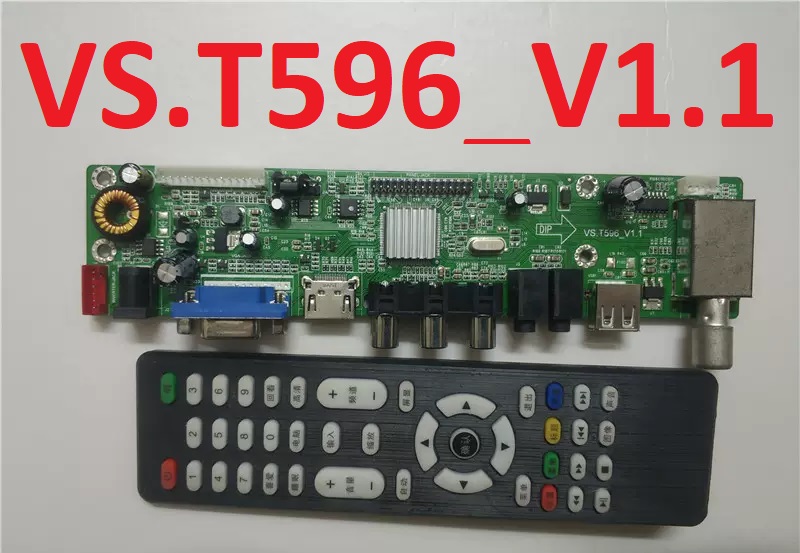
VS.T596_V1.1 Software Free Download

VS.T596_V1.1 Universal Board

VS.T596_V1.1 is a Universal LCD/LED Driver Board.

Basic Info:

Model No. VS.T596_V1.1

Main Chipset: TSUMMV29LU

Tuner:

Display Format: up to 1080

Vs.t596_V1.1

General Specifications:

TV System: PAL/SECAM/NTSC

Panel Interface: Single channel or Dual channel LVDS

Key Button Functions: CH-/CH+/MENU/VOL-/VOL+Souce/Power

Multi-Language OSD: Yes

Input/Output Ports: HDMI, VGA, AV, USB, RF TV interface and Earphone Out Jack

Audio O/P Power: 2 x 5 Watt (8 ohm)

Panel Voltage: +3.3V/+5V/+12V DC (jumping cap setting)

USB Port: Yes (Firmware Upgrade and Multimedia Playback Support)

USB File Format: Audio (Mp3, wma, m4a/aac), Video (avi, mp4, ts/trp, mkv/mov, mpg, dat, vob, rm/rmvb),                                                 Picture (Jpg, jpeg, bmp, png), Text (text)

IR Control: Yes (Controllable by Remote Control)

Electrical Parameters:

Working Input Voltage: DC +12 Volt

Maximum Current: 2000mA (Without Panel)

Standby Power: <0.2W (for the motherboard only)

Maximum Current for USB: 500mA

How to Upgrade Firmware:

  1. Copy the Required Firmware/software into the FAT32 USB Disk
  2. Plug the U disk into the Mainboard USB port of the LCD/LED TV
  3. Switch ON the power and Wait until even the IR indicator led stops flashing
  4. Done. Unplug the U-disk (It will take max 1 min to upgrade firmware)

Factory Service Mode:

INPUT
MENU

Note: 

The following given Software is a backup Dump and can be written by a programming tool. Kazmi Elecom Team is not responsible for any type of damage/loss as a result of uploading/downloading the firmware. First Check the mainboard and then install the software. If you are new and do not have enough knowledge of loading or installing software/firmware or dump files then read here first.

VS.T596_V1.1 Firmware All resolutions Free Download :

Kazmi-Elecom

For video tutorials, visit “Kazmi Elecom” my youtube channel.

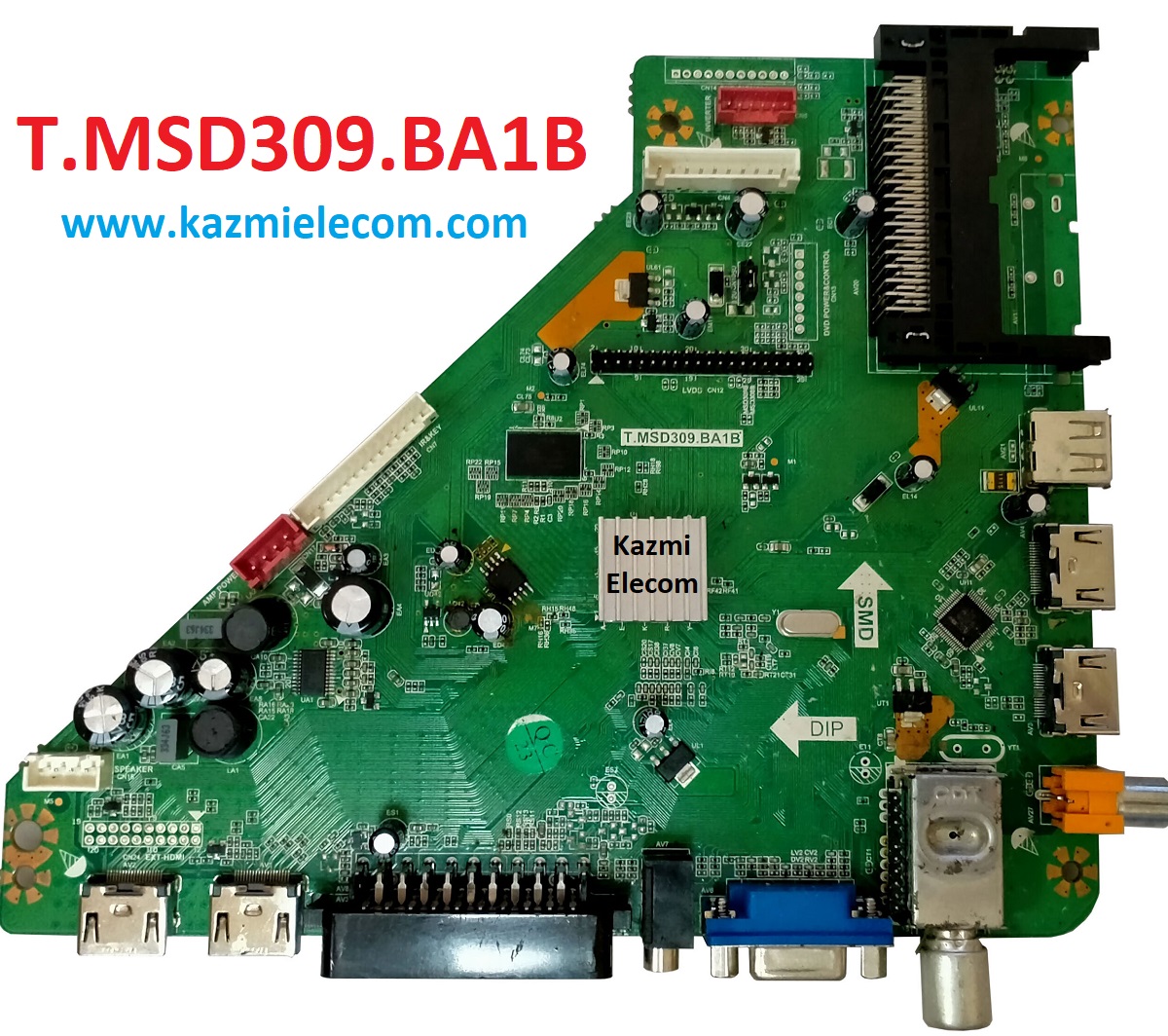
T.MSD309.BA1B Software Free Download

T.MSD309.BA1B LED TV Board

T.MSD309.BA1B is a simple ATV Driver Motherboard designed for LCD/LED TVs. T_MSD309_BA1B board is suitable for the Asia Pacific and the Middle East markets.T-MSD309-BA1B is a non-Combo Board. The main power module, LED Backlight Inverter Circuit, is required, and the ATV Card is built into the motherboard.

T-MSD309-BA1B has all the features as per the latest requirement, such as HDMI input, USB interface, PC input, Component Input, TV, and Scart.T-MSD309-BA1B firmware files are given below for the technician’s support.

T.msd309.Ba1B

General Specifications:

Brand/Mark: Universal Board

Model: T.MSD309.BA1B

Main Chip: MSD309

Product: LED TV

LED Backlight: NA

Flash IC: 4Mb

Screen supported: 32-50 inch

Resolution: Up to 1920×1080

Panel Voltage: 12V

Power Input: 12v

Sound Chipset:

Tuner: XDTT

Bin Name: CVT_309B.bin

Software Type: USB & Backup Dump

Service Code:

Menu 1147

Note: The following given Software is a backup Dump and can be written by a programming tool. Kazmi Elecom Team is not responsible for any type of damage/loss as a result of uploading/downloading the firmware. First Check the mainboard and then install the software. If you are new and do not have enough knowledge of loading or installing software/firmware or dump files then read here first.

T.MSD309.BA1B firmware for free download:

Kazmi-Elecom

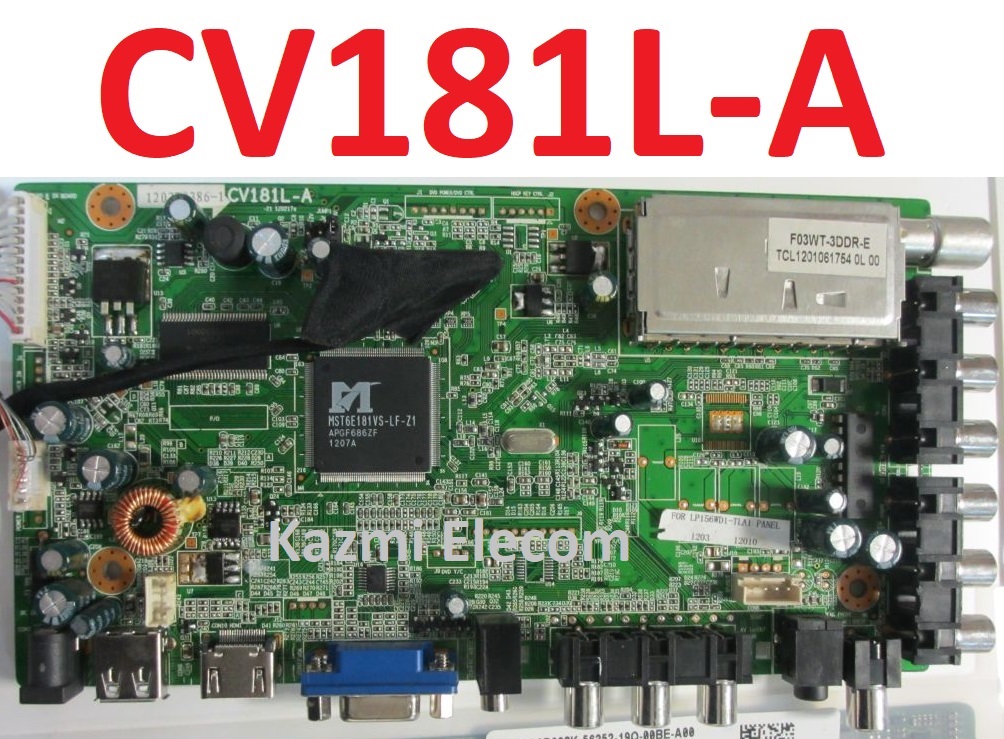
CV181L-A Software Free Download

CV181L-A LED TV Board

CV181L-A is an analog LCD/LED TV driver motherboard that is designed for Asian markets. CV181L_A is designed with different properties and features to support the different sizes of panel screens. CV181L-A is not a combo card which means a separate power supply module will be required to operate this board. CV181L A has multiple input ports like HDMI, VGA input, USB, AV-IN, AV-OUT, etc. Some boards have a dual AV input interface and Scart with an extension board.

Cv181L-A

General Specifications:

Board Make: China

Board Model:  CV181L-A-20 110401d, CV181L-A-11 101203c

Main Chipset: Mstar MST6M181/182

Audio Amp: YD1517P

Tuner: CDT-35P512-37

TV System: PAL/SECAM/NTSC

Panel Interface: Single-channel or Dual-channel LVDS

Key Button Functions: CH-/CH+/MENU/VOL-/VOL+Souce/Power

Multi-Language: Yes

Input/Output Ports: HDMI, VGA, AV, USB, RF TV interface, and Earphone Out

Audio O/P Power: 2 x 8 Watt (8 ohms)

Panel Voltage: +5V/+12V DC (Default 12V)

USB Port: Yes (Firmware Upgrade and Multimedia Playback Support)

IR Control: Yes (Controllable by Remote Control)

Electrical Parameters:

Working Input Voltage: DC 12 Volt

Maximum Current: 5000mA (Without Panel)

Standby Power: <0.5W

Maximum Current for USB: 500mA

Flash IC: 4MB, 1MB(DVD)

Firmware Type: Backup Dump

Note: The following given Software is a backup Dump and can be written by a programming tool. Kazmi Elecom Team is not responsible for any type of damage/loss as a result of uploading/downloading the firmware. First Check the mainboard and then install the software. If you are new and do not have enough knowledge of loading or installing software/firmware or dump files then read here first.

CV181L-A Firmware Collection Free Download:

Kazmi-Elecom

For video tutorials, visit “Kazmi Elecom” my youtube channel.

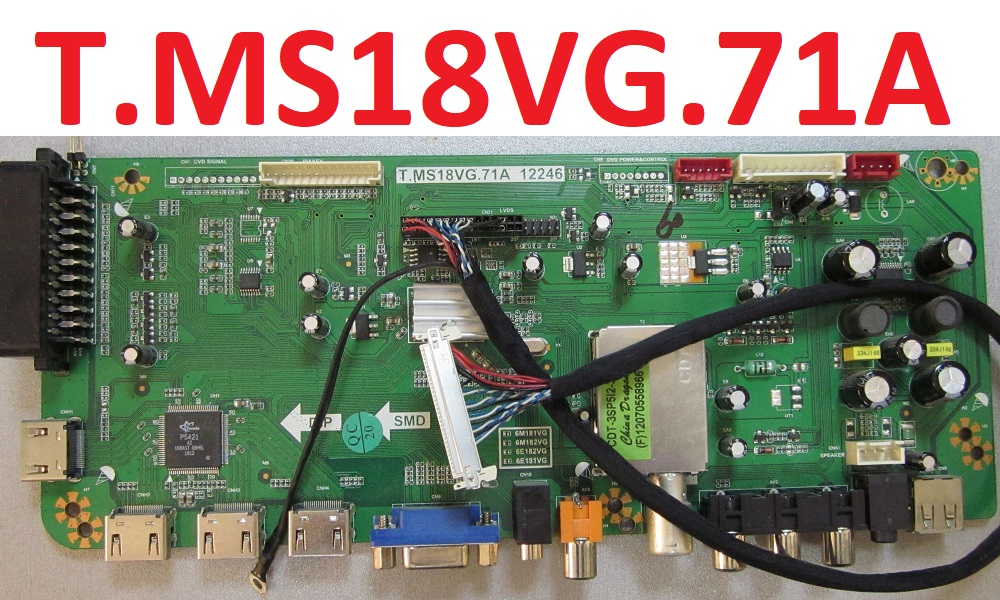
T.MS18VG.71A Software Free Download

T.MS18VG.71A LED TV Board

T.MS18VG.71A is an analog LCD/LED TV Control Board that is suitable for the Asia Pacific and the Middle East Market. It can support 32-inch to 46-Inches LED panels which a resolution is up to 1920×1080. Its USB interface supports Multimedia Playback and Software Upgrades as well. T.MS18VG.A1B has multiple HDMI ports that support 1.4 and its HDCP support 1.1. T_MS18VG_71A is compatible with Non-HD and FHD LCD/LED panel screens. T-MS18VG-71A is widescreen-supported and also has a multi-language option. T.MS18VG.71A has its special feature of  AV. T.MS18VG.71A software collection is given below for free download.

T.ms18Vg.71A

General Specifications:

Board Make: China

Board Model: T-MS18VG.71A

Main Chipset: Mstar MST6M182VG

TV System: PAL/SECAM/NTSC

Panel Interface: Single-channel or Dual-channel LVDS

Key Button Functions: CH-/CH+/MENU/VOL-/VOL+Souce/Power

Multi-Language: Yes

Input/Output Ports: HDMI, VGA, AV, USB, RF TV interface, and Earphone Out

Audio O/P Power: 2 x 8 Watt (8 ohms)

Panel Voltage: +5V/+12V DC (Default 12V)

USB Port: Yes (Firmware Upgrade and Multimedia Playback Support)

IR Control: Yes (Controllable by Remote Control)

Electrical Parameters:

Working Input Voltage: DC 12 Volt

Maximum Current: 5000mA (Without Panel)

Standby Power: <0.5W

Maximum Current for USB: 500mA

Flash IC: 4MB

Firmware Type: Backup Dump

Note: The following given Software is a backup Dump and can be written by a programming tool. Kazmi Elecom Team is not responsible for any type of damage/loss as a result of uploading/downloading the firmware. First Check the mainboard and then install the software. If you are new and do not have enough knowledge of loading or installing software/firmware or dump files then read here first.

T.MS18VG.71A Firmware Collection Free Download:

Kazmi-Elecom

For video tutorials, visit “Kazmi Elecom” my youtube channel.

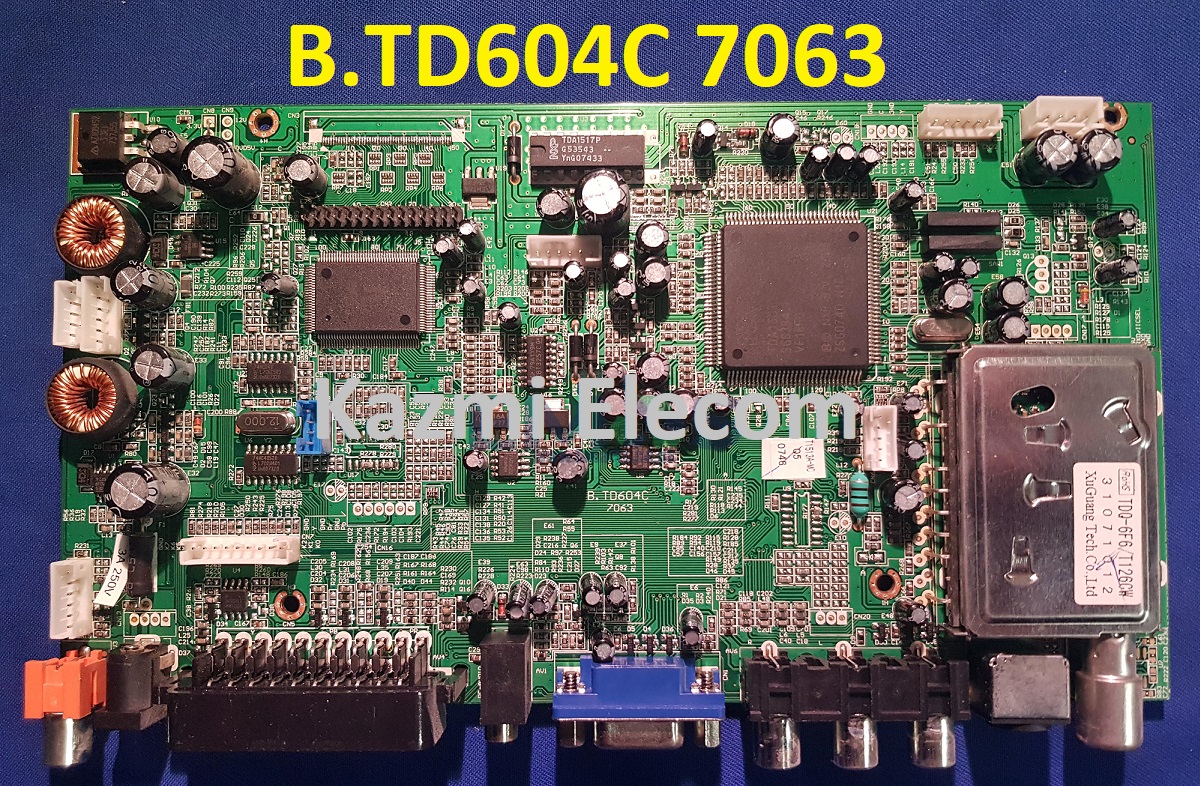
B.TD604C Software Free Download

B.TD604C LCD TV Board

B.TD604C is a universal LCD driver Board that has SD resolution Supported up to 1440. B-TD604C 7063 is a non-combo board which means the main power supply and LCD backlight driver board are required separately while the ATV module and sound card are built in. The firmware files are given below for the technician’s support.

B.td604C 7063

General Specifications:

Brand/Mark: China Universal

Model: B.TD604C 7063

Main Chip: TDA15021H/N1C00

TV System: PAL\SECAM\NTSC PLAYBACK

Product: LCD TV

Input Voltage: 12V DC

MAX Backlight Watt: NA

Backlight Current: NA

Resolution: up to 1400×1050

Flash size: KB

EEPROM: 24C16, 24C02

AUDIO: TDA1517P

Tuner: TDQ-6F6/T126CW

Service Menu:

Source

Note: The following given Software is a backup Dump and can be written by a programming tool. Kazmi Elecom Team is not responsible for any type of damage/loss as a result of uploading/downloading the firmware. First Check the mainboard and then install the software. If you are new and do not have enough knowledge of loading or installing software/firmware or dump files then read here first.

B.TD604C firmware for free download:

Kazmi-Elecom

For video tutorials, visit “Kazmi Elecom” my youtube channel.

error: Content is protected !!