Tag Archives: kazmi elecom

TPD.NT72563.PB772 Firmware Free Download

TPD.NT72563.PB772 LED TV Board

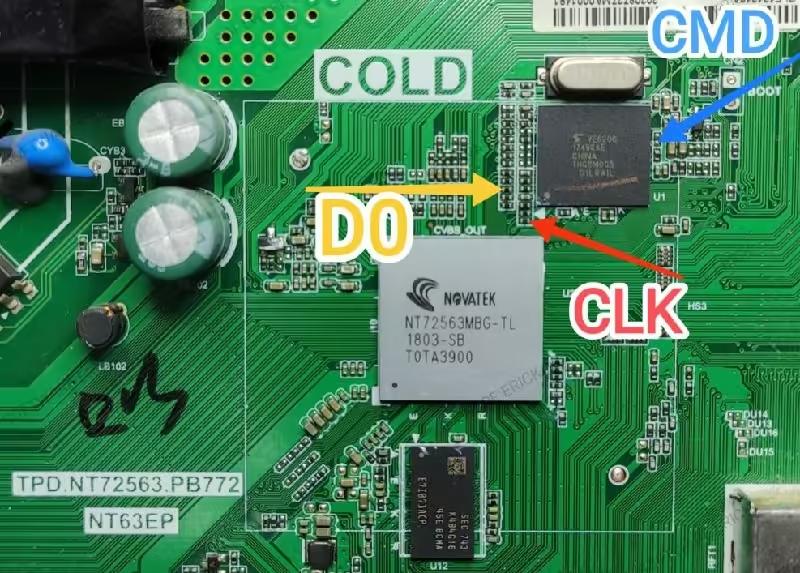
TPD.NT72563.PB772 is a smart Android LED TV board. Its maximum supported screen resolution is 1920×1080 Full HD 1080P. It has several input-output user connectivity interfaces such as a Headphones output jack of 3.5mm to amplify the audio output. For connecting Analog devices, it has an RCA (Component) input interface. For connecting digital Full HD devices it has three HDMI ports by which users can connect several full HD devices such as Blu-ray players, Playstations, Gaming consoles, Media Players, etc. It has a dual USB input interface for connecting hard disk drives, and other USB devices and for upgrading software purposes.

TPD.NT72563.PB772 is a three-in-one Android smart LED TV motherboard. It is also called a Combo network LCD LED TV driver board. It is built with three major parts on a single PCB: the cable TV tuner, the LED backlight inverter driver controller circuit module, and the main power input supply module. This board has a 48-pin LVDS connector interface for LCD LED TV Screen Panels. It has 4 GB storage memory capacity. The main processor is a quad-core made by Novatek (NT72563MBG-TL). The graphics and sound quality of this board is very excellent.
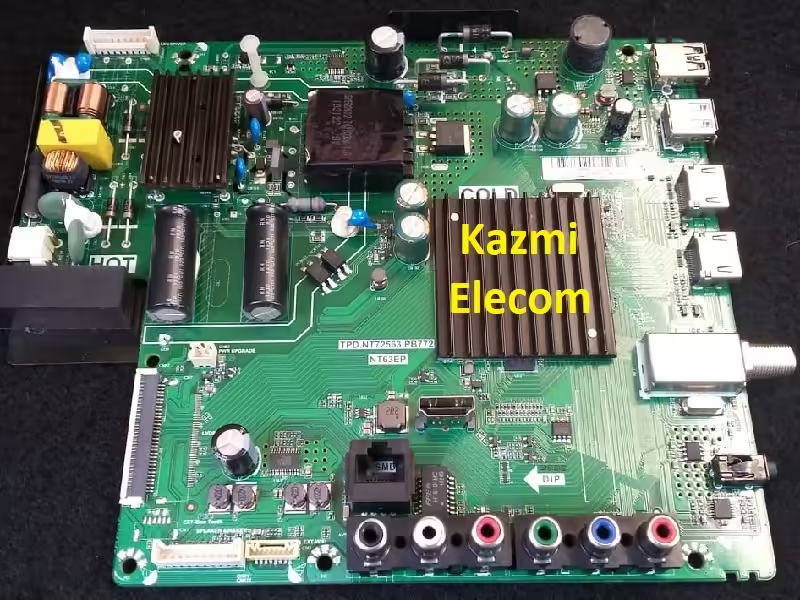
Tpd.nt72563.Pb772

TPD.NT72563.PB772 General Information:

Board Model: TPD.NT72563.PB772

Main Chipset: NOVATEK NT72563MBG-TL

CPU: Quad-Core ARM Cortex-A53

GPU: Dual-Core G52MP2

Android Version:

Resolution: 1920×1080

Audio Power: 2x8W (16 watt 8 ohm)

Backlight Current: NA

Backlight Power: NA

USB Ports: 2

HDMI Ports: 3

CI: No

Component: Yes

RJ45: Yes

Analog Tuner: PAL/SECAM/NTSC (AV) BG/DK/I/LL

Digital Tuner: DVB-T2/C/S2

Wifi: Yes

Mira-Cast: Yes

Memory (RAM): 4GB DRAM

Storage (ROM): 4 GB EMMC Flash

Power Rating: 220V~240V 50Hz

Power Consumption: 75Watt

Firmware Name: Update.img

Firmware Type: EMMC Backup Dump

Product User: TCL

TPD.NT72563.PB772 Technical Specifications:

  • Resolution 1920×1080 Full HD
  • HD support HD
  • LED backlight DLEDD
  • Response time 8 ms
  • Display scale 16:09
  • Stereo sound there is / there is
  • Matrix type LED
  • Refresh rate 60 Hz
  • Processor frame ARM Cortex-A53/1, 5GHz/Quad core
  • GPU G52MP2/Dual core
  • OS version Android 9
  • RAM (DRAM) 4GB
  • ROM (Flash) 4GB
  • WIFI 2T2R
  • HDMI 2.0 (HDCP 2.2) 3
  • HDMI CEC (T-link) Full
  • Caption (Subtitle) Yes
  • Game mode Yes
  • Bluetooth SBC / 5.0
  • Sleep Timer Yes
  • HDMI quick switch Yes
  • DLNA 1.5 Yes
  • USB Multimedia Browser Video up to 1080P: AVI, WMV, MP4, MPG, TS, MKV, OGM, Audio: WMA, MP3, Pictures: JPG, PNG, BMP, Text subtitles
  • OSD Languages 29 Albanian, Bulgarian, Croatian, Czech, Danish, Dutch, English, Estonian, Finnish, French, German, Greek, Hungarian, Italian, Latvian, Lithuanian, Macedonian, Norwegian, Polish, Portuguese, Romanian, Russian, Serbian, Slovak, Slovenian, Spanish, Swedish, Turkish, Ukrainian
  • USB HID support Yes
  • USB channel list clone Yes
  • USB 2.0 2
  • Teletext there is
  • ATV PAL/SECAM/NTSC (AV) BG/DK/I/LL
  • DTV DVB-T2/C/S2
  • Sound power 8w+8w
  • Acoustic system Buffer speakers
  • DOLBY DIGITAL there is
  • Supported formats MP3, WMA, MPEG4, MKV, JPEG
  • Remote control type RC802NU1
  • Social Yes
  • Web browser Yes
  • Processor Quad Core
  • Smart Home TCL Home, Google Home
  • WiFi sharing Chromecast & T-cast
  • AI Google Assistant Google Assistant Ready
  • SmartTV AndroidTV (29 languages)
  • HbbTV 2.0.2

Tpd.nt72563.Pb772

How to Write TPD.NT72563.PB772 EMMC Backup:

  1. Download the given TPD.NT72563.PB772 EMMC backup shared in this post below
  2. Note the EMMC Pinouts (D0, CMD, CLK) in the given picture above
  3. Jtag the mainboard with the Programming Tool
  4. Write the EMMC data
  5. Done.

How to Install USB Bootable Firmware:

  1. Download the required TPD.NT72563.PB772 USB bootable firmware.
  2. Extract the zip files to get the folder.
  3. Transfer the firmware (Update.zip) file to the empty FAT 32 formatted USB disk
  4. Switch OFF the TV/Board from the main power
  5. Insert the pen drive into the USB port 1 of the board
  6. Keep pressing the power button (Touch button) of keypad and switch on the TV
  7. The installation progress bar will display on the screen. Now release the power button
  8. Wait till completion. Done

Note: The following TPD.NT72563.PB772 firmware is USB bootable and a backup dump file. Kazmi Elecom Team is not responsible for any type of damage/loss as a result of uploading/downloading the firmware. First, check and verify the main board then install software. If you are new and do not have enough knowledge of loading/installing software/firmware or dump files, or facing any issues during firmware installation then visit and read here first.

TPD.NT72563.PB772 Firmware files for free download:

Kazmi-Elecom

17MB140TC Software Free Download

17MB140TC LED TV Board

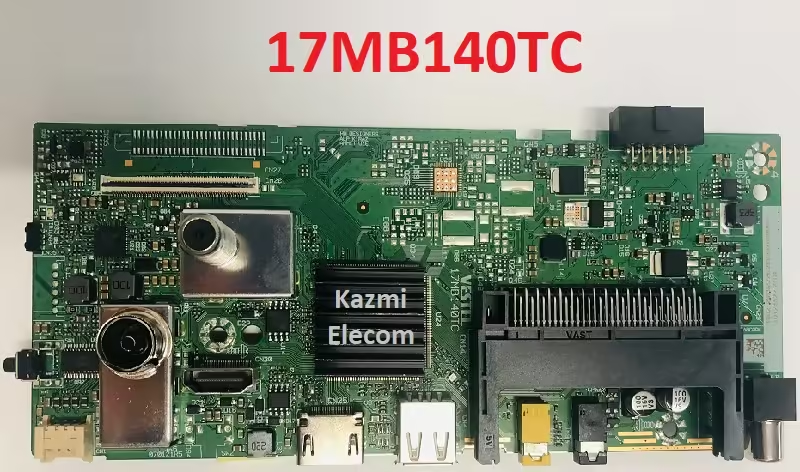
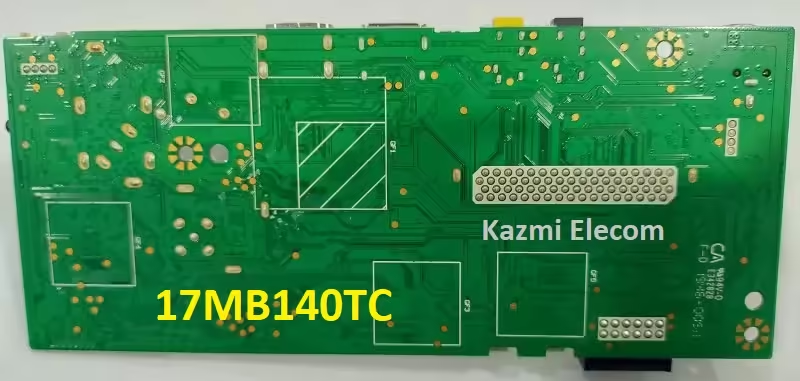
17MB140TC is a non-smart universal LCD LED TV controller board made by VESTEL. This board is not a three-in-one board. This is called a non-combo board also which means the main power input section and the LCD/LED TV backlight inverter section are not available in the main PCB board. Only the Cable antenna tuner is available in the mainboard while the other modules are required to complete LED TV. It has both Analog and Digital TV reception systems.

17MB140TC has multiple input interfaces as per user demand such as dual HDMI inputs for connecting Full HD external devices like Blu-ray media players, gaming consoles, PlayStations, STBs, etc. It also has a mini component input interface for connecting analog devices. It has USB input by which the user can play multimedia files of his own choice, upgrade software, connect external hard disk drives, etc. It also has the Common Interface (CI+).

17Mb140Tc

17MB140TC General Information:

Board Model: VESTEL 17MB140TC

Processor: Mediastar

Operating System: Non-Android

Android Version: NA

Resolution: 1366×768/1920×1080

Audio Power: 2x6W (12 watt 8 ohm)

Backlight Current: NA

Backlight Power: NA

USB Ports: 1

HDMI Ports: 2

CI: Yes

PC Input: No

Component: Yes (Mini)

Analog Tuner: Yes

SPDIF OUT: Yes

Storage (ROM): 16 MB SPI Flash

Firmware Name: NA

Firmware Type: Backup Dump

Product Users: Vestel, Vortex, Hitachi, Electronia, JVC, Lifemaxx, Horizon, Telefunken

17MB140TC Technical Specifications:

  • Operative System Non-Smart
  • Display 1366×768 and 1920×1080
  • ROM 16MB SPI Flash
  • HDMI ports 2
  • USB ports 1
  • USB supports Audio, Video, Image
  • Sound Features German + Nicam Stereo
  • Analog Receiver There is
  • Terrestrial Receiver (DVB-T) There is
  • Cable TV (DVB-C) There is
  • HD Satellite Receiver (DVB-S2) There is
  • Common Interface (CI+) There is
  • Analog/Cable Antenna Input 1 Piece
  • Satellite Antenna Input 1 Piece
  • SPDIF No
  • A/V IN Yes (Mini)
  • PC Input No
  • Headphone speaker output ports 1
  • Refresh rate 60 Hz
  • Resolution 1080P
  • Image formats supported BMP, GIF, JPEG, PNG
  • Analog TV reception formats PAL, NTSC, SECAM
  • Sound Features German + Nicam Stereo
  • No. of speakers 2
  • Total speaker output 12 W
  • Output per speaker 6 W
  • Sound type Mono
  • Voltage requirement 12V DC

17Mb140Tc

How to Write 17MB140TC Backup Dump:

  1. Download the given 17MB140TC Backup Dump File as per your requirement
  2. First, read and save the backup of the original SPI Memory Flash Data
  3. Erase the Flash Memory
  4. Write the Flash Memory
  5. Done.

Note: The following 17MB140 TC firmware is a backup dump file. Kazmi Elecom Team is not responsible for any type of damage/loss as a result of uploading/downloading the firmware. First, check and verify the main board then install software. If you are new and do not have enough knowledge of loading/installing software/firmware or dump files, or facing any issues during firmware installation then visit and read here first.

17MB140TC Firmware files for free download:
Kazmi-Elecom

RSAG7.820.10229 Firmware Free Download

RSAG7.820.10229 LED TV Board

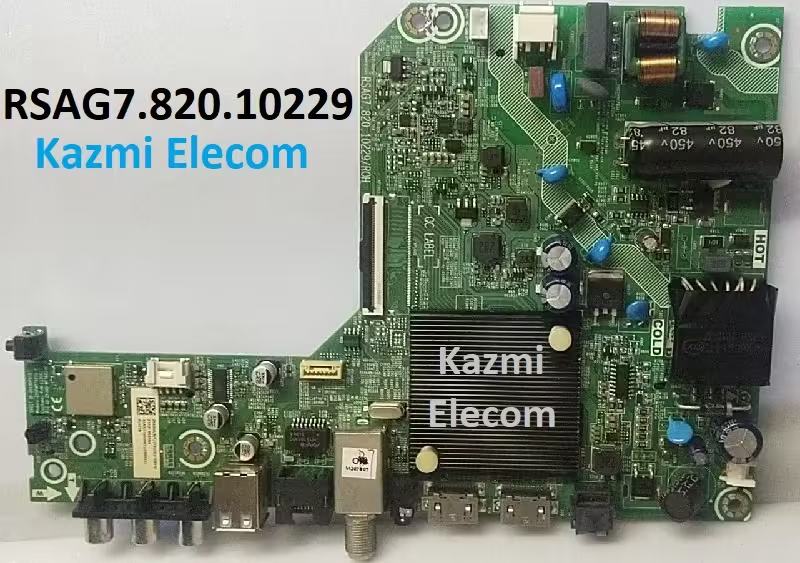
RSAG7.820.10229 is a smart LED TV board. Its supported resolution is 1080P 1920×1080. This board is mostly used for Hisense and Devant brands. It is a non-android board. VIDDA smart operating system is installed into this motherboard. This is a Combo board which means the main input power supply board as can be seen in the picture below, the backlight inverter module, and the cable TV tuner are built on a single piece of printed circuit board (PCB). This board has built many apps like YouTube, Netflix, Kids YouTube, Prime Video, and Vidaa Art. It also has the Vidaa store option to download apps.

RSAG7.820.10229 can support the sharing of context and screen with external devices. It has multiple input-output interfaces such as LAN (Local Area Network) connection RJ45 Ethernet socket interface for wired internet connectivity to work smooth and fast internet browsing. Dual HDMI slots for connecting Full HD devices, Dual USB inputs for software upgrades and connecting USB devices, and Component input interface for connecting Analog devices. It has an optical output port. It also has a headphones output interface jack of 3.5mm, and a cable tv tuner.

Rsag7.820.10229

RSAG7.820.10229 General Information:

Board Model: RSAG7.820.10229/ROH

Processor: MediaTek

CPU: 1.0GHz

GPU: Dual-Core MALI-400

Operating System: VIDAA6

Android Version: NA

Resolution: 1366×768/1920×1080

Audio Power: 2x8W (16 watt 8 ohm)

Backlight Current: NA

Backlight Power: NA

USB Ports: 2

HDMI Ports: 2

CI: No

PC Input: No

Component: Yes

RJ45: Yes

Analog Tuner: Yes

Digital Tuner: DVB

Wifi: Yes

Mira-Cast: Yes

SPDIF OUT: Yes

Memory (RAM): 512 Mb

Storage (ROM): 4 GB EMMC Flash

EMMC:

Power Rating: 100V~240V 50/60Hz

Power Consumption: 70Watt

Firmware Name: usb_MTK_DEV_SA.bin

Firmware Type: EMMC Backup Dump and USB bootable

Product User: Hisense

RSAG7.820.10229 Technical Specifications:

  • Operative System VIDDA6
  • Browser Odin 88
  • Display 1366×768 and 1920×1080
  • RAM/ROM 512 MB /4G Byte ROM
  • HDMI ports 2
  • MHL enabled Yes
  • HDMI Support MHL & ARC
  • Ethernet sockets 1
  • USB ports 2
  • USB supports Audio, Video, Image
  • Cable Port Yes
  • SPDIF Yes
  • A/V IN Yes
  • PC Input No
  • Headphone speaker output ports 1
  • Refresh rate 60 Hz
  • Resolution 1080P
  • Image formats supported BMP, GIF, JPEG, PNG
  • Analog TV reception formats PAL, NTSC, SECAM
  • Video formats supported MKV, MPEG, MPEG-1, MPEG-2, MPEG-4
  • Upscaling No
  • Audio formats supported AAC, AC3(Dolby Digital), MP2, MP3, PCM
  • Audio Features 5 Band Equalizer, Auto volume leveler: Balance, Dolby Atmos
  • No. of speakers 2
  • Total speaker output 16 W
  • Output per speaker 8 W
  • Sound type Mono
  • Bluetooth Optional (not builtin)
  • Processor Type Quad Core
  • Screen Format 4:3 / 16:9 / Auto / Zoom 1 / Zoom 2
  • Inbuilt apps Yes
  • Wi-Fi Yes
  • Internet Link 2.4GHz WiFi 802.11 b/g/n 2T2R, Ethernet Network
  • Remote Type RF (Radio frequency)
  • Miracast screen mirroring support Yes
  • Voltage requirement 100 – 240V 50/60HZ
  • Inbuilt apps YouTube, Netflix, Prime Video, Kidz YouTube, Facebook, Magic TV, VIDDA Art, etc

Rsag7.820.10229

How to Write RSAG7.820.10229 EMMC Backup:

  1. Download the given RSAG7.820.10229 EMMC backup shared in this post below
  2. Note the EMMC Pinouts in the given picture above
  3. Jtag the mainboard with the Programming Tool
  4. Write the EMMC data
  5. Done.

How to Install USB Bootable Firmware:

  1. Download the required RSAG7.820.10229 USB bootable firmware.
  2. Extract the zip files to get the folder.
  3. Transfer the firmware (usb_MTK_DEV_SA.bin) file to the empty FAT 32 formatted USB disk
  4. Switch OFF the TV/Board from the main power
  5. Insert the pen drive into the USB port of the board
  6. It will start automatically after powering on the TV otherwise keep pressing the power button of the board keypad and switch on the TV
  7. The installation progress bar will display on the screen. Now release the power button
  8. Wait till completion. Done

Note: The following RSAG7.820.10229 firmware is USB bootable and a backup dump file. Kazmi Elecom Team is not responsible for any type of damage/loss as a result of uploading/downloading the firmware. First, check and verify the main board then install software. If you are new and do not have enough knowledge of loading/installing software/firmware or dump files, or facing any issues during firmware installation then visit and read here first.

RSAG7.820.10229 Firmware files for free download:
Kazmi-Elecom

40-MS86R1-MAA2HG Firmware Free Download

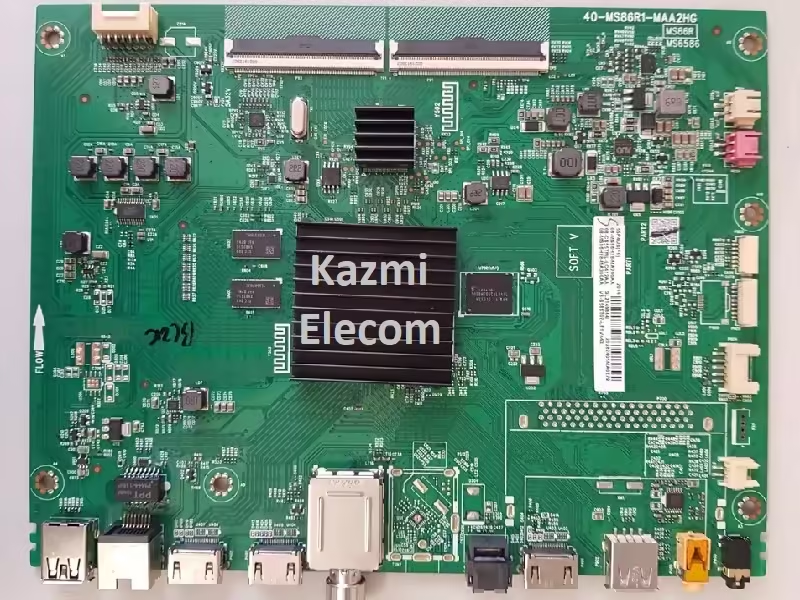
40-MS86R1-MAA2HG UHD TV Board

40-MS86R1-MAA2HG is a smart android UHD LED TV Board. This board can support 55-inch to 75-inch 4K LED TV Screen Panels. Its supported resolution is 3840×2160 4K 2160 pixels.  This Ultra HD smart Android board is a non-combo board. The main PCB motherboard is built with cable TV tuners only. To complete the LED TV installation setup, the main input power module circuit board and the backlight driver inverter circuit board are required separately. This board has the option of both analog (PAL, NTSC, SECAM) and digital TV reception signal options but a digital tuner (DVB) is optional in some regions. This board is supported with HDR (High Dynamic Range).

40-MS86R1-MAA2HG Ultra HD smart Android board is equipped with several input/output ports for user convenience such as two USB input ports for sharing and connecting external disk drives and other USB peripherals. The user can also use the USB ports to upgrade software. It has triple HDMI input ports for connecting external full HD devices such as Set-top Boxes, Gaming consoles, Blu-ray media players, plantations, etc. This board has also mini component input ports for connecting analog devices. An optical output (SPDIF) interface is available. A headphone output jack is available on this board. LAN interface is also available.

40-MS86R1-MAA2HG is made with a Mstar chipset so its graphic quality is very excellent with a dual-core Mali GPU. It has 1 GB RAM and 8 GB storage memory (EMMC). Its processing speed is very fast with the Arm cortex quad-core processor (MSD6586).

40-Ms86R1-Maa2Hg

40-MS86R1-MAA2HG General Information:

Board Model: 40-MS86R1-MAA2HG

Processor: MSD6586PYUT-8

Chassis: MS6586, MS86R

Software Version: V8-S586T02-LF1V

CPU: CA9 *2, 1.0GHz

GPU: Dual-Core MALI-400

Android Version:

Resolution: 3840×2160

Audio Power: 2x8W (16 watt 8 ohm)

Backlight Current: NA

Backlight Power: NA

USB Ports: 2

HDMI Ports: 3

CI: No

Component: Yes (Mini)

RJ45: Yes

Analog Tuner: PAL, DRY

Digital Tuner: DVB-T, DVB-T2, DVB-C, DVB-S/S2

Wifi: Yes

Mira-Cast: Yes

SPDIF OUT: Yes

Memory (RAM): 1 GB DDR3

Storage (ROM): 8 GB EMMC Flash

Power Rating: 220V~240V 50Hz

Power Consumption: 125Watt

Firmware Name:

Firmware Type: EMMC Backup Dump

Product User: TCL, THOMSON, HITACHI, TOSHIBA

40-MS86R1-MAA2HG Technical Specifications:

  • Operative System Linux, Android
  • Display 3840*2160
  • RAM/ROM 1.0G Byte DDR3 /8G Byte ROM
  • HDR HDR10 Decoding
  • HDMI ports 3
  • HDMI Support MHL & ARC
  • Ethernet sockets 1
  • USB ports 2
  • USB supports Audio, Video, Image
  • Cable Port Yes
  • SPDIF Yes
  • A/V IN Yes
  • Headphone speaker output ports 1
  • Refresh rate 60 Hz
  • Resolution 4K Ultra HD 2160P
  • Backlight Adjustable Yes (0~100)
  • Image formats supported BMP, GIF, JPEG, PNG
  • Analog TV reception formats PAL, NTSC, SECAM
  • Video formats supported MPEG-1, MPEG-2, MPEG-4
  • Audio formats supported MPEG-1, MPEG-2, MPEG-4
  • Dolby Decoder MS12
  • No. of speakers 2
  • Total speaker output 20 W
  • Output per speaker 10 W
  • Other smart audio features Auto volume leveler: Balance
  • Sound type 2.0, Stereo
  • Inbuilt apps Yes
  • Wi-Fi Yes
  • Internet Link 2.4GHz WiFi 802.11 b/g/n 2T2R, Ethernet Network
  • Certification CB, Dolby/MS12, HDMI, YouTube, NETFLIX
  • Miracast screen mirroring support Yes
  • Voltage requirement 100 – 240

40-Ms86R1-Maa2Hg

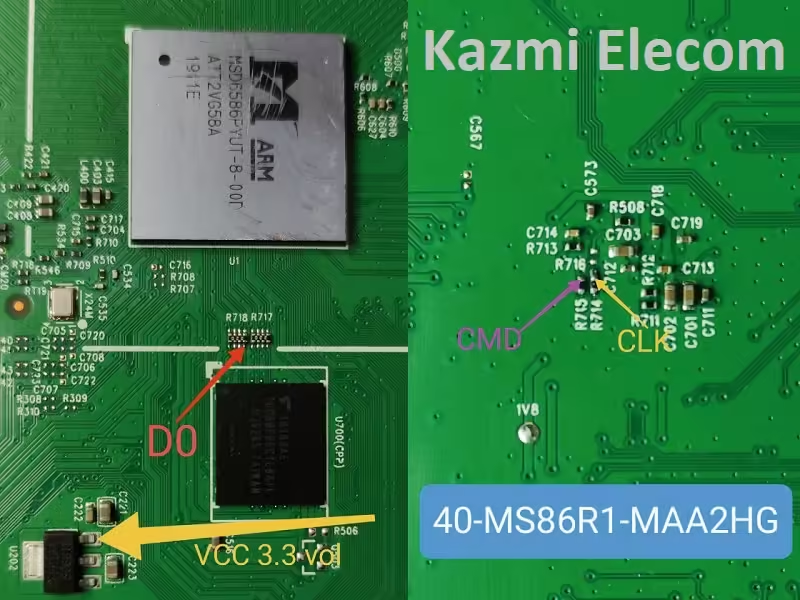
How to Write 40-MS86R1-MAA2HG EMMC Backup:

  1. Download the given 40-MS86R1-MAA2HG EMMC backup shared in this post below
  2. Note the EMMC Pinouts in the given picture above
  3. Jtag the mainboard with the Programming Tool
  4. Write the EMMC data
  5. Done.

Note: The following 40-MS86R1-MAA2HG firmware is USB bootable and a backup dump file. Kazmi Elecom Team is not responsible for any type of damage/loss as a result of uploading/downloading the firmware. First, check and verify the main board then install software. If you are new and do not have enough knowledge of loading/installing software/firmware or dump files, or facing any issues during firmware installation then visit and read here first.

40-MS86R1-MAA2HG Firmware files for free download:

Download Button Kazmi Elecom

MS68860-ZC01-01 Firmware Free Download

MS68860-ZC01-01 UHD Smart Board

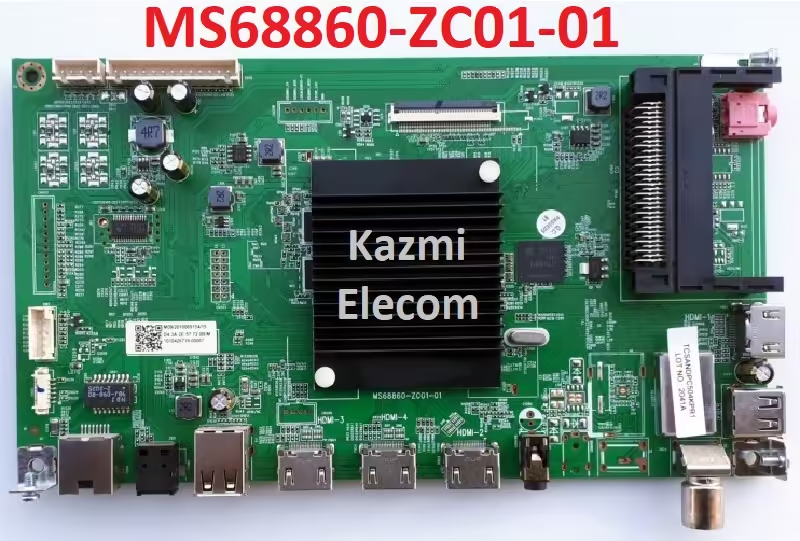
MS68860-ZC01-01 is a smart Android Ultra HD LED TV Board. Its maximum supported resolution is 2160P 4K 3840×2160 pixels. It is a non-combo board. This board does not have the option of an LED backlight inverter circuit module or a main power input option built into its main board PCB. These circuit modules are required separately to complete the LED TV setup. This board has dual tuner options for Analog signal reception (PAL, NTSC, SECAM) and Digital signal reception (DVB-C, DVB-T, DVB-T2).

MS68860-ZC01-01 has all the connectivity input-output user interface ports such as Four HDMI inputs to connect multiple digital devices like Blu-ray players, Playstations, Gaming consoles, Media Players, Set-top-box, etc. This board is built with three USB input ports for user convenience to connect external hard disk drives and other USB devices, it also plays and watches multimedia files, and for software upgrade purposes. Other ports included LAN (RJ45), Headphones, CL+, SPDIF, etc.

Ms68860-Zc01-01

MS68860-ZC01-01 General Information:

Board Model: MS68860-ZC01-01

Processor: MSD6886NQHA

CPU: Quad-Core

GPU: Dual-Core MALI-400

Android Version: 9.0

Resolution: 3840×2160

Audio Power: 2x10W (20 watt 8 ohm)

Backlight Current: NA

Backlight Power: NA

USB Ports: 3

HDMI Ports: 4

CI+: Yes

Component: Yes (Mini)

RJ45: Yes

Analog Tuner: Analog (PAL, NTSC, SECAM)

Digital Tuner: DVB (DVB-C, DVB-T, DVB-T2)

Wifi: Yes

Mira-Cast: Yes

SPDIF OUT: Yes

Memory (RAM): 1 GB DDR3

Storage (ROM): 8 GB EMMC Flash

EMMC: KLM8G1GETF-B041

Power Rating: 100V~240V 50/60Hz

Power Consumption: 110Watt

Firmware Name: upgrade_no_tvcertificate.pkg

Firmware Type: EMMC Backup Dump and USB Bootable

Product User: JVC, KIVI, KONKA, POLAROID

MS68860-ZC01-01 Technical Specifications:

  • Operative System Android
  • Android Version: 9
  • Display 3840*2160
  • RAM/ROM 1G Byte DDR3 /8G Byte ROM
  • HDR HDR10 Decoding
  • PC Input (VGA) No
  • HDMI ports 4
  • HDMI version HDMI 2.0
  • MHL enabled Yes
  • HDMI Support MHL & ARC
  • Ethernet sockets 1
  • USB ports 3
  • USB supports Audio, Video, Image
  • Cable Port Yes
  • Digital output S/PDIF optic
  • A/V IN Yes
  • Headphone speaker output ports 1
  • Refresh rate 60 Hz
  • Resolution 4K Ultra HD 2160P
  • Backlight Adjustable Yes (0~100)
  • Image formats supported BMP, GIF, JPEG, PNG
  • Analog TV reception formats PAL, NTSC, SECAM
  • Digital TV reception formats DVB-C, DVB-T, DVB-T2
  • Video formats supported MKV, MPEG, MPEG-1, MPEG-2, MPEG-4
  • Upscaling Yes
  • Other Video Features Dolby Vision, HDR 10
  • Audio formats supported AAC, AC3(Dolby Digital), MP2, MP3, PCM
  • Audio Features 5 Band Equalizer, Auto volume leveler: Balance, Dolby Atmos
  • Dolby Decoder MS12
  • No. of speakers 2
  • Total speaker output 20 W
  • Output per speaker 10 W
  • Sound type 2.0, Stereo
  • Bluetooth Yes
  • Processor Type Quad Core
  • Screen Format 4:3 / 16:9 / Auto / Zoom 1 / Zoom 2
  • Inbuilt apps Yes
  • Wi-Fi Yes
  • Internet Link 2.4GHz WiFi 802.11 b/g/n 2T2R, Ethernet Network
  • Remote Type RF (Radio frequency)
  • Voice control, voice search remote control with microphone
  • Other Remote Features Smart Control
  • Certification CB, Dolby/MS12, HDMI, YouTube、NETFLIX
  • Miracast screen mirroring support Yes
  • Voltage requirement 100 – 240V 50/60HZ
  • Power saving mode Yes
  • Band support Single Band

Ms68860-Zc01-01

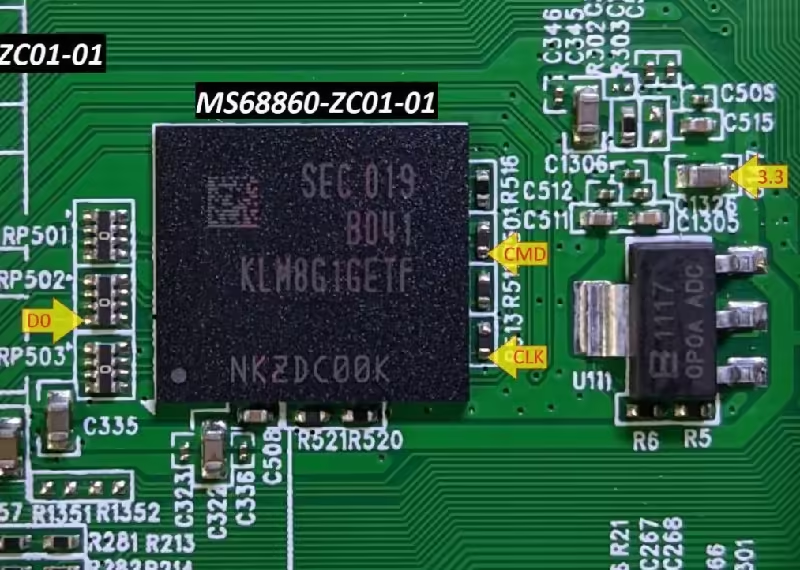
How to Write MS68860-ZC01-01EMMC Backup:

  1. Download the given MS68860-ZC01-01 EMMC backup shared in this post below
  2. Note the EMMC Pinouts in the given picture above
  3. Jtag the mainboard with the Programming Tool
  4. Write the EMMC data
  5. Done.

How to Install USB Bootable Firmware:

  1. Download the required MS68860-ZC01-01 USB bootable firmware.
  2. Extract the zip files to get the folder.
  3. Transfer the firmware (upgrade_no_tvcertificate.pkg) file to the empty FAT 32 formatted USB disk
  4. Switch OFF the TV/Board from the main power
  5. Insert the pen drive into the USB port of the board
  6. It will start automatically after powering on the TV otherwise keep pressing the power button of the board keypad and switch on the TV
  7. The installation progress bar will display on the screen. Now release the power button
  8. Wait till completion. Done

Note: The following MS68860-ZC01-01 firmware is USB bootable and a backup dump file. Kazmi Elecom Team is not responsible for any type of damage/loss as a result of uploading/downloading the firmware. First, check and verify the main board then install software. If you are new and do not have enough knowledge of loading/installing software/firmware or dump files, or facing any issues during firmware installation then visit and read here first.

MS68860-ZC01-01 Firmware files for free download:
Kazmi-Elecom

RSAG7.820.8466 Firmware Free Download

RSAG7.820.8466 UHD Smart Board

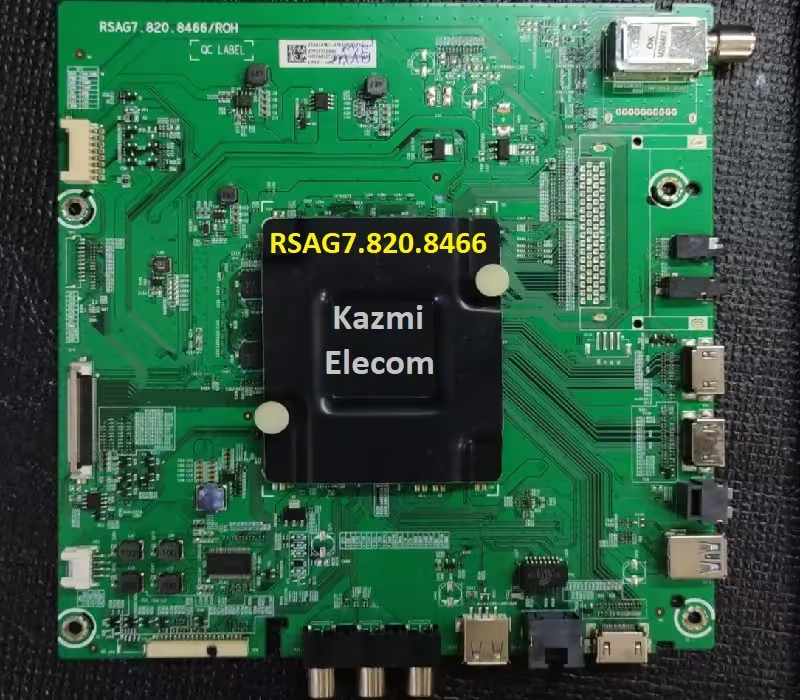
RSAG7.820.8466 is a UHD smart Android LED TV Board. This board has HDR (High Dynamic Range) picture quality with a supported resolution of 3840×2160. Its 4K Ultra HD 2160p Resolution And 60Hz Effective Refresh Rate Provide Brilliant Picture Quality And Smooth Motion For Optimal Viewing Experience. It is a smart UHD Android platform board with a Mediatek Quad-core Processor. Its memory (RAM) is 1.5G and its ROM storage is 16GB. This board has both the option of analog signal reception and digital signal reception. It has both Wi-Fi and Local Area Network (RJ45) for wireless and wired internet connectivity. Bluetooth option is also available.

It has inbuilt apps Hotstar, YouTube, Sony Live, Zee5, Eros Now, Alt Balaji, Hungama Play, Google Movies-TV & Google Music, etc. The user can install and uninstall other apps of his own choice. Other Smart Features All-Share, Display Mirroring, DLNA, DLNA DMP, Double USB Sharing, Easylink (HDMI-CEC), Free Share (DLNA), MHL, Network File Sharing, One-touch Connect, Photo share, Screen Casting, Smart-Share, Smart-View, WiFi Direct, Android, and Future Ready. It has also a voice recognition feature in its software. Users can use voice to enjoy Google Home voice features.

Rsag7.820.8466

RSAG7.820.8466 General Information:

Board Model: RSAG7-820-8466/ROH

Processor: MT5660IGEJ

CPU: CA9 *2, 1.0GHz

GPU: Dual-Core MALI-400

Android Version:

Resolution: 3840×2160

Audio Power: 2x8W (16 watt 8 ohm)

Backlight Current: NA

Backlight Power: NA

USB Ports: 2

HDMI Ports: 3

CI: No

Component: Yes (Mini)

RJ45: Yes

Analog Tuner: PAL, NTSC, SECAM

Digital Tuner: DVB

Wifi: Yes

Mira-Cast: Yes

SPDIF OUT: Yes

Memory (RAM): 1.5 GB DDR3

Storage (ROM): 16 GB EMMC Flash

EMMC: H26M52208FPR

Power Rating: 100V~240V 50/60Hz

Power Consumption: 110Watt

Firmware Name: NA

Firmware Type: EMMC Backup Dump

Product User: VU 43-OA

RSAG7.820.8466 Technical Specifications:

  • Operative System Android
  • Display 3840*2160
  • RAM/ROM 1.5G Byte DDR3 /16G Byte ROM
  • HDR HDR10 Decoding
  • HDMI ports 3
  • MHL enabled Yes
  • HDMI Support MHL & ARC
  • Ethernet sockets 1
  • USB ports 2
  • USB supports Audio, Video, Image
  • Cable Port Yes
  • SPDIF Yes
  • A/V IN Yes
  • Headphone speaker output ports 1
  • Refresh rate 60 Hz
  • Resolution 4K Ultra HD 2160P
  • Backlight Adjustable Yes (0~100)
  • Image formats supported BMP, GIF, JPEG, PNG
  • Analog TV reception formats PAL, NTSC, SECAM
  • Video formats supported MKV, MPEG, MPEG-1, MPEG-2, MPEG-4
  • Upscaling Yes
  • Other Video Features Dolby Vision, HDR 10
  • Audio formats supported AAC, AC3(Dolby Digital), MP2, MP3, PCM
  • Audio Features 5 Band Equalizer, Auto volume leveler: Balance, Dolby Atmos
  • Dolby Decoder MS12
  • No. of speakers 2
  • Total speaker output 20 W
  • Output per speaker 10 W
  • Sound type 2.0, Stereo
  • Bluetooth Yes
  • Processor Type Quad Core
  • Screen Format 4:3 / 16:9 / Auto / Zoom 1 / Zoom 2
  • Inbuilt apps Yes
  • Wi-Fi Yes
  • Internet Link 2.4GHz WiFi 802.11 b/g/n 2T2R, Ethernet Network
  • Remote Type RF (Radio frequency)
  • Other Remote Features Smart Control
  • Certification CB, Dolby/MS12, HDMI, YouTube、NETFLIX
  • Miracast screen mirroring support Yes
  • Voltage requirement 100 – 240V 50/60HZ
  • Power saving mode Yes
  • Band support Single Band
  • Inbuilt apps YouTube, Hotstar, Sony Liv, Zee5, Eros Now, Alt Balaji, Hungama Play, Google Movies-TV & Google Music

Rsag7.820.8466

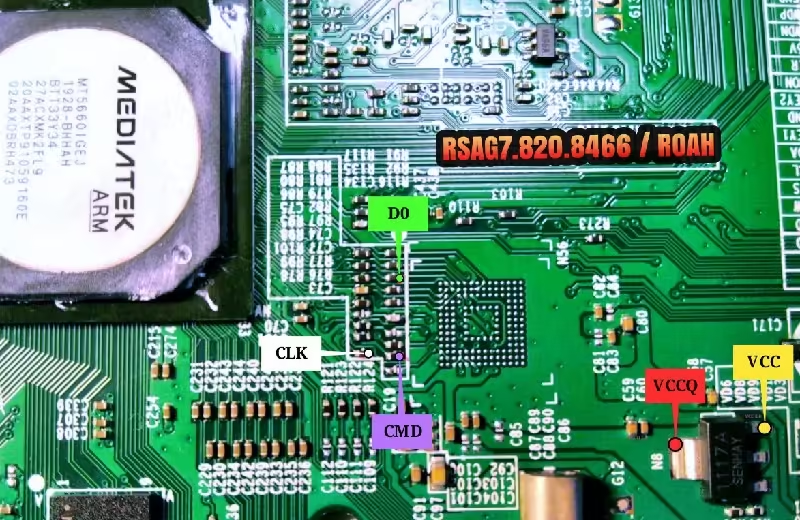
How to Write RSAG7.820.8466 EMMC Backup:

  1. Download the given RSAG7.820.8466 EMMC backup shared in this post below
  2. Note the EMMC Pinouts in the given picture above
  3. Jtag the mainboard with the Programming Tool
  4. Write the EMMC data
  5. Done.

Note: The following RSAG7.820.8466 firmware is USB bootable and a backup dump file. Kazmi Elecom Team is not responsible for any type of damage/loss as a result of uploading/downloading the firmware. First, check and verify the main board then install software. If you are new and do not have enough knowledge of loading/installing software/firmware or dump files, or facing any issues during firmware installation then visit and read here first.

RSAG7.820.8466 Firmware files for free download:
Kazmi-Elecom

40-MS86H1-MAA2HG Firmware Free Download

40-MS86H1-MAA2HG LED TV Board

40-MS86H1-MAA2HG is a 4K Ultra HD smart LED TV Board. Its maximum supported resolution is (2160P) 3840×2160 pixels. This board is mostly used for TCL, Hitachi, Thomson, and Toshiba brands, etc. This is a non-combo board which means the backlight inverter driver module and the main input power supply module are not built so separately these modules will be required to complete the LED TV setup. The aspect ratio of this 4K board is 1.90.1 which is wider than 16:9. This board has all supported smart features like Display Mirroring, MHL, Screen Casting, SmartShare, SmartView, WiFi Direct, Android, Future Ready, Air Mouse, etc. The RAM capacity of this board is 1 GB and the ROM storage is 8 GB.

40-MS86H1-MAA2HG UHD board has inbuilt all connectivity input-output interfaces such as three HDMI inputs for connecting Digital Full HD devices like Blu-ray media players, Digital Set-top-Box, gaming consoles, and PlayStations, etc. It has two USB input ports for connecting external hard disk drives, updating software, and playing multimedia files. It has component input for connecting analog devices. it has also the headphones output interface port. For wired internet connectivity it has a Local Area Network interface (RJ-45) to get fast browsing results.

40-Ms86H1-Maa2Hg

40-MS86H1-MAA2HG General Information:

Board Model: 40-MS86H1-MAA2HG

Processor: MSD6586

Chassis: MS6586, MS86H

Software Version: V8-S586T02-LF1V

CPU: CA9 *2, 1.0GHz

GPU: Dual-Core MALI-400

Android Version:

Resolution: 3840×2160

Audio Power: 2x8W (16 watt 8 ohm)

Backlight Current: NA

Backlight Power: NA

USB Ports: 2

HDMI Ports: 3

CI: Yes

Component: Yes (Mini)

RJ45: Yes

Analog Tuner: PAL, DRY

Digital Tuner: DVB-T, DVB-T2, DVB-C, DVB-S/S2

Wifi: Yes

Mira-Cast: Yes

SPDIF OUT: Yes

Memory (RAM): 1 GB DDR3

Storage (ROM): 8 GB EMMC Flash

Power Rating: 220V~240V 50Hz

Power Consumption: 90Watt

Firmware Name:

Firmware Type: EMMC Backup Dump

Product User: TCL, THOMSON, HITACHI, TOSHIBA

40-MS86H1-MAA2HG Technical Specifications:

  • Operative System Linux, Android
  • Display 3840*2160
  • RAM/ROM 1.0G Byte DDR3 /8G Byte ROM
  • HDR HDR10 Decoding
  • HDMI ports 3
  • HDMI Support MHL & ARC
  • Ethernet sockets 1
  • USB ports 2
  • USB supports Audio, Video, Image
  • Cable Port Yes
  • SPDIF Yes
  • A/V IN Yes
  • Headphone speaker output ports 1
  • Refresh rate 60 Hz
  • Resolution 4K Ultra HD 2160P
  • Backlight Adjustable Yes (0~100)
  • Image formats supported BMP, GIF, JPEG, PNG
  • Analog TV reception formats PAL, NTSC, SECAM
  • Video formats supported MPEG-1, MPEG-2, MPEG-4
  • Audio formats supported MPEG-1, MPEG-2, MPEG-4
  • Dolby Decoder MS12
  • No. of speakers 2
  • Total speaker output 20 W
  • Output per speaker 10 W
  • Other smart audio features Auto volume leveler: Balance
  • Sound type 2.0, Stereo
  • Inbuilt apps Yes
  • Wi-Fi Yes
  • Internet Link 2.4GHz WiFi 802.11 b/g/n 2T2R, Ethernet Network
  • Certification CB, Dolby/MS12, HDMI, YouTube、NETFLIX
  • Miracast screen mirroring support Yes
  • Voltage requirement 100 – 240

40-Ms86H1-Maa2Hg

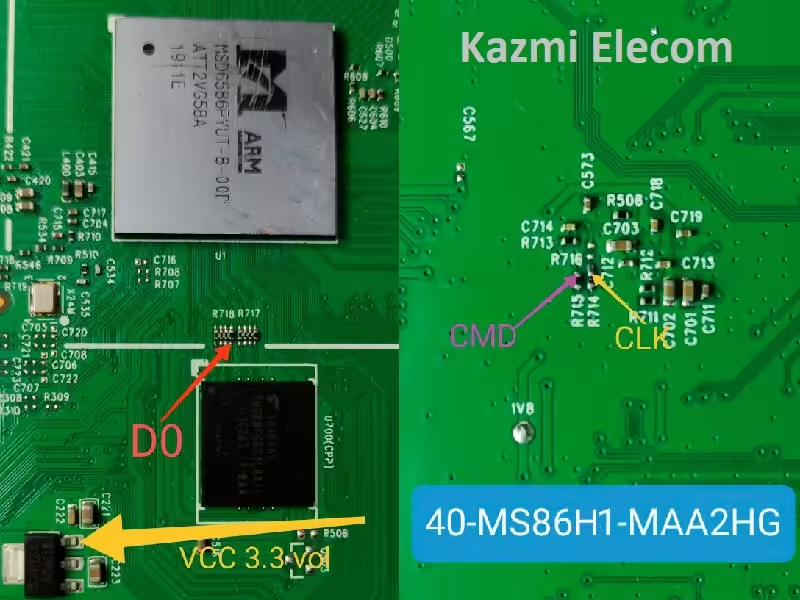
How to Write EMMC Backup:

  1. Download the given 40-MS86H1-MAA2HG EMMC backup shared in this post below
  2. Note the EMMC Pinouts in the given picture above
  3. Jtag the mainboard with the Programming Tool
  4. Write the EMMC data
  5. Done.

Note: The following 40-MS86H1-MAA2HG firmware is USB bootable and a backup dump file. Kazmi Elecom Team is not responsible for any type of damage/loss as a result of uploading/downloading the firmware. First, check and verify the main board then install software. If you are new and do not have enough knowledge of loading/installing software/firmware or dump files, or facing any issues during firmware installation then visit and read here first.

40-MS86H1-MAA2HG Firmware files for free download:
Konka LED55X1800A Software Free Download

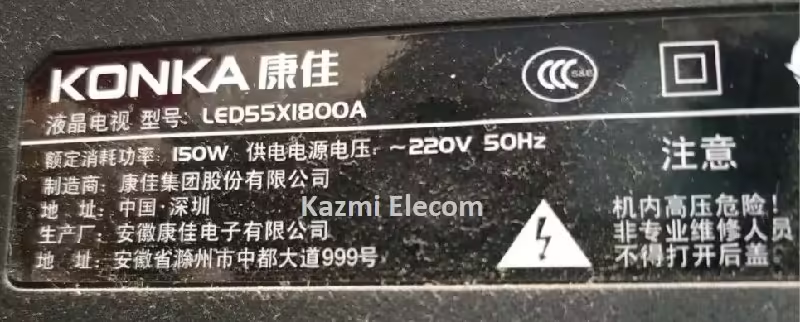
Konka LED55X1800A LED TV

Konka LED55X1800A is a 55-inch Android smart LED backlight TV. The supported maximum resolution of this TV is 1920×1080 Full HD. Its Operating system is Android 4.3. It can not support 3D Display. Its brightness is 600-1000 lumens. The Screen ratio of this LED TV is 16:9 and its Screen refresh rate is 240HZ. It is a Backlight LED TV. The scanning method used in this TV is Progressive Scan. Its response time is 3ms which is very good. It has a dual speaker system with 16 watts of RMS sound output. This LED TV has also the option of Earphones which is the very best option for the users.

Konka LED55X1800A smart TV has Multi-screen interaction support. The Wi-Fi is built-in in this TV. Bluetooth is also built-in. The main input operating voltage is 220V. It has triple USB input ports. USB video formats supported and MP3, JPG, etc. Users can connect multiple USB devices with this TV such as pen drives for updating software, and hard disk drives, and can play multimedia files. Its CPU is Quad Core which processing is very fast. The other features of this LED TV are UI, thumb control, and other latest technologies, easily enjoy millions of Android apps.

Konka Led55X1800A

Konka LED55X1800A General Information:

Model: LED55X1800A

Chassis: RTD2984

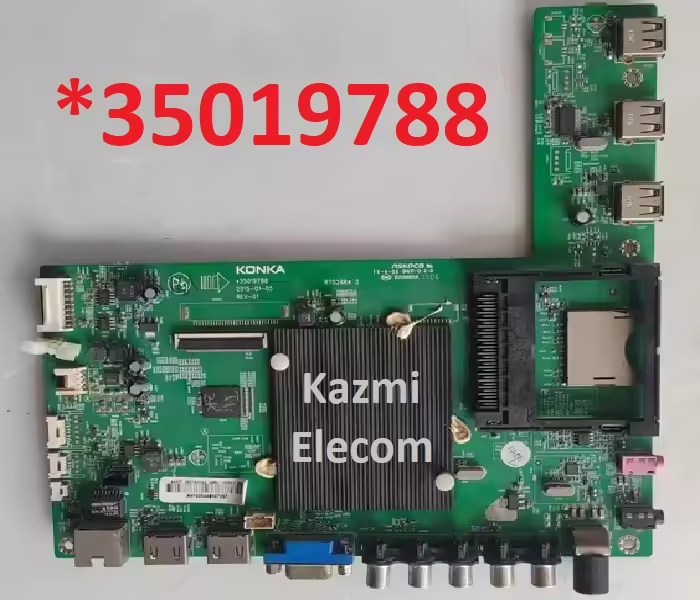
Main Board: *35019788

Panel: 55″

T-CON: NA

Resolution: 1920×1080

Audio Power: 2x8W (8 ohm)

Backlight Current: mA

Backlight Power: NA

USB Ports: 3

HDMI Ports2

SD Card Reader: Yes

RJ45: Yes

Analog Tuner: PAL, SECAM

Wifi: Built-in

Mira-Cast: No

Satellite Input: No

RAM: 512MB

ROM: 4 GB EMMC Flash

Power Rating: 220V~240V 50Hz

Power Consumption: 150 Watt

Firmware: NA

Firmware Type: EMMC Backup Dump

Product User: KONKA

Konka LED55X1800A Technical Specifications:

  • Product Brand KONKA
  • Product Model LED55X1800A
  • Energy efficiency rating
  • Screen size 55 inches
  • Resolution 1080P (1920*1080)
  • Operating system Android 4.3
  • 3D Display Not supported
  • Brightness 600-1000 lumens
  • Screen ratio 16:9
  • Screen refresh rate 240HZ
  • Backlight led
  • Scanning method Progressive Scan
  • Response time 3ms
  • Speaker 2
  • Earphone 1
  • Multi-screen interaction support
  • Wi-Fi built-in
  • Bluetooth built-in Operating voltage 220V
  • USB video formats supported MP3, JPG
  • Product Positioning Full HD TV, LED TV, Internet TV, Smart TV
  • Recommended viewing distance 4.5-5.5 m
  • CPU Quad Core
  • Other features UI, thumb control, and other latest technologies, easily enjoy millions of Android apps

Konka Led55X1800A *35019788

How to Write EMMC Backup:

  1. Download the given Konka LED55X1800A EMMC backup shared in this post below
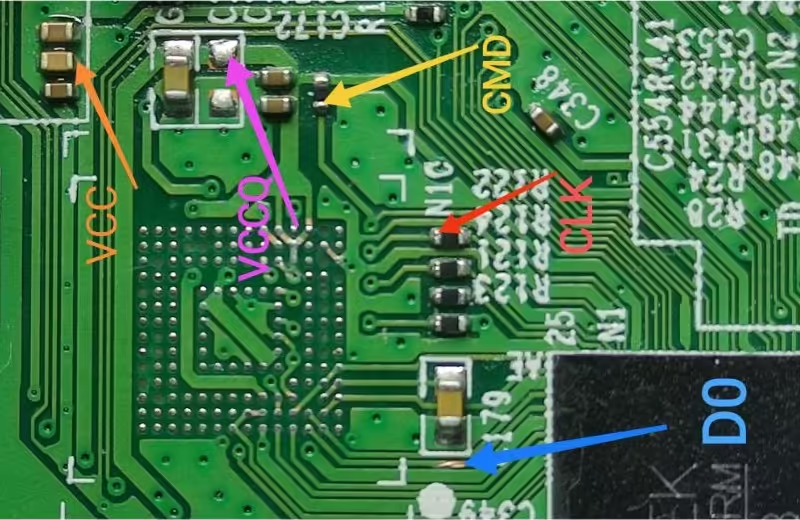
  2. Find the EMMC Pinouts
  3. Jtag the mainboard with the Programming Tool
  4. Write the EMMC data
  5. Done.

Note: The following Konka LED55X1800A firmware is a backup dump file. Kazmi Elecom Team is not responsible for any type of damage/loss as a result of uploading/downloading the firmware. First, check and verify the main board then install software. If you are new and do not have enough knowledge of loading/installing software/firmware or dump files, or facing any issues during firmware installation then visit and read here first.

Konka LED55X1800A Firmware files for free download:
Kazmi-Elecom

9632T8E Firmware Free Download

9632T8E Smart Android Board

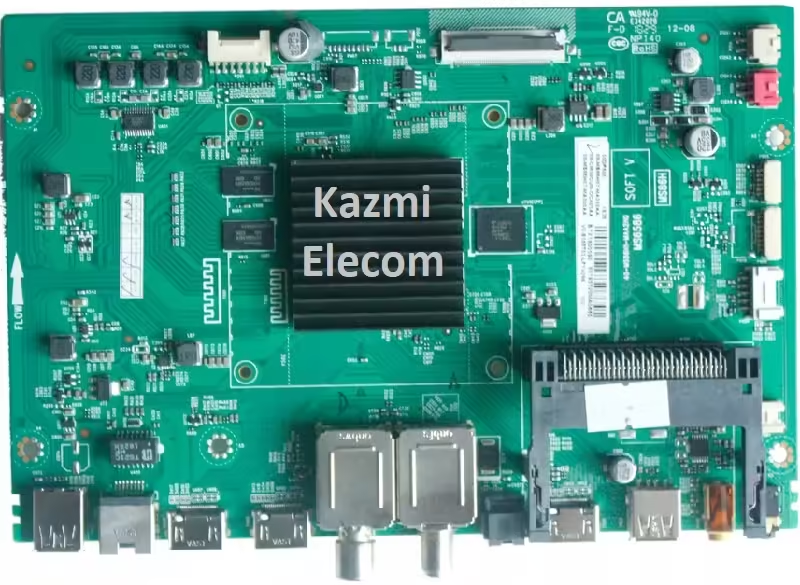
9632T8E is an Ultra HD smart Android board with a supported screen resolution of 3840×2160. This board is non-combo. This means that the power main input circuit module and LED backlight inverter driver controller circuit module are not built into the main PCB. It has a Dual tuner input one for analog cable TV and the second for Digital TV signals (DVB-T, DVB-T2, DVB-C, DVB-S/S2). 9632T8E board is built with Android platform version 9.0. It has 1.5 GB RAM and its storage capacity is 8 GB (ROM) Flash. It has a full-power Dolby digital stereo sound system option with a dual speaker output interface of 16-watt output power.

9632T8E is a universal UHD smart board that can support 48-inch to 65-inch LED TV Screen Panels. It has multiple input-output connectivity interfaces per user requirements, such as triple HDMI input options for connecting Full HD devices like Blu-ray media players, Gaming Consoles, PlayStations, and STBs. Dual USB Input ports for playing media files (Video, Audio, Picture) and connecting external hard disk drives. AV input for connecting analog devices. It has a Local Area Network (RJ45) interface for connecting wired internet to get better data usage.

9632T8E

9632T8E General Information:

Board Model: 9632T8E

Main Chipset: 9632

CPU: Quad-Core ARM Cortex-A53

GPU: Dual-Core G52MP2

Android Version: 9.0

Resolution: 3840×2160

Audio Power: 2x8W (16 watt 8 ohm)

Backlight Current: NA

Backlight Power: NA

USB Ports: 2

HDMI Ports: 3

CI: Yes

Component: Yes (Mini)

RJ45: Yes

Analog Tuner: PAL, DRY

Digital Tuner: DVB-T, DVB-T2, DVB-C, DVB-S/S2

Wifi: Yes

Mira-Cast: Yes

SPDIF OUT: Yes

Memory (RAM): 1.5 GB

Storage (ROM): 8 GB EMMC Flash

Power Rating: 220V~240V 50Hz

Power Consumption: 150Watt

Firmware Name: 9632_DVBT_8G.bin

Firmware Type: EMMC Backup Dump

Product User: ROSSO, NOA VISION, VOX, SOUNDMAX

9632T8E Technical Specifications:

  • Resolution 3840 х 2160 Ultra HD
  • HD support HD
  • LED backlight DLEDD
  • Response time 8 ms
  • Display scale 16:09
  • Stereo sound there is / there is
  • Matrix type LED
  • Refresh rate 60 Hz
  • Processor frame ARM Cortex-A53/1, 5GHz/Quad core
  • GPU G52MP2/Dual core
  • OS version Android 9
  • RAM (DDR3) 1.5GB
  • ROM (Flash) 8GB
  • WIFI 2T2R
  • HDMI 2.0 (HDCP 2.2) 3
  • USB 2.0 2
  • CI slot 1
  • Teletext there is
  • Available resolutions when connecting to a PC 640×480, 800×600, 1024×768, 1360×768
  • ATV PAL, DRY
  • DTV DVB-T, DVB-T2, DVB-C, DVB-S/S2
  • Sound power 8w+8w
  • Acoustic system Buffer speakers
  • DOLBY DIGITAL there is
  • Supported formats MP3, WMA, MPEG4, MKV, JPEG
  • Sleep timer there is
  • Child protection there is

9632T8E

How to Write EMMC Backup:

  1. Download the given 9632T8E EMMC backup shared in this post below
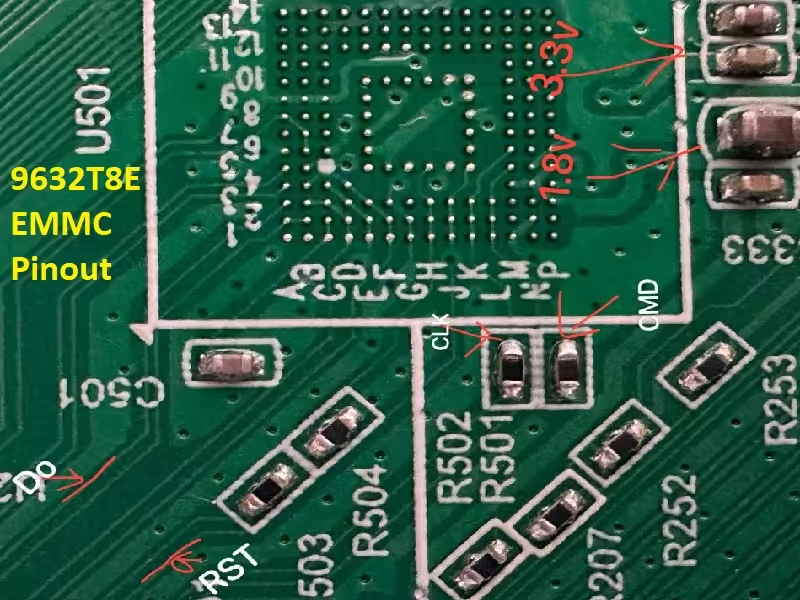
  2. Note the EMMC Pinouts in the given picture above
  3. Jtag the mainboard with the Programming Tool
  4. Write the EMMC data
  5. Done.

How to Install USB Bootable Firmware:

  1. Download the required 9632T8E USB bootable firmware.
  2. Extract the zip files to get the folder.
  3. Transfer the firmware (9632_DVBT_8G.bin) file to the empty FAT 32 formatted USB disk
  4. Switch OFF the TV/Board from the main power
  5. Insert the pen drive into the USB port of the board
  6. It will start automatically after powering on the TV otherwise keep pressing the power button of the board keypad and switch on the TV
  7. The installation progress bar will display on the screen. Now release the power button
  8. Wait till completion. Done

Note: The following 9632T8E firmware is USB bootable and a backup dump file. Kazmi Elecom Team is not responsible for any type of damage/loss as a result of uploading/downloading the firmware. First, check and verify the main board then install software. If you are new and do not have enough knowledge of loading/installing software/firmware or dump files, or facing any issues during firmware installation then visit and read here first.

9632T8E Firmware files for free download:
Kazmi-Elecom

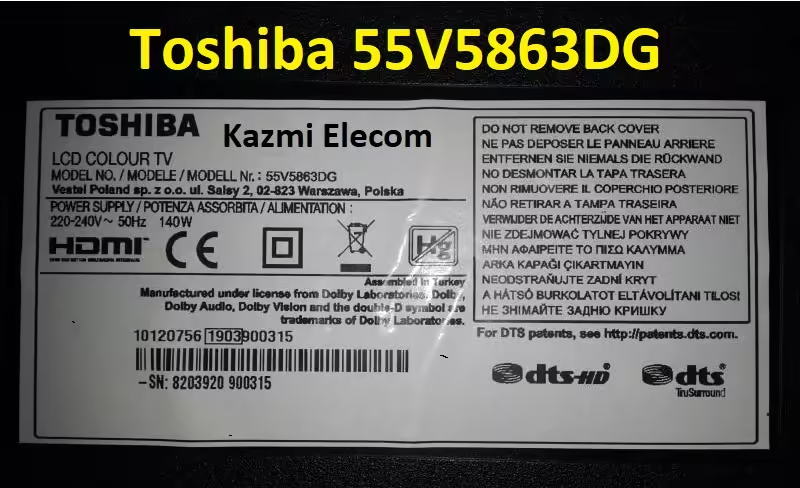
Toshiba 55V5863DG Firmware Free Download

Toshiba 55V5863DG LCD TV

Toshiba 55V5863DG is an Ultra HD 55-inch smart LED TV with a supported resolution of 3840×2160 Ultra HD. This D-LED can support HDR10. 4K means a clearer picture. More pixels on the screen, create crisper images with more details than standard HD. Discover the Netflix® button on your remote control to jump from one adventure to another. A contribution from us to help reduce your carbon footprint. Achieve thirty percent more energy efficiency with Eco Mode. Proving how seriously we take your right to privacy, we have become the first TV brand to be certified and approved as secure by the Bavarian State Government.

Get Social! Check and update your social media accounts while you watch TV. Our High Dynamic Range enhances colour contrast, making blacks darker and whites brighter. With its advanced capabilities, Dolby Vision HDR provides a captivating cinema viewing experience, so your favorite films and TV feel more life-like. Toshiba Gaming Mode optimizes the vibrancy of your graphics for a more exciting experience. Plus, it’s all set up to support HDR games too.

Toshiba 55V5863DG special features are HDMI™ ARC Through HDMI™2, USB Recording (PVR Ready), Channel List USB Cloning, Teletext, HDMI CEC, Basic Hotel Mode, Multi Menu Languages, Media Player, Child Lock, NTSC Playback, and USB Supported all format Files (Video, Audio, Picture).

Toshiba 55V5863Dg

Toshiba 55V5863DG General Information:

Model: 55V5863DG

Series: V58 LCD Colour TV

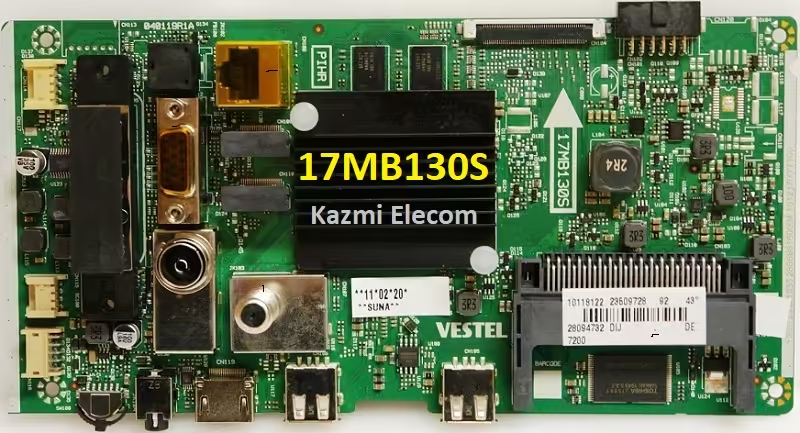
Main Board: 17MB130S VESTEL

Panel: VES550QNYL-2D-N01

T-CON: 6870C-0442B

Resolution: 3840×2160

Audio Power: 2x8W (8 ohm)

Backlight Current: mA

Backlight Power: NA

USB Ports: 2

HDMI Ports: 3

Scart: NA

RJ45: Yes

Analog Tuner: PAL, SECAM

Digital Tuner: HD DVB-T2/C/S2

Wifi: No

Mira-Cast: No

Satellite Input: No

RAM: 512MB

Memory: NAND Flash

Nand Flash Capacity: MT29F4G08ABAEA@TSOP48

Power Rating: 220V~240V 50Hz

Power Consumption: 140Watt Max.

Firmware: NA

Firmware Type: Nand Backup Dump

Product User: TOSHIBA

Toshiba 55V5863DG Technical Specifications:

  • Screen Size (inch/cm) 55″ / 140cm
  • Panel Type D-LED
  • Resolution UHD (3840 x 2160)
  • Brightness 350
  • Dolby Audio™ Yes
  • Audio Output Power (RMS) 2x10W
  • Speaker Type Downfiring Speaker Box
  • Internal Subwoofer No
  • Sound Modes Music, Movie, Speech, Classic, Flat, User
  • DTS DTS™ HD + DTS™, Tru Surround
  • Equalizer 5 Band
  • Sound by Onkyo
  • Wide Color Gamut No
  • HDR HDR10, HLG, Dolby Vision HDR
  • Picture Modes Dynamic, Game, Sports, Cinema, Natural, User
  • Dolby Vision HDR
  • HEVC (H.265) Decoder Yes
  • Tuner Type HD DVB-T2/C/S2
  • UHD from Satellite Yes
  • Dual Tuner No
  • Electronic Program Guide (EPG) Yes
  • Auto Search Yes
  • Program Storage Capacity (Analog) 200
  • Program Storage Capacity (Digital S/S2) 10000
  • Program Storage Capacity (Digital T/T2/C) 800
  • CI+ Yes
  • HDMI™ 3x HDMI™ 2.0
  • USB 2x USB2.0
  • Component (YPbPr) in via VGA
  • Composite Video/Audio in Yes
  • Scart No
  • Ethernet Yes
  • Headphone Out Yes
  • Antenna Input Yes
  • VGA (PC in – D-Sub15) Yes
  • HBBTV ver 2.0.2 Yes
  • Audio-Video Sharing (AVS) Yes
  • Smart Portal Toshiba
  • Toshiba TV Smart Center No
  • Web Browser Yes
  • Netflix Yes
  • YouTube™ Yes
  • Bluetooth No
  • Screen Mirroring Miracast
  • Processor Type Dual Core
  • Smart TV Yes
  • Total Picture Quality 1700

Toshiba 55V5863Dg

How to Write Nand Flash Backup:

  1. Download the given Toshiba 55V5863DG Nand Flash backup shared in this post below
  2. Remove the Nand Flash Memory from the board
  3. First, save the backup with the Programming Tool
  4. Write the Nand Flash data with a programmer
  5. Resold it back. Done.

Note: The following Toshiba 55V5863DG firmware is a backup dump file. Kazmi Elecom Team is not responsible for any type of damage/loss as a result of uploading/downloading the firmware. First, check and verify the main board then install software. If you are new and do not have enough knowledge of loading/installing software/firmware or dump files, or facing any issues during firmware installation then visit and read here first.

Toshiba 55V5863DG Firmware files for free download:
Kazmi-Elecom

error: Content is protected !!