TP.SK535.PB801 Android Smart Board
The Android network ATV driver smart LED TV board TP.SK535.PB801 has a 1920 x 1080 FHD resolution. The wifi system on TP_SK535_PB801 is very powerful. Smart FHD TV with the most recent Android Platform and fantastic features for Full HD Wide Screen entertainment with improved Smart functionality In addition to the VGA interface for computers, the TP SK535 PB801 Smart Board has numerous audio and video ports, USB interface ports, and numerous HDMI ports. The wired internet network can also use the LAN/RJ45 Connector interface port on the TP-SK535-PB801.
A Combo Network Triple play board with a built-in TV tuner (PAL, SECAM, NTSC) is the TP.SK535.PB801. This board’s Mediatek processor can upscale colors to 100%. The backlight’s color can be improved using the contrast feature. The TP.SK535.PB801 China smart network board can handle LED panels up to 43 inches in size. The technician can get support from the firmware file TP.SK535.PB801.
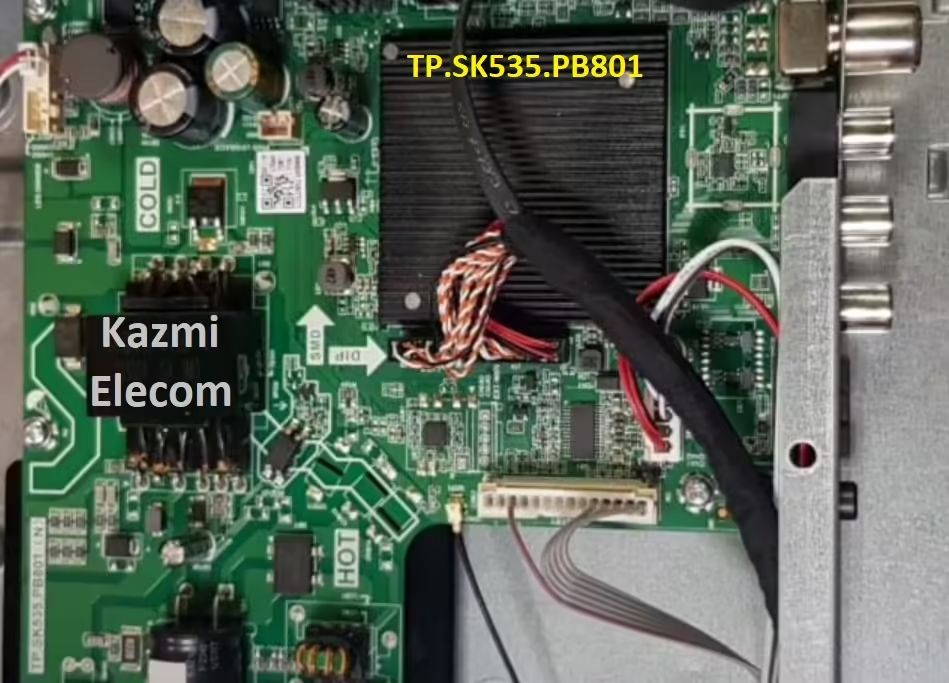
General Specifications and Features:
Brand/Mark: CVTE Android WIFI Network Drive Smart Board
Main Board: TP.SK535.PB801 (N)
Main Chipset: AML950
Operating System: Android 13.0
CPU: Multi Core Arm Cortex A53 64-bit
GPU: CA55*4
CPU Frequency: 1.2GHz
GPU Frequency: 432MHz
RAM: 1GB
ROM: 8 Gb
Resolution: up to 1920×1080
Backlight: 44-60V 600ma
Screen Size supported: 32 to 43 Inch
Audio Output power: 2x10W
Mirror Mode: Yes
Logo Change: Yes
Bluetooth: Yes
Tuner: RAFAEL R842
ATV System: PAL, SECAM,NTSC
DTV System: No
Input Voltage: 200-240V AC
Firmware Name: allupgrade_aml950S_an13_8G_1GB_68.img
Firmware Type: USB Bootable
Note: The following firmware is a USB bootable and EMC backup file. Kazmi Elecom Team is not responsible for any damage/loss caused by uploading/downloading the firmware. First, check and verify the main board then install software. If you are new and do not have enough knowledge of loading/installing software/firmware or dump files, or facing any issues during firmware installation then visit and read here first.
How to Download Firmware Files:
Download all parts of the following given firmware/Software and then extract any one of them you will get the folder. Now copy the files to USB. For more Details about the download process watch the video Click Here
TP.SK535.PB801 Software file for free download:


ok how can to get software
Download
Sir Need 1366×768 Please..
NA
كيف يمكن الحصول على البرنامج
I try copy this file to USB not installing in the tv , which file I should install
This
build.txt
Or
58fe8e13ef33ca3640394e0885bf6176 allupgrade_aml950S_an13_8G_1GB_68.img
Or both
The TV name is smart tv LG china tv with panel tp-sk535-pb801 (n) stuck on android logo kindly send full details how to install the software and video instructions to install the software.
thanks