5800-A6N82G-0P00 Smart Android Board
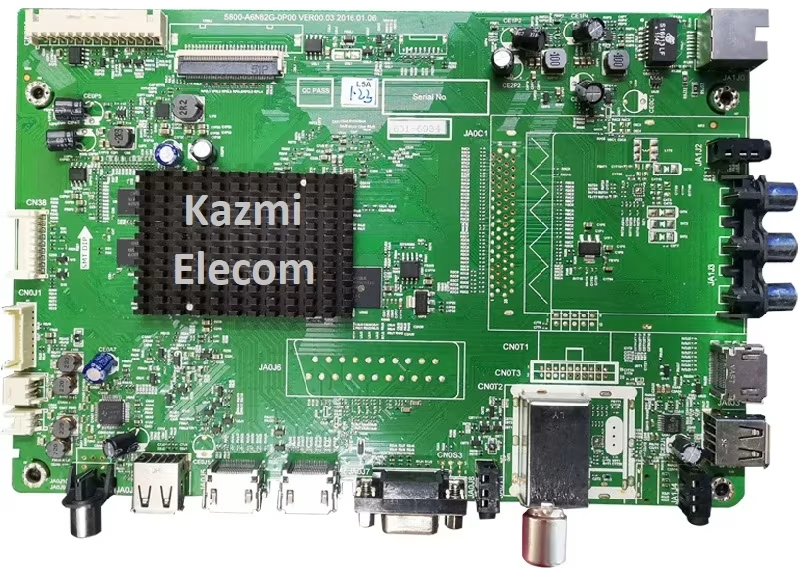
5800-A6N82G-0P00 is a non-combo Full HD Smart LED TV motherboard. The maximum resolution of 5800.A6N82G.0P00 is Full HD 1920×1080 with a Refresh Rate of 50 hertz. This board has multiple input interfaces for user convenience, such as three HDMI ports to connect Full HD devices like set-top boxes, Blu-Ray players, and gaming consoles. This board features two USB ports for connecting hard drives and other USB devices, as well as playing multimedia files. The user can also upgrade the software/firmware by the USB input port.
5800-A6N82G-0P00 has a dual tuner ATV and DTV (Optional) and can support the DVB-T2 signal (DVB-T support, DVB-T MPEG4, DVB-T2 support, DVB-C support, DVB-C MPEG4, DVB-S2 support). Firmware files and a backup of the EMMC are given below for free to support the technicians. This board also has the facility of a VGA interface for connecting laptops and Computer systems. Scart input/output is also embedded (Optional). RJ45 (LAN Cable) connectivity for wired internet is available for the user. Headphones Out is also available for audio-out signal amplification.
General Features & Technical Specifications:
Make: China
Board Model: 5800- A6N82G-0P00 VER00.04
Display Format: FHD
Screen Type: LED
Features Format: Smart
OS Version: Android
Main Chipset: Novatek NT72562BG-AA
Backlight Driver: MP3398A
Processor: Quad-Core
Graphic Processor: Quad-core
RAM Capacity: GB DDR3
Storage Memory: THGBMDG5D1LBAIL EMMC Flash
SPI Flash: 25L1606E
Screen Resolution: 1920×1080
No of HDMI Ports: 3
No of USB Ports: 2
Wi-Fi Type: Wi-Fi
Built-In Wi-Fi: Yes
Ethernet (RJ45): Yes
Speaker Output RMS: 12 (6W*2)
TV Tuner: Analog/Digital
Power Requirement: AC 110 – 240 V, 50/60 Hz
Power Consumption: 75 W
Firmware Type: USB bootable and EMMC Backup Dump
Firmware Name: Install.img
Product User: Skyworth, Toshiba, Goldstar
Service Menu Code:
Input/Source 2580 or Menu 1147 are common. For more Service Menu Codes, visit Here.
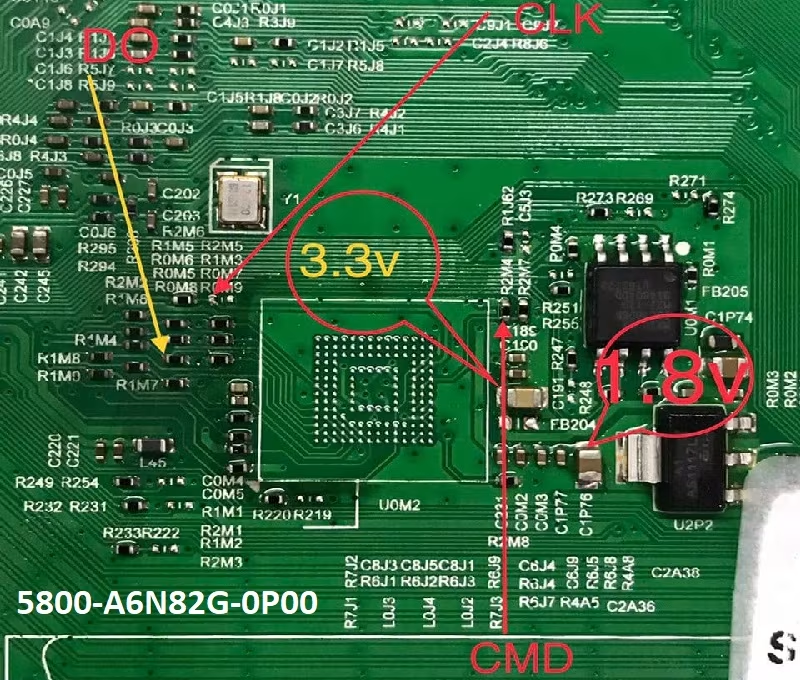
How to Write EMMC Backup:
- Download the given 5800- A6N82G-0P00 EMMC backup
- JTAG the mainboard with the Programming Tool
- Write the EMMC data
- Done.
Note: The following firmware is a backup dump file. Kazmi Elecom Team is not responsible for any type of damage/loss as a result of uploading/downloading the firmware. First, check and verify the main board, then install the software. If you are new and do not have enough knowledge of loading/installing software/firmware or dump files, or are facing any issues during firmware installation, then visit and read here first.
5800-A6N82G-0P00 Firmware for free download: