ALL LED TV FACTORY MENU CODE
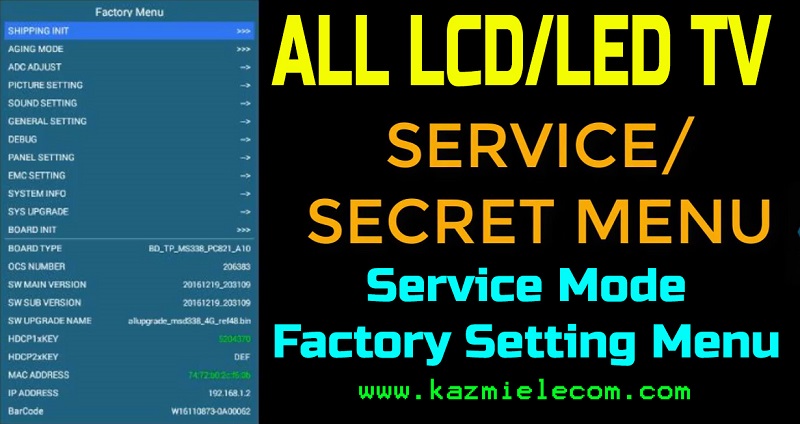
Factory Menu Code. Each LCD/LED TV has its secret menu code which is also called a factory setting menu, service mode, or factory menu. In other terms, it is the TV Master Key that is used by factory technicians to set the required parameters for 100% accuracy. LCD/LED TV Service Mode is hidden by the manufacturer so that the user may not change the settings. But sometimes TV technicians need this Factory Menu Code for modifications of TV parameters to correct or modify the display settings. Here are below all popular LCD/LED TV Service Menu Code:
China Universal Board/ Jumper Board Factory Menu Code:
- Menu 1125
- Menu 1147
- Menu 1149
- Menu 1150
- Menu 1167
- Menu 1185
- Menu 1187
- Menu 1197
- Menu 1199
- Menu 1950
- Menu 1973
- Menu 1999
- Menu 2008
- Menu 2211
- Menu 2383
- Menu 2387
- Menu 2508
- Menu 2580
- Menu 2588
- Menu 2611
- Menu 2880
- Menu 2888
- Menu 0000
- Menu 208
- Menu 0101
- Menu 0816
- Menu 710
- Menu 1234
- Menu 4711
- Menu 4725
- Menu 5880
- Menu 6181
- Menu 7050
- Menu 7168
- Menu 7343
- Menu 7710
- Menu 8002
- Menu 8093
- Menu 8500
- Menu 8202
- Menu 8593
- Menu 8892
- Menu 8893
- Menu 8896
- Menu 9301
- Menu 9380
- Menu 9385
- Menu 9527
- Menu 9735
- Menu 9883
- Input 1147
- Input 2580
- Input 0000
- Input 208
- Source/Input 308
- Input 3195
- Source 0000
- Source 2283
- source 2285
- Source 2580
- Source 2583
- Source 2585
- Source 2587
- Source 3133
- Source 3137
- Source 3138
- Source 3188
- Source 3195
- Source 6483
- Source 7343
- Mute 6483
Service Menu Code with Board Name:
- VS.Tp53U71.2 Input 208
- VS.Tp53U61.2 Input 208
- VS.TP56L62.2 Menu 1147
- T.VST59.031 Menu 1147
- T.R83.031 Menu 1147
- T.R85.031 Menu 1147
- TP.VST59s.PB813 Menu 1147
- TP.HV320.PB801 Menu 1147
- TR.85.03 Menu 1147
- T.VST59.031 .A81 A8 Menu 1147
- T.V56.03 Menu 1147
- T56J.11.2 Menu 1147, Input 2580, Input 0000, Menu 8896, AV 208, AV 308
- T.VST29.03 Menu 1147
- T.H11.675 Input 336
- T.H11.816 Input 336
- SKR.03 Menu 1147
- SKR.801 Menu 1147
- T5964.81 Menu 1147
- TP.MS338.PC821 Menu 1147
- TP.MSD309.BP85 Menu 8888
- LAD.MV59S.G Menu 7710
- T.VST29.61C Menu 1147
- T.MSD309.69A Menu 1147
- 5800-A8M260-0020 Source 3195
- 350016386 Menu 2008
- CVMV26L-A-20 Input 2580
- CV182L_B Input 2580
- SP208ESA HK-7050A-V2.08-E Menu 7050
- 35017414 REV-01 Menu 2008
- T.MS18VG.72 Menu 1147
- T.VST59.A5 Menu 1147
- CV181L-Y Input 2580
- CV9202L-S Input 2580
- T.VST.29.61C Menu 1147
- T.VST59.62 Menu 1147
- JUG7.820.531-3 Input 3138
- CV59SH-A Menu 1147
- CV59SH-A32 Menu 1147
- CV59SH-A39 Menu 1147
- CV59SH-ASM Menu 1147
- CV59SH-B39 Menu 1147
- CV59SH-C Menu 1147
- CV59SH-D Menu 1147
- CV59SH-D32 Menu 1147
- CV59SH-E32 Menu 1147
- CV59SH-G32 Menu 1147
- CV59SH-G39 Menu 1147
- CV59SH-I Menu 1147
- CV59SH-I42 Menu 1147
- CV59SH-J Menu 1147
- CV59SH-Q32 Menu 1147
- CV59SH-U32 Menu 1147
- CV59SH-U39 Menu 1147
- CV59SH-O Menu 1147
- CV59SH-S Menu 1147
- CV59SH-V59 Menu 1147
- CV59SH-DPW Menu 1147
- CV59SH-BPW Menu 1147
- CV59SH-EPW Menu 1147
- 35016445 REV-02 Menu 2008
- T.VST59S.73 Menu 1147
- TP.VST59.P83 Menu 1147, Menu 8893
- T.MT8223.3B Menu 1147
- T.MS.18VG.81B Menu 1147
- T.MS18VG.71A Menu 1147
- CV3663BH-Q32 SOURCE 2580
- LAD.MV56U.D36 MENU 1147
- LAD.MV56U.D48 MENU 1147
- T.R67.675 INPUT/SOURCE 208
- 40-T31TOT-MAB2HG Menu. Contrast 1950 or 9735
- TP.MS1306.PB772 Menu, Picture, contrast. 9735
- CV309H-X Source 2580
- TP.VST59.PB819 Menu 2008
- CV56BH.Q42 Input 2580
- TP.MS608.P82 Source/Input 1147
- 2841AM5C1 Source + Left Aero + Right Aero + Left Aero two times
- CV338H- A32 Menu 1147
- CV338H- A42 Menu 1147
- CV338H- A50 Menu 2580
- CV628H-T42 Menu 1147
- CV628H-B42 Input/Source 2580, Menu 1147
- CV950H-A42 Source 2580
- DP.V53RL.8136 Menu 1147
- DP.V53RU.8136 Menu 1147
- ZP.V53RL.671 Menu 1147
- MSD338ST V5.0 Source 2580
- TP.HV310.PB801 Menu 1147
- TP.HV320.PB801 Menu 1147
- TP.HV510.PC821 Source 2580
- TP.HV530.PC821 Source 2580
- TP.MS338.PB801 Menu 1147
- TP.MS338.PB802 Menu 1147
- TP.MS338.PC821 Menu 1147
- TP.MS338.PB822 Menu 1147
- TP.MS338.P818 Menu 1147
- TP.MS338.PB802 Menu 1147
- TP.MS338.PB818 Menu 1147
- TP.MS358.PB801 Menu 1147
- TP.MS608.PB831 Menu 1147
- Tp.MS608.P83 Menu 1147
- Tp.MS608.P82 Input/Source 1147
- TP.MS628.PC821 Menu 1147, Menu 2580
- TP.MS628.PB803 Menu 1147, Menu 2580
- TP.MS628.PB831 Menu 1147
- TP.MS628 PD65 Menu 1147, Menu 2580
- TP.MT5505.PC801 Menu 1147
- TP.MT5507.PC821 Menu 1147
- TP.MT5507.PB801 Menu 1147
- TP.VST59.P75 Menu 1147
- TP.RD8501.568 Menu 1147
- TP.RD8503.PB824 Menu 1147
- TP.RD8503.PB819 Menu 1147
- TP.RD8503.PA671 Menu 1147
- TP.V56C.PB818 Menu 1147
- TP.VST59S.PC1 Menu 1147
- TP.VST59S.PB802 Menu 1147
- TP.VST59S.PB716 Menu 1147
- TP.RT2984T.PC821 Menu 1147, Menu 2580
- TP.RT2982.PC821 Menu 1147, Menu 2580
- TP.RT2982.PB801
- TP.R69 PD64
- TP.V56.PB826 Menu 1147, Source 2580
- T.MS608.61 Source 2580
- T.MS608.81 Source 2580
- VS.SP33811.2 Input/Source 208
- ZP.VST6A338.PB818 Source 2580
- T.R83.031 Menu 1147
- T.R85.031 Menu 1147
- TR.85.03 Menu 1147
- T56J.11.2 Menu 1147
- VS.TP53U61.2 Input 208
- VS.TP53U71.2 Input 208
- VS.TP56L62.2 Menu 1147
- VS.T53U21.2 Source/Input 2580
- T.VST59.031 Menu 1147
- T.R83.816 Menu 1147
- T.R67.03 Menu 1147 & Input/Source 208
- TP.VST59.P63 Menu 1147
- TP.VST59.P86 Menu 1147, Menu 8893
- TP.V56C.PA673 Menu 1147
- CV56BL-L Input/Source 2580
- CV56BL-Q24 Input/Source 2580
- CV56BL-Y24 Input/Source 2580
- SKR.03 Menu 1147
- SKR.801 Menu 1147
- SKR.816 Menu 1147
- SKR.819 Menu 1147
- LAD.MV56U.A36 Menu 1147
- LAD.MV56U.A48 Menu 1147
- LAD.MV56U.A75 Menu 1147
- LAD.MV56U.B48 Menu 1147
- LAD.MV56U.C36 Menu 1147
- LAD.MV59S.I Menu 7710
- LAD.MV59S.G Menu 7710
- LAD.MV59S.Q Menu 7710
- LAD.MV59S.G Menu 7710
- LAD.MV9.R Menu 710
- LAD.MV9.P Menu 1147
- T.VST29.03 Menu 1147
- T.V56.03 Menu 1147
- T.VST59.031 .A81 A8 Menu 1147
- T5964.81 Menu 1147
- T.VST29.61 C Menu 1147
- CVMV26L-A-20 Input 2580
- CV182L_B Input 2580
- SP208ESA HK-7050A-V2.08-E Menu 7050
- T.MS18VG.72 Menu 1147
- T.VST59.A5 Menu 1147
- CV181 L-Y Input 2580
- T.VST.29.61 C Menu 1147
- T.VST59.62 Menu 1147
- T.VST59S. 73 Menu 1147
- TP.VST59.P83 Menu 1147
- T.MT8223.3B Menu 1147
- T.MS.18VG.81 B Menu 1147
- T.MS18VG.71A Menu 1147
- T.SIS231.T65 Menu 710, Menu 1147
- TP.VST59S.PA501 Menu+Audio+8532
- TP.MS3463S.PB801 Menu 1147
- TP.MS3463S.PB818 Menu 1147
- CV309H-X Source 2580
- TP.VST59.PB819 Menu 2008
- TP.VST59S.81 Menu 1147
- T53L13.5 Input 208, Menu 1147
- CV56BH-Q28 Input 2580
- CV56BH-Q32 Input 2580
- CV56BH-Q42 Input 2580
- CV56XH-U32 Input 208
- CV56XH-U42 Input 208
- CV56XH-U50 Input 208
- P75-2841V6.0 Input 2008
- CV110-AL Input 2580
- SP36821.2 Source/Input 815
- SP36811.2 Source/Input 815
- HDV56U-AS Menu 8896
- S368LA1.5 Menu 208 Or Source/Input 815, 344
- JNX53U11.2 Input 208
- Jainex 53U11.2 new Input 208
- KK.M368.A8 Source/Input 815, Source/Input 1147
- JUC7.820.00081373 Source/Input 3138
- T.MS18VG.62B Menu 1147
- CV182H-F Source/Input 2580
- T.VST59.11 Menu 1147
- TP.MS18VG.P83C Menu 1147


Changhong Ruba Service Menu Code:
- Source 3138
- Source 1125
- Source 42580
- Source 3130
- Menu 1125
- Menu 1147
- Menu 2580
- Menu 0816
Ecostar Service Menu Code:
- Menu 2008
- Menu 2508
- Menu 8002
- Menu 8202
Orient Service Menu Code:
- Input 2580, 2588
- Source 2588, 2580
- Menu+Contrast+1950
Orange Service Menu Code:
- Menu+Audio+Balance+1969
Haier Service Menu Code:
- Menu 1147
- Menu 1999
- Menu 8202
- Menu 8893
- Menu 4578
- Source 2580
- Menu+Highlight Audio+8893
- Menu+Source+8893+Ok
- Press “MENU/EXIT”; Press 1999; Press “OK”
Hitachi Service Menu Code:
- Menu 1147
- Menu 1195
- Input/Source 3195
KIVI Service Menu Code:
- Input/Source 2580
- Input/Source 1001
TCL Service Menu Code:
- Menu+Contrast+9735 or 1950
- With the TV on, Select Home
Select Setting and OK
Select System and OK
Select About and OK, System info for TV will be displayed
Use the remote and press the following sequence: Up, Right, Down, Right, Up
Press the Fast Forward button 3 times
Press the Rewind button 2 times
Use the remote and press the back arrow (it’s located on the top left just below the power button), this should bring you into the factory menu.
Samsung Service Menu Code:
- On Standby Press Mute+182+Power
- Turn OFF, Info, Menu, Mute, Power
- Sleep, P.STD, Mute. Power
- Display, Menu, Mute, Power
- Display, P.STD, Mute, Power
- On Standby: Menu, Mute, Power
- On Standby: P.STD, Help, Sleep, Power
- POWER (off) MUTE 8 2 4 POWER (on .) -> reset pin
- MUTE 119 OK -> “HotelMode”
- MUTE 120 EXIT -> “LEDDemo”
- MUTE 184 EXIT -> “DV”
- MUTE 185 EXIT ->?
- MUTE 187 EXIT -> “DSG” (HDMI test)
- MUTE 737 OK -> “PDPFactory”
- MUTE 750 EXIT -> “FlashPlayerDemo” (go to content library screen)
- MUTE 948 EXIT -> ” YahooFactoryReset” (resets widgets)
- MUTE OK MUTE OK -> “InfoLinkDemo”
- MUTE [“RSS” key?] ->
- INFO 321 EXIT -> “Calibration”
- MUTE 247 EXIT info ci
LG Service Menu Code:
- Press and hold the Menu button until 4 digit password is displayed:
- 8741
- 0413
- 0000
- 8878
- 7777
- 8743
Videocon Service Menu Code:
- Menu 123
- Menu 0323
- Menu 1147
- Menu 1947
- Menu 6483
- Menu+Sound+8532
Sansui Service Menu Code:
- Menu 6483
- Menu+Sound+8532
- Menu+Down Key+8532
Supra Service Menu Code:
- SUPRA STV-LC2277FL V6L10
MAIN: T.VST29.61C 12296
CPU: TSUMV59XU-Z1
TUNER: CDT-3SP5I2-36
SPI FLASH: W25Q32FVSIG
PSU: HKC-PL01 REV: 3.0
LED PANEL: LM215DA-T01
Login to the remote service c MENU -1,1,4,7. Exit EXIT - SUPRA STV-LC1985WL (V1M01)
MAIN BOARD – 5800-A8M260-0020,
SYSCON – MST6E181VS-LF-Z1,
FLASH – MX25L3206,
TUNER – HFT2-8F / 115CW,
LED DISPLAY – E185SG01.
Login to the service: SOURCE – 3,1,9,5. - SUPRA STV-LC42590F (V2L09)
MAIN BOARD-350016386,
Flash 25fl032,
LCD panel LC420WUE (SC) (V1)
Enter the service mode – with the remote control, press “MENU” – dial 2008 – exit – EXIT. - Supra LCD model STV-LC1522W
Main CVMV26L-A-20
Serial Flash F40-100CGP
eeprom K24C32
Tuner F21Wt-3BAR-E
audio TDA1517P
SYSCON TSUMV26KE-LF
LK-IN150205A
Panel M156MWR1
Login to the service with the remote control: “Menu”, “Red”, “Green”, “Yellow”, “Cyan” - SUPRA STV-LC2437AFL (V2L07)
MAIN BOARD-CV182L_B,
SPI FLASH-W25Q32,
TUNER-CDT-3SP512-37,
LED DISPLAY-M240HW02
Login to the service – INPUT-2580. - SUPRA STV-LC2222WD (V1I12)
Section TV:
MAIN BOARD-SP208ESA HK-7050A-V2.08-E,
SPI FLASH-EN25T80 (U7),
EEPROM-24C32 (U9),
TUNER-TNF931D-BFR1,
LCD MATRIX-CLAA215FA.
Section DVD: MPEG BOARD-B.SPDM7B,
MPEG-SPHE8202TQ (U25),
SPI FLASH-EN25T80 (U5),
Driver-D5888S,
Optics-HOP-120X.
Login to the service – MENU-7050. - SUPRA STV-LC39950FL (V1M01)
MAIN BOARD 35017414 REV-01
SYSCON MT8227AAKU (BMSL),
SPI FLASH W25Q32,
LED DISPLAY CMI-V390HJ1-P02.
Login to the service-MENU-2008. - SUPRA STV-LC32K800WL (V1M02)
MAIN BOARD T.MS18VG.72 T.VST59.A5,
SYSCON TSUMV59XE,
SPI FLASH W25Q32,
TUNER CDT-3NP5 / 1-10,
LED DISPLAY LM315TA-T01.
Login to the service MENU-1147. - SUPRA STV-LC2477FLD (V5L09)
SECTION TV:
MAIN BOARD-CV181L-Y,
SPI FLASH-W25Q32,
TUNER-CDT-3SP512-37,
LED DISPLAY-V236H1-P01.
SECTION DVD:
MPEG BOARD-GM-CH1089J-V1.2,
MPEG-MT1389DE (JDAL),
SPI FLASH-KH25L1606,
Driver-CD5888CB,
Optics-SF-HD850
Login to the service – INPUT-2580 - SUPRA STV-LC2477FLD (V6L10)
MAIN BOARD-T.VST.29.61C,
SYSCON-TSUMV59XU-Z1,
SPI FLASH-GD25Q32,
TUNER-CDT3SP512-36,
LED DISPLAY-V236H1-P01.
SECTION DVD:
MPEG BOARD-GM-CH1089J-V1.2,
MPEG-MT1389DE (JDAL),
SPI FLASH-KH25L1606,
Driver-CD5888CB,
Optics-SF-HD850.
Login to the service: MENU-1147. - SUPRA STV-LC19810WL (V4L12)
MAIN BOARD-Y.VST59.62,
SYSCON-TSUMV59XU,
SPI FLASH-GD25Q32,
TUNER-CDT-3NP5 / 1-10,
LED DISPLAY-LS185AWTNM
Login to the service – MENU-1147. - SUPRA STV-LC17250FL (V1L02) W25Q32
MAIN BOARD CV182L_B,
SPI FLASH W25Q32,
TUNER CDT-3SP512-37,
LED DISPLAY N164HGE-L12.
Login to the service INPUT-2580. - SUPRA STV-LC24410FL (V2M04)
MAIN BOARD-T.VST29.61C,
SYSCON TSUMV59XE-Z1,
SPI FLASH W25Q32,
TUNER CDT-3SP512-36,
LED DISPLAY HM236WU3-100.
Log in servis– MENU-1147.Supra STV- LC2204W
CPU MST719DU-LF
MAIN: JUG7.820.531-3, 24LC32, TEA2025B,
Tuner: TAF6-C2I21V
Login to the service: INPUT, 3,1,3,8 - SUPRA STV-LC42740FL (V1L11)
MAIN: 35016445 REV-02
SYSCON: MT8227AAKU (BMSL),
SPI FLASH: W25Q32.
Log in SM: MENU-2,0,0,8. - SUPRA STV-LC42740FL (V1L11)
MAIN: 35016445 REV-02
SYSCON: MT8227AAKU (BMSL),
SPI FLASH: W25Q32.
Log in SM: MENU-2,0,0,8. - SUPRA STV-LC42590F (V2L06)
MAIN: 35016386,
SYSCON: MST6E182VSA-LF-Z1,
SPI FLASH: S25FL032P (N504),
EEPROM: 24C64,
TUNER: AFT7 / W127,
LCD PANEL: LC420WUE.
Log in SM: MENU – 2,0,0,8. - SUPRA STV-LC42590F
Enter and exit the factory menu:
Press “MENU” button on the remote control and then press “2”, “0”, “0”, “8” in 3 seconds, and enter the factory menu in success.
Press “MUTE” button to exit the factory menu.
Press the “MENU” in the operation mode “2”, “0”, “0”, “8” for 3 seconds and enter the factory menu success.
Byhod from factory menu = MUTE = - SUPRA STV-LC2725AFL (V5L11)
MAIN: T.VST59S.73,
SYSCON: TSUMV56XES-Z1,
SPI FLASH: GD25Q32,
TUNER: CDT-3NP5 / 1-10,
LED PANEL: M270HGE-L21.
Enter the service mode: MENU -1,1,4,7.
Toshiba Service Menu Code:
- On Menu, select “Installation”, then “ System Information” press the right arrow button.
(“System Information” will change to “Factory Reset” or something similar) - Adjust the volume to zero, press the mute twice from the remote and press the menu button on the TV
(fourth button from the bottom and marked p and decree it shares) to exit, the menu shut the TV - Press the Menu, Highlight the Picture, Press 9301, ok
- Toshiba 32W2333D: Menu 4725
- Toshiba SL738R (TPV chassis): Menu 1991
- Toshiba Chassis 11AK53-3 29VH36G: Menu 4725
- 1. Press the {MENU} button on the remote.
2. Highlight the “Picture” icon.
3. Press the {9} {3} {0} {1} buttons on the remote. o {OK} button will access/navigate through modes o {VOL +}, {VOL-}, {P+} & {P-} buttons move through options and change values
4. To exit, press the {MENU} button.
Symphony Service Menu Code:
- Input/Source 2580
Vestel Service Menu Code:
- Menu 4725 then select “RESET”
Vision Quest Service Menu Code:
- Input/Source 2580
Vizio Service Menu Code:
- Menu under “Help” tab is Factory Default enter 0000
VU Service Menu Code:
- MENU+ALL SETTING-AUDIO SET+ SOUND+BALANCE+1969 SCREEN M DEN, MENU PRESS 3 Sec
- Menu 1147
- Setting, Audio settings, Advance audio settings, Balance “0”, 1950 or 2580
Seiki Service Menu Code:
- Menu 0000
Skyworth / IRIS Service Menu Code:
- Source 3195
RCA Service Menu Code:
- Menu 1147
ROLSEN Service Menu Code:
- Menu 1147
- Menu 710
COBY Service Menu Code:
- Enter menu, Hi-Lite “Audio” then enter 8893 Mode/Source 2580
AKAI Service Menu Code:
- Menu 8500
- Menu 6483
- Menu 1147
- Input/Source 1147
- Input/Source 2580
ACER Service Menu Code:
AR43AR2851UDFL:
- Go To Input > Select HDMI 1 > Press Menu Button > Picture Adjustment > Advance Settings > Open Contrast > Press ok button for 6 times in Remote>Factory mode> 4 option (SHOP)
ADSUN Service Menu Code:
- Input/Source 208 (32AESL1)
ADZEN Service Menu Code:
- Input/Source 2580
- Input/Source 6964
AIRTEC Service Menu Code:
- Input/Source 2580
- Input/Source 208
BESTON Service Menu Code:
- Menu 1147
BEETHOSOL Service Menu Code:
- Menu 1149
BPL Service Menu Code:
- Menu 1147
DAIWA Service Menu Code:
- Input/Source 2580
DEXP Service Menu Code:
- Menu/Source 1137
- Menu/Source 2208
DYNORA Service Menu Code:
- Input > Left > Right > Left > Right > Back Button
- E- Manual > Left > Right > Up > Down > Ok Button
- Input/Source 2580
GPLUS Service Menu Code:
- Menu 1147
- Source 2580
- Source 3138
- Menu 3138
- Menu 2013
HISENSE Service Menu Code:
- PRESS MENU+ALL SETING+AUDIO SET+ SOUND+BALANCE+1969 SCREEN M DEN, MENU PRESS 3 sec
HOM Service Menu Code:
- Source 208
INFOCUS Service Menu Code:
- Input/Source 2580
FUSION Service Menu Code:
- Menu 1147
- Menu 2008
- Menu 8893
- Input/Source 3138
- Input/Source 2580
IMEE Service Menu Code:
- Menu/Input/Source 2508
- Menu/Input/Source 1147
- Menu/Input/Source 208
INNOQ Service Menu Code:
- Source 208
INFINIX Service Menu Code:
- Input > Left > Right > Left > Right > Back Button
- E- Manual > Left > Right > Up > Down > Ok Button
KODAK Service Menu Code:
- Input/Source 2580
MAXHUB Service Menu Code:
- Input 1379
MI Service Menu Code:
- Press and hold MI + O key in the remote and power ON (LM43)
NVY Service Menu Code:
- Input/Source 2580
- Menu 1147
MOTOROLA Service Menu Code:
- Input/Source 3195
- First Press the OK & Back buttons simultaneously after the TV set on
- Setting-Picture setting-Advance-contrast-OK Key 7 times
- Input+3138 or Press menu key in the remote, select picture setting, select the advance setting, select contrast, Pess OK Key 7 TImes
55UHDADMXSBE/ 65UHDADMXSBE/55UHDGQMWS5Q/65UHDGQMWS5Q
- Input > Left > Right > Left > Right > Back Button
- E- Manual > Left > Right > Up > Down > Ok Button
NACSON Service Menu Code:
- Input/Source 2580
NOKIA Service Menu Code:
- Input/Source 3195
- First Press the OK & Back buttons simultaneously after the TV set on
- Setting-Picture setting-Advance-contrast-OK Key 7 times
- Input+3138 or Press menu key in the remote, select picture setting, select the advance setting, select contrast, Pess OK Key 7 TImes
OnePlus Service Menu Code:
Q & U Series/Y1S &Y1S Edge: Pair the remote (BT Remote should be paired with TV)
- Open settings on the homepage, Press (Vol+), Press(Vol-), Navigation Left, Right, Up, Down, OK
Y Series:
- Open E-Manuel, Navigation Left, Right, Up, Down, OK
PEL Service Menu Code:
- Google TV: Source + Left Aero + Right Aero + Left Aero two times
Vision World Service Menu Code:
- Input/Source 6975
- Menu 1149
Philips Service Menu Code:
- 062596 +Menu+Info+status
- 062597 +Menu+Info+status
- 061596 +Menu
- 22PFL 4407\V7 LCD MENU+2580
- 22PFL5557/V7 LED MENU+2580
- 24PFL5557\V7 LED MENU+2580
- 24PFL5957\V7 LED MENU+2580
- 32PFL4537\V7 LED MENU+2580
- 32PFL4737/V7 LED MENU+2580
- 32PFL5537\V7 LED MENU+2580
- 32PFL5937\V7 LED MENU+2580
- 22PFL5237\V7 LED MENU+2580
- 24PFL3457\V7 LCD MENU+1950
- 24PFL5007\V7 LED MENU+1950
- 24PFL5237/V7 LED MENU+1950
- 24PFL5637/V7 LCD MENU+1950
- 24PFL5957\V7 LCD MEMU+1950
- 32PFL3057\V7 LCD MENU+1950
- 32PLF5007/V7 LED MEMU+1950
- 32PFL5237\V7 LED MENU+1950
- 32PFL5537\V7 LCD MENU+1950
- 32PFL5637\V7 LCD MENU+2580
- 32PFL6357\V7 LED MENU+1950
- 32PFL6577\V7 LCD MENU+1950
- 32PFL7977\V7 LED MENU+1950
- 42PFL3457\V7 LED MENU+1950
- 42PFL6357V7 LED MENU+1590
- 42PFL6577\V7 LED MENU+1950
- 42PFL7357\V7 LED MENU+1950
- 42PFL7977\V7 LED MENU+1950
- 46PFL8577\V7 LED MENU+1950
- 58PFL9577\V7 LED MENU+1950
- 40PFL4757\V7 LED MENU+2580
- 42PFL6977\V7 LED MENU+1950
- 24PFL4555 Menu+Sound+8532
- 14PT3525 Menu-Picture-contrast-9735
- 14PT4525 Menu-Picture-contrast-9735
- 21PT3525 Menu-Picture-contrast-9735
- 21PT4525 Menu-Picture-contrast-9735
- 21PT5525 MENU-1147
- 24PFL4505 Menu+Cont+1950
- 24PFL5505 Menu+Cont+1950
- 24PFL5555 Menu+Cont+1950
- 32PFL3305 Menu+Cont+1950
- 32PFL4305 Menu+Cont+1950
- 32PFL4355 Menu+Sound+8532
- 32PFL5355 Menu+Cont+1950
- 32PFL5505 Menu+Cont+1950
- 42PFL3505 Menu+Cont+1950
- 42PFL4755 Menu+Sound+8532
- 42PFL5505 Menu+Cont+1950
- 42PFL5555 Menu+Cont+1950
- 46PFL5505 Menu+Cont+1950
- 46PFL5755 Menu+Cont+1950
- 46PFL6755 Menu+2008
- 55PFL5755 Menu+Cont+1950
- 55PFL6755 Menu+2008
- 21PT3426 MENU + 1947
- 32PFL5356 MENU + 1999 + BACK SPACE
- 32PFL5556 MENU + 1999 + BACK SPACE
- 42PFL5556 MENU + 1999 + BACK SPACE
- 46PFL5556 MENU + 1999 + BACK SPACE
- 42PFL6556 MENU + 1999 + BACK SPACE
- 46PFL6556 MENU + 1999 + BACK SPACE
- 32PFL4356 MENU + 2580 + OK
- 32PFL4556 MENU + 2580 + OK
- 22PFL4506 Menu+2580
- 26PFL4306 Menu+2580
- 42PFL5506 Menu+1999+back
- 24PFL5306 Menu+1950
- 32PFL5306 Menu+1950
- 32PFL6306 Menu+1950
- 32PFL6506 Menu+1950
- 22PFL4556 MENU + 2580 + OK
- 21PT4326 MENU + 1147
- 14PT3626 MENU + PICTURE MENU + 6483
- 21PT3326 MENU + PICTURE MENU + 6483
- 14PT4626 MENU + PICTURE MENU + 6483
- 21PT4226 MENU + PICTURE MENU + 6483
- 21PT3626 MENU + PICTURE MENU + 6483
- 21PT4626 MENU + PICTURE MENU + 6483
- 14PT3426 MENU + 1947
- 24PFL6306 Menu+1950
- 32PFL5007 Menu+1950
- 24PFL5007 Menu+1950
- 32PFL3057 Menu + 1950
- 42PFL3457 Menu + 1950
- 22PFL4407 Menu+2580
- 24PFL5237 Menu+1950
- 24PFL5637 Menu+1950
- 32PFL5237 Menu+1950
- 32PFL6577 Standby-UP-Down_down
- 42PFL6577 Standby-UP-Down_down
- 32PFL5637 Menu + 1950
- 14PT2407 MENU+1147
- 21PT4327 MENU+1147
- 42PFL7357 Menu + 1950
- 24PFL3457 Menu + 1950
- 22PFL5237 Menu + 1950
- 21PT3427 MENU+1147
- 21PT3527 MENU+1147
- 22PFL5557 Menu+2580
- 24PFL5557 Menu+2580
- 21PT5527 MENU+1147
- 32PFL4737 MENU+2580
- 14PT2307 MENU+1147
- 32PFL6357 MENU+1950
- 32PFL5957 Menu+2580
- 24PFL5957 Menu+2580
- 32PFL5537 Menu+2580
- 32PFL5937 Menu+2580
- 42PFL6357 MENU+1950
- 42PFL7977 Standby-UP-Down_down
- 32PFL7977 Standby-UP-Down_down
- 21PT4627 MENU+1147
- 40PFL4757 Menu+2580
- 32PFL4537 MENU+2580
- 46PFL8577 Standby-UP-Down_down
- 58PFL9577 Standby-UP-Down_down
- 42PFL6977 Standby-UP-Down_down
- 24PFL3538 MENU-2580
- 32PFL6977 Standby-UP-Down_down
- 29PFL5937 Menu+2580
- 21PT3428 MENU+1147
- 21PT4628 MENU+1147
- 14PT2508 MENU+1147
- 22PFL5237 Menu + 1950
- 21PT4428 MENU+1147
- 21PT3326 MENU + PICTURE MENU + 6483
- 14PT4428 MENU+1147
- 21PT3527 MENU+1147
- 22PFL2658 Menu+1950
- 24PFL3938 Menu+1950
- 22PFL2658 Menu + 1950
- 20PFL3938 Menu+1950
- 22PFL3958 Menu+1950
- 32PFL3938 Menu+1950
- 24PFL5237 Menu + 1950
- 24PFL4738 Menu+1950
- 22PFL4758 Menu+1950
- 32PFL4938 Menu+1950
- 29PFL4938 Menu+1950
- 29PFL4738 MENU-2580
- 32PFL4738 Menu+1950
- 40PFL4758 Menu+1950
- 50PFL4758 MENU-2580
- 46PFL4758 Menu+1950
- 32PFL5578 Standby-UP-Down_down
- 32PFL3738 Menu+1950
- 22PFL3758 Menu+1950
- 40PFL4958 Menu+1950
- 46PFL8777 Standby-UP-Down_down
- 20PFL3738 Menu+1950
- 32HFL4738 Menu+1950
- 29PFL4738 MENU-2580
- 24PFL3159 Menu+1950
- 20PFL2139 Menu+1950
- 32PFL3439 Menu+1950
- 39PFL4579 Standby-UP-Down_down
- 21PT3428 MENU+1147
- 40PFL5059 MENU-2580
- 22PFL3459 Menu+1950
- 32PFL5039 MENU-2580
- 21PT4428 MENU+1147
- 21PT5527 MENU+1147
- 39PFL3559 Menu+1950
- 32PFL4479 MENU-1950
- 24PFL2159 Menu+1950
- 24PFL3738 Menu+1950
- 50PFL5059 MENU-2580
- 20PFL3439 Menu+1950
- 39PFL3539 Menu+1950
- 20PFL3439 Menu+1950
- 32PFL3230 MENU-2580
- 50PFL5059 MENU-2580
- 22PFL3938 Menu+1950
- 21PT4428 MENU+1147
- 32PFL3738 Menu+1950
PANASONIC Service Menu Code:
- Menu 8202
REALME Service Menu Code:
- On the home page click on the Live TV, Press the menu key in Remote, Select the Advance option, and Navigation Left. Navigation Right, Navigation Left, Navigation Right, Open service menu
RUBIN Service Menu Code:
- Source/Menu 3138
ONIDA Service Menu Code:
- Source 2580
- Menu, VOL+, 8532
- Menu, PIC, Contrast, 9735
- Menu, PIC, Contrast, 1950
THOMSON Service Menu Code:
- Menu, PIC, Contrast, 9705
- Menu, PIC, Contrast, 9735
- Menu, PIC, Contrast, 1950
- Menu 1147
- Menu 2008
- Menu 9735
- Source 2580
- INPUT, LEFT, RIGHT, LEFT, RIGHT, BACK KEY (Q50H1100)
INTEX Service Menu Code:
- LED-1601 ME13
- LED-1602 Menu+8896
- LED-1602N Menu+8896
- LED-1600 Input+2580
- LED-1611-VT13 Source+6964
- LE19HD08-BO13 Input+2580
- LED TV-1902 Menu+8896
- LED 2110 Source+6964
- LED-2200FHD Menu+1147
- LED TV-2202 FHD Menu+1147
- LED TV-2410 Menu+8202
- LED TV-2400 HD Menu+1147
- LED TV-2800 Menu+1147
- LED TV -LE31HD08/3108 Source+2580
- LED TV-3107 Menu+1147
- LED TV-3207 Menu+1147
- LED TV-3199 GOLD Menu+1147
- LED TV-3210 Menu+1147
- LED-3110 Menu+8202
- LED TV-3111 Inside Menu- S/W update
- LED TV -3900 FHD Menu+1147
- LED TV-4000FHD Menu+8202
- LED-40FHD10-VM Input+2580
- LED TV-4200FHD Menu+8202
- LED-2011 (19.5″) Menu +1147
- LED-2412 Menu+8202
- LED- 4010FHD Menu+8202
- LED-2111 (20.7″) Menu +1147
- LED- 5000FHD Menu+8202
- LED 23.6″ Menu +1147
- LED-4001 (39″ HD) Menu +1147
- LED-2203FHD (21.5″) Source+6964
- Splash-800 (32″) Menu +1147
- LED-2810 (28″) Menu +1147
- 43″ LED TV (LED-4300FHD) Menu+8202
- 49″ LED TV (LED-5010FHD) Menu+8202
- LED-3105T Input+2580
Telefunken Service Menu Code:
- Menu 4725
Dazzle Service Menu Code:
- Menu 2483
- Menu 6483
Kevin Service Menu Code:
- Menu 1147
- Source 6964
Marq Service Menu Code:
- Menu 1147
- Source 6964
- Source 3195
- Press Menu- Advance Option- Zero Key 4 Times Press (32AAHDM)
Micromax Service Menu Code:
- B Series: Source 2580
- C Series: Source 3138
- K Series: Menu, Sound, Balance, 1969
- 32T Series: Menu 1147
- 40T Series: Menu, Contrast, 9735
- 50K2330UHD: Menu 2008
- 24L31FHD, 24L32FHD: Menu 8202
- 42C0050UHD: Setting 0816
Skywarth Service Menu Code:
- Source 3195
- Menu, Sound, Set-Up, Volume, 9527
- Volume 0, Menu, Brightness, 2648
Nobel TCL Service Menu Code:
- Menu, Contrast, 1950, 9735
- Input/Source 2580
AOC Service Menu Code:
- Menu 1999
BLACKOX Service Menu Code:
- Menu 1999
- Input/Source 2580 (Vol – and Program button for 3 Secs)
Ifalcon Service Menu Code:
- Press the Settings button on the Remote
Select picture Setting, Select Advanced settings
Select Contrast Then press 1950, TV will be displayed with the service menu
Polaroid Service Menu Code:
- Menu 1147
- Source 2580
Salora Service Menu Code:
- Menu, Picture, 2003
Shannon Service Menu Code:
- Menu 1147
WESTON Service Menu Code:
- Menu 1147
Alonso Service Menu Code:
- Menu 1147
C-Conic Service Menu Code:
- Source/Input 2580 (Press and Hold Home and OK Button)
Challenger Factory Menu Code:
- Menu 8202
CloudWalker Factory Menu Code:
- Menu 1147
Shawnak Factory Menu Code:
- Menu 8202
General Service Menu Code:
- Source 2580
Royal Service Menu Code:
- Source 2580
Ego Vision Service Menu Code:
- Menu 1147 (OK and Back Button for 3 Secs)
Iconic Service Menu Code:
- Source/Input 2580
Kraft Service Menu Code:
- Menu 8802, 8202
LIVE Service Menu Code:
- Source/Input 1147
- Source/Input 2580
LLOYED Service Menu Code:
- Menu 1147
- Menu, Sound, Balance, 1969
Wybor Service Menu Code:
- Source/Input 2580
Devant Service Menu Code:
- Menu, Sound, Balance, 0532
Sanyo Service Menu Code:
- Input 2580
Akira Service Menu Code:
- Menu/Program 6483
- Menu 8500
BBK Service Menu Code:
- Input/Source 2580
Beko Service Menu Code:
- Menu 9301
- Menu 8500
Dynex Service Menu Code:
- Input/Source 2580
Symphone Service Menu Code:
- Input/source 2580
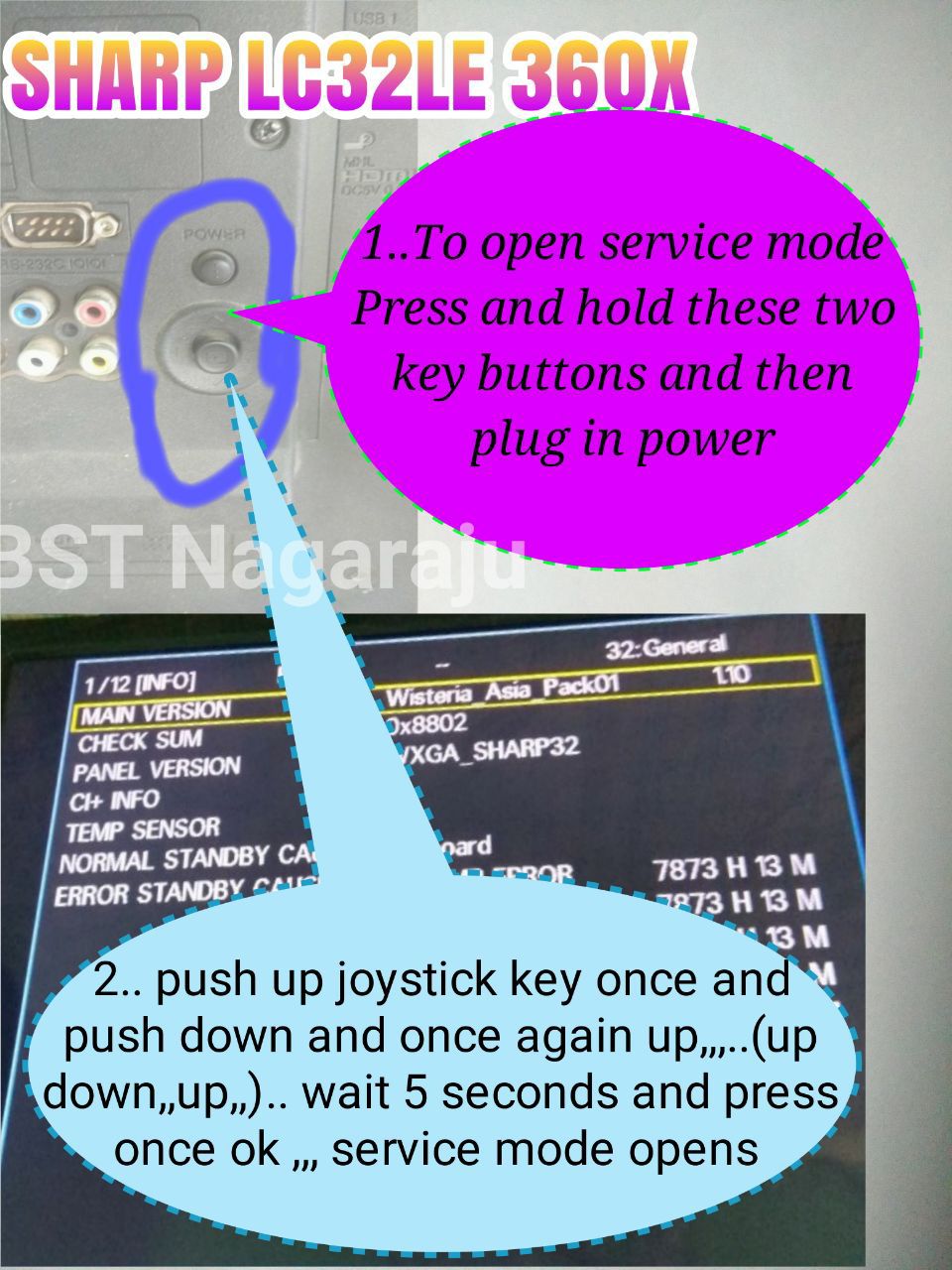
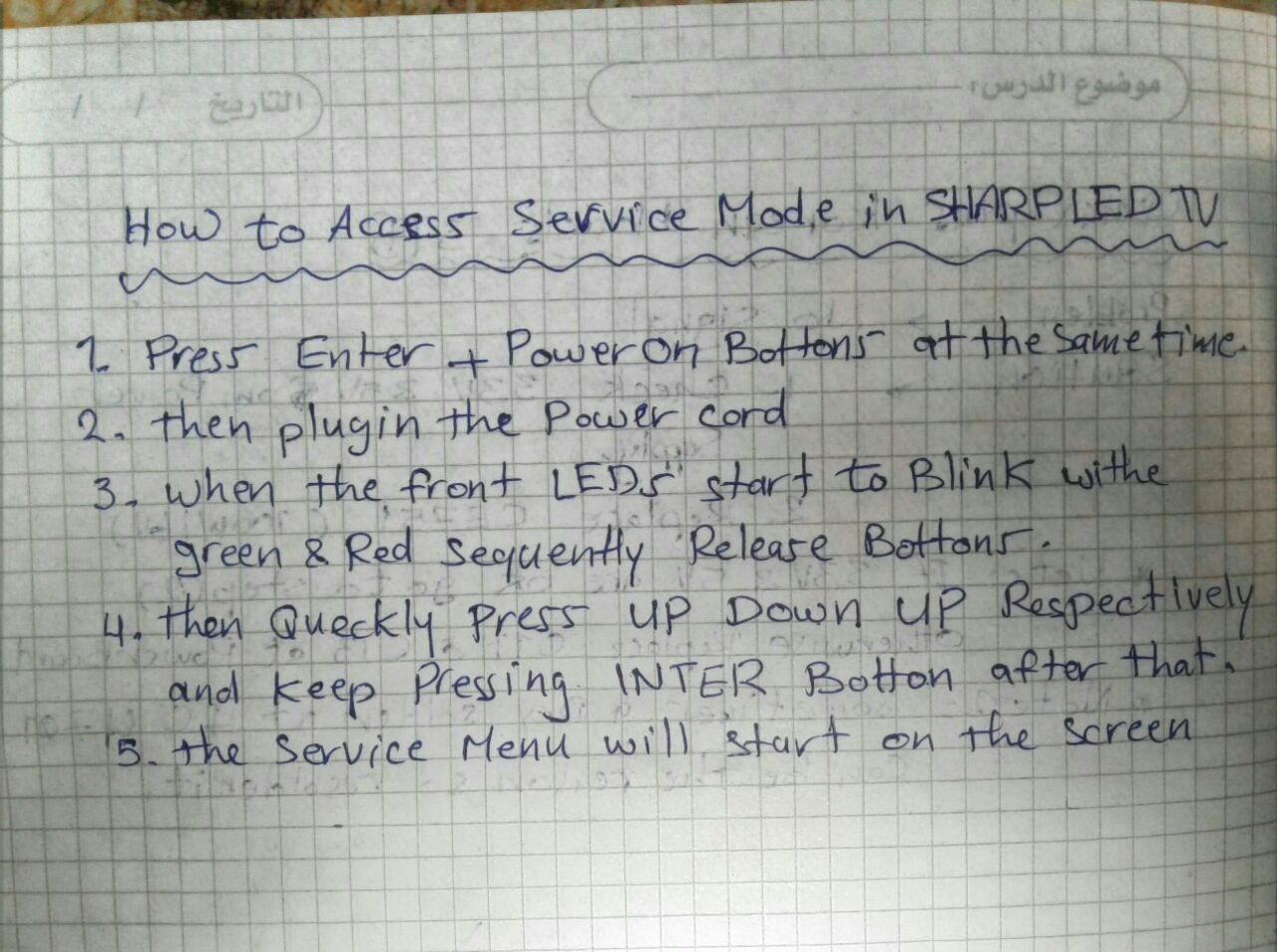
Sharp Service Menu Code:
- Menu 1147
- Menu 1999
- Menu 3481

Element Service Menu Code:
- Menu 0000
- Menu 1147
Elenberg Service Menu Code:
- Menu 6483
Erisson Service Menu Code:
- Menu 1147
Funai Service Menu Code:
- Turn on the TV and press the remote control {2}, {7}, {1} , {MUTE}.
- From standby mode. Press and hold MENU on the TV and press {STANDBY-ON} on the remote control.
- From standby mode. Press and hold {SETUP} on the TV and press {STANDBY-ON} on the remote.
- Press {CH -} , {VOL -} on TV and press {MENU} on RC.
- Press {CH+}, {CH -} and {VOL +} on TV and press {MENU} on RC.
Mitashi Service Menu Code:
- MiC019V01 MiC019V01 SOURCE + 2580
- MiC022V01 MiC022V01 SOURCE + 2580
- MiC032V01 MiC032V01 MENU + 2580
- MiC022V02 MiC022V02 MENU + 7168
- MiC022V03 MiC022V03 MENU + 7168
- MiC032V02 MiC032V02 MENU + 8222
- MiE022V01-adapter MENU + 7168
- MiE022v01-SMPS MENU + 1147
- MiE032V01 MiE032V01 MENU + 8222
- MiE024V01 MiE024V01 MENU + 0000
- MiC019V04 MiC019V04 MENU + 2580
- MiC022V04 MiC022V04 MENU + 2580
- MiC024V04 MiC024V04 MENU + 2580
- MiE022V04 MiE022V04 MENU + 2580
- MiE024V04 MiE024V04 MENU + 2580
- MiC032V04 MiC032V04 MENU + 2580
- MiC019V07 MiC019V07 MENU + 1147
- MiC022V07 MiC022V07 MENU + 1147
- MiC024V07 MiC024V07 MENU + 1147
- MiC032V07 MiC032V07 MENU + 8222
- MiE032v08 MENU + 1147
- MiC022v06 INPUT + 6964/MENU + 0000
- MiC040v01 FHD MENU + 2580
- MiC040v01-EL MENU + 1147
- MiE019v05 MiE019v05 MENU + 0000
- MiE022v05 FHD MiE022v05 FHD MENU + 0000
- MiE022v08 FHD MENU + 0000
- MiE022v08 NMB MENU + 1147
- MiE023v05 MiE023v05 MENU + 0000
- MiE023v05 MiE023v05 AN01 MENU + 0000
- MiC022v05 MENU + 0000
- MiC022v08 MENU + 0000
- MiC032v05 MiC032v05 MENU + 0000
- MiE032v02 FHD MiE032v02 FHD MENU + 0000
- MiE040v01 FHD MiE040v01 FHD MENU + 0000
- MiDE032v06 MiDE032v06 MENU + 1147
- MiDE039v06 FHD MiDE039v06 FHD MENU + 1147
- MiDE032v05-Ist MENU + 1147
- MiDE032v05-IInd MENU + 1147
- MiDE032v05 NMB MENU + 1147
- MiDE032v05 TW MENU + 1147
- MiDE032v05 WCI MENU + 1147
- MiDE032v05 CV59 MENU + 1147
- MiDE039v05 FHD MENU + 1147
- MiDE039v05 NMB MENU + 1147
- MiDE039v05 TW MENU + 1147
- MiE019v08 MiE019v08 MENU + 1147
- MiE024v08 FHD MiE024v08 FHD MENU + 1147
- MiE024v09 FHD MiE024v09 FHD MENU + 1147
- MiE024v10 FHD MiE024v10 FHD MENU + 1147
- MiDE050v05 FHD MiDE050v05 FHD MENU + 1147
- MiE030v08 MiE030v08 MENU + 1147
- MiE022v09 FHD MiE022v09 FHD MENU + 0000
- MiE030v09 MiE030v09 MENU + 0000
- MiC015v01 MiC015v01 INPUT + 1147
- MiC017v01 MiC017v01 INPUT + 1147
- MiE015v01 MiE015v01 INPUT + 1147
- MiE017v01 MiE017v01 INPUT + 1147
- MiDE032v09 MiDE032v09 MENU + 0000
- MiDE065v09 FHD MiDE065v09 FHD MENU + 0000
Sony Factory Menu Code:
- On Standby Mode Press Display, 5, Power
- On Standby Mode Press Display, 5, Vol+, Power
- On Standby Mode Press Display, 5, Vol-, Power
- On Standby Mode Press Display, 5, Picture, Power
- On Standby Mode Press Display, 5, Vol+, Picture Power
Condor Factory Menu Code:
- Menu 2513
- Menu 8202
- Menu, Balance (=0), 0532
Daewoo Factory Menu Code:
- Source, Right Arrow Key, Down Arrow Key
- Menu 8500
- Menu 8202
Soniq Factory Menu Code:
- Menu 200912
Note:
If you are not a technician or an electronic expert and do not have enough knowledge of how to open the Factory Menu Code of LED TVs then I suggest you do nothing. It may harm your TV and Kazmi Elecom team is not responsible as a case of any damage or loss. A better way that I recommend for such users is to visit your nearest professional technicians or service center support to get it repaired.
wow nice thank you
How can i change the safe mode in the wishdome share smart Gv
can not change
Hello brother, wisdom share tv wifi connected but the connection is not being transferred. But wifi connection is all ok. How to fix?
Please help
reset and try again
Sir f and D ka tv hai lekin remote main numkey nhi hai to kaise enter kare service menu main mera color invert hogaya hai wisdom share ka software hai
iska service remote alag se hoga
Thanks. Bahi… Apnay. To. Kam. Easy. Kardia. Ha……… Thanks. Again
Oscar company ka LED TV old model ka hai jismein baccha ne remote fenk kar screen ko damage kar diya hai iska kya dam padega
apni local market visit kar len
Plz send me FHD resolution cade for board TP.MS358.PB802 .
https://www.kazmielecom.tech/tp-ms358-pb802-software/
problem is the text is not copying and no download link its difficult to type one by one .. and no download text file link .
bhai isko save kr lo
bahi mera pass 39 inch smart china led ha (Board No=TP-MS358-PB802).Is ka ka panel ki setting kharab ho gai ha.Ab screen black ho gai Ha.kuch bhi nahi a raha ha.Plz Help
Bai Nobel led ki pic ulti ho gai h wo sedhi ni ho ri 1147,1950,9735 koi b cod ni lag rha iska hal bta dyn sukria
ulti hui kese? agar board ya panel change kia hy to software se seedhi hogi ya phir t-con se
Well vision smart LED tv inropatetive screen after system recovery
Plz help
Clarion 55″ Tv model no JM5600, TCON BOARD P/N: HV675B2-V6. 0
Wow nice thanks you
Star x tv service code
No saben como entrar a esta tp.ms608.p83 Es una smart tv china
Try Menu 1147
how can i save sound setting in service menue.when i switch off tv and than switch on it again comes with old sound setting.changhong led tv.menu 1147
I say don’t change the default service menu setting. just reset to factory default and check
Me I press factory and panel and I press lvcd odd / evren / what shall I do
load firmware. or attach board to another panel and revert changes. or follow the steps by watching a same working tv
Svp
Reset burn mode tv iris lcd 32k08
Asslamualekum bhai tcl ki lcd hy l32d2900 es ko chala ty hi light on ho jati hy logo ke neechy wali phr 5 dafa blink krti hy phr off ho jati hy light es ka koi soulotion
w.salam dear check kar k he pata chal sakta hy. kisi local technician ko check karwa len
HELLO sir do you have firmware for CV181L-Y main board?thank you
Dear what about orca tv
Do you hace code for it ?
No
Sir i am using Mepl smart android tv. I am facing problem for cast screen with my mobile to tv not connect. Pl help
T series ka service coad nhi hai
What is beko B32M 5770B service menu or firmware download link
BHAI KISI TARIKE SE JO CHINA TV ME AATA H “WISDOM SHARE SMART CLOUD START THEME” WO OFF HO SKTA HAI KYA
No way
Comment fonctionne la plaquette TP.SK108.PB801
elle marche avec 5fils de LCD ou 10fils
both
Bhai mere 50 inch orient ka remote kaam nahi kar raha hai
Main ne hotal mode on kar liya tha ab off nahi ho raha kindly
Help me
service menu se off hoga
Bhai service manu main nahi ja raha remote to ab kaam nahi kar raha kindly bta dain ke kesy jaye ga service manu main
bahi mera pass Smart china led ha (TP-MS358-PB802
). Service menu ma jo panel setting hawo kharab ho gai ha jis ki waja sa screen black ho gai.led on hoti ha par kuch bhi nazar nahi ata.Plz help me.
software dobara hoga
Assalam o alikum bhai mera motomax 32 led smart hai service code 1147 use karne se screen blak hugy hai picture nahi ari hai
same tv ko dekh k steps follow karen nai to software dobara hoga
tsumv59xu ka service code bata dy ga sumsung la logo ata hn a
aur is main sumsun ka orgnal remote chalta hn
SmartTech 24” Android TV service code, please
Hello! Thank you for this web …
Bahi kis Tarah Hoga ?
Mr kazmi
Tanx for all your good work
I proud of u
What is the code for Kevin smart TV?
https://www.kazmielecom.tech/2019/04/08/all-lcd-led-service-menu-code.html
Thanks
For service mode all types led s and lcd thank
Bhai mera micromax uhd tv 50inch tv ki screen divided in many parts in horizontally. Please tell me kaise solve hoga.
how to enter gazer tv tv43-us2g service menu
how do i enter polystar 32inch tv service menu
26″ D TT_ _
ECS _ Norm
_ 2 _ _ OCM _
_ _ W_ _ DK _H
Do you have europa tv service code plz share
Lg
sir mere pass wisdom share 32inch led hy tp ms358 pb802 isme mene external speakers atach kre hain but unka sound remote se control nh hota
g aisa he hota hy. ap speaker ka remote use karen
Sir 40L6010 Ka Restore code kia Hai Plz Sir Bata Dain
Source 2580 ya 2588
Panasonic services code plese
Sir Videocon led LCD tv ke software load Karo apne website per please
ok
Hi you have the code for MASTER TL406 TS
Tks
As Salam O Alaikum Sir, Mere paas 32″ ka Smart LED TV (Samsung Made in Malaysia) hai. Us per android app say specs check kiye to Manufacturer “MStar Semiconductor, Inc.” likha hai. Masla yeh hai k Tv ko her baar Remote say on kerna hota hai. Kya TV baghair remote k direct ON ho sakta hai?
service menu me option hoti hy direct on ho jye gi. ya phir remote se off na kia karen direct switch off karen to dobara direct on ho jye gi
TV k apne menu mein koi aisa option nahi aa raha. Aur ager TV ko switch se bhi off karen to direct on nahi hota, remote say he on kerna perhta hai. Kya Service Menu open kerne ka koi code hota hai?
Menu 1147 try kar len
Sir yeh code maine try kiya tha laikin kuch option nahi aata. Masla yeh hai k TV ka remote kharab ho gaya hai aur TV k back per jo buttons hain woh bhi kaam nahi ker rahe. Maine mobile per EK App download ki hai us say TV ko ON kerta hoon. Is liye Main chahta hoon k Remote say ON kerne k baghair TV direct on ho jaye. Q K ghar mein sab mobiles mein bhi iR sensor nahi, sirf Mere he mobile phone say TV ON ho sakta hai.
Dear dekh k he pata chal sakta hy. different brands ka different procedure hota hy
top tuch p70-x9 v6.0-b ye card hai sir is ka code keya hai ya is ka softwear day dy sir plz
My lg 42LA6210_td smart and 3D secret menu not show try press both setting key and hold from tv and remot and press the code not work 1105 for hotel mode only work but other code not work
TCL LCD 42E9AF KA SERVICE COAD BATAO PLEASE
Lvds map
How about for HKTV
I want to alter the picture curve setting in china led tv 802 board. there are 4 values for each brightness, contrast, colour and sharpness. The default value is not the best. Can you tell how those 4 values for each picture mode affect.
Menú de servicio de smartv aiwa main hls90d-ui por favor
Sir we need your help about Sansuai uhd board pla shair your what’s app no. On my what’s app. On. 8850309017 or 9869378089 pls pls pls
Please class pro TV service menu code
Hi Bhai Jan,
I watch lot of your fantastic youtube videos and try myself to learn bit of this and purchased an android board from ebay MSD-338-V5.0 and connected it to LG 43 inch panel everuything is coming on picture is fine but all is in Chinees I mean OSD and dont know where to go and hw to change. Tried to download the firmware from your web link but it keeps on giving me error. If you can kindly send me the firmware or software for this please. I can go into the factory setting too but all the time as I switch on so many android icins are on the screen and some pictures are keep omn changing like video files but can not do anything. I will appriciate your kind help and let me know I can pay you for your time please.
Thanks
Ashok
Mobile:-0044-7930396618
Dear download all parts ten extracts anyone of then you will get the folder
Please i need your help my friend colleagues, i am electronics technician in Ghana, plz this has been my problem for long time and in need your help very urgent Chinese mother board led lcd televisions upside down problems, mostly the ones which doesn’t have mirror mode and flip H/V in their service mode and factory mode, please teach me any other means to work out,hope you will help me.
Pls anyone reply , Vu 55 inch service mode
try Menu 1147, Source 2580
Europa tv service code?
mais la service de lg n’entre pas g essai presque tout
lg modele 32ln5100-TA
Bhai China 40 inch Android led ki atv menu settings reset ki to lcd band ho gaye dobara LCD on kerna per lcd ka colours urr gaya to ya problem kasa fix ho gi?
mapping adjust karen
super
How to remove a globalstar led tv frm upside down ?
super sir
T.MS.18VG.81B 12145 SOFTWARE
sorry
How do I exit from the wisdom share hidden menu?
just press exit key on remote
TP.HV553.PC821
need service menu for this board
try some already given in the post
GRATE SIR GOOD JOB AND THANKSH
Je veux que vous me des a voir des télévision code menu secret code menu service secret ou code renversés l’imange et téléchargeur des code de télécommande
Sunny TV, plate 18AT013, from the service menù (source+2580), i change the mirror of the screen, but when i unplug the TV, it return to the previous setting.
How do you make the change permanent?
Thanks in advance
maybe eeprom faulty
Wisdom share tv main sirf 20 channel aa rahay hai. Is it possible k tune kiya ja skay. Tune option hi nai mil raha. Thanks
Dear menu me ja k channel me tunning ki option hogi
Mi service mode please 32
pleas service code sunny model:SN032L-7U chassis:B.TR901G 8363
Congrats Dear Friend , Nice and worth fully collections,
Code for Insignia tv?
Device model : TV848DTMB service code?
I just use service code and I mistakenly click something and my TV became black out please help me
hard reset to recovery mode or reload the software
Sir my tv screen is blacked out of factory mode. how can this be fixed?
hard reset to recovery mode or reload the software
Need code for dansat smart tv
TGl tv crt cord
Tv. Modle L32 H 05 B hitachi led tv japan used pl servicemode
Dear Sir,
I have an lg TV 14 inch Model No.14S1RGE-TH .It’s software settings accidentally disturbed by me.kindly guide me for default settings reset again.
Thanks in advance
Crown led smart TV vst348c ka menu sarvis kiya he
GSD59IT0V1.1
Please sir send this bord service menu code
not confirm. try from given list
TV Fox 43DlE178
Servis mod code?
Pozdrav!
Yc tv service menu cod
Crown led vst348c ka menu sarvis kod nahi mil raha hai ap batao sir
try from the given list
ANY OPTION
MY INTEX LED 3230 ( 32 INCH )
SOUND NOT WORKING
KINDLY ADVISE ANY OPTION
check the sound ic
Please sir I had Samsung 32 inch the sound is not work but when I put earphone inside the output audio it talking but not talk in speaker. . please how can you help me out
first check the speaker then check the audio amplifier ic and it surrounding components specially resistance
I need the manu service code of iconic smart tv
Assalam-o-Alaikum
Bhai mujhe VST596.v3.1-8 ka software chahiye bahot try kia kahin se nhi mila please ap meri help karden apki bahut meherbani hogi
w.salam dear board picture share karen Forum page pe
picture kese share karte hein apke page se ???
can not share
beau travail constate a ma visite ce matin sur sites bon courage
TP.MS358.PB802 1GB RAM 1080P ka firmware chahiye and how can i backup my existing firmware as not backup option available in menu.
https://www.kazmielecom.tech/2020/02/20/tp-ms358-pb802-software-free-download.html
not for update prurpose.
can not save backup of android tv by usb
Wansa wud55i7756s ka home menu kaam nahi ker raha. Menu+2008 se reset bhi kiya dobara settings bhi ki han but android nahi chal raha. Kya app bata sakty han k iske elawa kya kiya ja sakta ha? Aur iska firmware bhi upload ker den….
pehly to check karen k TV android hy bhe ya nai. kuch TVs sirf smart hote hen android nai
hello sir need your help please
I have a wisdom share tv, accidently press something now it’s on black mode, could you please send indicate what to do
thank you
Load software
Sir i have a Wisdom Share LED 50″ , the model number is hltv_msd338_1G, could you pls help me how to change to logo for the same. Cause i tried many combination but i m unable to open the settings menu
simply Menu 1147 work on this board. and logo change video also shared. check in videos
Sir Maine lloyed 32 “tv ko service mode me ja ker (panel burn)on Kiya to RGB same laga. Bataye Kya kare sir.
burn mode ki video share ki hui hy woh dekh len
The List is impressive.
You must list codes for Oktra also.
The colours of my set are suddenly inverted. It’s like watching ghosts.
The Time Setting Menu is locked.
It does not recognize USB ports.
Your help will be appreciated. Thanks.
try with universal codes like 1147, 2580 etc
Sir vu led service code plz
Sir Kodak 50 inch led tv
Service code plz
Kodak
M : 50FHDX900S
(Screen upside down )
Please ser factory setting kee no
Thank you sir teek hogeya.
Juc7.820.00243914
service menu code
Sir, me ne dany ka Android TV box apni changhong ruba 32 inch led se connect kiya to display no signal mil rha tha dosri led se connect kiya to koi problem nhi this us led se resolution 1080p pe Android box ki setting ki fir apni changhong ruba led pe connect Kia to 1080p wali setting pe ok chal rha tha ye problem led me hai ya led 4k support nh hai, kindly resolve the problem
led 4k supported nai hy
Pls I need olevia LCD \Led secret factory menu code
Sir my europa ledtv unlocked so pls help me
best of the best thank you
brother i was exploring the service menu of my lloyd led tv and i don’t remember what i pressed and my tv turned off and on automatically and now my remote is not working, please help me ,is there any remote reset code like this? please i need help
no idea
please don’t say this,only you can help me, listen remote power on button is working when tv is off but when tv turns on remote doesn’t work and remote is totally working its some type of lock so there should be any sequence code to unlock remote keys,please tell me something
get idea from youtube video tutorials
Please I need factory settings or service code for Nasco tv
I am in Ghana
5 star manu code
Tp.vst59s.pa501 firmware please
I will share soon
hello..
what about sunny smart android tv service menu code? please
no idea you should try one by one
Sir Need LEDTVVJY16HH-6MA Software plz
sir,,tcl l32 s6500 ka service menu kese open ho ga
Salam Sir!
Mujh se ghalati se SERVICE MENU 1147 se BURN mode ON hogaya hai aur ab monitor ki screen pr, jis main LVDS Panel installed hai, sirf colors cycle ho rha hain.
Monitor bhi auto on ho raha hai aur power ki lights bhi blink kr rhi hain.
Please BURN mode se EXIT honay ka tareeqa bta den.
w.salam dear video tutorial share kia hua hy usko dekh k follow karen
thanks
Aoa,
i have wisdom share 42inch Tv, original nhe hy china ka hy or mere pas Universal Remote hy but menu press krne se full menu nhe aa rha hy
just picture – sound and common aa rha hy.
android apps or baki k menu kese aa saktey hen ?
w.salam dear agar remote pe Home/Root ka button hy to use se try karen otherwise TV Mode pe exit/return ka button use karen. phir bhe na ho to remote change karen
actually bachey randomly buttons press kr rahy thay to khudi aa gya tha menu to mainey wifi connect kr liya or youtube app install ki or exit kr dya, baad mai kisi bhe button se nhe aa rha hy, kuch guide kr sktey hen k kese aa skta hy ?
Multynet 65QA7 ka service code chahye. Board nein pata konsa hae.
i have vitron smart tv 32″ yesterday i was setting something on the hidden code after i had pressed 1147 i went panel setting and i presseted the panel id but instead the screen went blank, please help to turn the tv to normal mode
load firmware
thx for you i need service mode tsumv59t8c1
sir i have VU 49D6575 49 inch full HD model with 1920*1080 resolution. earlier it was showing horizontal lines and picture ghosting on screen, then seraching solution on u tube i found menu 1147 code for service mode and i pressed that service menu openend, i wrongly pressed ageing mode or burn mode. Now it is showing red, blue,green and white solid colors on screen and no remote key is working. I rried the method on your channel to exit burn mode by pressing exit button on remote and also by pressing standby button for 5-10 seconds and power on the TV but burn mode is not going.
now suggest what to do to clear burn mode, should upgrade the software? if yes pl share software download link and steps to do it.
i will be very grateful to you.
https://forum.kazmielecom.com/showthread.php?tid=1916&pid=2281&highlight=burn+mode#pid2281
Halo , how are you doing there. I am in Tanzania and p/se can you give me gaidence how to download Android file for tv and how to install them
https://www.kazmielecom.tech/how-to-load-firmware/
Dear Brother,
I am using Sharp TV LC-58UE1M & I am facing problem since long time as already my TV is out of work due to issue with ethernet connecting, as I tried several time to configure it
after enter the user name & Password but not accepted then I entered the same user & password into manufacturer field… then pressed OK , the screen got OFF, from that time the device N/W and just the device doing loading / restart ,after several times the screen comes on, then open for just 1 min. & just picture without sound then restart again
Note: during this one minute the remote control can not be used “inactive”
so please your urgent help & support
better to visit a local technician
Hello sir Orange smart LED TV source code?
Try Menu 1147 or Source 2580. otherwise try from given list
Hello sir , mare pas global tv 32 inh hy , os ma sab ulta show ho raha hy plz code btaye.
Menu 1147 or Source 2580
https://www.kazmielecom.tech/category/document/service-menu-codes
Tp56u91.2 me picture ulta h service mode code please sir
Menu 1147 Input 2580 try karen nai to koi aur given post me se try karen
Ego smart led tv ka service menu code nhi hai
Hi, I have a BOE or WR 32″ TV Chinese Board # T.RSC8.13C.11413 any idea the code for this one?
SI C EST POSSIBLE CODE MENU CARTE MERE JUC 7_820_00 1285955 CONDOR
alt 32 hacx service code
not confirm. try MENU 1147 Or Source 2580 other then try one by one
hello
can find software tv campomatic 67 inc
LED67HUAR2019010088
with my respect
Search by board number
Hi there!
I have a Westinghouse WD32HU3660 smart tv.Issue with it it is stuck at the W logo.The motherboard is ST6308RTE-EP3 board, W17027-1-SY.Any ideas please?
Thx
First, try to hard reset. otherwise, load firmware
https://www.kazmielecom.tech/2020/03/21/how-to-reset-smart-tv.html
Hi there!
Thank you for the prompt reply.I have concern about the compability with those software, due it’s different hardware.My board has MStar chip.
add all android tv and bpl led tv service mode
Please share if you have any
hii bro my tv mitashi few days back locked my screen how open seeing number of videos but not results please tell and how to download software my model tv
please help
dear you did not mention any model
sir Aslam-o-Alikum pel smart tv andriod 43″ Device name TV358_DTMB need flash software
w.salam. what is the issue in TV??
PEL 43 inch smart tv, My TV Stuck in Entering Recovery System! , I have tried your all upgrade software but not working
China android led remote ir file.
https://www.kazmielecom.tech/2020/02/23/customer-configuration-files-free-download.html
Code for maxi 43inch tv
kodak led 32 inch android tv v 9 ka service code kya hoga bahot zaruri hai is company ke sare tv update ke baad display ka problem dete hai. thanks and advance
confirm nai hy. ap one by one try kar k check karen aur jo lage mujhe bhe bata dena
No question, actually I don’t need any code. I just want to say Thanks for sharing these codes and solving unknown people’s problems by answering then.
Salute to you guysat Kazmi Electronics.
how do i put the firmware on my flash drive step by step kindly email me
https://www.kazmielecom.tech/how-to-load-firmware/
I need the firmware and the codes of board T.V67.03
I’ve looked everywhere and haven’t found it. Please help me.
NOT SEEN SUCH BOARD
Sorry, the correct name is T.U67.03. It’s for sale on Taobao.
https://www.twozhe.com/item/668614709275.html
I need anything from the board
NA.
T.R67.03 software will work but sound ic may not work
Hlo sir what is tha factory menu code of wishdom cloud smart tv
Bord no. Is =BD_MSD358_818
Menu 1147 or Source 2580
sir meri LED man koi account login nahen hota like youtube or led ac login’
man sign in click krta hon to hang he rehta hai page change nahen hota
wisdom share led china 46 inch TP.ATM30.PB801 boardhai
Factory default kar len
Sir 56u91.2 motherboard ka service menu nhi lag rha
Not confirm. one by one try karen
Sir ji namste, cv351h-a42 bord service menu code kya hai?
Hi,
I have a unfamiliar led tv manufacturer EURONET A-PANEL 32″ LED TV, I can’t seem to find the code to access its hidden setting, please can you help.
try one by one
Mere pas Lloyd ka l32nuh lcd he,usme aging mode hata na he, please help,
https://forum.kazmielecom.com/showthread.php?tid=1916&pid=2281&highlight=burn+mode#pid2281
SL 53A PB818 colour invert problem ?
Or tell me right factory code
I tried many factory codes but not appear service menu
Only one code menu+2580 is opens the hotel setup
Plz guide that how I solve my problem
Or tell me how I software it
I tried by USB in stand by mod but not flash .
never find the service menu for this board. I also tried almost all codes but did not succeed. save backup and try another dump
https://www.kazmielecom.tech/sl-53a-pb818-software/
Marq TV 49SAUHD
1870142M-00552
On motherboard :1870142M-00635
Meri TV bhi on hote hi logo aane ke bad back screen ho jati he..
TV logo stuck issue..to aap isme kuchh help kar sakte ho
Dear Visitors !
CV628H-B42 [Menu 1147 ] pay service menu open nahe hoti blkay…
[Input/Source 2580] pay open hoti hain.
Wisdom share smart cloud tv screen automatic red, green blue white
Power button bhi 10 minutes tak pess kar ke dekh leya fher bhi nai hua
https://forum.kazmielecom.com/showthread.php?tid=1916&highlight=burn+mode
Bhai, Aap ke forum par register kiya hai lekin activation email nahin mil rahi hai, spam pura check kiya par email nahi hai,
resend email option bhi 2 bar try kiya phir bhi mail nahi aa rahi hai, please help karen. Thank you.
activated
HK.T.RDA8501P538 Service Menu Code = Source + 2580
RASG7.820.2257/ROM
YUG LED32K11
SERVICES CODE
Not confirm. try one by one
Sir maine Software installed kiya ha apni LED ka but oski resolution problem ha or oski factory setting b kisi b code se open nhi ho rahi plz guide me. 03324558518
dear na to brand/model mention kia apne aur na he board
Helo Kazmi.my tv board name is the.sk706s.pc822.plaes cod servic for this tv.thank you
Menu 1147 or Input/Source 2580. Otherwise try one by one
hi sir
I need service code
board number is
Hk.RT.2874P839
plz help me out
Riaz from lahore pakistan
thanks
try Menu 1147 or Source 2580 otherwise try one by one
Model : SkyWorth 47E83 RS
Board : 5800-a8a020-op20
Hi , Reset Code : Source 3195 not working.
Firmware Available for this Board ..?? or How to Reset code please.
firmware not available. try one by one
I opened service menue of my chinese led 50 inch led by 1147 than accidently change setting may in Emc change from Off to On
Afterwards my led is working on HDMI 1 mode only
Moreover 1147 menue service code not working
Plz help me how can i correct my settings
Mzee LCD TV manu code
Menu 1147 or Input/Source 2580
otherwise, try one by one
Dear I have wisdom share zelore 55″ mistakely I changed a setting in panel control then went black. Pls let me know the solution to get back. I tried to remove the colour patch vertical line now fully dark.
follow the step to change it back from another working TV or load software
Hi,
“I have a Mullier brand TV with a CV59SH-ASM mainboard. When I try to turn it on, I am prompted to input a code, but I don’t know what the code is. Is there a way to reset the code or bypass it so I can watch TV?”
try 0000
SIR PLZ SEND P150-2874V6.0 LLOYDL65US SERVICE CODE
not confirm. try one by one
I want resulution code of t.r67.03 v10
t.r67.03 v3 wala kar len
Hello
Please I use a Sono Smart Tv experiencing ghost image and none of the codes work for me please on need help
Not confirm. try one by one
Code for global star TV
not confirm. try one by one
Muy interesante toda la informacion
Hi,
I have a General Tec TV (Model # GLEDM50W-4KSM). When I play videos on YouTube, Amazon Prime, or Netflix, I can hear the audio and see subtitles, but the video does not appear.
I contacted the company, but they do not have the required software and suggestedto change the motherboard. Could you please help by providing the correct software or guiding me on how to resolve this issue?
Thank you for your assistance.
C19249DVB TR DS
SNCB31 24
18.5″ Wide Screen HD LED
Reply someone please need factory menu code to add usb to source please help
not sure. try one by one
Hass Tv Double screen problem ….can’t find panel setting how to solved this problem
check panel division in the service menu or change software
Please pI want To know. Servicemode of hitachi tv modle no L19 H 05 B and L32 H 07 B
not confirm. try one by one