Tag Archives: kazmi elecom

P50-2843V3.2 Firmware Free Download

P50-2843V3.2 Smart Android Board

P50-2843V3.2 is a high-speed smart network universal driver board with an FHD resolution of 1920×1080. It is dedicated to 32″ to 43″ screens. It has a powerful wifi system. Smart FHD TV features With Android Platform and great features to entertain Full HD Wide Screen with better to work SMART feature. P50-2843 V3.2 Smart Board has multiple A/V ports, USB interface ports, and many HDMI ports, in addition to VGA, Scart, and Headphones. P50_2843_V3.2 has a LAN/RJ45 Ethernet Connector interface port also for the wired/cable internet network.

P50 2843 V3.2 is a Combo high-speed Network Triple play wifi motherboard with a built-in ATV, Backlight Driver Board, and Power Supply Module. The Video and Sound quality of the P50-2843-V3.2 Android board are very good and the Response rate is very efficient. P50.2843.V3.2 China smart network board has an Android 11. x version. P50-2843V3.2 board bifurcated into two types according to its configuration that is given in the picture below.
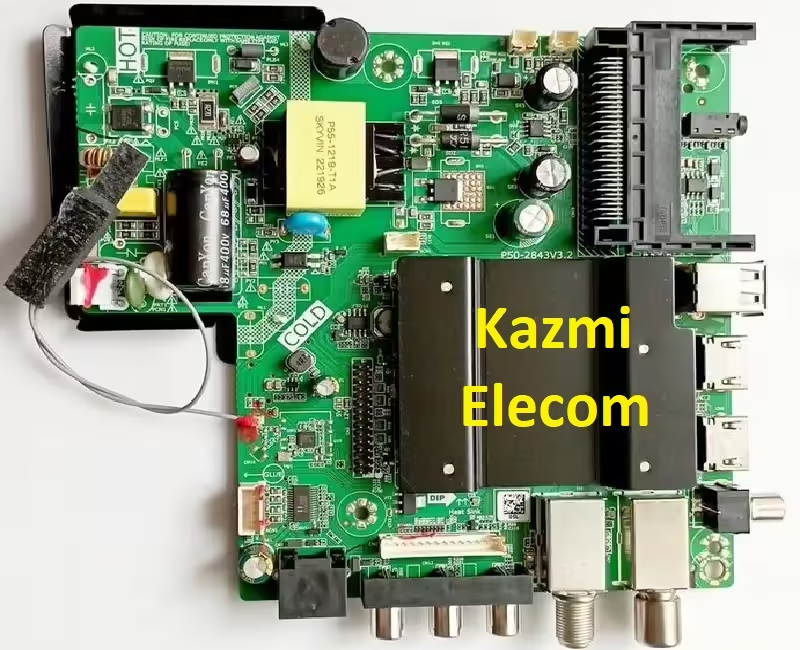
P50-2843V3.2

Technical Specifications and General Features:

Brand/Mark: FHD Smart LED TV Main Board

Main Board Model: P50-2843V3.2

Main Chipset: RTK2843/RTK2853

Interface: Single/Dual LVDS

TV System:  DVB-T/T2/S/S2/C

Operating System: Android 11.0

Ram: 1Gb

Rom: 8Gb eMMC

Backlight: 36 to 41 V 600 mA

Audio Output: 2x8w (8 Ω)

HDMI Inputs: 02

USB Inputs: 02

RCA Input: 01

LAN (RJ45): Yes

Resolution: up to 1920×1080 (32” to 43″)

Panel Power: 12V

Power Input: 100-240V AC

Service Menu Code: Source/Input 2580, 2008, Menu 1201

Firmware Name: install_2843.img

Firmware Type: USB Bootable

Caution: 

All the images, pictures, snapshots, descriptions, general specifications, and technical details related to the P50-2843V3.2 board in this article are for reference only. If you are a user and do not have any repairing experience or lack of knowledge about electronics repair then it is better to first visit the nearest technician without opening the back cover of the LED TV or loading the software/firmware. Sometimes, the fault is different based on the visual observations. So, please do not try it at home. If the LED TV is hanging or slow then you can reset it to Factory Default only.
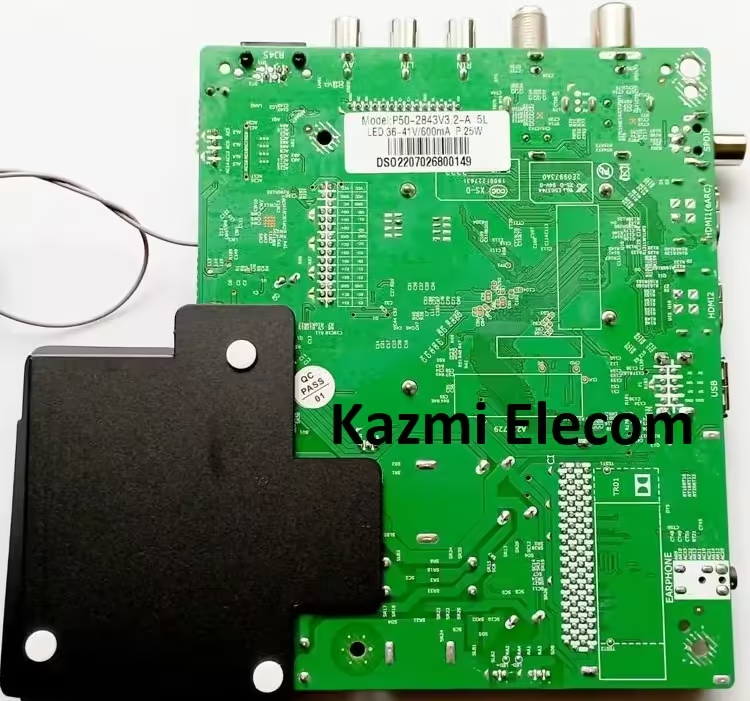
P50-2843V3.2


P50-2843V3.2 Android Version Upgrade:

Please note that the installed interpretation in this board is the final interpretation and the Android interpretation is n’t updateable. So, no need to upgrade the software if the board is working typically. Only if, the dereliction software malfunctions due to some bugs will the manufacturer give the software update. else, no interpretation update is issued.

P50-2843V3.2 Board Replacement:

If the board is fully dead and no chance to repair also replace the same board as formerly installed. And if the same board is n’t available on the request also search for the board that has the same specifications, the newest Android interpretation, and the rearmost features to avoid any difficulties. If the backlight module is defective in the quintet board also you can install only the backlight module independently also no need to change the whole board.

Note: The following firmware is an EMMC backup dump train. Kazmi Elecom Team is n’t responsible for any damage/ loss caused by uploading/ downloading the firmware. First, check and corroborate the main board also install software. However, or facing any issues during firmware installation also visit and read then first, If you’re new and do n’t have enough knowledge of lading/ installing software/ firmware or dump lines. and read here first.

How to Download:

Download all parts of your required given resolution firmware and then extract any one of them you will get the folder. Now copy the files to USB or load it with a programmer. For more Details about the download process watch the video Click Here

P50-2843V3.2 firmware for free download:

Kazmi-Elecom

GALLAXY GLA-520 Dump File Free Download

GALLAXY GLA-520 Satellite Receiver

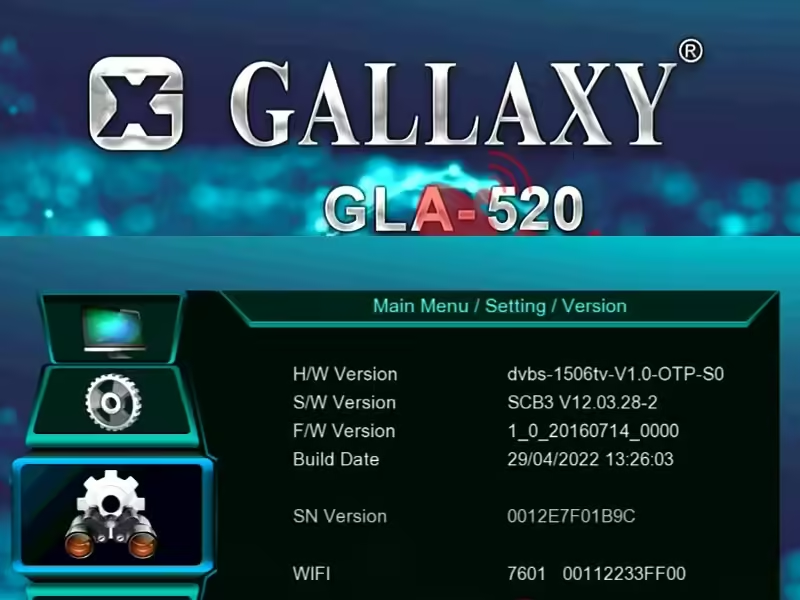
GALLAXY GLA-520 dump file or Flash file is a basic boot instructions and information software program for a receiver that is written on EEPROM or Flash IC or Memory IC of the satellite receiver. When powered on the main processor/Microcontroller retrieves the information from memory to know how to work/boot if it fails to get the boot information then it may stuck on the power/red light or boot logo screen. The software version of this receiver is SCB3 V12.03.28-2.

Sometimes the Memory IC or SPI Flash of the GALLAXY GLA-520 satellite receiver is imperfect due to technical errors or Its built-in firmware/program crashes because of an error then the System IC Controller does not get any boot instructions or basic information and the satellite receiver does not turn on. The hardware version of this receiver is MM1-AVL1506T-DC-IF-ZZQ-V3.1. The dump file of GALLAXY GLA-520 is given below for technician/user support.

Gallaxy Gla-520

General Information and Technical Specifications:

Manufacturer: GALLAXY

Box Model: GLA-520

Main Board: MM1-AVL1506T-DC-IF-ZZQ-V3.1

S/W Version: SCB3 V12.03.28-2

Main Controller or Chipset: 1506T

Box Type: Digital Full HD

Flash Type: SPI SOP8/SOIC8

Flash Size: 4 Mb

Software Type: Backup Dump

Software Size: Mb

Download File Format: ZIP

Download Type: Free

Note:

Below given the GALLAXY GLA- 520 receiver software is a backup dump train and can be loaded with a Programming tool or with a haul tool in the dead receiver or can be upgraded SPI Flsh Memory or downgraded to the aged interpretation in the typically working satellite receiver with the USB Upgrade procedure or by the RS232 Upgrade Tool. Kazmi Elecom Team is n’t responsible for any type of damage/ loss as a result of uploading/ downloading the software. Always keep a backup before loading the USB software or jotting SPI flash memory.

Download Button Kazmi Elecom

GALLAXY GLA-520 dump file for free download.

TP.T921DT.PB803 Firmware Free Download

TP.T921DT.PB803 Smart Android Board

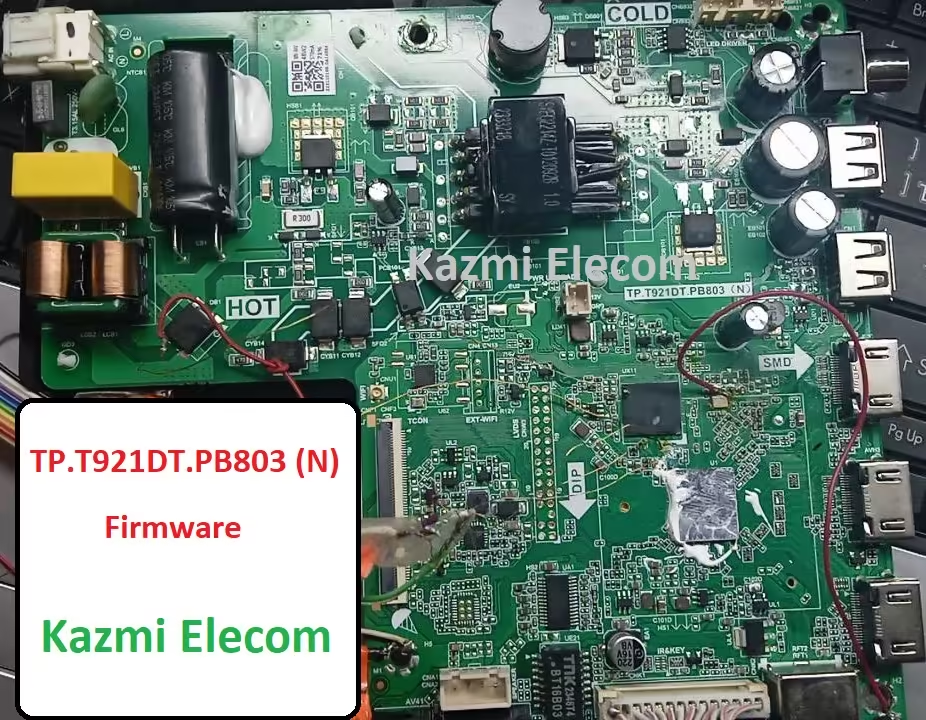
TP.T921DT.PB803 is a three-in-one keen Android-driven TV controller board. The bolstered determination is Full HD 1920×1080 which is appropriate for the LVDS interface and can be fit for numerous HD and FHD screen panels. This is a Combo board that has an inbuilt Control Module, Driven Backdrop illumination Driver Module, and TV tuner in a single PCB board. So, no requirement to introduce an isolated control card or backdrop illumination inverter board. The Backdrop illumination driver module capacity is 35-110 V with a greatest current of 650 mA and the control capacity is 75 watts. The sound and video graphics quality of this board is very excellent.

TP.T921DT.PB803 has all the network interface ports for the client as per the current necessities. It has numerous USB ports to play media records and for introducing firmware records. It has too numerous HDMI ports as well for interfacing Full HD gadgets like Blu-ray and gaming comforts. RCA ports are accessible for the network. RJ45 association for wired web and too have WIFI network. Earphone jack and RF tuner for cable TV. TP.T921DT.PB803 firmware records are given underneath for the bolster of professionals to recover dead stuck LED TVs.

Tp.t921Dt.pb803

General Specifications:

Model: TP.T921DT.PB803 (N)

Main Chipset: Amlogic T921D

Resolution Supported: 2K

CPU: A53*4

GPU: IMG7800

OS: Android 9

Ram: 512Mb

Rom: 4 Gb

Audio Output Power: 2X10 W (8Ω)

Backlight: 35-110V 650 mA

Backlight Power: 75W

Service Code:

Firmware File: allupgrade_aml921_4G_sos.bin

Firmware Type: EMMC Backup Dump

Caution: 

All the pictures and detail points of interest related to TP.T921DT.PB801 in this post is for reference as it were. If you are a client and do not have any repair encounters, it is superior to visit the closest specialist to begin with without stacking the software/firmware. Some of the time, the blame is distinctive based on visual perceptions. So, if you don’t mind do not attempt it at domestic. If the Driven TV is moderate at that point reset it to Plant Default as it were.

Pros:

Installing the TP.T921DT.PB801 USB software or eMMC backup dump file has numerous advantages. The following are a few benefits:

  • By loading the provided USB software or EMMC backup file, the dead board or stuck-on logo can be recovered and made functional.
  • The remote and logo can be changed at your discretion to satisfy the customer.
  • This will save money rather than having to change the mainboard.
  • It will also save time rather than having to arrange for a new board.
  • It will also improve your skills and confidence.

Cons:

Installing the TP.T921DT.PB801 USB software or backup dump files may have some drawbacks. However, the technician or user’s understanding is what matters. The following are a few cons:

  • By writing the specified software, the panel screen parameters may be altered, and the remote control may not function.
  • The working board may move into the standby position.

Tp.t921Dt.pb803

Note: The following firmware is a EMC backup file. Kazmi Elecom Team is not responsible for any damage/loss caused by uploading/downloading the firmware. First, check and verify the main board then install software. If you are new and do not have enough knowledge of loading/installing software/firmware or dump files, or facing any issues during firmware installation then visit and read here first. Always keep a backup before writing the flash.

How to Download Firmware Files:

Download all parts of the following firmware/software and then extract any one of them you will get the folder. Now copy the files to USB. For more Details about the download process watch the video Click Here

TP.T921DT.PB803 Firmware file for Free Download:

Kazmi-Elecom

DIGICLASS DC-M67CA IP HD Dump File Free Download

DIGICLASS DC-M67CA IP HD Satellite Receiver

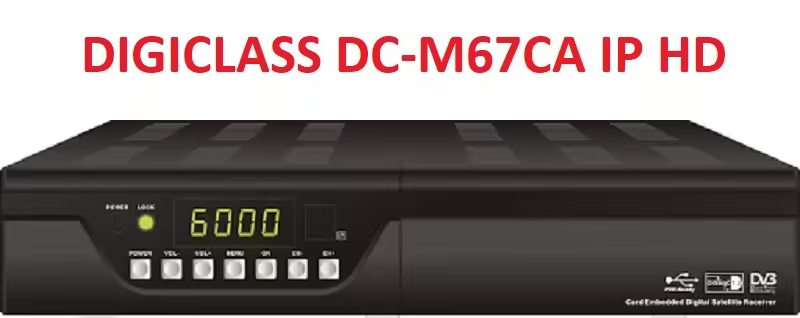
The DIGICLASS DC-M67CA IP HD dump file or Flash file is a satellite receiver’s basic boot instructions and information software program that is written on the EEPROM, Flash IC, or Memory IC. If the main processor or microcontroller fails to retrieve the boot information when the device is powered on, it may become stuck on the power/red light or boot logo screen.

When the DIGICLASS DC-M67CA IP HD satellite receiver’s Memory IC or SPI Flash is imperfect due to technical errors or when the receiver’s built-in firmware or program crashes due to an error, the System IC Controller does not receive any basic information or boot instructions, and the satellite receiver does not turn on. To restore the receiver to its normal state, we must reprogram the flash ic using the matched tackle dump and flash train. The DIGICLASS DC-M67CA IP HD dump file is provided below for user and technician support.

Digiclass Dc-M67Ca Ip Hd

Information and Technical Specifications:

Manufacturer: DIGICLASS

Box Model: DC-M67CA IP HD

Main Board:

Main Controller or Chipset:

Box Type: Digital

Flash Type: SPI SOP8/SOIC8

Flash Size: 4 Mb

Software Type: Backup Dump

Software Size: Mb

Download File Format: ZIP

Download Type: Free

Note:

The DIGICLASS DC-M67CA IP HD receiver software is a backup dump file that can be loaded with a programming tool or a loader tool in a dead receiver, upgraded with SPI flash memory, or downgraded to an earlier version in a working satellite receiver using the USB upgrade method or the RS232 upgrade tool. When you upload or download the software, Kazmi Elecom Team assumes no liability for any harm or loss. Before writing SPI flash memory or loading the USB software, always keep a backup.

Download Button Kazmi Elecom

DIGICLASS DC-M67CA IP HD dump file for free download.

HK.T.RT2831P538 Firmware Free Download

HK.T.RT2831P538 Smart Android Board

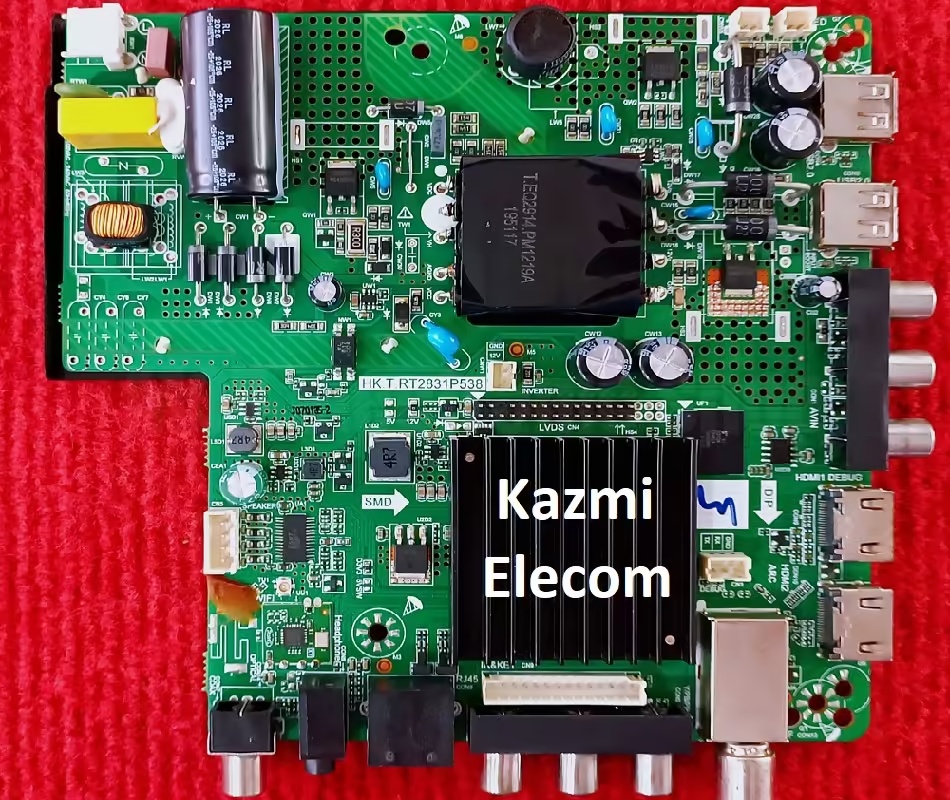
An intelligent Android Intelligent DVB-T2 Network LCD/LED TV Board with an integrated digital converter is the HK.T.RT2831P538. It is compatible with the LVDS interface and can run LED panels with a resolution of up to 1920 x 1080 and larger. The HK_T_RT2831P538 is a three-in-one (combo) board that includes an ATV board, a power card, and a backlight driver module. The HK-T-RT2831P538 has multiple input interface ports (RJ45) for wired internet connectivity, including dual USB input options for connecting external USB peripherals and playing multimedia files, dual HDMI for connecting Full HD devices, AV, VGA, and LAN ports. It has a wireless interface as well.

LED TVs of the RCA and Westinghouse brands came with the HK T RT2831P538 unit. It has a USB interface that can be used to play multimedia files and load software. Support for ATV, DTV, and CATV receivers via HK-T-RT2831P538 The HK.T.RT2831P538 firmware file is provided below for the assistance of technicians to recover the dead LED TV boards. The sound quality of this board is good and the graphics quality of this card is very excellent. It is built with Android platform 7.1. It has a 1GB RAM capacity and an 8 GB ROM storage option. It can support 32-inch to 43-inch LCD LED TV HD and Full HD Screen Panels.

Hk.t.rt2831P538

General Features and Technical Specifications:

Model: HK.T.RT2831P538

Main Chipset: RTD2831

Resolution Supported: 1920×1080

CPU: ARM Cortex A53 Quad-Core

CPU Frequency: 1.1 GHz

GPU: Dual Core Mali470MP

GPU Frequency: 600 MHz

OS: Android 7.1

Ram: (756 Mb) 1 Gb DDR3

Rom: 8 Gb

Audio Output Power: 10 W (5Wx2)

HDMI Input: 02

RCA Input: 02

USB Input: 02

VGA Connection: Yes

LAN (RJ45): Yes

Wi-Fi: Builtin

Energy consumption: 35W

Backlight: 36V-42V

Backlight Power: 320mA

Service Code:

Firmware File: Install.img

Firmware Type: EMMC Backup Dump

Product User: RCA, Westinghouse

Caution:

This post’s pictures, features, descriptions, and specifications for the mainboard HK.T.RT2831P538 are only for reference purposes. Without loading the software, firmware, or emmc backup file, you should go to the nearest expert technician if you are a domestic user who does not have any experience repairing electronics or lacks knowledge of electronics. Visual inspections occasionally reveal faults that differ from the original. Therefore, please do not attempt to use your LED TV at home. Resetting the smart LED TV to Factory Default will only clear cache memory if the device is slow or if some applications are not working properly.

Hk.t.rt2831P538

HK.T.RT2831P538 EMMC Backup:

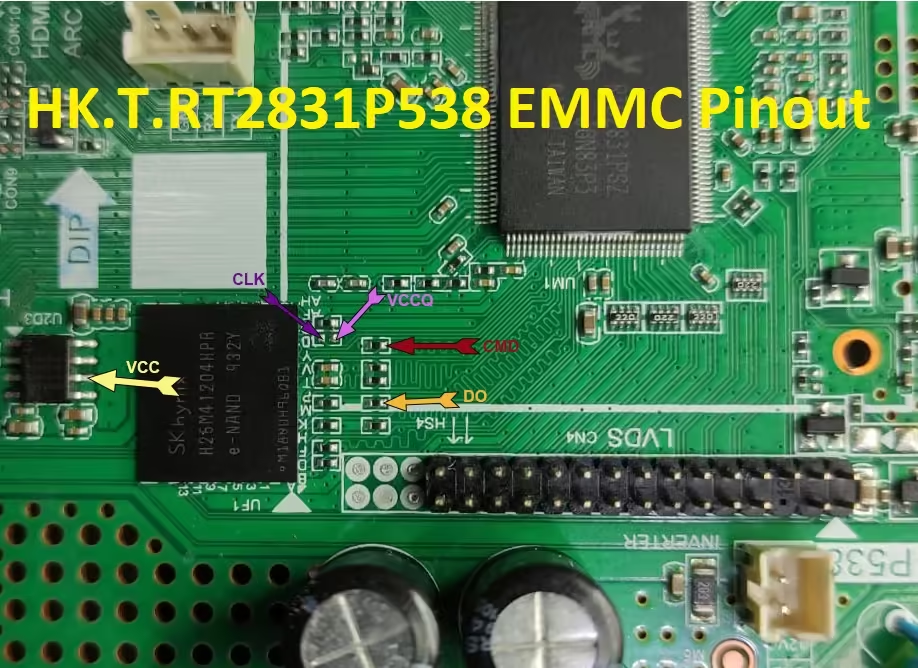
The eMMC chip on this board is 8 GB. Pendrive can read the EMMC backup, but you need to jtag the mainboard HK.T.RT2831P538 and use a programming tool to write it. When writing an emmc backup file, be careful. You can write it if the board is on standby because of incorrect software or an incomplete installation; otherwise, it is on standby or red because of hardware failure. Thus, locate the problem first. There’s no need to write an emmc backup in this case.

Note: The firmware that follows is an EMC backup file and a USB bootable file. When you upload or download the firmware, Kazmi Elecom Team assumes no liability for any harm or loss. Before installing software, check and verify the main board. If you’re new and don’t know enough about software/firmware loading/installing or dump files, or if you’re having trouble installing firmware, read this  here first.

How to Download Firmware File:

Download all parts of the following firmware/software and then extract any one of them you will get the folder. Now copy the install.img file to USB. For more Details about the download process watch the video Click Here

HK.T.RT2831P538 Firmware file for Free Download:

Kazmi-Elecom

RTD2851V6.0 Firmware Free Download

RTD2851V6.0 Smart UHD Board

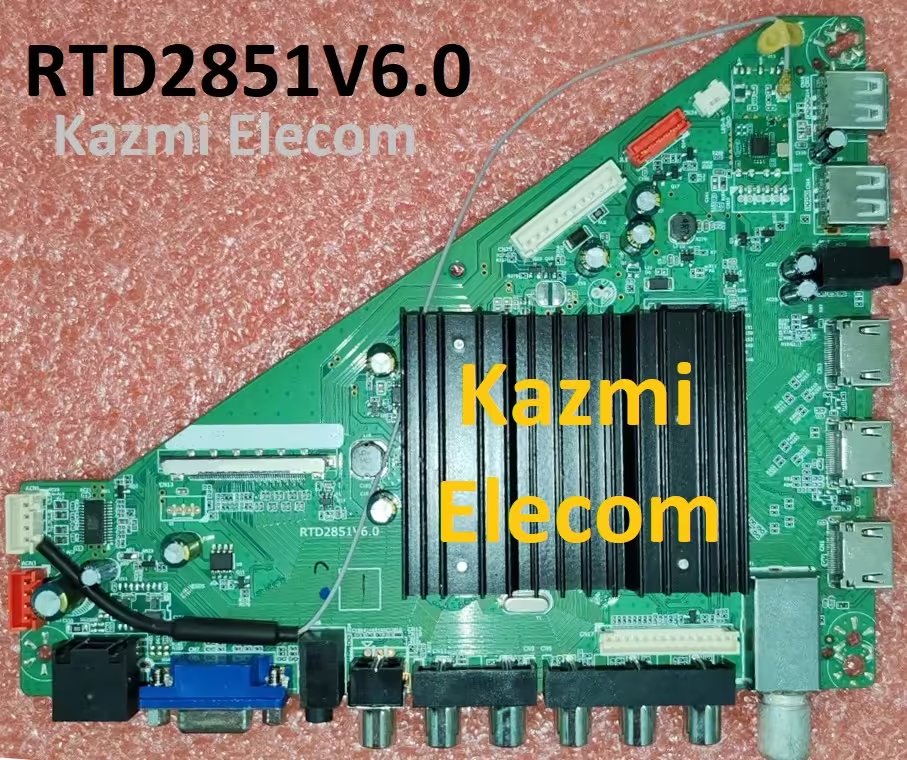
RTD2851V6.0 is a Cleverly shrewd 4K arrange driver-driven TV board with a Coordinates computerized earthbound collector bolster determination of 3840×2160. RTD2851V6.0 is devoted to 60 Hz screens. It is not a combo board. Savvy UHD TV With Android Stage and awesome highlights to engage ultra HD Wide Screen with superior to work Keen. RTD2851V6.0 has all the highlights and different input interface networks. It has different ports like HDMI, AV, Earphones, VGA interface, USB ports, and RJ45 Ethernet harbor for wired web networks. Its USB interface can be utilized for program updates and interactive media record playback.

RTD2851V6.0 is a advanced and analog TV board, it can get analogtelevision (PAL/SECAM/NTSC) and computerized tv (DVB-T/T2) signals. RTD2851V6.0 Firmware record is given underneath for the Technician’s bolster. It is built with a Mstar chipset that’s why its built quality is exceptionally great. Its show picture-video quality is great and may involve the client’s genuine Ultra HD pixels. This board is consistent with 4K Ultra HD determination screen boards. A WiFi Android chipset is mounted on this board, too. The sound quality of this board is too exceptionally great. This board is Non-Combo, So, the control primary circuit module and backdrop illumination driver controller will be required independently.

Rtd2851V6.0

Technical Features & Specifications:

Brand/Make: LCD/LED UHD Smart Android Wi-Fi Network Driver Board

Model: RTD2851V6.0

Supported Resolution: 3840×2160 UHD 4K

Screen Format: 16:9

Operating System: Android

CPU: ARM Cortex-A53

GPU: Mali T720 MP2

RAM: 1.5 GB DDR3

ROM: 8 Gb EMMC

HDMI Inputs: 03

USB Ports: 02

RCA: Yes

VGA Port: Yes

Wi-Fi: Builtin

LAN (RJ45): Yes

Headphones Jack: Yes

Sound Output: 10Wx2 DOLBY

RF TUNER: DIGITAL TUNER DVB-T/T2

Video System: PAL/SECAM/NTSC

Power Input: 100-240 V AC

Power Consumption: 150W

Standby Power: 0.5W

Firmware: Install.img

Firmware Type: EMMC Backup

Product: RCA

Caution: 

All snapshots/pictures/illustrations and specification/feature information in this post of RTD2851V6.0 are for reference only. If you are a stoner and have no experience with forms, we suggest you visit your nearest technician first without loading any software/firmware. Errors may vary due to visual fitment. So, don’t try this at home. If your LED TV is slow, do a factory reset only.

Rtd2851V6.0

RTD2851V6.0 EMMC Backup:

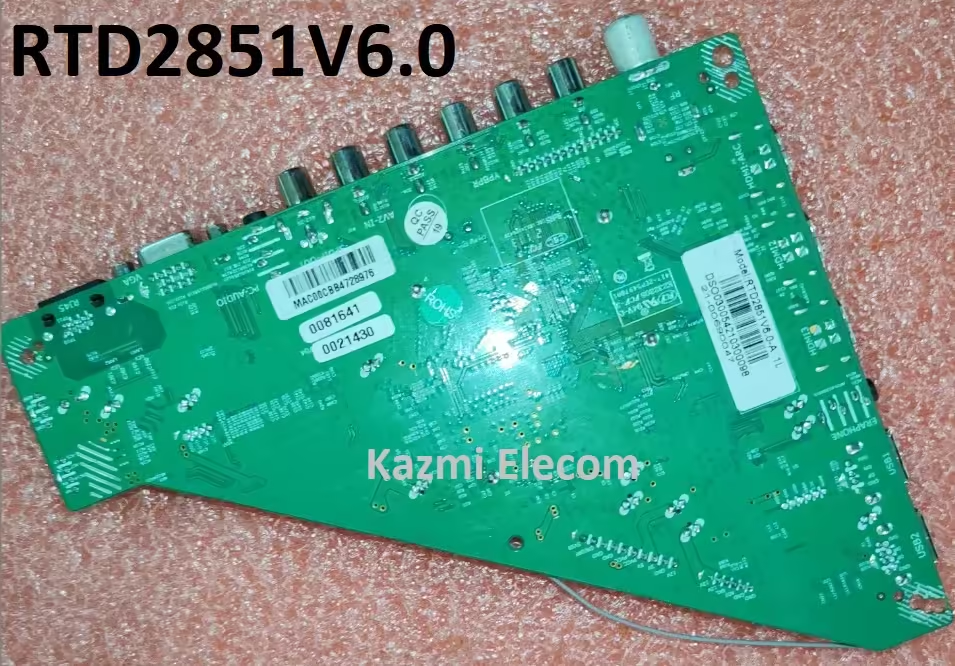
This board has an 8GB eMMC ROM capacity. Users can read EMMC backup via USB stick, but to write EMMC backup, the motherboard must be jtag (EMMC pinouts picture diagram included with the EMMC backup file given below for download) with RTD2851V6.0 and burn it with a programming tool. Please be careful when writing EMMC backup file. You can do this if the board is in standby mode and light red due to wrong software or incomplete installation. Otherwise, it is in standby mode or light red due to hardware failure. So please check for errors first. In this case, there is no need to create EMMC backup.

Note: The following firmware is a USB bootable and EMC backup file. Kazmi Elecom Team is not responsible for any damage/loss caused by uploading/downloading the firmware. First, check and verify the main board then install software. If you are new and do not have enough knowledge of loading/installing software/firmware or dump files, or facing any issues during firmware installation then visit and read here first.

How to Download:

Download all parts of the following given firmware/software according to your requirement and then extract any one of them you will get the complete folder. Now copy the files to USB and write an EMMC backup with a programmer. For more Details about the download process watch the video Click Here

RTD2851V6.0 firmware files for free download:

Kazmi-Elecom

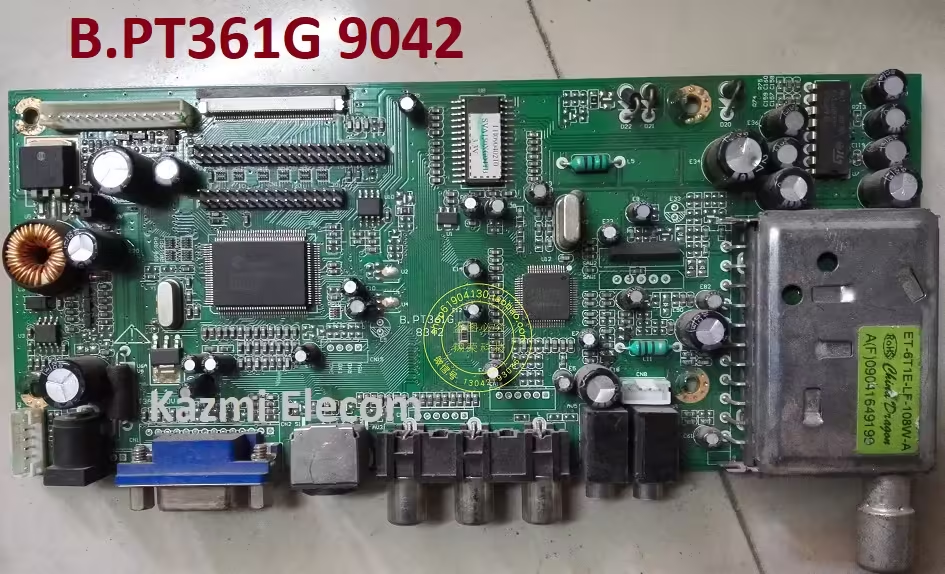
B.PT361G All Resolution Firmware Free Download

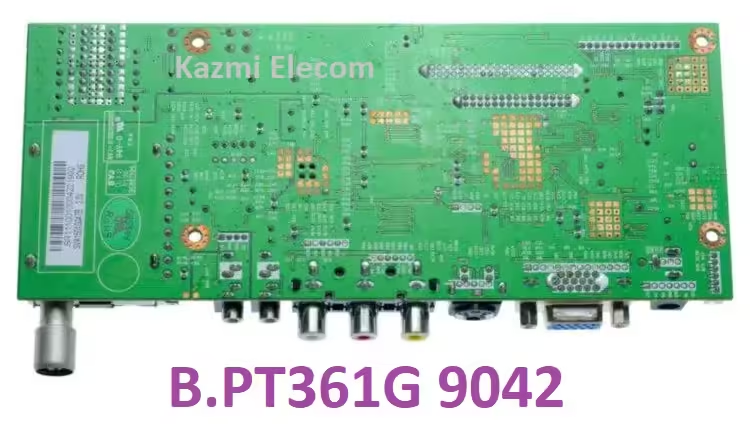
B.PT361G LCD TV Board

The universal jumper board B.PT361G supports multi-resolution panel screens and software. Since it is not a combo board, the motherboard does not contain a power supply module. As a result, in order to make it work, you’ll need a separate DC 12V power supply. It is necessary to have a fixed power supply module, which could be an AC to DC power Kit module or a DC Adapter. For the user’s requirements, this board supports all of the essential connectivity interfaces.

Basic Info:

Model No. B.PT361G 9042

Hardware Version: NA

Main Chipset: NT68625MFG-128

Display Format: up to 1920×1080

Aspect Ratio: 4:3, 16:9 & 16:10

Tuner: EL-6T1E-LF-108W-A

Sound: TEA2025

Bin Name: .hex

B.pt361G

General Specifications:

TV System: PAL/SECAM/NTSC

Panel Interface: Single-channel or Dual-channel LVDS

Key Button Functions: CH-/CH+/MENU/VOL-/VOL+Souce/Power

Multi-Language OSD: Yes

Input/Output Ports: HDMI, VGA, AV, USB, RF TV interface, and Earphone Out

Audio O/P Power: 2 x 3 Watt (8 ohms)

Panel Voltage: +3.3V/+5V/+12V DC (jumping cap setting)

USB Port: Yes (Firmware Upgrade and Multimedia Playback Support)

USB File Format: Audio (Mp3, wma, m4a/aac), Video (avi, mp4, ts/trp, mkv/mov, mpg, dat, vob, rm/rmvb),                                                 Picture (Jpg, jpeg, bmp, png), Text (text)

IR Control: Yes (Controllable by Remote Control)

Electrical Parameters:

Working Input Voltage: DC +12 Volt

Maximum Current: 2000mA (Without Panel)

Standby Power: <0.2W (for the motherboard only)

Maximum Current for USB: 500mA

Factory Service Mode:

Menu+1147

Caution: 

This post’s pictures and information about the specifications of the B.PT361G are only for reference. If you are a user and don’t know how to fix things, it’s best to go to the nearest technician without loading the software or firmware first. Occasionally, the fault is distinct from the visual observations. Therefore, please do not attempt it at home.

B.pt361G

Note:  The firmware that follows is a file that can be loaded using a programming tool and is USB-bootable. When you upload or download the firmware, Kazmi Elecom Team assumes no liability for any harm or loss. Before installing software, check and verify the main board. If you’re new and don’t know enough about software/firmware loading/installing or dump files, or if you’re having trouble installing firmware, read this first. Before writing the flash, always keep a backup.

B.PT361G Firmware All resolutions Free Download:

Download Button Kazmi Elecom

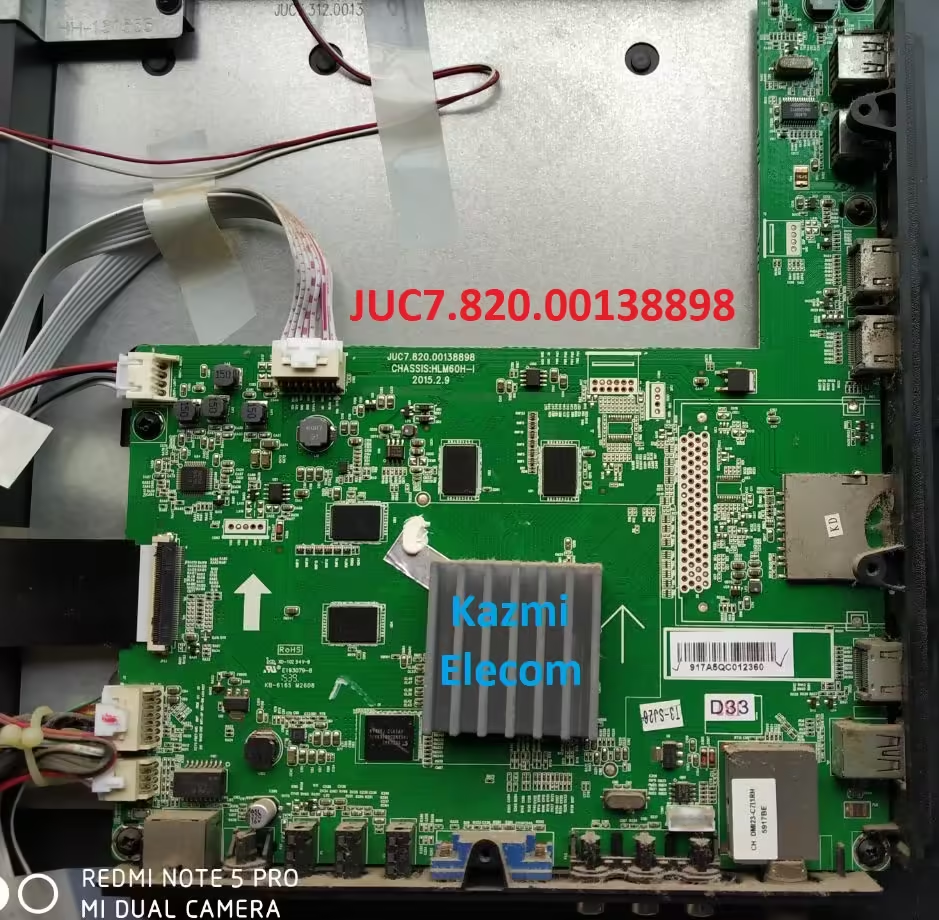
JUC7.820.00138898 Firmware Free Download

JUC7.820.00138898 UHD Smart Board

JUC7.820.00138898 is a non-combo UHD LED TV Android Board. It has a supported HD resolution of 3840×2160 and a Refresh Rate of 60 hertz. Its display colors are very brilliant to give an extraordinary experience to the user. The User can connect multiple HD devices like Blu-Ray players, gaming consoles, and set-top boxes via its HDMI ports. This board has multi USB inputs so the user can also connect external hard disks and other USB peripherals devices as well. The user can play multimedia files of his own choice by USB interface and also can upgrade software by this interface.

JUC7.820.00138898 can support the Smart TV Features as Android. JUC7-820-00138898 firmware files are given below for free of cost download to support technicians. This board has triple HDMI inputs, Dual USB inputs, a Mini AV input with an RF tuner, and an RJ45 connector for internet connectivity. A powerful Wi-Fi system is built into this LED TV motherboard. A separate power board and backlight power module can be connected as input power source.

Juc7.820.00138898

General Features & Specifications:

Brand: China

Board Model: JUC7.820.00138898

Chassis: HLM60H-I

Display Format: UHD

Screen Type: LED

Features Format: Smart

OS Version: Android

Chipset:

Processor: Quad-Core

Graphic Processor: Dual-core

RAM Capacity: 1GB DDR3

Storage Memory: 8GB ROM

Screen Resolution: 3840×2160

No of HDMI Ports: 3

No of USB Ports: 2

Wi-Fi Type: Wi-Fi

Built-In Wi-Fi: Yes

Ethernet (RJ45): Yes

Speaker Output RMS: 16W (8W*2)

Tuner: ATV/DTV

Power Requirement: AC 110 – 240 V, 50/60 Hz

Power Consumption: 100 W

Firmware Type: EMMC Backup Dump

Firmware Name: upgrade_HLS….bin

Product: CONDOR, VU

Caution: 

Every one of the photos/snaps, elements, depictions, and particular subtleties connected with the mainboard JUC7.820.00138898 in this post is for reference as it were. In the event that you are a homegrown client and don’t have any fixing experience or absence of information about hardware, then, at that point, you ought to visit the closest master specialist first without stacking the product/firmware or emmc reinforcement record. In some cases, by the visual perceptions, the shortcoming is not quite the same as the first.

Therefore, please do not attempt to use your LED TV at home. Provided that the Brilliant Drove television is slow or a few applications breaking down then, at that point, reset the Drove television to Processing plant Default just to clear reserve memory.

JUC7.820.00138898 Android Version Upgrade:

Please be aware that the Android version cannot be updated, and the version installed on this board is the final version. Thus, if the board is operating regularly, there is no need to update the software. The manufacturer won’t release an update for the software until the default program starts acting up due to flaws. No version upgrade is released in the other case.

Juc7.820.00138898

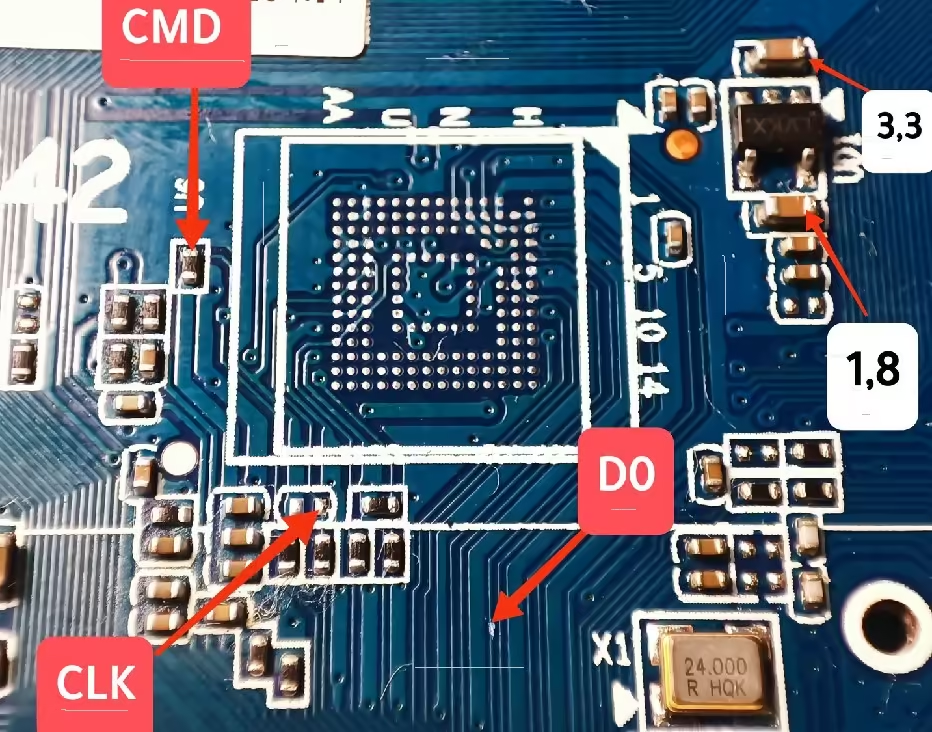
JUC7.820.00138898 EMMC Backup:

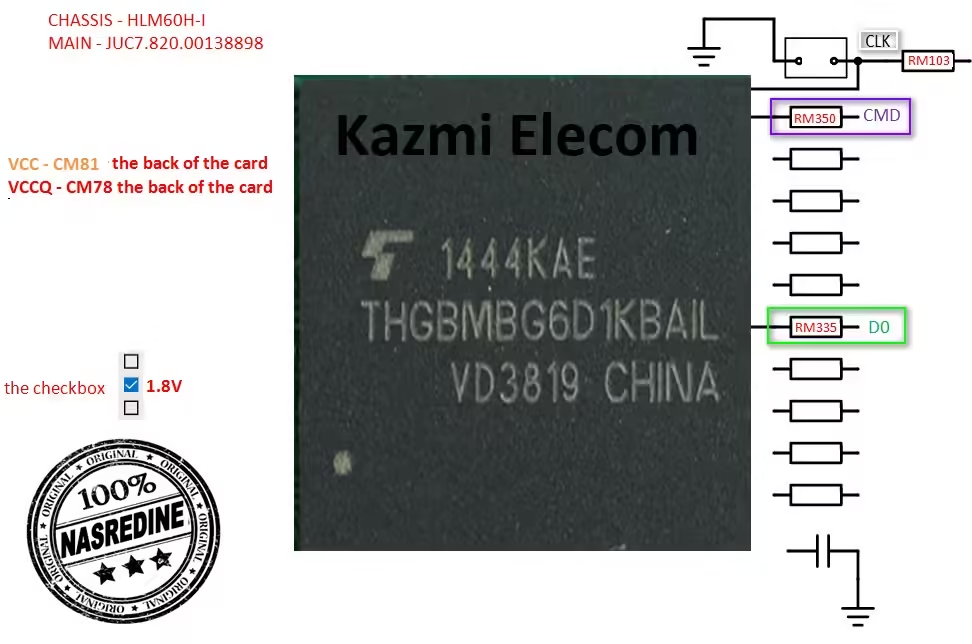
There is a 4/8GB eMMC chip on this board. Pendrive can be used to read an EMMC backup, however a programming tool is required to write a backup of the mainboard (JUC7.820.00138898). When writing an emmc backup file, exercise caution. If the board is on standby or has a red light on it because of a hardware malfunction, you can fix it if the standby light is caused by incorrect software or an incomplete installation. Thus, locate the error first. No emmc backup needs to be written in this situation.

Note: The following firmware is a USB bootable and EMC backup file. Kazmi Elecom Team is not responsible for any damage/loss caused by uploading/downloading the firmware. First, check and verify the main board then install software. If you are new and do not have enough knowledge of loading/installing software/firmware or dump files, or facing any issues during firmware installation then visit and read here first.

How to Download Firmware File:

Download all parts of the following firmware and then extract any one of them you will get the folder. Now copy the files to USB. For more Details about the download process watch the video Click Here

JUC7.820.00138898 Firmware for free download:
Kazmi-Elecom

CV6683-L42 Firmware Free Download

CV6683-L42 Smart Android Board

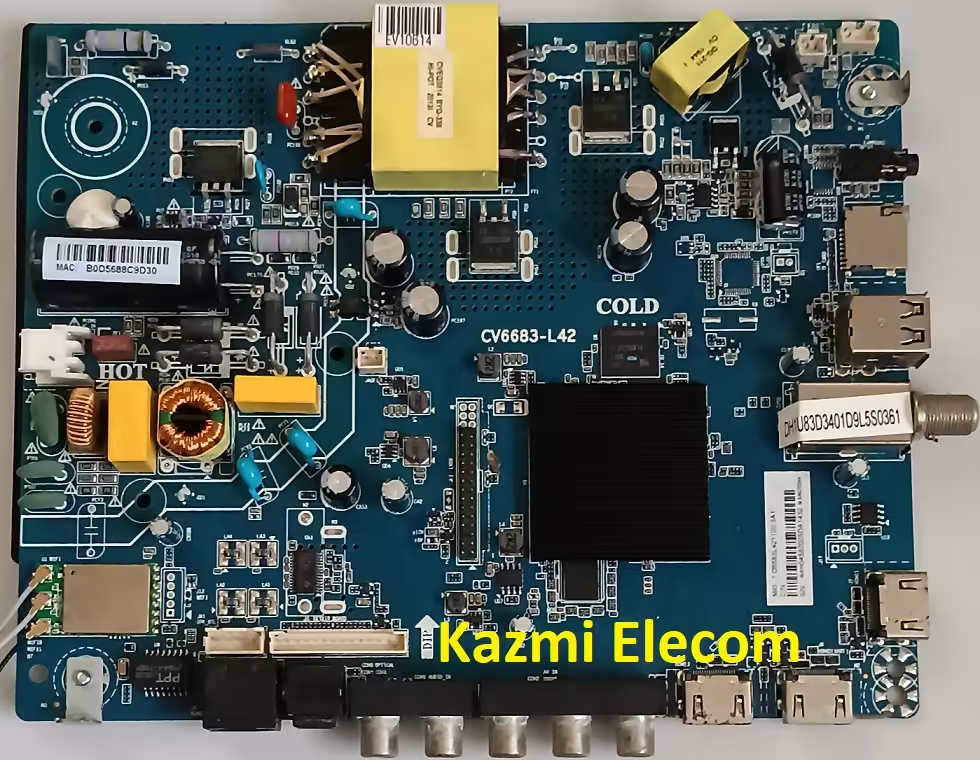
CV6683-L42 is an Android smart network driver LED TV mainboard with a maximum resolution of 1920×1080 Full HD 1080P. CV6683_L42 has an inbuilt powerful wi-fi reception system. This board has a Smart Full HD Android 9.0 Platform built-in with great features and applications to entertain Full HD Wide Screen display. CV6683 L42 Smart Board has multiple ports such as Audio Video Input for analog device connectivity, dual USB input interface Ports for playing multimedia files by Pen drive and software upgrades as well, three HDMI ports as well for connecting Full HD devices like Blueray players STB boxes and gaming consoles and play stations, etc.

CV6683-L42 has a Local Area Network (RJ45) Connector interface port for wired internet connectivity to work smoothly and fast. This board does not have a VGA interface for PC or Laptop connectivity. CV6683_L42 is a Combo three-in-one Network Triple-play board that has a Digital TV tuner built into it. The Graphics quality of this board is very excellent and the Sound quality of this board is also good with a 16w dual speaker system. CV6683.L42 Android board is very good and the Response rate is very efficient. CV6683-L42 China smart network board can support 43 to 65-inch LED Screen Panels. CV6683-L42 firmware is available for technician support.

Cv6683-L42

CV6683-L42 has 1GB RAM and 8 GB ROM capacity with an SD card reader input port. It has a headphone output jack for amplification of sound as per the user’s requirements. This board is compatible with both HD and FHD screen panels.

Technical Specifications and Features:

Brand/Make: LCD/LED Smart Driver Board

Model: CV6683-L42

Chipset: CV6683

Supported Resolution: 1920×1080

Screen Format: 16:9

Operating System: Android 9.0

CPU: ARM A53*4@1.1GHz

GPU: Mali 470 MP3

RAM: 1 GB DDR3

ROM: 8Gb EMMC

Sound Output: 10Wx2

Backlight: 27~74 V 600mA (Depends upon Hardware)

TUNER: Analog & Digital Tuner DVB-T2

Video System: PAL/SECAM/NTSC

Power Input: 100-240 V AC

Power Consumption: 80W

Standby Power: 0.5W

Firmware: upgrade_no_tvcertificate.pkg

Firmware Type: EMMC Backup Dump

Product User: HAIER LE43K6500DG

Caution: 

The images and specifications for the CV6683-L42 included in this page are solely for reference. It’s best to go see the closest professional without loading the software or firmware if you’re a user with no repair knowledge. Occasionally, the fault differs from what is seen visually. Do not attempt this at home, please. Reset the LED TV to Factory Default only if it is sluggish.

CV6683-L42 EMMC Backup:

It has an 8GB eMMC chip on this board. Pendrive can be used to read the EMMC backup, however, a programming tool must be used to write a backup of the mainboard (CV6683-L42). When writing an emmc backup file, exercise caution. If the board is on standby or has a red light on it because of a hardware malfunction, you can fix it if the standby light is caused by incorrect software or an incomplete installation. Thus, locate the error first. No emmc backup needs to be written in this situation.

Cv6683-L42

Note:  The firmware that follows is an EMC backup file that can not be booted via USB. A Programming tool will be required to rewrite the EMMC Backup File. The Kazmi Elecom Team disclaims all liability for any harm or loss resulting from the firmware download or upload. Install the software after first inspecting and verifying the main board. If you’re new and don’t know enough about loading/installing software, firmware, or dump files, or if you’re having problems installing the firmware, go here and read here first.

How to Download Firmware Files:

Download all parts of the following given firmware/software and then extract any one of them you will get the folder. Now copy the files to USB. For more details about the download process watch the video Click Here

CV6683-L42 firmware file for free download:

Kazmi-Elecom

RSAG7.820.12367 Software Free Download

RSAG7.820.12367 LED TV Board

RSAG7.820.12367 is a HD and FHD DVB LED TV Android Smart Board. It has a supported up to Full HD resolution of 1920×1080 and a Refresh Rate is 50/60 hertz without 3D technology. It has dual HDMI input ports to connect full HD devices such as set-top boxes, Blu-Ray players, and gaming consoles. It has more than one USB port to connect external hard disk drives and other USB devices and for playing multimedia files as well. It has a Dolby Sound system that Supports 20 Watts sound output and HDR Display viewing. It has dual Tuners for Analog and Digital broadcasting signal reception.

RSAG7.820.12367 can support the Smart TV Features as Android. RSAG7.820.12367 firmware files are given below for free of cost download to support technicians. This board is three-in-one and is also called a Combo Board. This is a single Printed Circuit motherboard on which the main power input Supply circuit module, Cable TV tuners, and LED Backlight inverter circuit are built together. So, there is no need for an extra module to complete the LED TV setup. Analog Signal reception is NTSC/PAL/SECAM and for Digital signal reception the protocols are DVB-T, DVB-T2, DVB-C, DVB-S, and DVB-S2.

Rsag7.820.12367

General Features & Specifications:

Brand: China

Board Model: RSAG7.820.12367/ROH

Display Format: Full HD 1080P

Screen Type: LED

Features Format: Smart

OS Version: Android

Chipset: Mstar

Processor: Dual-Core

Graphic Processor: Dual-core

RAM Capacity: GB DDR3

Storage Memory: GB ROM

Screen Resolution: 1920×1080

No of HDMI Ports: 2

No of USB Ports: 2

Wi-Fi Type: Wi-Fi

Built-In Wi-Fi: Yes

Ethernet (RJ45): Yes

Speaker Output: 20W (10W*2)

Tuner: ATV/DTV (NTSC/PAL/SECAM)/(DVB-T, DVB-T2, DVB-C, DVB-S, DVB-S2)

Power Requirement: AC 110 – 240 V, 50/60 Hz

Power Consumption: 65 W

Firmware Type: EMMC Backup

Firmware Name: NA

Product: Hisense

Caution: 

All the pictures/snaps, features, descriptions, and specification details related to the mainboard RSAG7.820.12367 in this post are for reference only. If you are a domestic user and do not have any repairing experience or lack knowledge about electronics, then you should visit the nearest expert technician first without loading the software/firmware or emmc backup file. Sometimes, by the visual observations, the fault is different from the original. So, please do not open your LED TV and try it at home. Only if the smart LED TV is slow or some applications malfunctioning then reset the LED TV to Factory Default only to clear cache memory.

Rsag7.820.12367

RSAG7.820.12367 EMMC Backup:

This board has a 4 eMMC storage memory. you can read the EMMC backup by Pendrive but for writing a backup of EMMC you should jtag the mainboard RSAG7.820.12367 and write by a programming tool. Be careful while writing emmc backup file, if the board is on standby light due to wrong software or incomplete installation then you can do it, otherwise, it is on standby or red light due to hardware fault. So, first trace the fault. In this case, no need to write emmc backup.

Note: The following firmware is a USB bootable and EMC backup file. Kazmi Elecom Team is not responsible for any damage/loss caused by uploading/downloading the firmware. First, check and verify the main board then install software. If you are new and do not have enough knowledge of loading/installing software/firmware or dump files, or facing any issues during firmware installation then visit and read here first.

How to Download Firmware File:

Download all parts of the following emmc backup firmware and then extract any one of them you will get the folder. Now copy the files to USB. For more Details about the download process watch the video Click Here

RSAG7.820.12367 Firmware for free download:
Kazmi-Elecom

error: Content is protected !!