Tag Archives: kazmi elecom

CV182H-J Software Free Download

CV182H-J LED TV Board

CV182H-J is a simple ATV Driver Motherboard designed for LCD/LED TVs. This board is suitable for the Asia Pacific and the Middle East markets. This is a Non-Combo Board. The main power module and LED Backlight Inverter Circuit module are required separately but ATV Card is built into this motherboard. This board has all the features as per the latest requirements like multi HDMI inputs, USB interface, PC input, Component Input, TV, and Scart.

CV182H-J firmware files are given below for the technician’s support.

Cv182H-J

General Specifications:

Brand/Mark: Universal Board

Model: CV182H-J

Main Chip: MST6E182VS-LF-Z1

Product: LED TV

LED Backlight: mA

Flash IC: 4Mb

Sound Chip:

Tuner: CTD-3SP512-37

Screen supported: 32 to 42 inches

Resolution: Up to 1920×1080

Panel Voltage: 5V, 12V

Power Input: 12V DC

Service Code:

Source/Input 2580

Note: The following given Software is a backup Dump and can be written by a programming tool. Kazmi Elecom Team is not responsible for any type of damage/loss as a result of uploading/downloading the firmware. First Check the mainboard and then install the software. If you are new and do not have enough knowledge of loading or installing software/firmware or dump files then read here first.

CV182H-J firmware for free download:

Kazmi-Elecom

For video tutorials, visit “Kazmi Elecom” my YouTube channel.
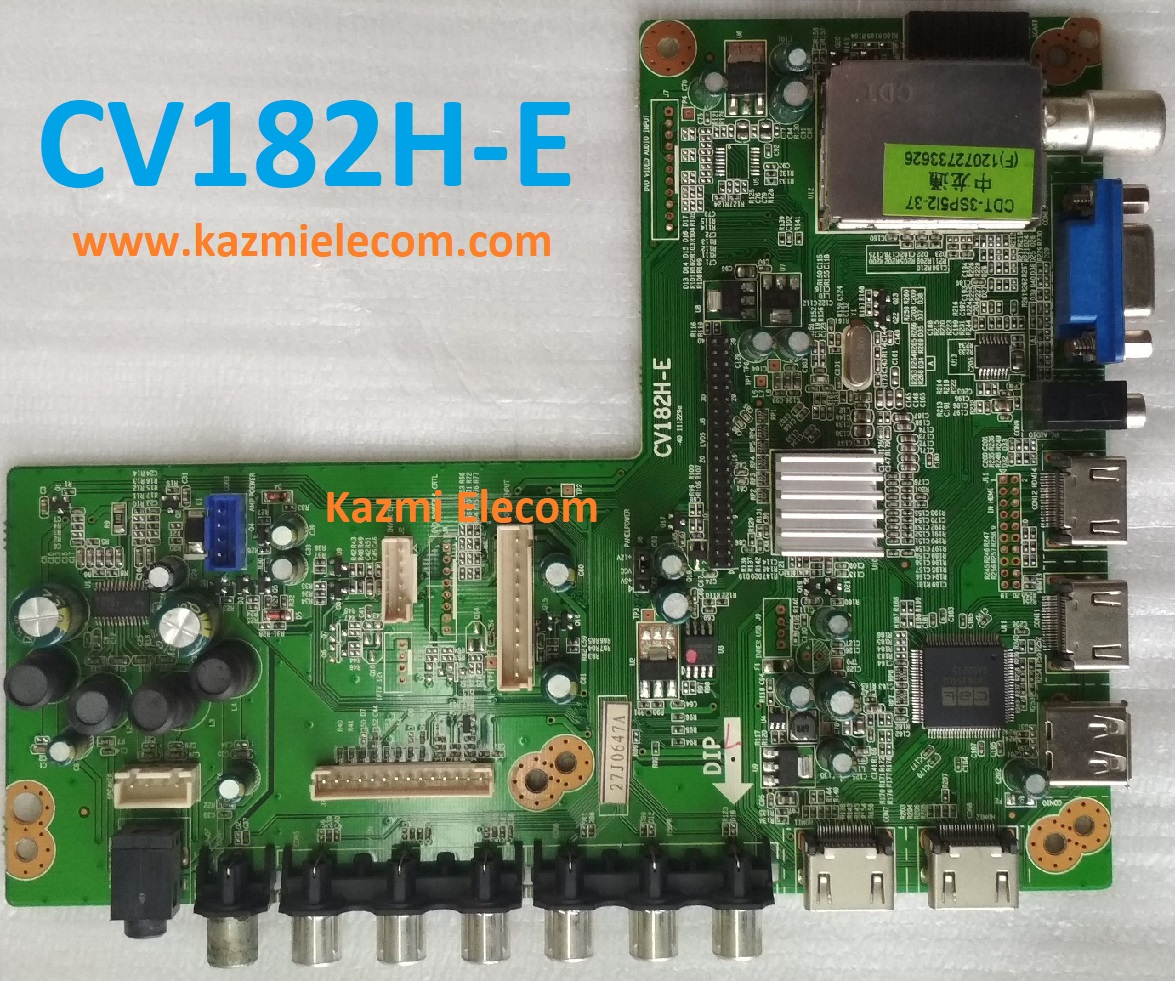
CV182H-E Software Free Download

CV182H-E LED TV Board

CV182H-E is a simple ATV Driver Motherboard designed for LCD/LED TVs. This board is suitable for the Asia Pacific and the Middle East markets. This is a Non-Combo Board. The main power module and LED Backlight Inverter Circuit module are required separately but ATV Card is builtin into this motherboard. This board has all the features as per the latest requirements like HDMI input, USB interface, PC input, Component Input, TV, and Scart.CV182H-E firmware files are given below for the technician’s support.

Cv182H-E

General Specifications:

Brand/Mark: Universal Board

Model: CV182H-E

Main Chip:

Product: LED TV

LED Backlight: mA

Flash IC: 4Mb

Sound Chip:

Tuner: CTD-3SP512-37

Screen supported: 32 to 42 inches

Resolution: Up to 1920×1080

Panel Voltage: 5V, 12V

Power Input: 12V DC

Service Code:

Source/Input 2580

Note: The following given Software is a backup Dump and can be written by a programming tool. Kazmi Elecom Team is not responsible for any type of damage/loss as a result of uploading/downloading the firmware. First Check the mainboard and then install the software. If you are new and do not have enough knowledge of loading or installing software/firmware or dump files then read here first.

CV182H-E firmware for free download:

Kazmi-Elecom

For video tutorials, visit “Kazmi Elecom” my youtube channel.

T.RT2025.1B Software Free Download

T.RT2025.1B Driver Board

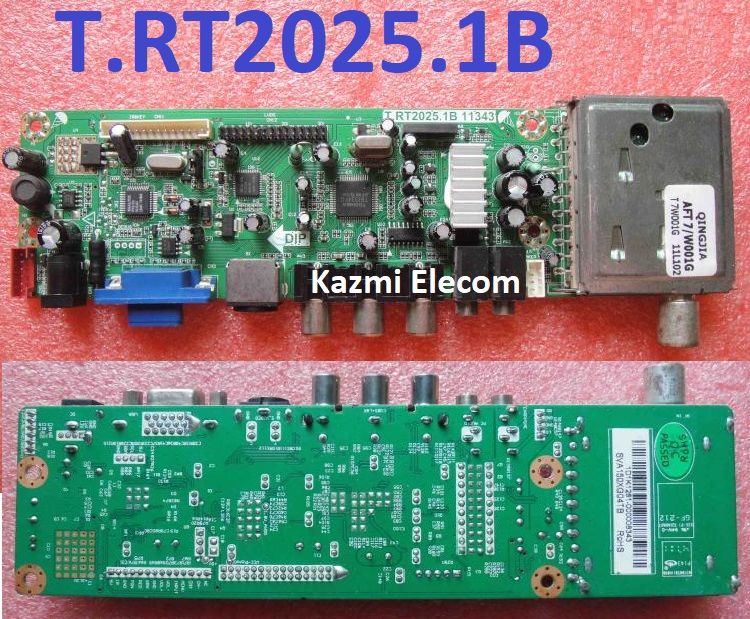
T.RT2025.1B 11343 is a universal driver board support 15-32 inch LCD TV motherboard with multi-resolution screen panels. This is an analog TV control board, which is suitable for Asia-Pacific and Middle-East markets. It can best support less than 26-inch LCD panels which a resolution is up to 1440×900.

Basic Info:

Model No. T.RT2025.1B 11343

Main Chipset: RTD2025L+RTD2120L+TB1334

Display Format: up to 1920×1080

Aspect Ratio: 4:3, 16:9 & 16:10

Tuner: AFT7/W001G

Sound: YD7496

T.rt2025.1B

General Specifications:

TV System: PAL/SECAM/NTSC

Panel Interface: Single-channel or Dual-channel LVDS

Key Button Functions: CH-/CH+/MENU/VOL-/VOL+Souce/Power

Multi-Language OSD: Yes

Input/Output Ports: S-Video, VGA, AV, USB, RF TV interface, and Earphone Out

Audio O/P Power: 2 x 3 Watt (8 ohms)

Panel Voltage: +3.3V/+5V/+12V DC (jumping cap setting)

USB Port: Yes (Firmware Upgrade and Multimedia Playback Support)

USB File Format: Audio (Mp3, wma, m4a/aac), Video (avi, mp4, ts/trp, mkv/mov, mpg, dat, vob, rm/rmvb),                                                 Picture (Jpg, jpeg, bmp, png), Text (text)

IR Control: Yes (Controllable by Remote Control)

Electrical Parameters:

Working Input Voltage: DC +12 Volt

Maximum Current: 2000mA (Without Panel)

Standby Power: <0.2W (for the motherboard only)

Maximum Current for USB: 500mA

Note: The following given software/firmware is USB upgradeable and Backup Dump Files. Kazmi Elecom Team is not responsible for any type of damage/loss as a result of loading/installing the firmware. If you are new and do not have enough knowledge of loading or installing software/firmware or dump files then read here first.

T.RT2025.1B Firmware files all resolutions for Free Download:


Kazmi-Elecom

For video tutorials, visit “Kazmi Elecom” my youtube channel.

T.SIS231.T701 Software Free Download

T.SIS231.T701 LED TV Board

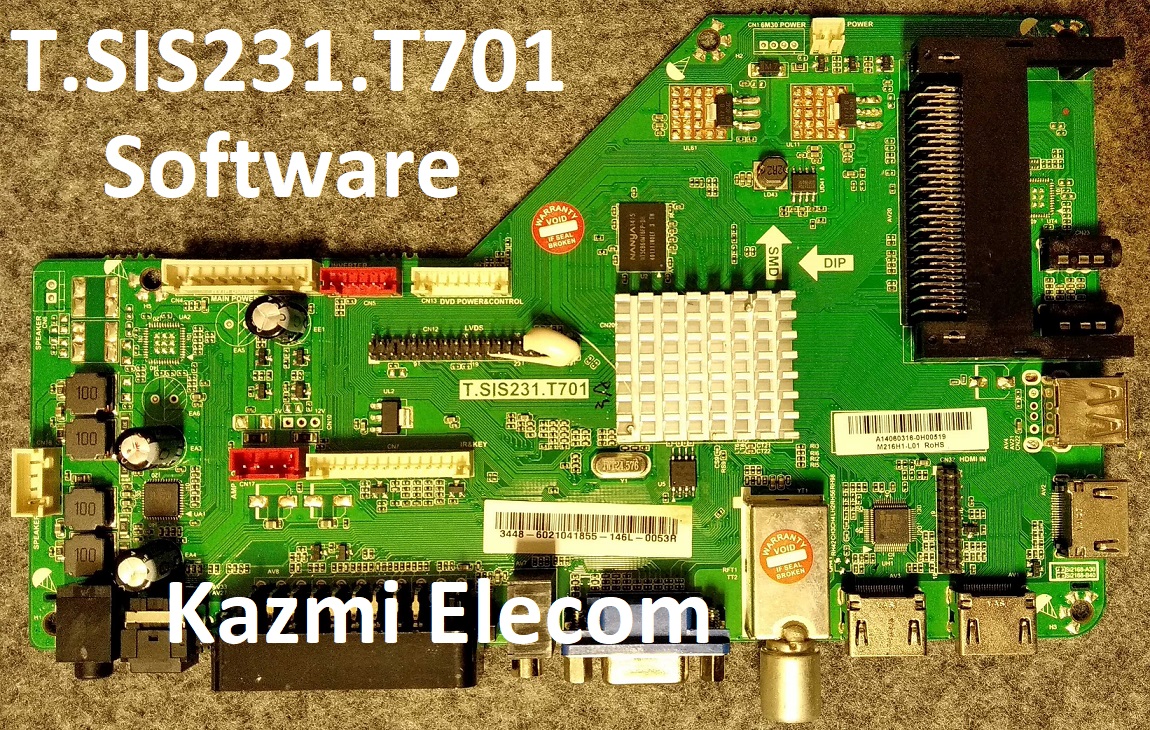
T.SIS231.T701 is an LCD/LED TV Board. It is suitable for the LVDS interface and supports more than 20-55 inches of LED panels, with a maximum resolution of up to 1920*1080. T_SIS231_T701 is a non-combo board i.e. power card and backlight driver module are required separately while the ATV board is built-in into it. T-SIS231-T701 has multiple input interface ports like USB, HDMI, AV, Headphones, and Scart ports for computer connectivity.

T SIS231 T701 for many brands of LED TVs like HAIER, etc. Its USB interface can be used for loading software as well as for playing multimedia files. T.SIS231.T701 support for analog TV signals. T.SIS231.T701 firmware files are given below for the technician’s support.

T.sis231.T701

General Specifications:

Model: T.SIS231.T701

Main Chipset: SIS231

Resolution Supported: 1920×1080

Flash Memory: 25Q64

Television System: PAL (BG, DK), SECAM (BG, DK, LL)

Tuner:

Audio Output Power: 2X6 W (8Ω)

Backlight: NA

Backlight Power: W

Power Input: 12V

Power Consumption: 45W

Service Code: Menu 1147, Balance (value is “0”) +1969

Firmware Name: .bin

Firmware Type: Backup Dump

Note: The following given software/firmware is USB upgradeable and Backup Dump Files. Kazmi Elecom Team is not responsible for any type of damage/loss as a result of loading/installing the firmware. If you are new and do not have enough knowledge of loading or installing software/firmware or dump files then read here first.

How to Download:

Download the following given firmware/software and then extract you will get the folder. Now copy the files to USB.

T.SIS231.T701 Firmware files for Free Download:

Kazmi-Elecom

For video tutorials, visit “Kazmi Elecom” my youtube channel.

CV182H-B SOFTWARE FREE DOWNLOAD

CV182H-B LED TV Board

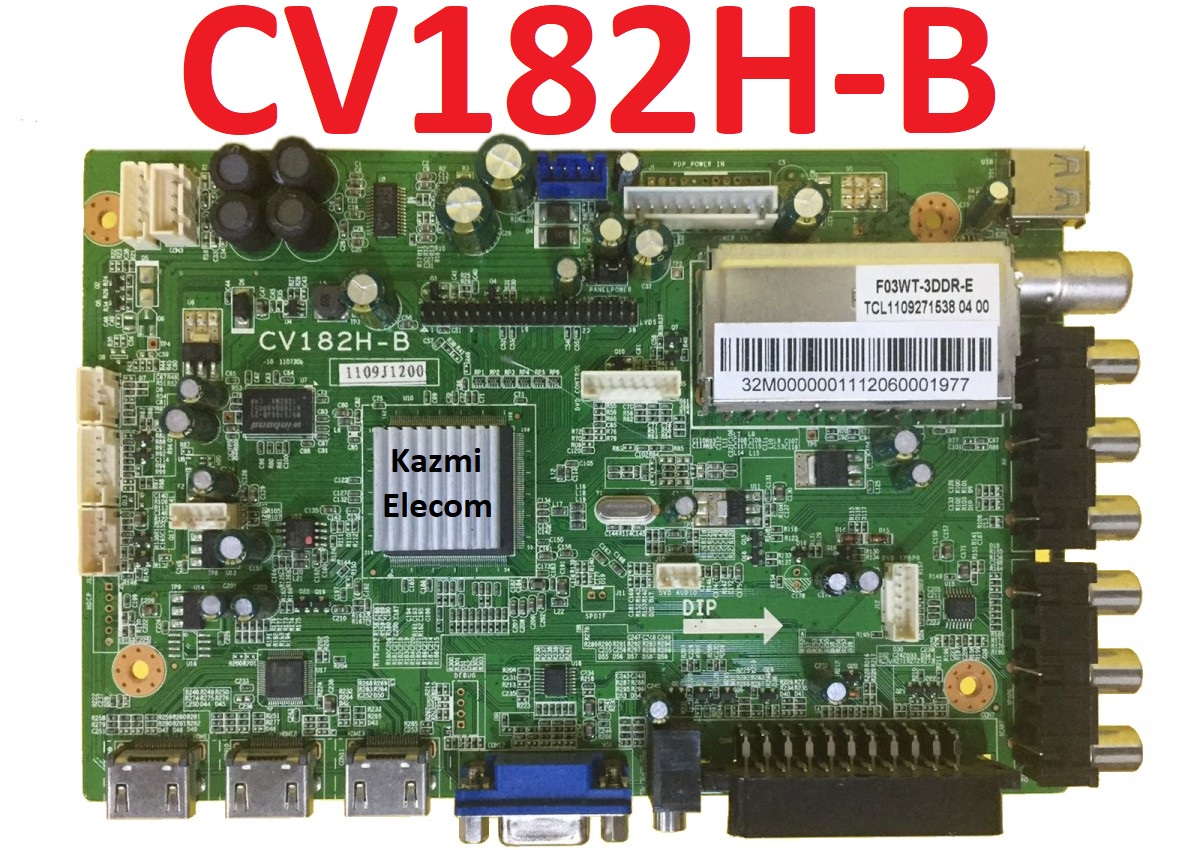
CV182H-B is a simple ATV Driver Motherboard designed for LCD/LED TVs. This board is suitable for the Asia Pacific and the Middle East markets. This is a Non-Combo Board. The main power module and LED Backlight Inverter Circuit module are required separately but ATV Card is builtin into this motherboard. This board has all the features as per the latest requirements like HDMI input, USB interface, PC input, Component Input, TV, and Scart.CV182H-B firmware files are given below for the technician’s support.

Cv182H-B

General Specifications:

Brand/Mark: Universal Board

Model: CV182H-B

Main Chip:

Product: LED TV

LED Backlight: mA

Flash IC: Mb

Sound Chip:

Tuner: F03WT-3DDR-E

Screen supported: 18 to 42 inches

Resolution: Up to 1920×1080

Panel Voltage: 5V, 12V

Power Input: 12V DC

Service Code:

Source/Input 2580

Note: The following given Software is a backup Dump and can be written by a programming tool. Kazmi Elecom Team is not responsible for any type of damage/loss as a result of uploading/downloading the firmware. First Check the mainboard and then install the software. If you are new and do not have enough knowledge of loading or installing software/firmware or dump files then read here first.

CV182H-B firmware for free download:

Kazmi-Elecom

For video tutorials, visit “Kazmi Elecom” my youtube channel.

T.MSD309.B51 Software Free Download

T.MSD309.B51 LED TV Board

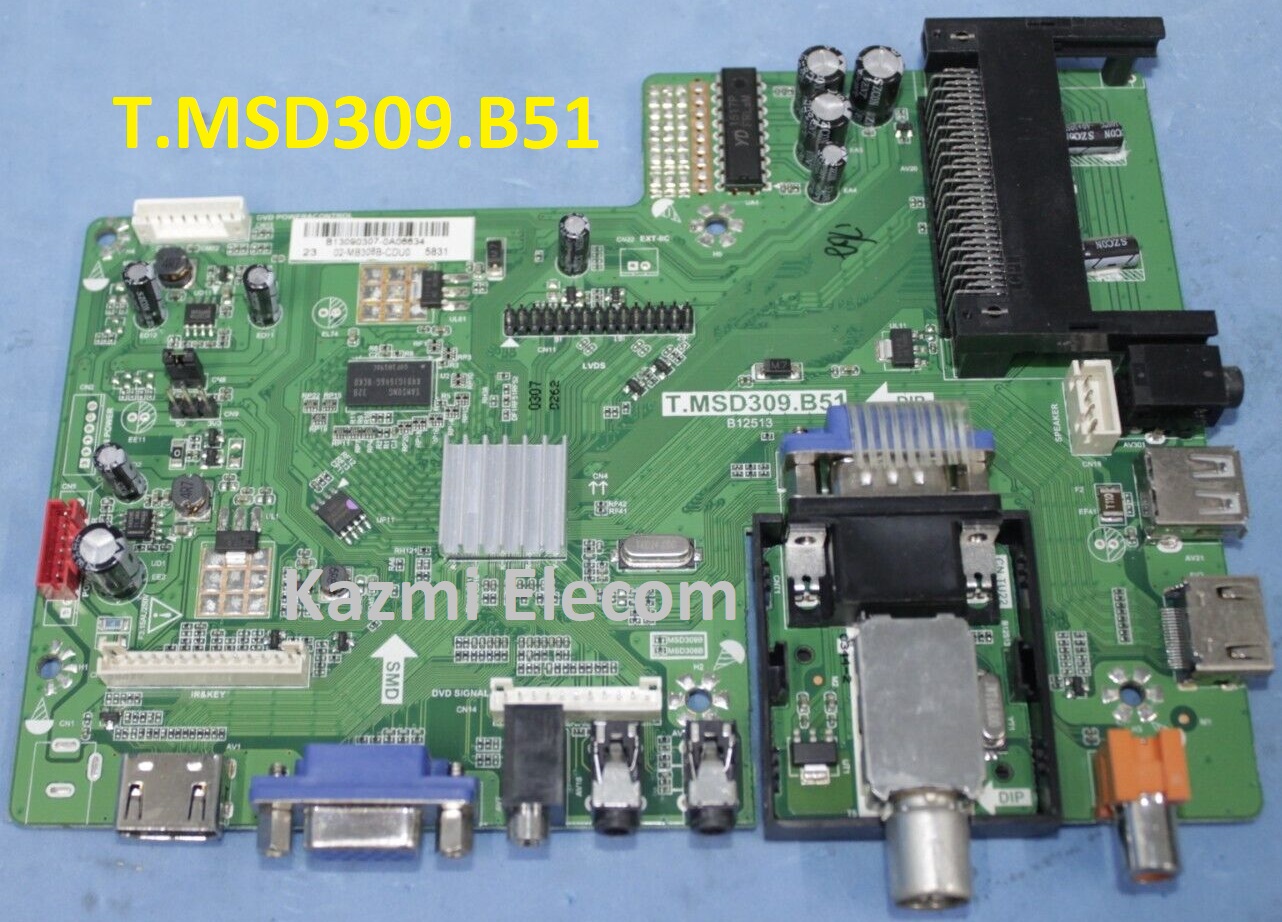
T.MSD309.B51 is a simple ATV Driver Motherboard designed for LCD/LED TVs. T_MSD309_B51 board is suitable for the Asia Pacific and the Middle East markets.T-MSD309-B51 is a non-Combo Board. The main power module, LED Backlight Inverter Circuit is required and ATV Card is builtin into the motherboard. T MSD309 B51 has all the features as per the latest requirements like HDMI input, USB interface, PC input, Component Input, TV, and Scart.T-MSD309-B51 firmware files are given below for the technician’s support.

T.msd309.B51

General Specifications:

Brand/Mark: Universal Board

Model: T.MSD309.B51 B12513

Main Chip: MSD309

Product: LED TV

LED Backlight: NA

Flash IC: 4Mb

Screen supported: 32-46 inch

Resolution: Up to 1920×1080

Panel Voltage: 12V

Power Input: 12v

Sound Chipset: 1517P

Tuner: XDTT

Service Code:

Source/Input

Note: The following given Software is a backup Dump and can be written by a programming tool. Kazmi Elecom Team is not responsible for any type of damage/loss as a result of uploading/downloading the firmware. First Check the mainboard and then install the software. If you are new and do not have enough knowledge of loading or installing software/firmware or dump files then read here first.

How to Download Firmware Files:

Download all parts of the following firmware and then extract any one of them you will get the folder. Now copy the files to USB. for More Detail about the download process watch the video Click Here

T.MSD309.B51 firmware for free download:

Kazmi-Elecom

For video tutorials, visit “Kazmi Elecom” my youtube channel.

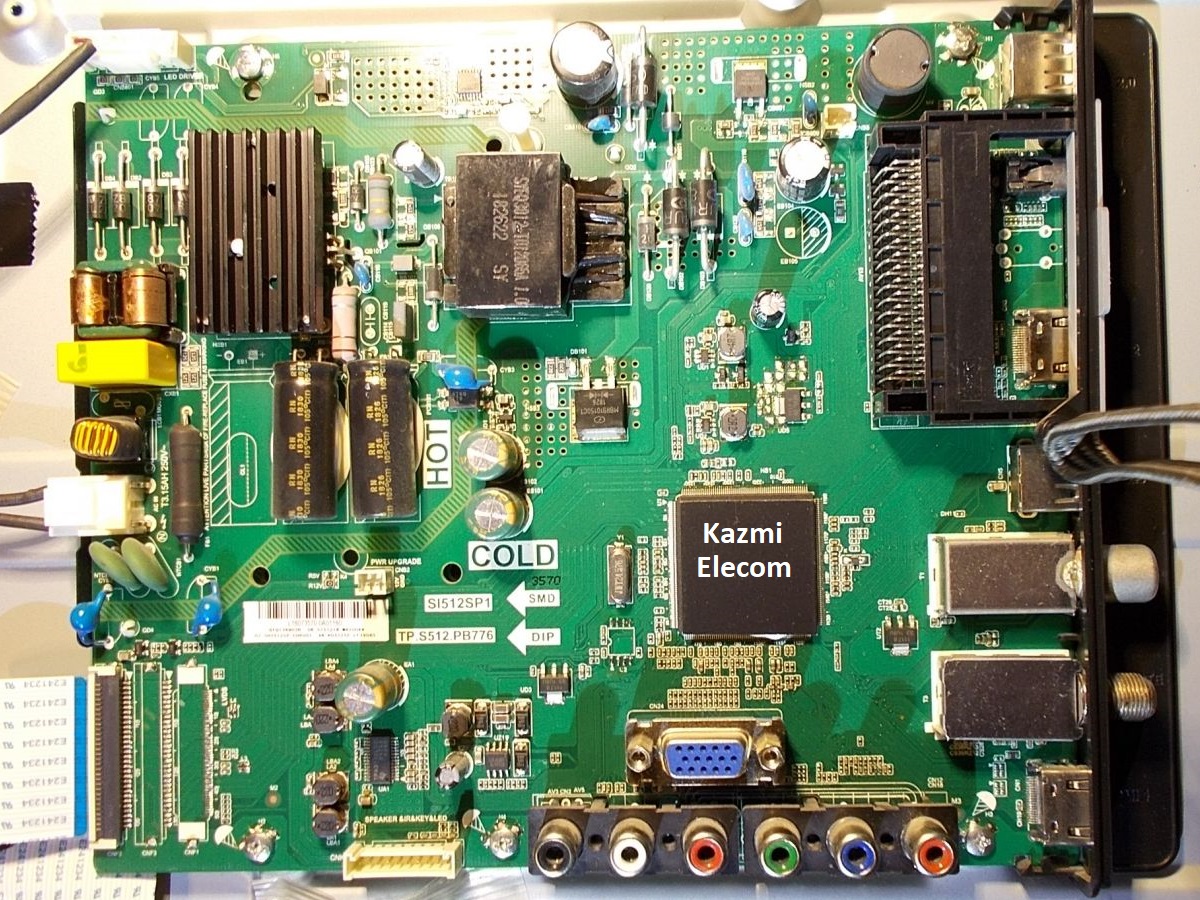
TP.S512.PB776 Software Free Download

TP.S512.PB776 LED TV Board

TP.S512.PB776 is a universal LCD/LED TV Controller driver board. It is a combo board means the backlight driver board, ac power supply module, and TV module are built-in in a single board of PCB. It has multiple input interfaces as per current user requirements. Software files are given below in this post for the support of technicians. If you are new and do not have enough knowledge of loading or installing software/firmware or dumping files then read here first.

Tp.s512.Pb776

General Specifications:

Brand/Mark: China Universal

Model: TP.S512.PB776

Resolution: 1920×1080

Backlight: 300mA

Backlight Voltage: 76.2-90V

Aspect Ratio: 16:9

Sound Output: 8 W

USB: 2

HDMI: 2

Composite Video Input: 1

Component Video Input: 1

Headphone Out: 1

PC Audio connector: 1

RF In: 1

DTV: 1

Supports Hard Disk: Up to 1 TB

Power Supply: 100-240V 50/60Hz

Power Consumption: 45 Watts

Power Consumption:  0.5 Watts Standby mode

Note: The following given software/firmware is USB upgradeable and Backup Dump Files. Kazmi Elecom Team is not responsible for any type of damage/loss as a result of loading/installing the firmware. If you are new and do not have enough knowledge of loading or installing software/firmware or dump files then read here first.

How to Download:

Download the following given firmware/software and then extract you will get the folder. Now copy the files to USB.

TP.S512.PB776 firmware files free download:

Kazmi-Elecom

For video tutorials, visit “Kazmi Elecom” my youtube channel.

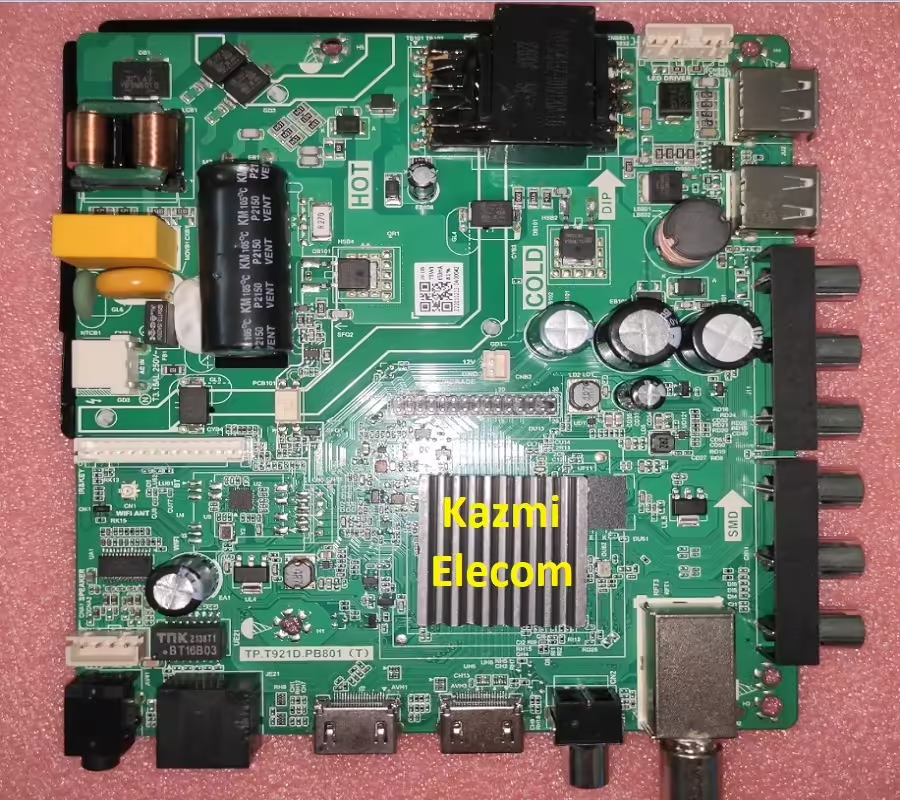
TP.T921DT.PB801 Software Free Download

TP.T921DT.PB801 Smart Android Board

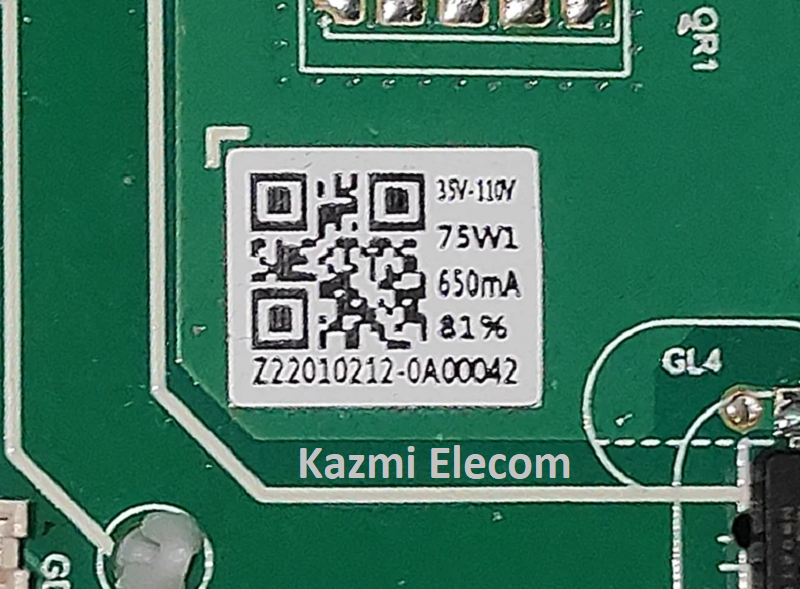
TP.T921DT.PB801 is a three-in-one smart Android LED TV controller board. The supported resolution is Full HD 1920×1080 which is suitable for the LVDS interface and can be fit for multiple HD and FHD screen panels.  This is a Combo board that has an inbuilt Power Module, LED Backlight Driver Module, and TV tuner in a single PCB board. So, no need to install a separate power card or backlight inverter board. The Backlight driver module capacity is 35-110 V with a maximum current of 650 mA and the power capacity is 75 watts.

TP.T921DT.PB801 has all the connectivity interface ports for the user as per the current requirements. It has multiple USB ports to play media files and for installing firmware files. It has also multiple HDMI ports as well for connecting Full HD devices like Blu-ray and gaming consoles. RCA ports are available for connectivity. RJ45 connection for wired internet and also have WIFI connectivity. Headphone jack and RF tuner for cable TV. TP.T921DT.PB801 firmware files are given below for the support of technicians.

Tp.t921Dt.pb801

General Specifications:

Model: TP.T921DT.PB801 (T)

Main Chipset: 921

Resolution Supported: 2K

CPU: A53*4

GPU: IMG7800

OS: Android 9

Ram: 512/1 Gb

Rom: 4/8 Gb

Audio Output Power: 2X10 W (8Ω)

Backlight: 35-110V 650 mA

Backlight Power: 75W

Service Code:

Firmware File: allupgrade_aml921_4G_75.bin

Firmware Type: USB upgradeable Firmware

Caution: 

All the pictures and specification details related to TP.T921DT.PB801 in this post is for reference only. If you are a user and do not have any repair experience, it is better to visit the nearest technician first without loading the software/firmware. Sometimes, the fault is different based on the visual observations. So, please do not try it at home. If the LED TV is slow then reset it to Factory Default only.

Pros:

There are many advantages to installing the given TP.T921DT.PB801 USB software or eMMC backup dump file. A few benefits are described below:

  • The dead board or stuck-on logo can be recovered and operational by loading the given USB software or EMMC backup file
  • Remote and Logo may change at your own choice to satisfy the customer
  • Money saving instead of changing the mainboard
  • Time-saving instead of arranging a new board
  • Customer satisfaction to do an urgent job
  • Skill and confidence improvement

Cons:

There may be some disadvantages to installing the given TP.T921DT.PB801 USB software or backup dump file. But it depends on the technician or user, as per his understanding. A few drawbacks are described below:

  • The working board may go to the standby position
  • Remote Control may not work and the Logo may change by writing the given software
  • Panel screen parameters may be changed

Tp.t921Dt.pb801

TP.T921DT.PB801 Android Version Upgrade:

Please note that the installed version in this board is the final version and the Android version is not updateable. So, no need to upgrade the software if the board is working normally. Only if, the default software malfunctions due to some bugs will the manufacturer provide the software update. Otherwise, no version update is issued.

TP.T921DT.PB801 Board Replacement:

If the board is completely dead and no chance to repair then replace the same board as already installed. And if the same board is not available on the market then search for the board that has the same specifications, the newest Android version, and the latest features to avoid any difficulties. If the backlight module is faulty in the combo board then you can install only the backlight module separately then no need to change the whole board.

Note: The following firmware is a USB bootable and EMC backup file. Kazmi Elecom Team is not responsible for any damage/loss caused by uploading/downloading the firmware. First, check and verify the main board then install software. If you are new and do not have enough knowledge of loading/installing software/firmware or dump files, or facing any issues during firmware installation then visit and read here first. Always keep a backup before writing the flash.

How to Download Firmware Files:

Download all parts of the following firmware/software and then extract any one of them you will get the folder. Now copy the files to USB. For more Details about the download process watch the video Click Here

TP.T921DT.PB801 Firmware file for Free Download:

Kazmi-Elecom

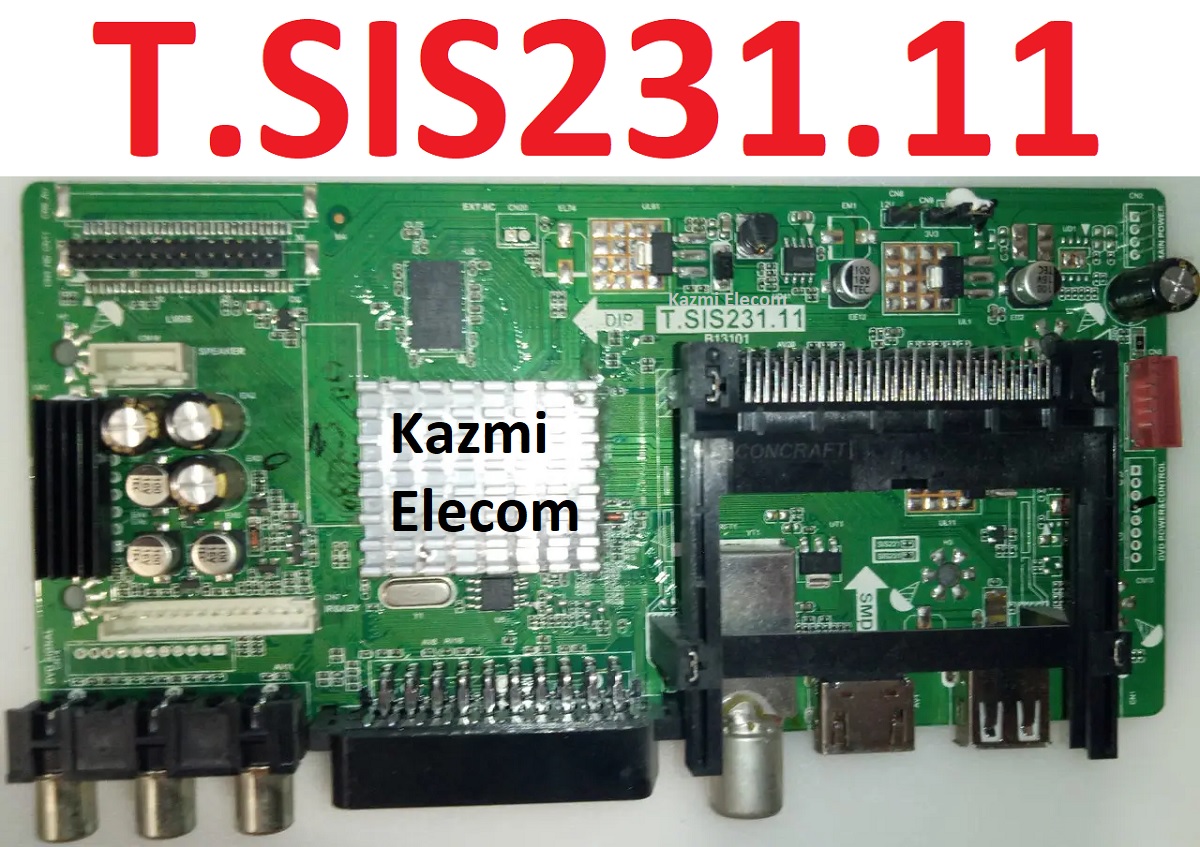
T.SIS231.11 Software Free Download

T.SIS231.11 LED TV Board

T.SIS231.11 is an LCD/LED TV Board. It is suitable for the LVDS interface and supports more than 20-30 inches of LED panels, with a maximum resolution of up to 1920*1080. T_SIS231_11 is a non-combo board i.e. power card and backlight driver module are required separately while the ATV board is built-in into it. T-SIS231-11 has multiple input interface ports like USB, HDMI, AV, Headphones, and Scart ports for computer connectivity.

T SIS231 11 for many brands of LED TVs like AKAI, DYON, TOKAI, etc. Its USB interface can be used for loading software as well as for playing multimedia files. T.SIS231.11 support for analog TV signals. T.SIS231.11 firmware files are given below for the technician’s support.

T.sis231.11

General Specifications:

Model: T.SIS231.11

Main Chipset: SIS231

Resolution Supported: 1920×1080

Flash Memory: 25Q64

Television System: PAL (BG, DK), SECAM (BG, DK, LL)

Tuner:

Audio Output Power: 2X6 W (8Ω)

Backlight: NA

Backlight Power: W

Power Input: 12V

Power Consumption: 45W

Service Code: Menu 1147, Balance (value is “0”) +1969

Firmware Name: .bin

Firmware Type: Backup Dump

Note: The following given software/firmware is USB upgradeable and Backup Dump Files. Kazmi Elecom Team is not responsible for any type of damage/loss as a result of loading/installing the firmware. If you are new and do not have enough knowledge of loading or installing software/firmware or dump files then read here first.

How to Download:

Download the following given firmware/software and then extract you will get the folder. Now copy the files to USB.

T.SIS231.11 Firmware files for Free Download:

Kazmi-Elecom

For video tutorials, visit “Kazmi Elecom” my youtube channel.

T.MSD309.27A Software Free Download

T.MSD309.27A LED TV Board

T.MSD309.27A is a simple ATV Driver Motherboard designed for LCD/LED TVs. T_MSD309_27A board is suitable for the Asia Pacific and the Middle East markets.T-MSD309-27A is a non-Combo Board. The main power module, LED Backlight Inverter Circuit is required and ATV Card is builtin into the motherboard. T MSD309 27A has all the features as per the latest requirements like HDMI input, USB interface, PC input, Component Input, TV, and Scart.T-MSD309-27A-11093 & 11356 firmware files are given below for the technician’s support.

T.msd309.27A

General Specifications:

Brand/Mark: Universal Board

Model: T.MSD309.27A 11093&11356

Main Chip: MSD308, MSD309

Product: LED TV

LED Backlight: NA

Flash IC: 4Mb

Screen supported: 32-46 inch

Resolution: Up to 1920×1080

Panel Voltage: 12V

Power Input: 12v

Sound Chipset: R2A15122

Tuner: XDTT-6F1C/T1146

Service Code:

Source/Input

Note: The following given Software is a backup Dump and can be written by a programming tool. Kazmi Elecom Team is not responsible for any type of damage/loss as a result of uploading/downloading the firmware. First Check the mainboard and then install the software. If you are new and do not have enough knowledge of loading or installing software/firmware or dump files then read here first.

How to Download Firmware Files:

Download all parts of the following firmware and then extract any one of them you will get the folder. Now copy the files to USB. for More Detail about the download process watch the video Click Here

T.MSD309.27A firmware for free download:

Kazmi-Elecom

For video tutorials, visit “Kazmi Elecom” my youtube channel.


error: Content is protected !!