Tag Archives: kazmi elecom

TP.SIS231.PT85 Software Free Download

TP.SIS231.PT85 LED TV Board

TP.SIS231.PT85 is an LCD/LED TV Board. It is suitable for the LVDS interface and supports more than 32-50 inches of LED panels, with a maximum resolution of up to 1920*1080. TP_SIS231_PT85 is a three-in-one (combo) board i.e power card, backlight driver module, and ATV board builtin in it. TP-SIS231-PT85 has multiple input interface ports like USB, HDMI, AV, Scart port, and VGA port for computer connectivity.

TP SIS231 PT85 for many brand LED TVs like Supra, Haier, Crown, Bush, etc. Its USB interface can be used for loading software as well as for playing multimedia files. TP.SIS231.PT85 support for analog TV signals. TP.SIS231.PT85 firmware files are given below for the technician’s support.
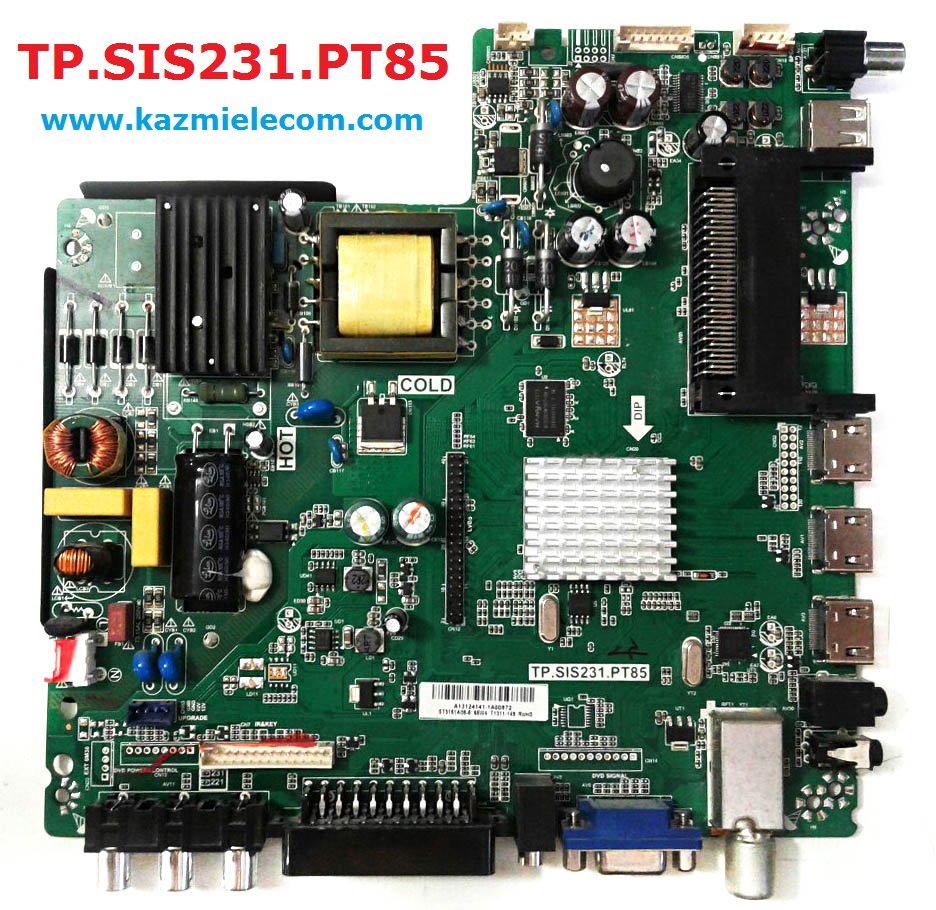
Tp.sis231.Pt85

General Specifications:

Model: TP.SIS231.PT85

Main Chipset: SIS231

Resolution Supported: 1920×1080

Flash Memory: 25Q64

Television System: PAL (BG, DK), SECAM (BG, DK, LL)

Tuner: DVB-T, DVB-C

Audio Output Power: 2X6 W (8Ω)

Backlight:

Backlight Power: 75 W

Power Input: 100 to 240V

Power Consumption: 75W

Service Code: Menu 1147, Balance (value is “0”) +1969

Firmware Name: SISEU23X8M.bin

Firmware Type: USB Bootable Firmware and Flash Backup Dump

Note: The following given software/firmware is USB upgradeable and Backup Dump Files. Kazmi Elecom Team is not responsible for any type of damage/loss as a result of loading/installing the firmware. If you are new and do not have enough knowledge of loading or installing software/firmware or dump files then read here first.

How to Download:

Download the following given firmware/software and then extract you will get the folder. Now copy the files to USB. for More Detail about the download process watch the video Click Here

TP.SIS231.PT85 Firmware files for Free Download:

Kazmi-Elecom

S.NO.BOARD/DESCRIPTIONDOWNLOAD LINK
1TP.SIS231.PT85_1366x768_ACONATIC_DUMPDownload
2TP.SIS231.PT85_1366x768_ASAHI_DUMPDownload
3TP.SIS231.PT85_1366x768_DAEWOO_DUMPDownload
4TP.SIS231.PT85_1366x768_DAIKO_DUMPDownload
5TP.SIS231.PT85_1366x768_DYON_DUMPDownload
6TP.SIS231.PT85_1366x768_FOX_DUMPDownload
7TP.SIS231.PT85_1366x768_HISENSE_DUMPDownload
8TP.SIS231.PT85_1366x768_MAXWELL_DUMPDownload
9TP.SIS231.PT85_1366x768_TD SYSTEMS_DUMPDownload
10TP.SIS231.PT85_1366x768_TELEFUNKEN_USBDownload
11TP.SIS231.PT85_1366x768_THOME_DUMPDownload
12TP.SIS231.PT85_1366x768_VISION_DUMPDownload
13TP.SIS231.PT85_1920x1080_DNS_DUMPDownload
14TP.SIS231.PT85_1920x1080_GLOBEVISION_DUMPDownload
15TP.SIS231.PT85_1920x1080_HISENSE_USBDownload
16TP.SIS231.PT85_1920x1080_JVC_DUMPDownload
17TP.SIS231.PT85_1920x1080_SUPRA_DUMPDownload


T.MS18VG.62B Software Free Download

T.MS18VG.62B LED TV Board

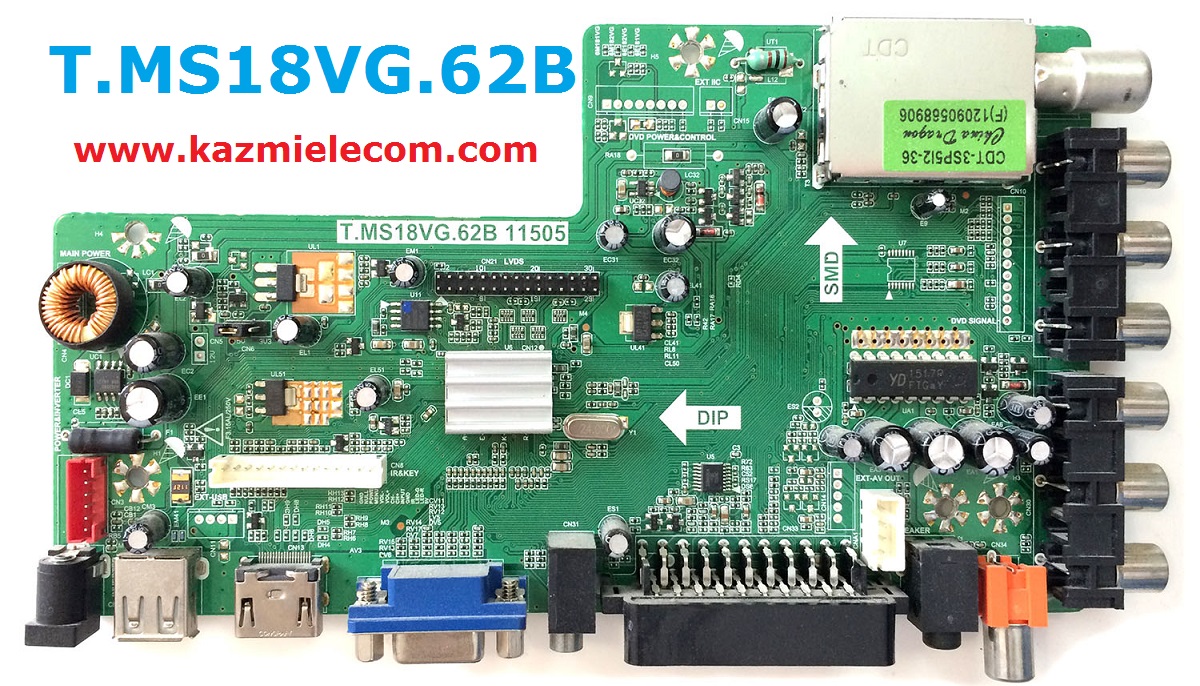
T.MS18VG.62B is an analog LCD/LED TV Control Board that is suitable for the Asia Pacific and the Middle East Market. It can support 18-inch to 24-Inches LED panels which a resolution is up to 1920×1080. Its USB interface supports Multimedia Playback and Software Upgrades as well. T.MS18VG.62B has multiple HDMI ports that support 1.4 and its HDCP support 1.1. T_MS18VG_62B is compatible with Non-HD and FHD LCD/LED panel screens. T-MS18VG-62B is widescreen-supported and also has a multi-language option. T.MS18VG.62B has its special feature of  AV.T.MS18VG.62B software collection is given below for free download.

T.ms18Vg.62B 11505

General Specifications:

Board Make: China

Board Model: T-MS18VG.62B 11505

Main Chipset: Mstar MST6M182VG

TV System: PAL/SECAM/NTSC

Panel Interface: Single-channel or Dual-channel LVDS

Key Button Functions: CH-/CH+/MENU/VOL-/VOL+Souce/Power

Multi-Language: Yes

Input/Output Ports: HDMI, VGA, AV, USB, RF TV interface, and Earphone Out

Audio O/P Power: 2 x 8 Watt (8 ohms)

Panel Voltage: +5V/+12V DC (Default 12V)

USB Port: Yes (Firmware Upgrade and Multimedia Playback Support)

IR Control: Yes (Controllable by Remote Control)

Electrical Parameters:

Working Input Voltage: DC 12 Volt

Maximum Current: 5000mA (Without Panel)

Standby Power: <0.5W

Maximum Current for USB: 500mA

Flash IC: 4MB

Firmware Type: Backup Dump

Note: Following firmware collection is a Backup Dump saved from working LED TVs that can be loaded by a programmer. Kazmi Elecom Team is not responsible for any type of damage/loss as a result of uploading/downloading the firmware.

How to Download Firmware File:

Download your required file of the following firmware and then extract it you will get the folder. Now you can write the file with a programming tool. for More Detail about the download, process watch the video Click Here

T.MS18VG.62B Firmware Collection Free Download:

Kazmi-Elecom

S.NO.BOARD/DESCRIPTIONDOWNLOAD LINK
1T.MS18VG.62B_1366X768_BBK_DUMPDownload
2T.MS18VG.62B_1366X768_ERISSON_DUMPDownload
3T.MS18VG.62B_1366X768_EUROSTAR_DUMPDownload
4T.MS18VG.62B_1366X768_HELIX_DUMPDownload
5T.MS18VG.62B_1366X768_RUBIN_DUMPDownload
6T.MS18VG.62B_1366X768_SHIVAKI_DUMPDownload
7T.MS18VG.62B_1920X1080_ERISSON_DUMPDownload
8T.MS18VG.62B_1920X1080_HCN_DUMPDownload

For video tutorials, visit “Kazmi Elecom” my youtube channel.

Z.VST.V56RU.A8 Software Free Download

Z.VST.V56RU.A8 LED TV Board

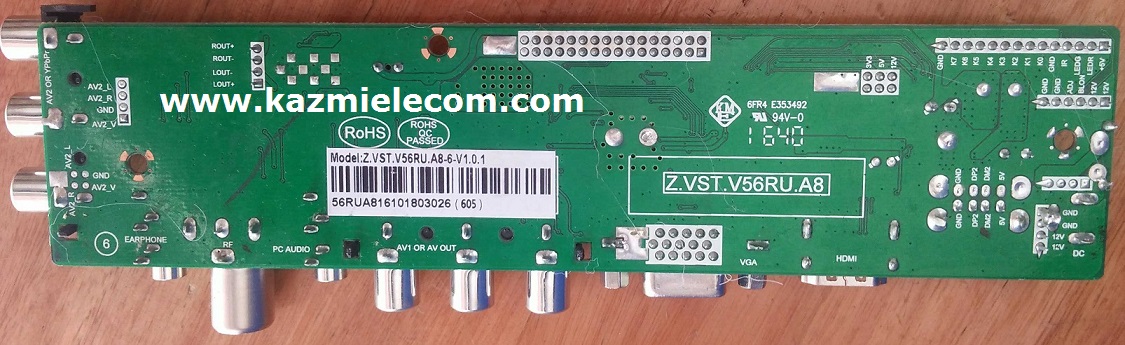
Z.VST.V56RU.A8 is a universal TV control board, which is suitable for the Europe market. Z.VST.V56RU.A81 is a digital DVB-T2/DVB-T/DVB-C TV driver board for the European market. Its USB slot can be used for updating software and playing multimedia, such as MP3 and JPEG.

The solution’s USB interface is available for software upgrades and multimedia playback. HDMI1.3/1.4 compliant with ARC support, HDCP1.2 compliant. The HDMI-supported version of this solution is 1.3/1.4 compatible with ARC, and HDCP supports version 1.2.

Z.vst.v56Ru.a8

General Specifications:

Model: Z.VST.56RU.A8

Main Chipset: MSD

Video Input: A

Resolution Support: up to 1920×1080

Tuner chip: R840/R842

Panel Volt: 3.3v, 5v, 12v

Terminal Functions: USB, HDMI, VGA, AV, PC AUDIO IN, TV, EARPHONEOUT, AV OUT

Key Function: TV/AV,MENU,VOL+,VOL-, CH+,CH-,POWER

OSD Language: English, Spanish, French, etc.

Audio Output: 2×2W(4Ω)/2×8W

Flash Memory: 25Q64CSIG

Power Input: 12v DC

Standby Power Consumption: < 0.3W(Board Only)

Service Menu Code:

Input 2580

Note: The following firmware is a backup file. Kazmi Elecom Team is not responsible for any type of damage/loss as a result of uploading/downloading the firmware. If you are facing any issues during firmware installation then visit and read here first.

How to Download Firmware Files:

Download all parts of the following firmware and then extract any one of them you will get the folder. Now copy the files to USB. For more Details about the download process watch the video Click Here

Z.VST.56RU.A8 firmware for free Download:

Kazmi-Elecom

AKAI LEA-40V35M Software Free Download

AKAI LEA-40V35M LED TV

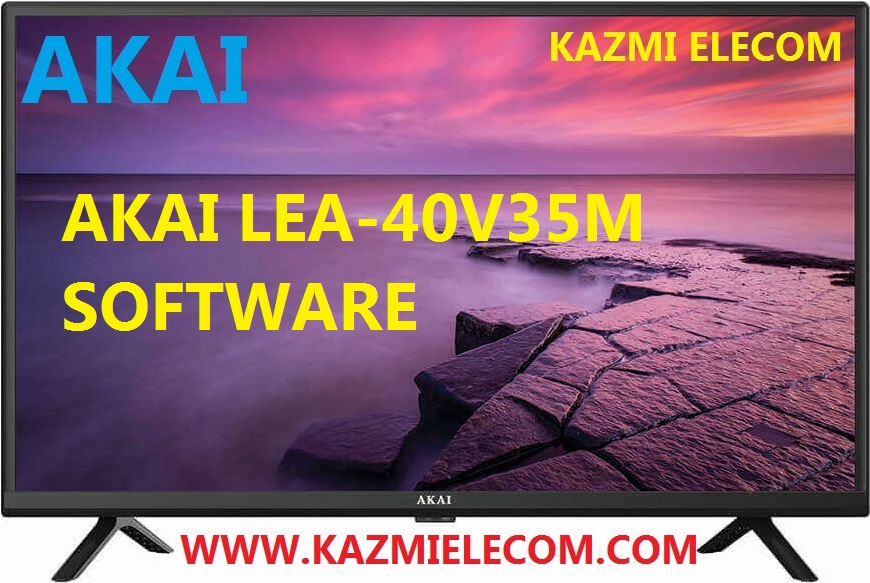
AKAI LEA-40V35M is a 40 inches HD Ready LED TV with a resolution of 1366×768. LEA-40V35M is a non-smart tv. LEA-40V35M led TV has all the latest features and connectivity ports as HDMI port and USB port, Dual Audio Video with a 60 Hz refresh rate. It has a powerful sound output system. Its aspect ratio is 16:09 and its dynamic ratio is 150000:1.

Its view angle is horizontal: 170 degrees and vertical: 160 degrees. LEA-40V35M has additional edge led technology, smart power saving, digital noise reduction, intelligent picture technology, eye-safe t matrix, brightness is 250 cd/m2 and response time is 5 ms. AKAI Software file is given below for the technician’s support. For more AKAI Software collection visit here.

Akai Lea-40V35M

General Specifications & Features:

Make: AKAI

Model: LEA-40V35M

Display Size: “40

Storage Memory: MB

HD Technology: HD

Panel: HD

No of HDMI Ports:

No of USB Ports:

No of AV Ports:

Speaker Output RMS:

Power Requirement: AC 110 – 240 V, 50/60 Hz

Power Consumption: W, 0.5 W (Standby)

Software Type: Backup Dump

Software Name:

Main Board: TP.MS3463S.PB801

Note: Following given Software is backup dump. Kazmi Elecom Team is not responsible for any type of damage/loss as a result of uploading/downloading the Software.If you are new and do not have enough knowledge of loading or installing software/firmware or dump files then read here first.

Kazmi-Elecom

AKAI LEA-40V35M Software file free download.

For video tutorials, visit “Kazmi Elecom” my youtube channel.

T.R67.03 V7 Software Free Download

T.R67.03 V7 Universal Board

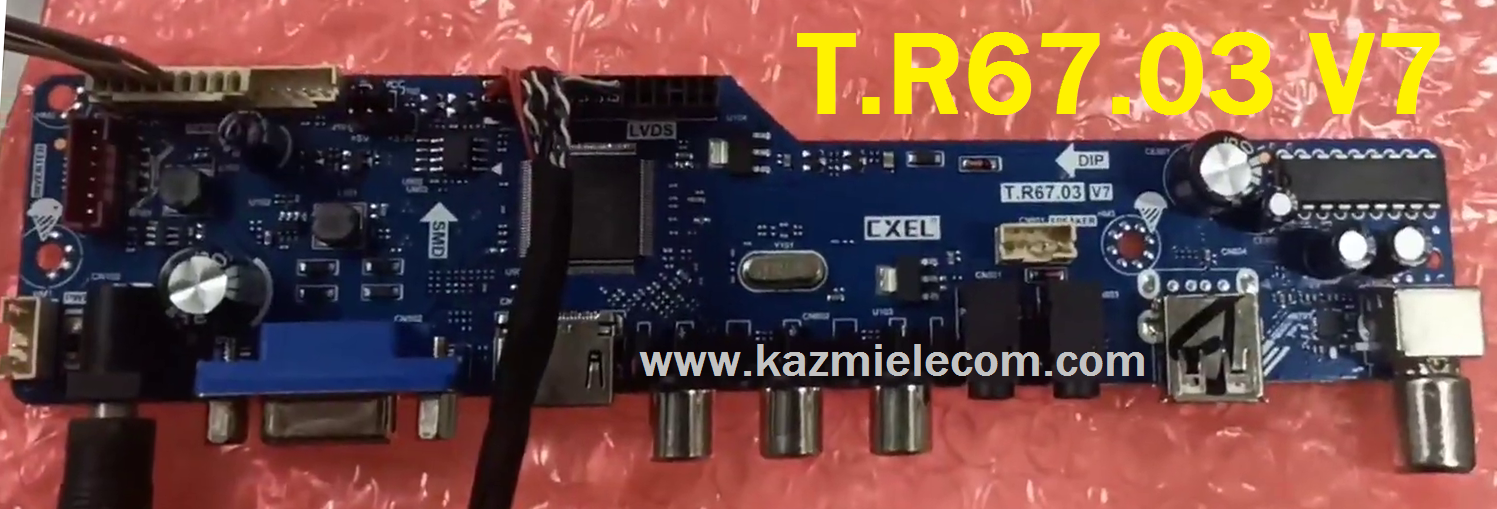
T.R67.03 V7 is a universal jumper board with multi-resolution software.

Basic Info:

Model No. T.R67.03 V7

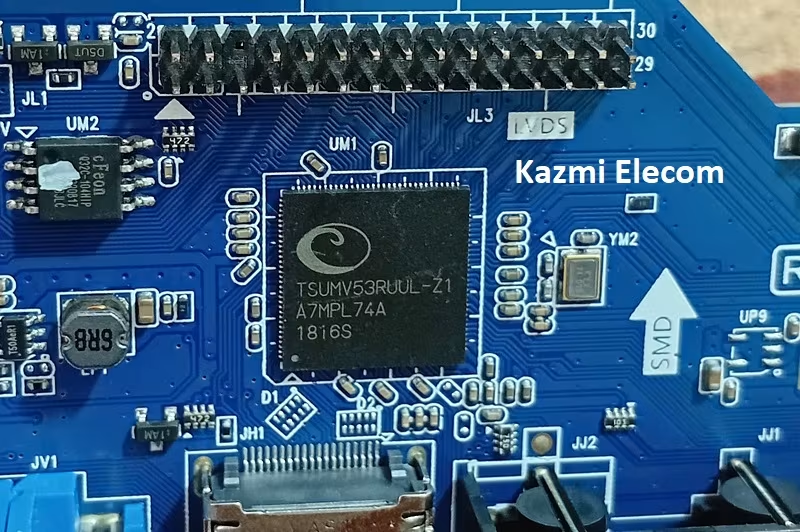
Main Chipset: UTS6710-X OR TSUMV53RUUL-Z1

Display Format: up to 1920×1080

Aspect Ratio: 4:3, 16:9 & 16:10

Tuner: 5160

Sound: CD1517CP

Bin Name: YDG.6710.bin, YDG_6710.code.bin

Multi Resolution Codes

T.r67.03 V7

General Specifications:

TV System: PAL/SECAM/NTSC

Panel Interface: Single-channel or Dual-channel LVDS

Key Button Functions: CH-/CH+/MENU/VOL-/VOL+Souce/Power

Multi-Language OSD: Yes

Input/Output Ports: HDMI, VGA, AV, USB, RF TV interface, and Earphone Out

Audio O/P Power: 2 x 3 Watt (8 ohms)

Panel Voltage: +3.3V/+5V/+12V DC (jumping cap setting)

USB Port: Yes (Firmware Upgrade and Multimedia Playback Support)

USB File Format: Audio (Mp3, wma, m4a/aac), Video (avi, mp4, ts/trp, mkv/mov, mpg, dat, vob, rm/rmvb),                                                 Picture (Jpg, jpeg, bmp, png), Text (text)

IR Control: Yes (Controllable by Remote Control)

Electrical Parameters:

Working Input Voltage: DC +12 Volt

Maximum Current: 2000mA (Without Panel)

Standby Power: <0.2W (for the motherboard only)

Maximum Current for USB: 500mA

How to Upgrade Firmware:

  1. Copy the Required Firmware/software into FAT32 USB Disk
  2. Plugin the U disk into the Mainboard USB port of the LCD/LED TV
  3. Switch ON the power and Wait until even the IR indicator led stops flashing
  4. Done. Unplug the U-disk (It will take a max half min to upgrade firmware)

Factory Service Mode:

Menu+1147 & Source/Input+208

Multi-Resolution Code:

  • INPUT/SOURCE 03661 FOR 1920X1080
  • INPUT/SOURCE 03662 FOR 1366X768
  • INPUT/SOURCE 03663 FOR 1280X1024
  • INPUT/SOURCE 03664 FOR 1440X900
  • INPUT/SOURCE 03665 FOR 1600X900
  • INPUT/SOURCE 03666 FOR 1680X1050
  • INPUT/SOURCE 03667 FOR 1024X768

T.r67.03 V7 New

T.R67.03 V7 Firmware All resolutions Free Download:

Download Button Kazmi Elecom

S.NO.BOARD/DESCRIPTIONDOWNLOAD LINK
1T.R67.03-V7_1024x768_USBDownload
2T.R67.03-V7_1280x800_USBDownload
3T.R67.03-V7_1280x1024_USBDownload
4T.R67.03-V7_1366x768_USBDownload
5T.R67.03-V7_1440x900_USBDownload
6T.R67.03-V7_1600x900_USBDownload
7T.R67.03-V7_1600x1200_USBDownload
8T.R67.03-V7_1680x1050_USBDownload
9T.R67.03-V7_1920x1080_USBDownload
10T.R67.03-V7_1920x1200_USBDownload
11T.R67.03-V7-1024x768-TSUMV53-USB-NEWDownload
12T.R67.03-V7-1366x768-TSUMV53-USB-NEWDownload
13T.R67.03-V7-1440x900-TSUMV53-USB-NEWDownload
14T.R67.03-V7-1600x900-TSUMV53-USB-NEWDownload
15T.R67.03-V7-1600x1200-TSUMV53-USB-NEWDownload
16T.R67.03-V7-1680x1050-TSUMV53-USB-NEWDownload
17T.R67.03-V7-1920x1080-TSUMV53-USB-NEWDownload
18T.R67.03-V7-1920x1200-TSUMV53-USB-NEWDownload
T.R67.03-V7-1280x1024-TSUMV53-DUMPDownload

For video tutorials, visit “Kazmi Elecom” on my YouTube channel.

T.MS6M182.81B Software Free Download

T.MS6M182.81B LED TV Board

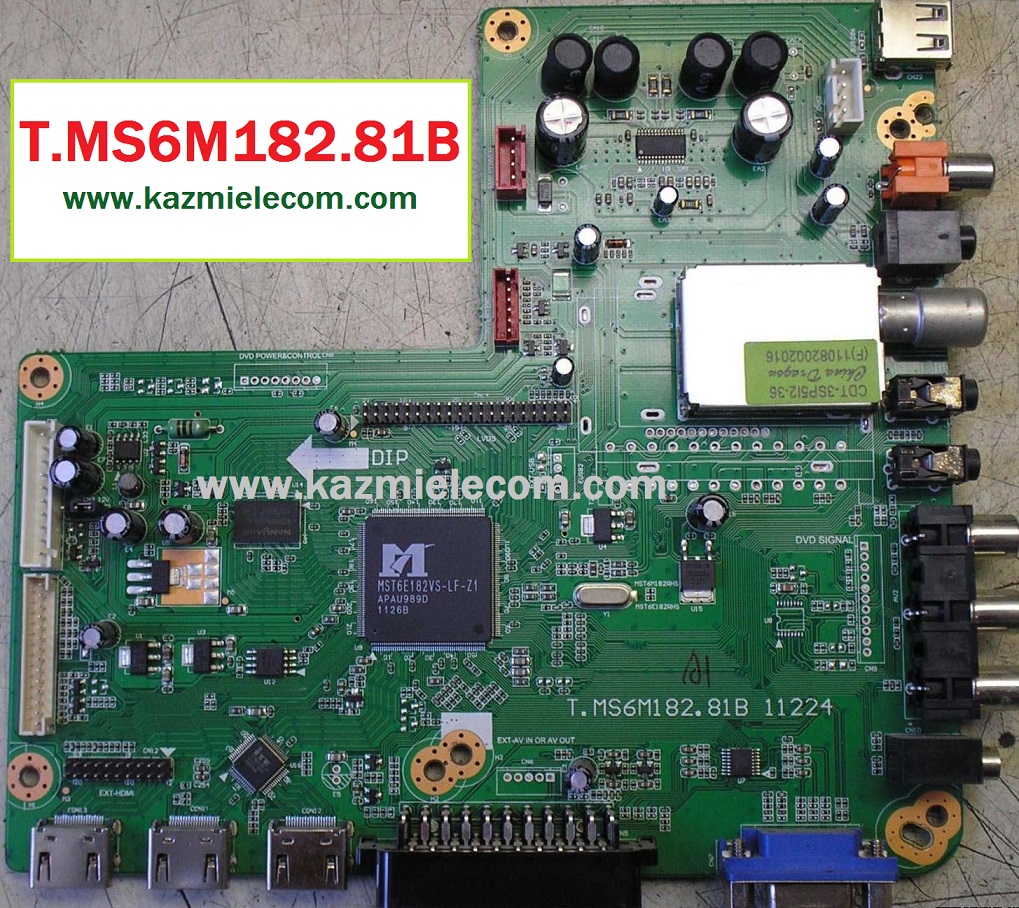
T.MS6M182.81B is a universal LCD/LED Board that has Full HD resolution Supported up to 1920×1080. T_MS6M182_81B is a non-combo board which means the main power supply is required for power input but the ATV board and LED backlight driver board is a built-in single PCB. This can also be operated by a DC 12V input power supply. The firmware files are given below for the Technician’s support. This board has multiple connectivity user interfaces like HDMI, AV Port, Scart, VGA, RF antenna, USB, and Headphone Jack. T.MS6M182.81B Software files are shared in this post for the support of Technicians.

T.ms6M182.81B

General Specifications:

Board Make: China

Board Model: T-MS6M182-81B 11224, T-MS6M182.81B-1 11345

Main Chipset: MST6E182VS-LF-Z1

TV System: PAL/SECAM/NTSC

Panel Interface: Single-channel or Dual-channel LVDS

Key Button Functions: CH-/CH+/MENU/VOL-/VOL+Souce/Power

Multi-Language: Yes

Input/Output Ports: HDMI, VGA, AV, USB, RF TV interface, and Earphone Out

Audio O/P Power: 2 x 8 Watt (8 ohms)

Panel Voltage: +5V/+12V

USB Port: Yes (Firmware Upgrade and Multimedia Playback Support)

IR Control: Yes (Controllable by Remote Control)

Electrical Parameters:

Working Input Voltage: AC220 Volt

Maximum Current: 5000mA (Without Panel)

Standby Power: <0.5W

Maximum Current for USB: 500mA

Flash IC: 4MB

Firmware Type: Backup Dump

Service Menu: Menu 1147

Note: Following firmware collection is a USB Boot and Backup Dump saved from working LED TVs that can be loaded by a programmer. Kazmi Elecom Team is not responsible for any type of damage/loss as a result of uploading/downloading the firmware. If you are new and do not have enough knowledge of loading or installing software/firmware or dump files then read here first.

How to Download Firmware File:

Download your required file of the following firmware and then extract it you will get the folder. Now you can write the file with a programming tool. for More Detail about the download, process watch the video Click Here

T.MS6M182.81B Firmware Collection Free Download:

Kazmi-Elecom

S.NO.BOARD/DESCRIPTIONDOWNLOAD LINK
1
T.MS6M182.81B_1366x768_DIGITALDownload
2T.MS6M182.81B_1366x768_FUSIONDownload
3T.MS6M182.81B_1366x768_SUPRADownload
4T.MS6M182.81B_1920x1080_DIGITALDownload
5T.MS6M182.81B_1920x1080_EUROSTARDownload
6T.MS6M182.81B_1920x1080_NIKURADownload
7T.MS6M182.81B_1920x1080_SUPRADownload

For video tutorials, visit “Kazmi Elecom” my youtube channel.

TCL LED TV PANEL MIRROR CODE

TCL LED TV PANEL MIRROR CODE

TCL LED TV panel mirror code procedure is explained in this article. Here is a question what is mirror code and why do we need this? The answer is the software developer designs the program to change the software configuration as per user requirement by shortcode. Codes are used by remote control numeric pad with some combination like a Menu button. All the changes by pressing a short code from the remote control are invisible to the user and work in the background.

And the second answer is we use short code when we change the different types of panels as already installed by the company. If we change the same panel as the old one then no issue and do not need to do anything but when we change the different panel screen then we face the mirror or mapping issue and we need to change the inverted picture for the normal working of led tv. If the panel Mirror option is not available in the service menu then we use the code option.

Tcl Led Tv Panel Mirror Code

TCL LED TV Panel Mirror Code:

TCL LED TV panel mirror code expected range is 001>399. you can try them one by one if the panel mirror option code is not confirmed. Most code from a given range may work but a few of them may not work. you can share your experience in the comment box to support other technicians. Some known codes already confirmed by technicians are described below:

  • TCL L32d2730: Menu 062598 Menu 002 for Normal
  • TCL L32d2730: Menu 062598 Menu 007 for Mirror
  • TCL L32D2900: Menu 062598 Menu 002 for Normal
  • TCL L32D2900: Menu 062598 Menu 007 for Mirror
  • TCL L32S62: Menu 062598 Menu 009 for Normal, 13
  • TCL L32S62: Menu 062598 Menu 028 for Mirror
  • TCL L32S6500: Menu 062598 Menu 007, 046, 118, 036, 103, 104
  • TCL L32S4900: Menu 062598 Menu 007
  • TCL 32S65A: Menu 062598 Menu 115
  • TCL L43S6500: Menu 062598 Menu 062
  • TCL L49S6500: Menu 062598 Menu 011
  • TCL 50C716: Menu 062598 Menu 324
  • TCL 65C716: Menu 062598 Menu 292
  • TCL 65C815: Menu 062598 Menu 266
  • TCL 55P8M: Menu 062598 Menu 025
  • TCL 65P8M: Menu 062598 Menu 197
  • TCL L39B2610: Menu 062598 Menu 015 for Normal
  • TCL L39B2610: Menu 062598 Menu 013 for Mirror
  • TCL L40D2730: Menu 062598 Menu 027 for Normal
  • TCL L40D2730: Menu 062598 Menu 028 for Mirror
  • TCL 75P715: Menu 062598 Menu 252
  • TCL C55P5US: Menu 062598 Menu 140
  • TCL L28D2720: Menu 062598 Menu 047
  • TCL L32D2730A: Menu 062598 Menu 054
  • TCL L43P1FS: Menu 062598 Menu 009
  • TCL L43P6US: Menu 062598 Menu  028, 071
  • TCL L65P6US: Menu 062598 Menu 037, 054
  • TCL L55P65US: Menu 062598 Menu 013
  • TCL L43P8: Menu 062598 Menu 275
  • TCL L50P8: Menu 062598 Menu 011
  • TCL L55P8: Menu 062598 Menu 021
  • TCL L65P8S: Menu 062598 Menu 012
  • TCL L50C1US: Menu 062598 Menu 083
  • TCL L55D2750: Menu 062598 Menu  047
  • TCL L55D2900: Menu 062598 Menu 013

Some other working TCL LED TV panel mirror codes are:

  • Menu 062598 Menu 015
  • Menu 062598 Menu 017
  • Menu 062598 Menu 027
  • Menu 062598 Menu 050 Thomson Logo
  • Menu 062598 Menu 109 SEMP Logo
  • Menu 062598 Menu 126 Hitachi Logo
  • Menu 062598 Menu 127 RCA Logo

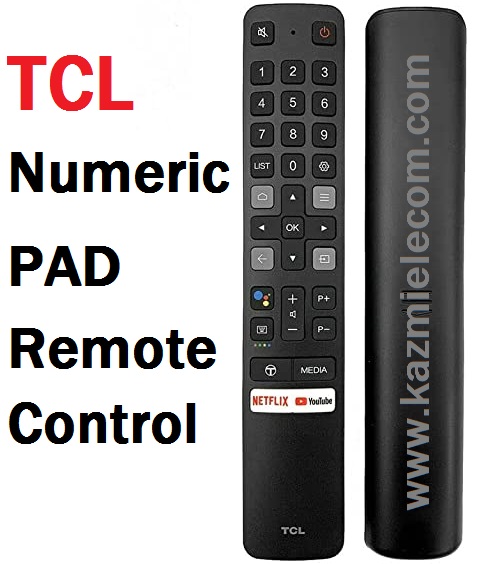
Following the smart remote control with numeric buttons will work for the code procedure:

Tcl Smart Remote Control

if you use a simple non-smart led tv remote control for this purpose, it will not work because when you press the Menu button on the remote control the Home screen displays on the TV so, you can not succeed until the menu options pop up on the screen.

Note:

It is strongly prohibited if you are not a technician do not try any code on your working LED TV. Any unknown changes in your TV may cause the tv to dead. Kazmi Elecom team is not responsible in case of any damage or loss. watch the given below video tutorial for a better understanding.

For video tutorials, visit “Kazmi Elecom” my youtube channel.

TCL LED TV PANEL MIRROR CODE

TCL LED TV PANEL MIRROR CODE

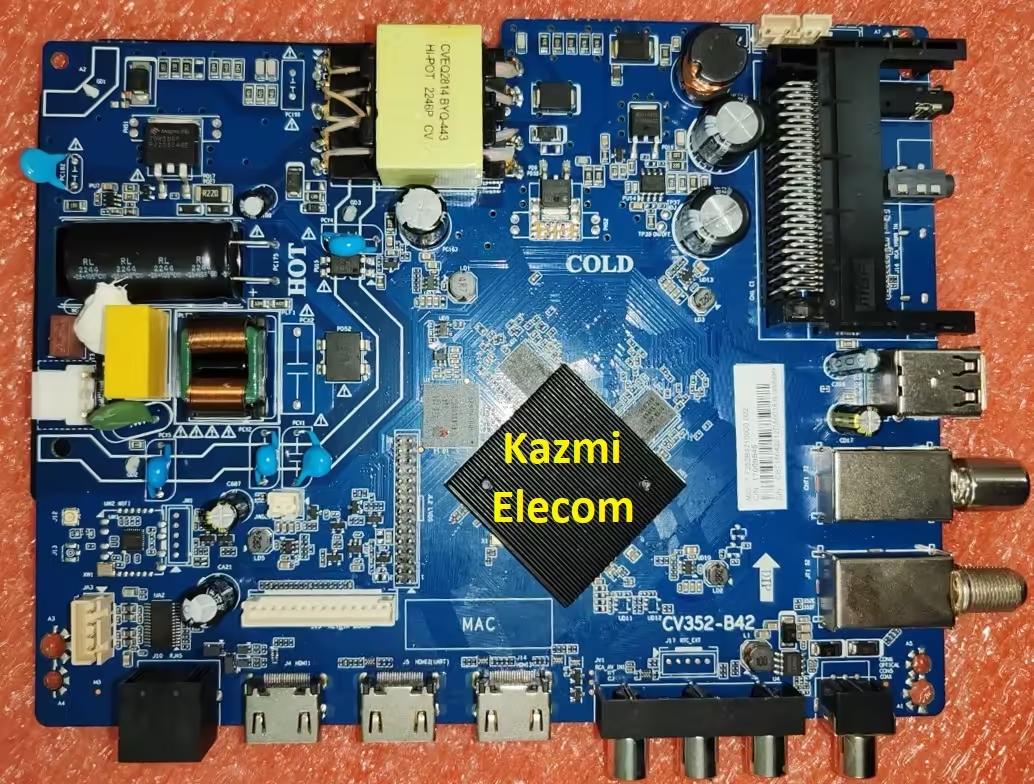
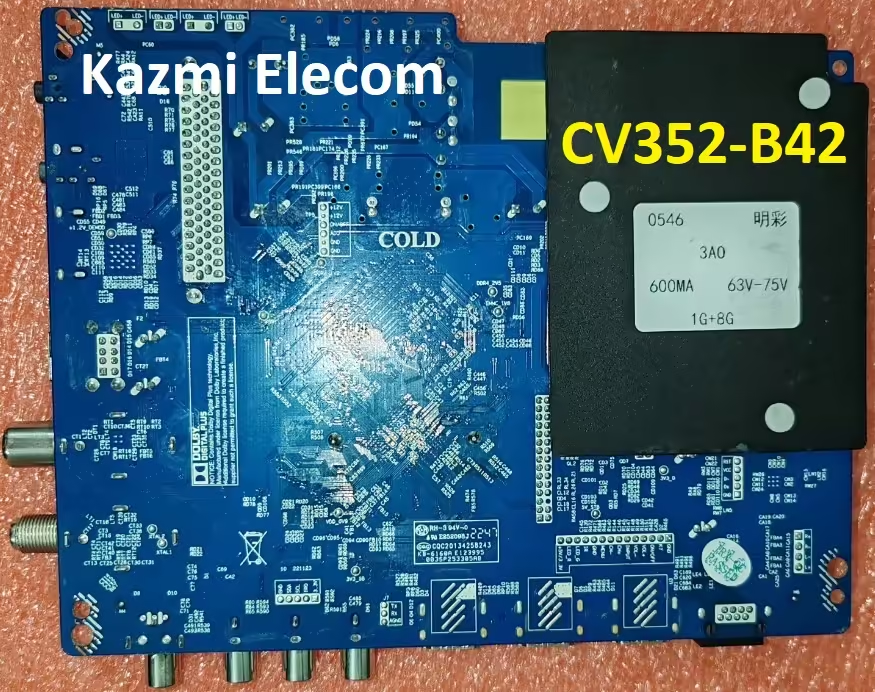
CV352-B42 Firmware Free Download

CV352-B42 Smart Android Board

CV352-B42 is an ATV & DTV Android network driver smart LED TV board with an FHD resolution of 1920×1080. CV352_B42 has a powerful wifi system. Smart FHD TV With Android Platform and great features to entertain Full HD Wide Screen with better-to-work SMART. CV352 B42 Smart Board has multiple ports of Mini A/V Input jack, Dual USB interface Ports, and Triple HDMI ports as well in addition to SCART. In this board, VGA connections are not available for PC or Laptops. CV352-B42 has a LAN/RJ45 Connector interface port for the wired internet network.

CV352.B42 is a Combo Network Triple play board that has a Digital TV tuner built-in in it (digital terrestrial receiver). The display picture quality and Graphics are very excellent and stunning. The Sound quality of the CV352.B42 Android board is also good. The viewing angle and the Response rate are very efficient. CV352.B42 China smart network board can support up to 32-55″ LED Panels. CV352.B42 firmware file is available for the technician’s support. This is a three-in-one Android smart network board in which Wifi, Power Module, Backlight controller module, and dual tuner are placed on a single piece of printed circuit motherboard.

Cv352-B42

Technical Specifications and Features:

Brand/Mark: LCD/LED Main Board (Android WIFI Network Drive Board)

Main Board: CV352-B42

Main Chipset:

OS: Android 13.0

CPU: Cortex-A53 Quad Core @ 1GHz

GPU: Mali450MP

CPU Frequency: 1GHz

GPU Frequency: 432MHz

Back Light V/C : 65-100V 680mA

Ram: 1 Gb

Rom: 8 Gb eMMC

Resolution: up to 1920×1080

Speakers: 2 x 8W

RF connectivity X 1
HDMI X 3
USB X 2
YPbPr X 1
HEADPHONES X 1
Scart 1
RJ45 X 1

Tuner: ATV & DTV

Firmware: CtvUpgrade.bin

Firmware Type: USB Updateable Firmware

Firmware Installation Guide: Click Here

Cv352-B42

Note: The following firmware is a USB bootable and EMC backup file. Kazmi Elecom Team is not responsible for any damage/loss caused by uploading/downloading the firmware. First, check and verify the main board then install software. If you are new and do not have enough knowledge of loading/installing software/firmware or dump files, or facing any issues during firmware installation then visit and read here first.

How to Download CV352-B42 Firmware Files:

Download all parts of the following given firmware and then extract any one of them you will get the folder. Now copy the files to USB. For more Details about the download process watch the video Click Here

How to Load Software:

  1. Transfer the required resolution file into a USB Disk
  2. Plugin the USB Disk into the Main Board
  3. Keep Pressing the Standby/Power button and Power on the board
  4. Wait until the LED light starts flashing
  5. Note: The USB file must be the name “CtvUpgrade.bin”

CV352-B42 firmware for free download:

Kazmi-Elecom

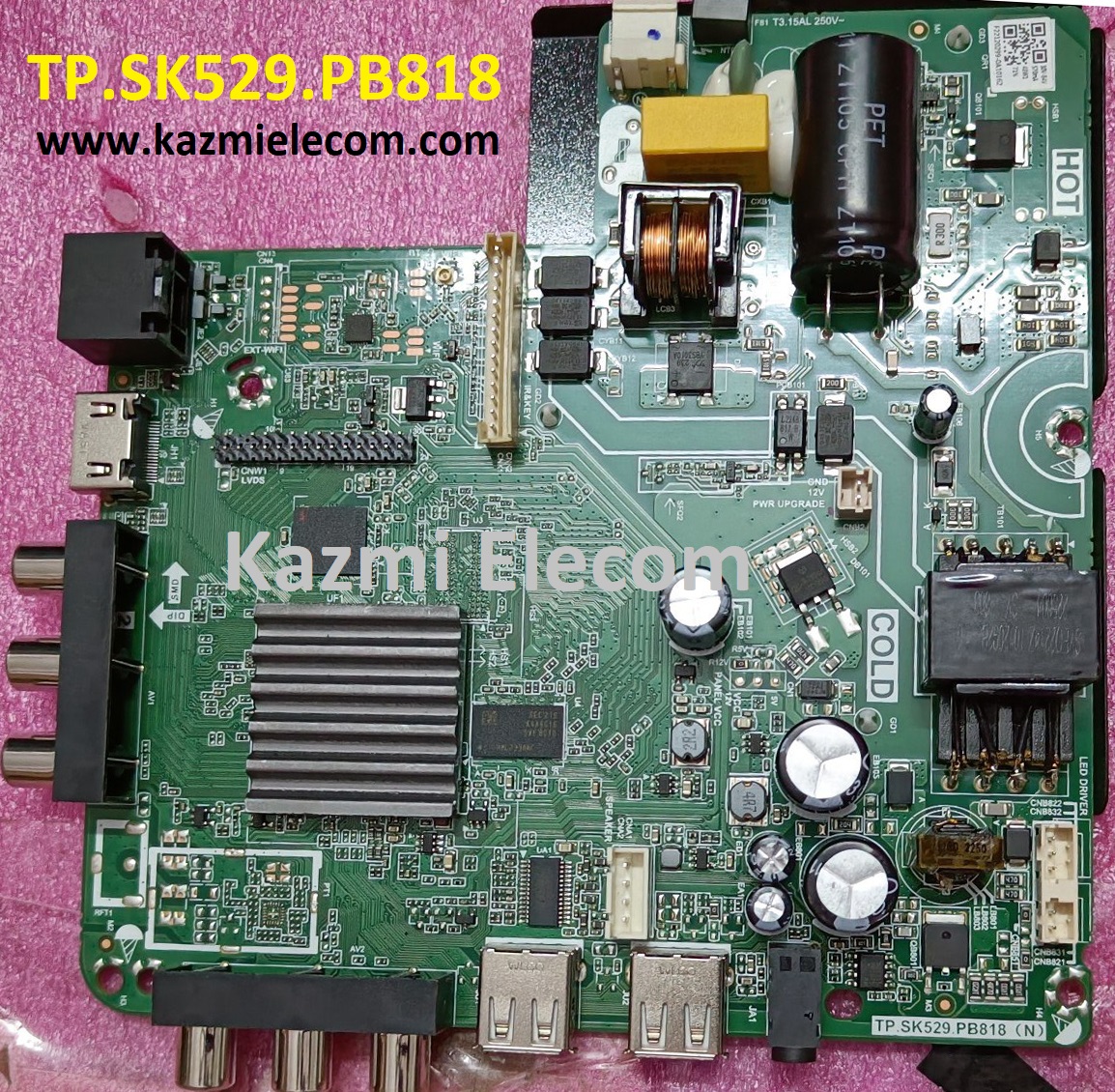
TP.SK529.PB818 Firmware Free Download

TP.SK529.PB818 Smart Android Board

TP.SK529.PB818 is an Android network driver smart LED TV board with an FHD resolution of 1920×1080. TP_SK529_PB818 has a powerful wifi system. Smart FHD TV With the latest Android Platform and great features to entertain Full HD Wide Screen with better-to-work SMART. TP SK529 PB818 Smart Board has multiple ports A/V, USB interface Ports, and a single HDMI port as well in addition to the VGA interface for computers. TP-SK529-PB818 has a LAN/RJ45 Connector interface port for the wired internet network.

TP.SK529.PB818 is a Combo Network Triple play board that has the Digital TV tuner built-in in it (DTMB/DVB-C/ATSC/ISDB-T). The Graphics and Sound quality of this android board are very good and the Response rate is very efficient. TP.SK529.PB818 China smart network board is the best fit for 32″ to 42″ LED Panels. TP.SK529.PB818 firmware file is available for the technician’s support. If you are facing any issues during firmware installation then visit and read here first.

Tp.sk529.Pb818

General Specifications:

Brand/Mark: Main Board (Android WIFI Network Drive Smart Board)

Main Board: TP.SK529.PB818

Main Chipset: HV352

Operating System: Android 9

CPU: Multi Core Arm Cortex A53 64-bit

GPU: Mali 450

CPU Frequency: 1.2GHz

GPU Frequency: 432MHz

RAM: 512MB

ROM: 4 Gb

Resolution: up to 1920×1080

Backlight: 35V-52V 25W480mA

Screen Size supported: 32 to 42 Inch

Audio Output power: 2x8W

Mirror Mode: Yes

Logo Change: Yes

Bluetooth: Yes

Tuner: SI2159

Input Voltage: 200-240V AC

Firmware Name: allupgrade_V3520N0E_4G_512M_68.bin,

Firmware Type: USB Updateable Firmware

Note The following given Software/firmware is USB upgradeable. Kazmi Elecom Team is not responsible for any type of damage/loss as a result of uploading/downloading the firmware.

How to Download Firmware Files:

Download all parts of the following given firmware/Software and then extract any one of them you will get the folder. Now copy the files to USB. For more Details about the download process watch the video Click Here

TP.SK529.PB818 Software file for free download:

Kazmi-Elecom

For video tutorials, visit “Kazmi Elecom” my YouTube channel.

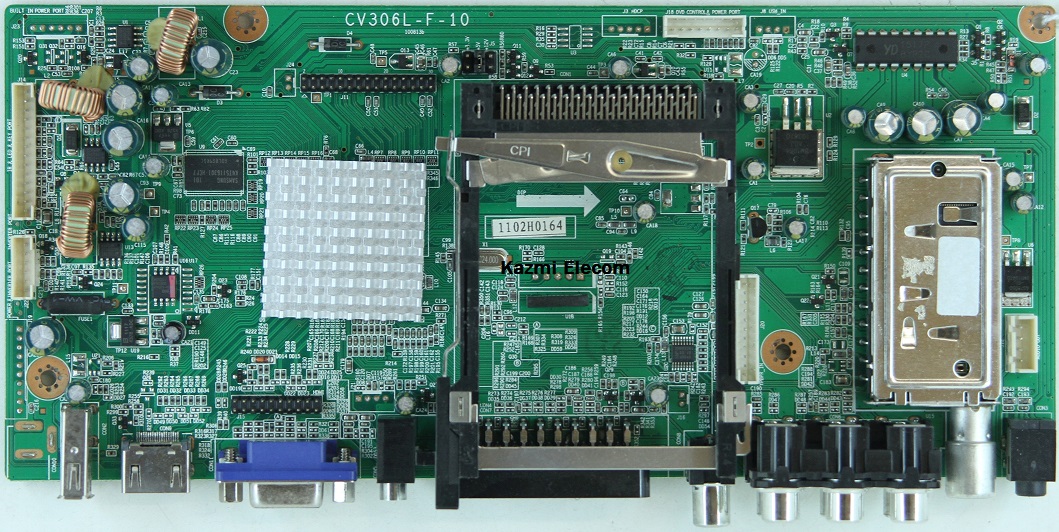
CV306L-F-10 Software Free Download

CV306L-F-10 LED TV Board

CV306L-F-10 is a simple ATV Driver Motherboard designed for LCD/LED TVs. This board is suitable for the Asia Pacific and the Middle East markets. This is not a Combo Board which means The main power module and LED Backlight Inverter Circuit module are required separately while ATV Card is builtin into this motherboard. This LED TV Board has all the features as per the latest requirements like HDMI input, USB interface, PC input, Component Input, TV, and Scart.CV306L-F-10 firmware files are given below for the technician’s support. If you are facing some issues during the loading or installing firmware files then read here first.

Cv306L-F-10

General Specifications:

Brand/Mark: Universal Board

Model: CV306H-K

Main Chip:

Product: LED TV

LED Backlight: 32-55 v/25w

Flash IC: 4Mb

Screen supported: 18.5″, 23.5″

Resolution: Up to 1920×1080

Sound IC: YD1517

Panel Voltage: 3.3V, 5V, 12V (Jumper Selector)

Power Input: 12V DC

Service Code:

Menu 8888

Note: The following firmware is a backup file. Kazmi Elecom Team is not responsible for any type of damage/loss as a result of uploading/downloading the firmware.

How to Download Firmware Files:

Download all parts of the following firmware and then extract any one of them you will get the folder. Now copy the files to USB. for More Detail about the download process watch the video Click Here

CV306L-F-10 firmware for free download:

Kazmi-Elecom

For video tutorials, visit “Kazmi Elecom” my youtube channel.

error: Content is protected !!