Tag Archives: kazmi elecom

T.RD8501.03 Software Free Download

T.RD8501.03 Universal Board

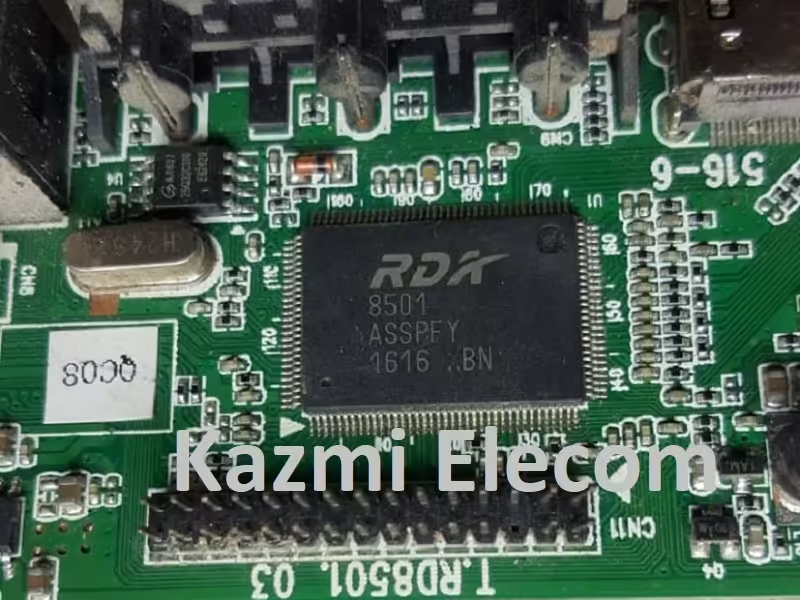
T.RD8501.03 is a universal LCD LED TV controller board. This board is multi-panel supported and multi-resolution supported with a maximum resolution of Full HD 1920×1080 pixels. It can be installed with 15-55-inch screen panels. It has multiple input interface ports such as USB, HDMI, VGA, RCA, and RF Tuner. It can be operated by a 12V DC power supply directly. It has a jumper setting for Panel screen power with different settings of 3.3V, 5V, and 12V.

Basic Info:

Model No. T.RD8501.03

Main Chipset: RD8501C

Display Format: up to 1920×1080

Aspect Ratio: 4:3, 16:9 & 16:10

Board Size: 168.00 X 42.0 (mm)

T.rd8501.03

General Specifications:

TV System: PAL/SECAM/NTSC

Panel Interface: Single channel or Dual channel LVDS

Key Button Functions: CH-/CH+/MENU/VOL-/VOL+Souce/Power

Multi-Language OSD: Yes

Input/Output Ports: HDMI, VGA, AV, USB, RF TV interface and Earphone Out

Audio O/P Power: 2 x 3 Watt (8 ohm)

Panel Voltage: +3.3V/+5V/+12V DC (jumping cap setting)

USB Port: Yes (Firmware Upgrade and Multimedia Playback Support)

USB File Format: Audio (Mp3, wma, m4a/aac), Video (avi, mp4, ts/trp, mkv/mov, mpg, dat, vob, rm/rmvb),                                                 Picture (Jpg, jpeg, bmp, png), Text (text)

IR Control: Yes (Controllable by Remote Control)

Electrical Parameters:

Working Input Voltage: DC +12 Volt

Maximum Current: 2000mA (Without Panel)

Standby Power: <0.2W (for motherboard only)

Maximum Current for USB: 500mA

How to Upgrade Firmware:

Step 1: Empty/format the USB disk

Step 2: Copy the required resolution program (*. Bin file) to the USB disk.

Step 3: Connect the USB disk with the Mainboard in the USB Port

Step 4: Connect the Keypad and IR

Step 5: Connect the power supply, and check the keyboard light. If there is a flashing light, that is in the written program, waiting for the light to turn to Green, work is done. If there is no flashing light, please cut off the power supply, then connect the USB once again, then connect the power supply again,

Factory Service Mode:

Menu+1147
T.rd8501.03

Note: The following T.RD8501.03 firmware is USB bootable. Kazmi Elecom Team is not responsible for any type of damage/loss as a result of uploading/downloading the firmware. First, check and verify the main board then install software. If you are new and do not have enough knowledge of loading/installing software/firmware or dump files, or facing any issues during firmware installation then visit and read here first. Always keep a backup before

How to Download:

Download the following given required resolution firmware and then extract it you will get the folder. Now copy the bin file to Pen drive and install it by USB. For More Details about the download, process watch the video Click Here

T.RD8501.03 Firmware All resolutions Free Download Here :

Download Button Kazmi Elecom

S.NO.BOARD/DESCRIPTIONDOWNLOAD
1T.RD8501.03_1024x768_516_ IR_00BF_CVT_7KEYDownload
2T.RD8501.03_1280x768_516_ IR_00BF_CVT_7KEYDownload
3T.RD8501.03_1280x1024_516_ IR_00BF_CVT_7KEYDownload
4T.RD8501.03_1366x768_516_ IR_00BF_CVT_7KEYDownload
5T.RD8501.03_1400x900_516_ IR_00BF_CVT_7KEYDownload
6T.RD8501.03_1400x1050_516_ IR_00BF_CVT_7KEYDownload
7T.RD8501.03_1600x900_516_ IR_00BF_CVT_7KEYDownload
8T.RD8501.03_1600x1200_516_ IR_00BF_CVT_7KEYDownload
9T.RD8501.03_1680x1050_516_ IR_00BF_CVT_7KEYDownload
10T.RD8501.03_1920x1080_516_ IR_00BF_CVT_7KEYDownload

Smart LED TV Mstar Android Recovery. Recover Boot Loop Smart LED TV without Loading Software
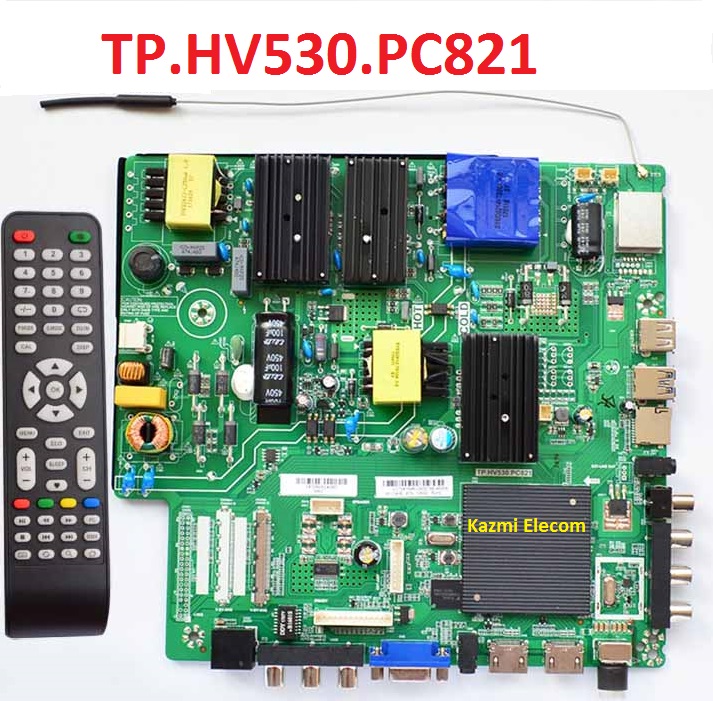
TP.HV530.PC821 SOFTWARE FREE DOWNLOAD

TP.HV530.PC821 4k LED TV Board

TP.HV530.PC821 is a 4K UHD LED TV driver board with a support resolution of 3840×2160. TP.HV530_PC821 is dedicated to 50/60 Hz screens. UHD TV With features to entertain ultra HD Wide-Screen. TP.HV530_PC821 has the full features of input interface connectivity. It has multiple ports like HDMI, AV, Headphones, VGA interface, Coaxial Out, USB ports, and RJ45 Ethernet port for wired internet connectivity. Its USB interface can be used for Firmware upgrades as well as for multimedia playback.

TP.HV530.A is a digital and analog TV board, it can receive analogtelevision (PAL/SECAM) and digital television (DVB-T) signals. The TP HV530 PC821 USB Upgrade Firmware file is given below for the Technician’s support. TP.HV530-PC821 Main Board is used for Haier, Akira, NPG, Myros, Zyneth, JTC, Aucma, and BBK LED TVs. TP-HV530-PC821 is also used for other Brand’s 4K Ultra HD LED TVs.

Tp.hv530.Pc821_Software

Specifications & Features:

Brand/Mark: China Universal 4K Three-In-One Motherboard

Main Board: TP.HV530.PC821

Backlight :  111-180V 80W 450mA

OS: Android 4.4

CPU Frequency: 1.2 GHz

GPU Frequency: 432 MHz

Ram: 768 Mb DDR

Rom: 8 Gb eMMC

Screen Supported: 42-65″

Resolution: up to 3840X2160

Service Code: 2580

Power Consumption: 108 Watt

Firmware: allupgrade_v320_512M_xx.bin

Firmware Type: USB Upgrade Firmware

Note: The following given software/firmware is USB upgradeable. Kazmi Elecom Team is not responsible for any type of damage/loss as a result of uploading/downloading the firmware. First, check and verify the main board then install software. If you are new and do not have enough knowledge of loading/installing software/firmware or dump files, or facing any issues during firmware installation then visit and read here first.

How to Download:

Download all parts of the following given firmware/software and then extract any one of them you will get the folder. Now copy the files to USB. For more Details about the download process watch the video Click Here

TP.HV530.PC821 firmware for free download:

Kazmi-Elecom

S.NO.BOARD/DESCRIPTIONDOWNLOAD LINK
1TP.HV530.PC821_1920x1080.part1Download
TP.HV530.PC821_1920x1080.part2Download
TP.HV530.PC821_1920x1080.part3Download
TP.HV530.PC821_1920x1080.part4Download
2TP.HV530.PC821_3840x2160.part1Download
TP.HV530.PC821_3840x2160.part2Download
TP.HV530.PC821_3840x2160.part3Download
TP.HV530.PC821_3840x2160.part4Download
3TP.HV530.PC821_1920x1080_4G_M90_REF36.part01Download
TP.HV530.PC821_1920x1080_4G_M90_REF36.part02Download
TP.HV530.PC821_1920x1080_4G_M90_REF36.part03Download
TP.HV530.PC821_1920x1080_4G_M90_REF36.part04Download
TP.HV530.PC821_1920x1080_4G_M90_REF36.part05Download
4TP.HV530.PC821-3840x2160-8G-REF36.part1Download
TP.HV530.PC821-3840x2160-8G-REF36.part2Download
5TP.HV530.PC821-3840x2160-8G-REF65.part1Download
TP.HV530.PC821-3840x2160-8G-REF65.part2Download
6TP.HV530.PC821-3840x2160-8G-Starlife-Ref60.part1Download
TP.HV530.PC821-3840x2160-8G-Starlife-Ref60.part2Download
7TP.HV530.PC821-3840x2160-8G-Starlife-Ref70.part1Download
TP.HV530.PC821-3840x2160-8G-Starlife-Ref70.part2Download
8TP.HV530.PC821-3840x2160-4G-NIKAI-REF56.part1Download
TP.HV530.PC821-3840x2160-4G-NIKAI-REF56.part2Download
9TP.HV530.PC821_3840X2160_8G_Samsung_Pakistan.part01Download
TP.HV530.PC821_3840X2160_8G_Samsung_Pakistan.part02Download
TP.HV530.PC821_3840X2160_8G_Samsung_Pakistan.part03Download
TP.HV530.PC821_3840X2160_8G_Samsung_Pakistan.part04Download
TP.HV530.PC821_3840X2160_8G_Samsung_Pakistan.part05Download

For video tutorials, visit “Kazmi Elecom” my YouTube channel.

CV628H-B42 Software Free Download

CV628H-B42

CV628H-B42 is a smart android network driver board for lcd/led tv.

Cv628H-B42_Software

Technical Specifications:

Brand/Mark: LCD/LED Main Board (Android WIFI Network Drive Board)

Main Borad : CV628H-B42

OS: Android 4.4

CPU: Dual Core PB803

Size: 15 * 19 cm

Back Light V/C : 65v-80v 560MA

Ram: 512 Mb DDR

Rom: 4 Gb eMMC

Resolution: up to 1920×1080


Service Code:

Menu+1147

Note: The following given software/firmware is USB upgradeable. Kazmi Elecom Team is not responsible for any type of damage/loss as a result of uploading/downloading the firmware. If you are new and do not have enough knowledge of loading or installing software/firmware or dump files then read here first.

How to Download:

Download all parts of the following given firmware/software and then extract any one of them you will get the folder. Now copy the files to USB. for More Detail about the download process watch the video Click Here

Cv628H-B42_Firmware

How to Load Software:

  1. Transfer the required resolution file into USB Disk
  2. Plugin the USB Disk into Main Board
  3. Keep Pressing the Standby/Power button and Power on the board
  4. Wait until the led light starts flashing
  5. Note: USB file must be the name of “CtvUpgrade.bin”

CV628H-B42 firmware for free download:

Download Button Kazmi Elecom

S.NO.BOARD/DESCRIPTIONDOWNLOAD LINK
1CV628H-B42_1366x768_Samsung_Flip_Tested.part1Download
CV628H-B42_1366x768_Samsung_Flip_Tested.part2Download
CV628H-B42_1366x768_Samsung_Flip_Tested.part3Download
2CV628H-B42_1366x768_Sony.part1Download
CV628H-B42_1366x768_Sony.part2Download
CV628H-B42_1366x768_Sony.part3Download
CV628H-B42_1366x768_Sony.part4Download
3CV628H-B42_1366×768_China_Flip_Tested.part1Download
CV628H-B42_1366×768_China_Flip_Tested.part2Download
CV628H-B42_1366×768_China_Flip_Tested.part3Download
CV628H-B42_1366×768_China_Flip_Tested.part4Download
4CV628H-B42_1920x1080_China.part1Download
CV628H-B42_1920x1080_China.part2Download
CV628H-B42_1920x1080_China.part3Download
CV628H-B42_1920x1080_China.part4Download
5CV628H-B42_1920x1080_Samsung.part1Download
CV628H-B42_1920x1080_Samsung.part2Download
CV628H-B42_1920x1080_Samsung.part3Download
CV628H-B42_1920x1080_Samsung.part4Download
6CV628H-B42_1366x768_Sony_Normal (Seedha)_Tested.part1Download
CV628H-B42_1366x768_Sony_Normal (Seedha)_Tested.part2Download
CV628H-B42_1366x768_Sony_Normal (Seedha)_Tested.part3Download
CV628H-B42_1366x768_Sony_Normal (Seedha)_Tested.part4Download
CV628H-B42_1366x768_Sony_Normal (Seedha)_Tested.part5Download
7CV628H-B42_1366x768_Sony_Flip (Ulta).part1Download
CV628H-B42_1366x768_Sony_Flip (Ulta).part2Download
CV628H-B42_1366x768_Sony_Flip (Ulta).part3Download
CV628H-B42_1366x768_Sony_Flip (Ulta).part4Download
CV628H-B42_1366x768_Sony_Flip (Ulta).part5Download
8CV628H-B42_1366x768_Samsung_EMMC.part01Download
CV628H-B42_1366x768_Samsung_EMMC.part01Download
9CV628H-B42_1366x768_SamsungIR.part1Download
CV628H-B42_1366x768_SamsungIR.part2Download
CV628H-B42_1366x768_SamsungIR.part3Download
CV628H-B42_1366x768_SamsungIR.part4Download
CV628H-B42_1366x768_SamsungIR.part5Download
10CV628H-B42_1366x768_Kaiyue-Kazakhstan_USB.part1Download
CV628H-B42_1366x768_Kaiyue-Kazakhstan_USB.part2Download
CV628H-B42_1366x768_Kaiyue-Kazakhstan_USB.part3Download
CV628H-B42_1366x768_Kaiyue-Kazakhstan_USB.part4Download
CV628H-B42_1366x768_Kaiyue-Kazakhstan_USB.part5Download
11CV628H-B42_1366x768_MAXWELL-Tunisia_USB.part1Download
CV628H-B42_1366x768_MAXWELL-Tunisia_USB.part2Download
CV628H-B42_1366x768_MAXWELL-Tunisia_USB.part3Download
CV628H-B42_1366x768_MAXWELL-Tunisia_USB.part4Download
CV628H-B42_1366x768_MAXWELL-Tunisia_USB.part5Download
12CV628H-B42_1366x768_Pakistan_USB.part1Download
CV628H-B42_1366x768_Pakistan_USB.part2Download
CV628H-B42_1366x768_Pakistan_USB.part3Download
CV628H-B42_1366x768_Pakistan_USB.part4Download
CV628H-B42_1366x768_Pakistan_USB.part5Download
13CV628H-B42_1920x1080_Kuwait_USB.part1Download
CV628H-B42_1920x1080_Kuwait_USB.part2Download
CV628H-B42_1920x1080_Kuwait_USB.part3Download
CV628H-B42_1920x1080_Kuwait_USB.part4Download
CV628H-B42_1920x1080_Kuwait_USB.part5Download
14CV628H-B42_1920x1080_LLC-DUBAI_USB.part1Download
CV628H-B42_1920x1080_LLC-DUBAI_USB.part2Download
CV628H-B42_1920x1080_LLC-DUBAI_USB.part3Download
CV628H-B42_1920x1080_LLC-DUBAI_USB.part4Download
CV628H-B42_1920x1080_LLC-DUBAI_USB.part5Download
15CV628H-B42_1366x768_India_USB.part1Download
CV628H-B42_1366x768_India_USB.part2Download
CV628H-B42_1366x768_India_USB.part3Download
CV628H-B42_1366x768_India_USB.part4Download
CV628H-B42_1366x768_India_USB.part5Download
16CV628H-B42_1366x768_Samsung_Pakistan.part01Download
CV628H-B42_1366x768_Samsung_Pakistan.part02Download
17CV628H-B42_1920x1080_Changhong.part1Download
CV628H-B42_1920x1080_Changhong.part2Download
CV628H-B42_1920x1080_Changhong.part3Download
CV628H-B42_1920x1080_Changhong.part4Download
CV628H-B42_1920x1080_Changhong.part5Download
18CV628H-B42_1920x1080_Samsung_Pakistan.part1Download
CV628H-B42_1920x1080_Samsung_Pakistan.part2Download
CV628H-B42_1920x1080_Samsung_Pakistan.part3Download
CV628H-B42_1920x1080_Samsung_Pakistan.part4Download
CV628H-B42_1920x1080_Samsung_Pakistan.part5Download
19CV628H-B42_1920x1080_SONY.part1Download
CV628H-B42_1920x1080_SONY.part2Download
CV628H-B42_1920x1080_SONY.part3Download
CV628H-B42_1920x1080_SONY.part4Download
CV628H-B42_1920x1080_SONY.part5Download
20CV628H-B42_1920x1080_SONY_3D.part1Download
CV628H-B42_1920x1080_SONY_3D.part2Download
CV628H-B42_1920x1080_SONY_3D.part3Download
CV628H-B42_1920x1080_SONY_3D.part4Download
CV628H-B42_1920x1080_SONY_3D.part5Download
21CV628H-B42_1920x1080_WELCOME_India.part1Download
CV628H-B42_1920x1080_WELCOME_India.part2Download
CV628H-B42_1920x1080_WELCOME_India.part3Download
CV628H-B42_1920x1080_WELCOME_India.part4Download
CV628H-B42_1920x1080_WELCOME_India.part5Download
22CV628H-B42_1920x1080_Starsat_LE4348_Smart.part1Download
CV628H-B42_1920x1080_Starsat_LE4348_Smart.part2Download
CV628H-B42_1920x1080_Starsat_LE4348_Smart.part3Download
CV628H-B42_1920x1080_Starsat_LE4348_Smart.part4Download
CV628H-B42_1920x1080_Starsat_LE4348_Smart.part5Download
23CV628H-B42_1920x1080_Extra_Kuwait.part1Download
CV628H-B42_1920x1080_Extra_Kuwait.part2Download
CV628H-B42_1920x1080_Extra_Kuwait.part3Download
CV628H-B42_1920x1080_Extra_Kuwait.part4Download
CV628H-B42_1920x1080_Extra_Kuwait.part5Download
24CV628H-B42_1366x768_Conic_India.part01Download
CV628H-B42_1366x768_Conic_India.part02Download
25CV628H-B42_1366x768_Mitashi_India.part1Download
CV628H-B42_1366x768_Mitashi_India.part2Download
CV628H-B42_1366x768_Mitashi_India.part3Download
CV628H-B42_1366x768_Mitashi_India.part4Download
CV628H-B42_1366x768_Mitashi_India.part5Download
26CV628H-B42_1920x1080_Mitashi_India.part1Download
CV628H-B42_1920x1080_Mitashi_India.part2Download
CV628H-B42_1920x1080_Mitashi_India.part3Download
CV628H-B42_1920x1080_Mitashi_India.part4Download
CV628H-B42_1920x1080_Mitashi_India.part5Download
CV628H-B42_1920x1080_Mitashi_India.part6Download
CV628H-B42_1920x1080_Mitashi_India.part7Download
CV628H-B42_1920x1080_Mitashi_India.part8Download
CV628H-B42_1920x1080_Mitashi_India.part9Download
CV628H-B42_1920x1080_Mitashi_India.part10Download
27CV628H-B42_1366x768_VU_California.part1Download
CV628H-B42_1366x768_VU_California.part2Download
CV628H-B42_1366x768_VU_California.part3Download
CV628H-B42_1366x768_VU_California.part4Download
CV628H-B42_1366x768_VU_California.part5Download
28CV628H-B42_1920x1080_CONIC_India.part01Download
CV628H-B42_1920x1080_CONIC_India.part02Download

Mystery MTV-4225LT2 Software Free Download

Mystery MTV-4225LT2 LED TV

Mystery MTV-4225LT2 is a 42 inches HD Ready LED TV with a resolution of 1366/768. MTV-4225LT2 is a non-smart tv. MTV-4225LT2 led TV has all the latest features and connectivity ports as HDMI port and USB port, Dual Audio Video with a 60 Hz refresh rate. It has a powerful sound output system. Its aspect ratio is 16:09 and its dynamic ratio is 150000:1.

Its view angle is horizontal: 170 degrees and vertical: 160 degrees. MTV-4225LT2 has additional edge led technology, smart power saving, digital noise reduction, intelligent picture technology, eye-safe t matrix, brightness is 250 cd/m2 and response time is 5 ms. Mystery Software file is given below for the technician’s support. For more Mystery Software collection visit here.

Mystery Mtv-4225Lt2

General Specifications & Features:

Make: Mystery

Model: MTV-4225LT2

Display Size: “42

Storage Memory: MB

HD Technology: HD

Panel: HD LVF420CMOT

No of HDMI Ports:

No of USB Ports:

No of AV Ports:

Speaker Output RMS:

Power Requirement: AC 110 – 240 V, 50/60 Hz

Power Consumption: W, 0.5 W (Standby)

Software Type: Backup Dump

Software Name:

Main Board: 40-T31TOT-MAB2HG

Note: Following given Software is backup dump. Kazmi Elecom Team is not responsible for any type of damage/loss as a result of uploading/downloading the Software.If you are new and do not have enough knowledge of loading or installing software/firmware or dump files then read here first.

Kazmi-Elecom

Mystery MTV-4225LT2 Software file free download.

For video tutorials, visit “Kazmi Elecom” my youtube channel.

Mystery MTV-323 Software Free Download

Mystery MTV-323 LED TV

Mystery MTV-323 is a 32 inches HD Ready LED TV with a resolution of 1366/768. MTV-323 is a non-smart tv. MTV-323 led TV has all the latest features and connectivity ports as HDMI port and USB port, Dual Audio Video with a 60 Hz refresh rate. It has a powerful sound output system. Its aspect ratio is 16:09 and its dynamic ratio is 150000:1.

Its view angle is horizontal: 170 degrees and vertical: 160 degrees. MTV-323 has additional edge led technology, smart power saving, digital noise reduction, intelligent picture technology, eye-safe t matrix, brightness is 250 cd/m2 and response time is 5 ms. Mystery Software file is given below for the technician’s support. For more Mystery Software collection visit here.

Mystery Mtv-323

General Specifications & Features:

Make: Mystery

Model: MTV-323

Display Size: “32

Storage Memory: MB

HD Technology: HD

Panel: HD LSC320AN09-H

No of HDMI Ports:

No of USB Ports:

No of AV Ports:

Speaker Output RMS:

Power Requirement: AC 110 – 240 V, 50/60 Hz

Power Consumption: W, 0.5 W (Standby)

Software Type: Backup Dump

Software Name:

Main Board: MS34631-ZC01-01

Note: Following given Software is backup dump. Kazmi Elecom Team is not responsible for any type of damage/loss as a result of uploading/downloading the Software.If you are new and do not have enough knowledge of loading or installing software/firmware or dump files then read here first.

Kazmi-Elecom

Mystery MTV-323 Software file free download.

For video tutorials, visit “Kazmi Elecom” my youtube channel.

Mystery MTV-4230LT2 Software Free Download

Mystery MTV-4230LT2 LED TV

Mystery MTV-4230LT2 is a 42 inches HD Ready LED TV with a resolution of 1366/768. MTV-4230LT2 is a non-smart tv. MTV-4230LT2 led TV has all the latest features and connectivity ports as HDMI port and USB port, Dual Audio Video with a 60 Hz refresh rate. It has a powerful sound output system. Its aspect ratio is 16:09 and its dynamic ratio is 150000:1.

Its view angle is horizontal: 170 degrees and vertical: 160 degrees. MTV-4230LT2 has additional edge led technology, smart power saving, digital noise reduction, intelligent picture technology, eye-safe t matrix, brightness is 250 cd/m2 and response time is 5 ms. Mystery Software file is given below for the technician’s support. For more Mystery Software collection visit here.

Mystery Mtv-4230Lt2

General Specifications & Features:

Make: Mystery

Model: MTV-4230LT2

Display Size: “42

Storage Memory: MB

HD Technology: HD

Panel: HD V420HJ2-P01

No of HDMI Ports:

No of USB Ports:

No of AV Ports:

Speaker Output RMS:

Power Requirement: AC 110 – 240 V, 50/60 Hz

Power Consumption: W, 0.5 W (Standby)

Software Type: Backup Dump

Software Name:

Main Board: MS34630-ZC01-01

Note: Following given Software is backup dump. Kazmi Elecom Team is not responsible for any type of damage/loss as a result of uploading/downloading the Software.If you are new and do not have enough knowledge of loading or installing software/firmware or dump files then read here first.

Kazmi-Elecom

Mystery MTV-4230LT2 Software file free download.

For video tutorials, visit “Kazmi Elecom” my youtube channel.

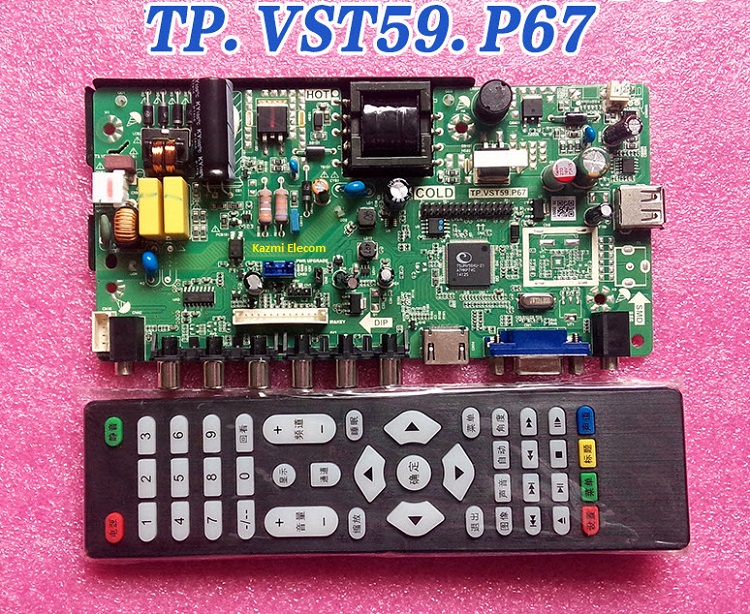
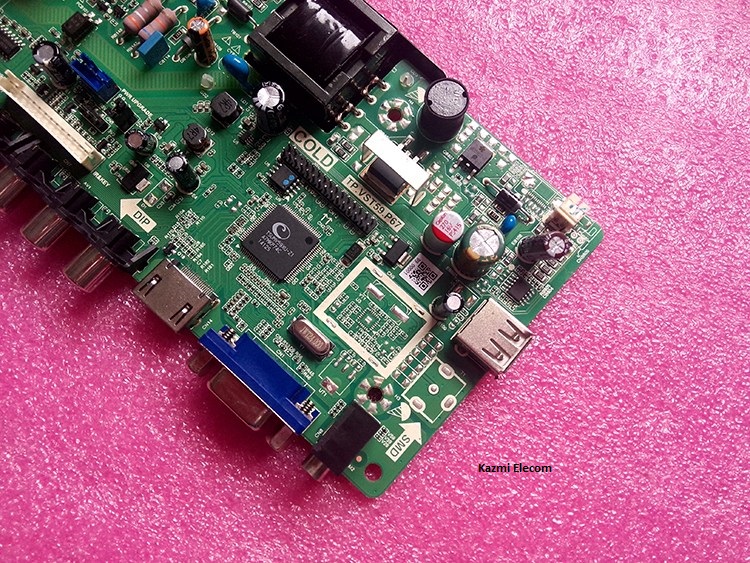
TP.VST59.P67 Software Free Download

TP.VST59.P67 Universal LCD/LED Controller Board

TP.VST59.P67 is a non-smart LCD/LED TV combo Controller driver board.

Basic Info:

Model No. TP.VST59.P67 (Combo Board)

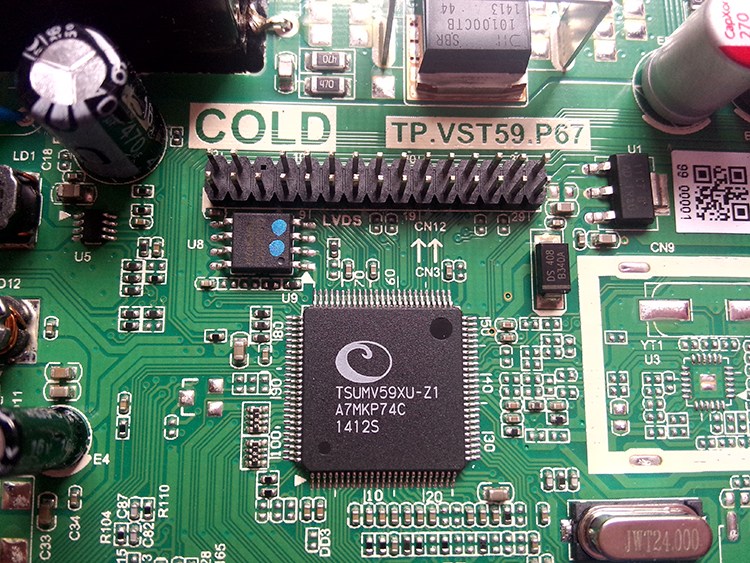
Main Chipset: TSUMV59XU-Z1

LED Backlight: 220mA to 300mA

Display Format: up to 1920×1200

Panel Supported: 19″ t0 26″

Aspect Ratio: 4:3, 16:9 & 16:10

Tp.vst59.P67

Electrical Parameters:

Working Input Voltage: AC 220V

Maximum Current: 3000mA (Without Panel)

Standby Power: <0.2W (for the motherboard only)

Maximum Current for USB: 500mA

Tp.vst59.P67_Firmware

How to Upgrade Firmware:

Step 1: Empty the U disk

Step 2: Copy the corresponding resolution program (*. Bin file) to the U disk.

Step 3: Connect the U disk with Mainboard

Step 4: Connect the Keypad and IR also

Step 5: Connect the power supply, check the keyboard light. If there is a flashing light, that is in the written program, waiting for the light turn to Green, work is done. If there is no flashing light, please cut off the power supply, then connect the USB once again, then connect the power supply again,

Factory Service Mode:

Menu+1147

Note: The following firmware is a USB Boot/dump backup. Kazmi Elecom Team is not responsible for any type of damage/loss as a result of uploading/downloading the firmware. If you are new and do not have enough knowledge of loading or installing software/firmware or dump files then read here first.

How to Download Firmware Files:

Download the following firmware and then extract you will get the folder. Now load the file by a programmer. For More Detail about the download, process watch the video Click Here

Tp.vst59.P67_Software

TP.VST59.P67 Firmware All resolutions Free Download Here :

Kazmi-Elecom

S.NO.BOARD/DESCRIPTIONDOWNLOAD LINK
1T.VST59.P67_General_1024x768_NormalDownload
2T.VST59.P67_General_1366x768_NormalDownload
3T.VST59.P67_General_1600x900_NormalDownload
4T.VST59.P67_General_1680x1050_NormalDownload
5T.VST59.P67_General_1920x1080_NormalDownload
6T.VST59.P67_General_1920x1200_NormalDownload
7T.VST59.P67_Panel_1366x768_NormalDownload
8T.VST59.P67_Panel_1920x1080_NormalDownload
9TP.VST59.P67_General_1024x768_MirrorDownload
10TP.VST59.P67_General_1366x768_MirrorDownload
11TP.VST59.P67_General_1600x900_MirrorDownload
12TP.VST59.P67_General_1680x1050_MirrorDownload
13TP.VST59.P67_General_1920x1080_MirrorDownload
14TP.VST59.P67_General_1920x1200_MirrorDownload
15TP.VST59.P67_Panel_1366x768_MirrorDownload
16TP.VST59.P67_Panel_1920x1080_MirrorDownload
17TP.VST59.P67_KONKA_LED24AS811-W25Q32FVDownload
18TP.VST59.P67_1366x768_Samsung_Backup DumpDownload
19TP.VST59.P67_1920x1080_Sony_Backup DumpDownload

Mystery MTV-4324LT2 Software Free Download

Mystery MTV-4324LT2 LED TV

Mystery MTV-4324LT2 is a 43 inches HD Ready LED TV with a resolution of 1366/768. MTV-4324LT2 is a non-smart tv. MTV-4324LT2 led TV has all the latest features and connectivity ports as HDMI port and USB port, Dual Audio Video with a 60 Hz refresh rate. It has a powerful sound output system. Its aspect ratio is 16:09 and its dynamic ratio is 150000:1.

Its view angle is horizontal: 170 degrees and vertical: 160 degrees. MTV-4324LT2 has additional edge led technology, smart power saving, digital noise reduction, intelligent picture technology, eye-safe t matrix, brightness is 250 cd/m2 and response time is 5 ms. Mystery Software file is given below for the technician’s support. For more Mystery Software collection visit here.

Mystery Mtv-4324Lt2

General Specifications & Features:

Make: Mystery

Model: MTV-4324LT2

Display Size: “43

Storage Memory: MB

HD Technology: HD

Panel: HD BOEI430WU1

No of HDMI Ports:

No of USB Ports:

No of AV Ports:

Speaker Output RMS:

Power Requirement: AC 110 – 240 V, 50/60 Hz

Power Consumption: W, 0.5 W (Standby)

Software Type: Backup Dump

Software Name:

Main Board: TP.MS3463S.PB801

Note: Following given Software is backup dump. Kazmi Elecom Team is not responsible for any type of damage/loss as a result of uploading/downloading the Software.If you are new and do not have enough knowledge of loading or installing software/firmware or dump files then read here first.

Kazmi-Elecom

Mystery MTV-4324LT2 Software file free download.

For video tutorials, visit “Kazmi Elecom” my youtube channel.

Mystery MTV-4333LT2 Software Free Download

Mystery MTV-4333LT2 LED TV

Mystery MTV-4333LT2 is a 43 inches HD Ready LED TV with a resolution of 1366/768. MTV-4333LT2 is a non-smart tv. MTV-4333LT2 led TV has all the latest features and connectivity ports as HDMI port and USB port, Dual Audio Video with a 60 Hz refresh rate. It has a powerful sound output system. Its aspect ratio is 16:09 and its dynamic ratio is 150000:1.

Its view angle is horizontal: 170 degrees and vertical: 160 degrees. MTV-4333LT2 has additional edge led technology, smart power saving, digital noise reduction, intelligent picture technology, eye-safe t matrix, brightness is 250 cd/m2 and response time is 5 ms. Mystery Software file is given below for the technician’s support. For more Mystery Software collection visit here.

Mystery Mtv-4333Lt2

General Specifications & Features:

Make: Mystery

Model: MTV-4333LT2

Display Size: “43

Storage Memory: MB

HD Technology: HD

Panel: HD LC430DUY-SHA1

No of HDMI Ports:

No of USB Ports:

No of AV Ports:

Speaker Output RMS:

Power Requirement: AC 110 – 240 V, 50/60 Hz

Power Consumption: W, 0.5 W (Standby)

Software Type: Backup Dump

Software Name:

Main Board: MS36633-ZC01-01

Note: Following given Software is backup dump. Kazmi Elecom Team is not responsible for any type of damage/loss as a result of uploading/downloading the Software.If you are new and do not have enough knowledge of loading or installing software/firmware or dump files then read here first.

Kazmi-Elecom

Mystery MTV-4333LT2 Software file free download.

For video tutorials, visit “Kazmi Elecom” my youtube channel.

Mystery MTV-3234LT2 Software Free Download

Mystery MTV-3234LT2 LED TV

Mystery MTV-3234LT2 is a 32 inches HD Ready LED TV with a resolution of 1366/768. MTV-3234LT2 is a non-smart tv. MTV-3234LT2 led TV has all the latest features and connectivity ports as HDMI port and USB port, Dual Audio Video with a 60 Hz refresh rate. It has a powerful sound output system. Its aspect ratio is 16:09 and its dynamic ratio is 150000:1.

Its view angle is horizontal: 170 degrees and vertical: 160 degrees. MTV-3234LT2 has additional edge led technology, smart power saving, digital noise reduction, intelligent picture technology, eye-safe t matrix, brightness is 250 cd/m2 and response time is 5 ms. Mystery Software file is given below for the technician’s support. For more Mystery Software collection visit here.

Mystery Mtv-3234Lt2

General Specifications & Features:

Make: Mystery

Model: MTV-3234LT2

Display Size: “32

Storage Memory: MB

HD Technology: HD

Panel: HD V320BJ6-Q01

No of HDMI Ports:

No of USB Ports:

No of AV Ports:

Speaker Output RMS:

Power Requirement: AC 110 – 240 V, 50/60 Hz

Power Consumption: W, 0.5 W (Standby)

Software Type: Backup Dump

Software Name:

Main Board: MS36631-ZC01-01

Note: Following given Software is backup dump. Kazmi Elecom Team is not responsible for any type of damage/loss as a result of uploading/downloading the Software.If you are new and do not have enough knowledge of loading or installing software/firmware or dump files then read here first.

Kazmi-Elecom

Mystery MTV-3234LT2 Software file free download.

For video tutorials, visit “Kazmi Elecom” my youtube channel.

error: Content is protected !!