Tag Archives: kazmi elecom

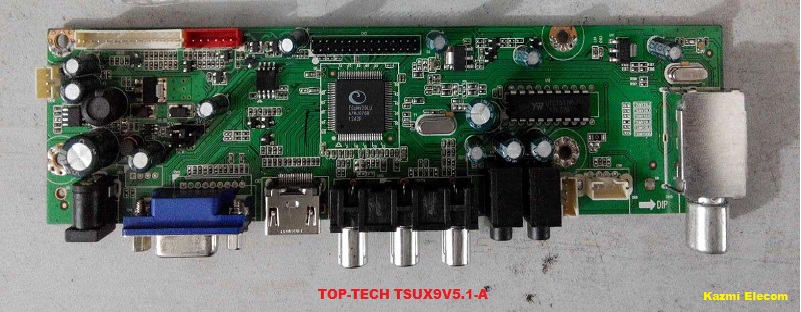
TOP-TECH TSUX9V5 Software Free Download

TOP-TECH TSUX9V5 LED Universal Controller

  • TOP-TECH TSUX9V5.0
  • TOP-TECH TSUX9V5.1
  • TOP-TECH TSUX9V5.1-A
  • TOP-TECH TSUX9V5.1-C
  • TOP-TECH TSUX9V5.1-D
  • TOP-TECH TSUX9V5.3
  • VD-TSU59V5.1D-XC

Tsux9V5.1-C_Software

Tsux9V5.1_Firmware

Basic Info:

Model No. TSUX9V5.x

Main Chipset: TSUMV59XU-Z1 & TSUMV29LU

Trademark: TOP-TECH

Display Format: up to 1920×1200

Aspect Ratio: 4:3, 16:9 & 16:10

General Specifications:

TV System: PAL/SECAM/NTSC

Panel Interface: Single channel or Dual channel LVDS

Key Button Functions: CH-/CH+/MENU/VOL-/VOL+Souce/Power

Multi-Language OSD: Yes

Input/Output Ports: HDMI, VGA, AV, USB, RF TV interface and Earphone Out

Audio O/P Power: 2 x 3 Watt (8 ohm)

Panel Voltage: +3.3V/+5V/+12V DC (jumping cap setting)

USB Port: Yes (Firmware Upgrade and Multimedia Playback Support)

USB File Format: Audio (Mp3, wma, m4a/aac), Video (avi, mp4, ts/trp, mkv/mov, mpg, dat, vob, rm/rmvb),                                                 Picture (Jpg, jpeg, bmp, png), Text (text)

IR Control: Yes (Controllable by Remote Control)

Electrical Parameters:

Working Input Voltage: DC +12 Volt

Maximum Current: 2000mA (Without Panel)

Standby Power: <0.2W (for the motherboard only)

Maximum Current for USB: 500mA

How to Upgrade Firmware:

Step 1: Empty the U disk

Step 2: Copy the corresponding resolution program to the U disk base on your screen size.

Step 3: Connect the U disk with the Mainboard

Step 4: Connect the Keyboard and TV Mainboard

Step 5: Connect the power supply, and check the keyboard light. If there is a flashing light, that is in the written program, waiting for the light to turn to Green, work is done. If there is no flashing light, please cut off the power supply, then connect the USB once again, then connect the power supply again,

Factory Service Mode:

Menu+2580

Note: Following firmware collection is USB bootable. Kazmi Elecom Team is not responsible for any type of damage/loss as a result of uploading/downloading the firmware. If you are new and do not have enough knowledge of loading or installing software/firmware or dump files then read here first.

How to Download Firmware File:

Download your required file of the following firmware and then extract it you will get the folder. Now you can write the file with a programming tool. for More Detail about the download, process watch the video Click Here

TSUX9V5 Firmware All resolutions Free Download Here :

Kazmi-Elecom

S.NO.BOARD/DESCRIPTIONDOWNLOAD LINK
1TOP-TECH_TSU29V5.0_1920x1080Download
2TOP-TECH_TSUX9V5.1_800x600Download
3TOP-TECH_TSUX9V5.1_1280x1024Download
4TOP-TECH_TSUX9V5.1_1366x768Download
5TOP-TECH_TSUX9V5.1_1920x1080Download
6TOP-TECH_TSUX9V5.1-A_1024x768Download
7TOP-TECH_TSUX9V5.1-A_1280x768Download
8TOP-TECH_TSUX9V5.1-A_1280x800Download
9TOP-TECH_TSUX9V5.1-A_1280x1024Download
10TOP-TECH_TSUX9V5.1-A_1366x768Download
11TOP-TECH_TSUX9V5.1-A_1400x1050Download
12TOP-TECH_TSUX9V5.1-A_1440x900Download
13TOP-TECH_TSUX9V5.1-A_1600x1200Download
14TOP-TECH_TSUX9V5.1-A_1680x1050Download
15TOP-TECH_TSUX9V5.1-A_1920x1080Download
16TOP-TECH_TSUX9V5.1-C_1280X1024_7KEY_TestedDownload
17TOP-TECH_TSU59V5.1-C_1920x1080Download
18TOP-TECH_TSUX9V5.1-D_1024x768Download
19TOP-TECH_TSUX9V5.1-D_1280x768Download
20TOP-TECH_TSUX9V5.1-D_1280x800Download
21TOP-TECH_TSUX9V5.1-D_1280x1024Download
22TOP-TECH_TSUX9V5.1-D_1366x768Download
23TOP-TECH_TSUX9V5.1-D_1440x900Download
24TOP-TECH_TSUX9V5.1-D_1600x900Download
25TOP-TECH_TSUX9V5.1-D_1680x1050Download
26TOP-TECH_TSUX9V5.1-D_1920x1080Download
27TSUX9V5.1_Mix SoftwareDownload
28TOP-TECH_TSU59V5.3_1920x1080Download

VD-TSU59V5.1D-XC

S.NO.BOARD/DESCRIPTIONDOWNLOAD LINK
1VD-TSU59V5.1D-XC_1024x768_FirmwareDownload
2VD-TSU59V5.1D-XC_1280x1024_FirmwareDownload
3VD-TSU59V5.1D-XC_1366x768_FirmwareDownload
4VD-TSU59V5.1D-XC_1440x900_FirmwareDownload
5VD-TSU59V5.1D-XC_1600x1200_FirmwareDownload
6VD-TSU59V5.1D-XC_1680x1050_FirmwareDownload
7VD-TSU59V5.1D-XC_1920x1080_FirmwareDownload

For video tutorials, visit “Kazmi Elecom” my youtube channel.

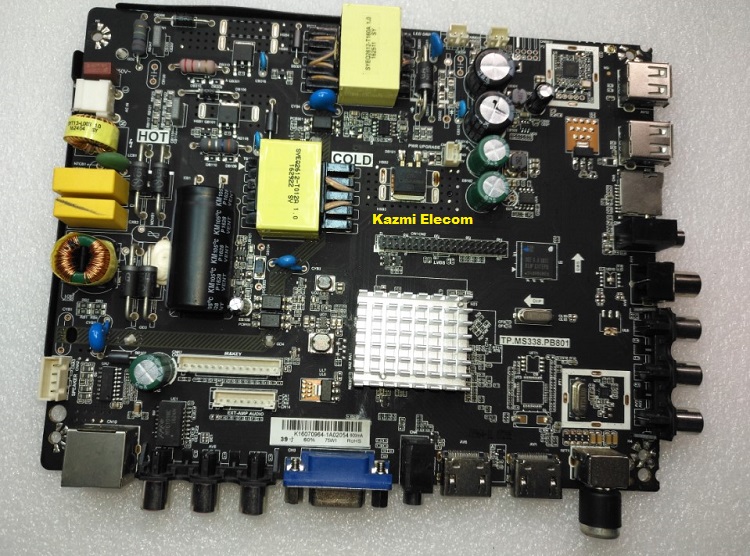
TP.MS338.PB801 Software Free Download

TP.MS338.PB801 Smart Board

TP.MS338.PB801 is a universal smart integrated board with an Android wifi network function. TP MS338 PB801 is a three-in-one network Driver Wi-Fi board that can support up to 32 to 48-inch screens. TP_MS338_PB801 can be equipped with various screens. TP.MS338 PB801 Smart Board has multiple ports A/V, USB interface Ports, and many HDMI ports as well in addition to VGA, Scart, and Earphones. TP.MS338-PB801 has a LAN/RJ45 Connector interface port also for the wired internet network.

TP_MS338_PB801 is a Combo Network Triple play board that has a Digital TV tuner built-in in it. The Graphics and Sound quality of the TP.MS338-PB801 android board are very good and the Response rate is very efficient.  TP.MS338.PB801 firmware is available for technician support.


Tp.ms338.Pb801_Software

General Specifications:

Brand/Mark: FHD Smart DVB-T2 LED TV Main Board

Main Borad Model: TP.MS338.PB801

Main Chipset: DTMB: MSD6A338ST-WL OR MSD6A338ST-003J
DVB-T2: MSD6A338SXE-WLOR MSD6A338SXE-003J

OS: Android 4.4

CPU: A7*2

CPU Frequency: 1GHz

GPU: Mali400*2

GPU Frequency: 550MHz

Ram: 512 Mb & 1 Gb

Rom: 4/8 Gb eMMC

Backlight: 30v to 160v 45w

Audio Output: 2x8w

Resolution: upto 1920×1080 (32” to 46″)

Service Code: Menu+1147

Note: The following firmware is USB bootable. Kazmi Elecom Team is not responsible for any type of damage/loss as a result of uploading/downloading the firmware. First, check and verify the main board then install software. If you are new and do not have enough knowledge of loading/installing software/firmware or dump files, or facing any issues during firmware installation then visit and read here first.

How to Download:

Download all parts of the following given firmware and then extract any one of them you will get the folder. Now copy the files to USB. For more Details about the download process watch the video Click Here

How to Install:

  • Copy the .bin file into the USB disk
  • Connect the U-Disk to TV
  • Switch on the TV
  • Standby lights start flashing. when the light flashing speed increases it means it is complete.
  • Switch OFF, Remove the Disk, and Switch ON again. Done

 TP.MS338.PB801 firmware for free download:

Kazmi-Elecom

S.NOBOARD/DESCRIPTIONDOWNLOAD LINK
1TP.MS338.PB801_1920x1080_SAMSUNG REMOTE.part1Download
TP.MS338.PB801_1920x1080_SAMSUNG REMOTE.part2Download
TP.MS338.PB801_1920x1080_SAMSUNG REMOTE.part3Download
2TP.MS338.PB801_1366x768_SAMSUNG IR_4GB_512MB.part1Download
TP.MS338.PB801_1366x768_SAMSUNG IR_4GB_512MB.part2Download
TP.MS338.PB801_1366x768_SAMSUNG IR_4GB_512MB.part3Download
TP.MS338.PB801_1366x768_SAMSUNG IR_4GB_512MB.part4Download
TP.MS338.PB801_1366x768_SAMSUNG IR_4GB_512MB.part5Download
3TP.MS338.PB801_1366x768_China M90 Remote.part1Download
TP.MS338.PB801_1366x768_China M90 Remote.part2Download
TP.MS338.PB801_1366x768_China M90 Remote.part3Download
TP.MS338.PB801_1366x768_China M90 Remote.part4Download
TP.MS338.PB801_1366x768_China M90 Remote.part5Download
4TP.MS338.PB801_1920x1080_Sony.part1
TP.MS338.PB801_1920x1080_Sony.part2
TP.MS338.PB801_1920x1080_Sony.part3
TP.MS338.PB801_1920x1080_Sony.part4
TP.MS338.PB801_1920x1080_Sony.part5
5TP.MS338.PB801_1920x1080_8G_1G_REF35.part1Download
TP.MS338.PB801_1920x1080_8G_1G_REF35.part2Download
TP.MS338.PB801_1920x1080_8G_1G_REF35.part3Download
TP.MS338.PB801_1920x1080_8G_1G_REF35.part4Download
TP.MS338.PB801_1920x1080_8G_1G_REF35.part5Download
6TP.MS338.PB801_1366x768_IKON_EMMC.part01Download
TP.MS338.PB801_1366x768_IKON_EMMC.part02Download
TP.MS338.PB801_1366x768_IKON_EMMC.part03Download
TP.MS338.PB801_1366x768_IKON_EMMC.part04Download
TP.MS338.PB801_1366x768_IKON_EMMC.part05Download
7TP.MS338.PB801_1366x768_SONY IR_4GB_512MB.part1Download
TP.MS338.PB801_1366x768_SONY IR_4GB_512MB.part2Download
TP.MS338.PB801_1366x768_SONY IR_4GB_512MB.part3Download
TP.MS338.PB801_1366x768_SONY IR_4GB_512MB.part4Download
TP.MS338.PB801_1366x768_SONY IR_4GB_512MB.part5Download
8TP.MS338.PB801_IKON_IK-E40DFS_USB.part1Download
TP.MS338.PB801_IKON_IK-E40DFS_USB.part2Download
TP.MS338.PB801_IKON_IK-E40DFS_USB.part3Download
TP.MS338.PB801_IKON_IK-E40DFS_USB.part4Download
TP.MS338.PB801_IKON_IK-E40DFS_USB.part5Download
9TP.MS338.PB801_Continental JCL-43EL11CK_USB.part1Download
TP.MS338.PB801_Continental JCL-43EL11CK_USB.part2Download
TP.MS338.PB801_Continental JCL-43EL11CK_USB.part3Download
TP.MS338.PB801_Continental JCL-43EL11CK_USB.part4Download
TP.MS338.PB801_Continental JCL-43EL11CK_USB.part5Download
10TP.MS338.PB801_1366x768_4G_REF34_USB.part1Download
TP.MS338.PB801_1366x768_4G_REF34_USB.part2Download
TP.MS338.PB801_1366x768_4G_REF34_USB.part3Download
TP.MS338.PB801_1366x768_4G_REF34_USB.part4Download
TP.MS338.PB801_1366x768_4G_REF34_USB.part5Download
11TP.MS338.PB801_1920x1080_4G_REF29_USB.part1Download
TP.MS338.PB801_1920x1080_4G_REF29_USB.part2Download
TP.MS338.PB801_1920x1080_4G_REF29_USB.part3Download
TP.MS338.PB801_1920x1080_4G_REF29_USB.part4Download
TP.MS338.PB801_1920x1080_4G_REF29_USB.part5Download
12TP.MS338.PB801_1920x1080_Samsung_Tested.part1Download
TP.MS338.PB801_1920x1080_Samsung_Tested.part2Download
TP.MS338.PB801_1920x1080_Samsung_Tested.part3Download
TP.MS338.PB801_1920x1080_Samsung_Tested.part4Download
TP.MS338.PB801_1920x1080_Samsung_Tested.part5Download
13TP.MS338.PB801_1920x1080_4G_REF54_USB.part1Download
TP.MS338.PB801_1920x1080_4G_REF54_USB.part2Download
TP.MS338.PB801_1920x1080_4G_REF54_USB.part3Download
TP.MS338.PB801_1920x1080_4G_REF54_USB.part4Download
TP.MS338.PB801_1920x1080_4G_REF54_USB.part5Download
14TP.MS338.PB801_AFTRON_AFLED3920DSJ_USB.part1Download
TP.MS338.PB801_AFTRON_AFLED3920DSJ_USB.part2Download
TP.MS338.PB801_AFTRON_AFLED3920DSJ_USB.part3Download
TP.MS338.PB801_AFTRON_AFLED3920DSJ_USB.part4Download
TP.MS338.PB801_AFTRON_AFLED3920DSJ_USB.part5Download
TP.MS338.PB801_AFTRON_AFLED3920DSJ_USB.part6Download
TP.MS338.PB801_AFTRON_AFLED3920DSJ_USB.part7Download
TP.MS338.PB801_AFTRON_AFLED3920DSJ_USB.part8Download
TP.MS338.PB801_AFTRON_AFLED3920DSJ_USB.part9Download
TP.MS338.PB801_AFTRON_AFLED3920DSJ_USB.part10Download
15TP.MS338.PB801_1366x768_Saudi Arab_Ref53.part1Download
TP.MS338.PB801_1366x768_Saudi Arab_Ref53.part2Download
TP.MS338.PB801_1366x768_Saudi Arab_Ref53.part3Download
TP.MS338.PB801_1366x768_Saudi Arab_Ref53.part4Download
TP.MS338.PB801_1366x768_Saudi Arab_Ref53.part5Download
16TP.MS338.PB801_1366x768_4G_REF55.part1Download
TP.MS338.PB801_1366x768_4G_REF55.part2Download
TP.MS338.PB801_1366x768_4G_REF55.part3Download
TP.MS338.PB801_1366x768_4G_REF55.part4Download
TP.MS338.PB801_1366x768_4G_REF55.part5Download
17TP.MS338.PB801_1366x768_8G_1G_REF40.part1Download
TP.MS338.PB801_1366x768_8G_1G_REF40.part2Download
TP.MS338.PB801_1366x768_8G_1G_REF40.part3Download
TP.MS338.PB801_1366x768_8G_1G_REF40.part4Download
TP.MS338.PB801_1366x768_8G_1G_REF40.part5Download
18TP.MS338.PB801_1920x1080_4G_REF43.part1Download
TP.MS338.PB801_1920x1080_4G_REF43.part2Download
TP.MS338.PB801_1920x1080_4G_REF43.part3Download
TP.MS338.PB801_1920x1080_4G_REF43.part4Download
TP.MS338.PB801_1920x1080_4G_REF43.part5Download
19TP.MS338.PB801_1920x1080_4G_REF56.part1Download
TP.MS338.PB801_1920x1080_4G_REF56.part2Download
TP.MS338.PB801_1920x1080_4G_REF56.part3Download
TP.MS338.PB801_1920x1080_4G_REF56.part4Download
TP.MS338.PB801_1920x1080_4G_REF56.part5Download
20TP.MS338.PB801_1920x1080_4G_REF44.part1Download
TP.MS338.PB801_1920x1080_4G_REF44.part2Download
TP.MS338.PB801_1920x1080_4G_REF44.part3Download
TP.MS338.PB801_1920x1080_4G_REF44.part4Download
TP.MS338.PB801_1920x1080_4G_REF44.part5Download
21TP.MS338.PB801_1366x768_4G_Wanbao_Ref66.part1Download
TP.MS338.PB801_1366x768_4G_Wanbao_Ref66.part2Download
TP.MS338.PB801_1366x768_4G_Wanbao_Ref66.part3Download
TP.MS338.PB801_1366x768_4G_Wanbao_Ref66.part4Download
TP.MS338.PB801_1366x768_4G_Wanbao_Ref66.part5Download
22TP.MS338.Pb801-1366x768-Vision VS-32E5800-EMMC.part1Download
TP.MS338.Pb801-1366x768-Vision VS-32E5800-EMMC.part2Download
23TP.MS338.PB801_1366x768_512M_4G_REF35.part1Download
TP.MS338.PB801_1366x768_512M_4G_REF35.part2Download
TP.MS338.PB801_1366x768_512M_4G_REF35.part3Download
TP.MS338.PB801_1366x768_512M_4G_REF35.part4Download
TP.MS338.PB801_1366x768_512M_4G_REF35.part5Download
24TP.MS338.PB801-1366x768-Samsung-REF64.part1Download
TP.MS338.PB801-1366x768-Samsung-REF64.part2Download
25TP.MS338.PB801_1920x1080_Micromax 40Canvas-s3.part1Download
TP.MS338.PB801_1920x1080_Micromax 40Canvas-s3.part2Download
TP.MS338.PB801_1920x1080_Micromax 40Canvas-s3.part3Download
TP.MS338.PB801_1920x1080_Micromax 40Canvas-s3.part4Download
TP.MS338.PB801_1920x1080_Micromax 40Canvas-s3.part5Download
26TP.MS338.PB801_1920x1080_M90_REF30.part1Download
TP.MS338.PB801_1920x1080_M90_REF30.part2Download
TP.MS338.PB801_1920x1080_M90_REF30.part3Download
TP.MS338.PB801_1920x1080_M90_REF30.part4Download
TP.MS338.PB801_1920x1080_M90_REF30.part5Download
27TP.MS338.PB801_1366x768_Worldtech_India.part1Download
TP.MS338.PB801_1366x768_Worldtech_India.part2Download
TP.MS338.PB801_1366x768_Worldtech_India.part3Download
TP.MS338.PB801_1366x768_Worldtech_India.part4Download
TP.MS338.PB801_1366x768_Worldtech_India.part5Download
28TP.MS338.PB801_1920x1080_4G_GIBCO_Ref48.part1Download
TP.MS338.PB801_1920x1080_4G_GIBCO_Ref48.part2Download
TP.MS338.PB801_1920x1080_4G_GIBCO_Ref48.part3Download
TP.MS338.PB801_1920x1080_4G_GIBCO_Ref48.part4Download
TP.MS338.PB801_1920x1080_4G_GIBCO_Ref48.part5Download
29TP.MS338.PB801_1920x1080_Worldtech_India.part1Download
TP.MS338.PB801_1920x1080_Worldtech_India.part2Download
TP.MS338.PB801_1920x1080_Worldtech_India.part3Download
TP.MS338.PB801_1920x1080_Worldtech_India.part4Download
TP.MS338.PB801_1920x1080_Worldtech_India.part5Download
30TP.MS338.PB801_1920x1080_Continental_Ref35.part1Download
TP.MS338.PB801_1920x1080_Continental_Ref35.part2Download
TP.MS338.PB801_1920x1080_Continental_Ref35.part3Download
TP.MS338.PB801_1920x1080_Continental_Ref35.part4Download
TP.MS338.PB801_1920x1080_Continental_Ref35.part5Download
31TP.MS338.PB801_1366x768_1G_8G_Mitashi_Ref30.part1Download
TP.MS338.PB801_1366x768_1G_8G_Mitashi_Ref30.part2Download
TP.MS338.PB801_1366x768_1G_8G_Mitashi_Ref30.part3Download
TP.MS338.PB801_1366x768_1G_8G_Mitashi_Ref30.part4Download
TP.MS338.PB801_1366x768_1G_8G_Mitashi_Ref30.part5Download
32TP.MS338.PB801_1366x768_1G_8G_Mitashi_Ref53.part1Download
TP.MS338.PB801_1366x768_1G_8G_Mitashi_Ref53.part2Download
TP.MS338.PB801_1366x768_1G_8G_Mitashi_Ref53.part3Download
TP.MS338.PB801_1366x768_1G_8G_Mitashi_Ref53.part4Download
TP.MS338.PB801_1366x768_1G_8G_Mitashi_Ref53.part5Download
33TP.MS338.PB801_512M_4G_India_Ref59.part1Download
TP.MS338.PB801_512M_4G_India_Ref59.part2Download
TP.MS338.PB801_512M_4G_India_Ref59.part3Download
TP.MS338.PB801_512M_4G_India_Ref59.part4Download
TP.MS338.PB801_512M_4G_India_Ref59.part5Download
34TP.MS338.PB801_1366x768_512M_4G_Ref60.part1Download
TP.MS338.PB801_1366x768_512M_4G_Ref60.part2Download
TP.MS338.PB801_1366x768_512M_4G_Ref60.part3Download
TP.MS338.PB801_1366x768_512M_4G_Ref60.part4Download
TP.MS338.PB801_1366x768_512M_4G_Ref60.part5Download
35TP.MS338.PB801_1920x1080_512M_4G_Ref60.part01Download
TP.MS338.PB801_1920x1080_512M_4G_Ref60.part02Download
TP.MS338.PB801_1920x1080_512M_4G_Ref60.part03Download
TP.MS338.PB801_1920x1080_512M_4G_Ref60.part04Download
TP.MS338.PB801_1920x1080_512M_4G_Ref60.part05Download
36TP.MS338.PB801-1366X768-512M-Logo-Blue-Pakistan.part1Download
TP.MS338.PB801-1366X768-512M-Logo-Blue-Pakistan.part2Download
37TP.MS338.PB801_1366x768_512M_4G_Ref30.part1Download
TP.MS338.PB801_1366x768_512M_4G_Ref30.part2Download
TP.MS338.PB801_1366x768_512M_4G_Ref30.part3Download
TP.MS338.PB801_1366x768_512M_4G_Ref30.part4Download
TP.MS338.PB801_1366x768_512M_4G_Ref30.part5Download
38TP.MS338.PB801_1920X1080_512M_4G_ACONATIC.part1Download
TP.MS338.PB801_1920X1080_512M_4G_ACONATIC.part2Download
TP.MS338.PB801_1920X1080_512M_4G_ACONATIC.part3Download
TP.MS338.PB801_1920X1080_512M_4G_ACONATIC.part4Download
TP.MS338.PB801_1920X1080_512M_4G_ACONATIC.part5Download
39TP.MS338.PB801_IKON_IK-E32DFS_USB.part1Download
TP.MS338.PB801_IKON_IK-E32DFS_USB.part2Download
TP.MS338.PB801_IKON_IK-E32DFS_USB.part3Download
TP.MS338.PB801_IKON_IK-E32DFS_USB.part4Download
TP.MS338.PB801_IKON_IK-E32DFS_USB.part5Download
40TP.MS338.PB801_1920x1080_1G_8G_Samsung.part1Download
TP.MS338.PB801_1920x1080_1G_8G_Samsung.part2Download
TP.MS338.PB801_1920x1080_1G_8G_Samsung.part3Download
TP.MS338.PB801_1920x1080_1G_8G_Samsung.part4Download
TP.MS338.PB801_1920x1080_1G_8G_Samsung.part5Download
41TP.MS338.PB801-1920x1080-4G-REF32.part1Download
TP.MS338.PB801-1920x1080-4G-REF32.part2Download
42TP.MS338.PB801-1920x1080-4G-ELEKTA-REF33.part1Download
TP.MS338.PB801-1920x1080-4G-ELEKTA-REF33.part2Download
43TP.MS338.PB801_1366x768_512M_4G_ELECTROSTAR.part1Download
TP.MS338.PB801_1366x768_512M_4G_ELECTROSTAR.part2Download
TP.MS338.PB801_1366x768_512M_4G_ELECTROSTAR.part3Download
TP.MS338.PB801_1366x768_512M_4G_ELECTROSTAR.part4Download
TP.MS338.PB801_1366x768_512M_4G_ELECTROSTAR.part5Download
44TP.MS338.PB801_1920x1080_512M_4G_Samsung_Ref68.part1Download
TP.MS338.PB801_1920x1080_512M_4G_Samsung_Ref68.part2Download
TP.MS338.PB801_1920x1080_512M_4G_Samsung_Ref68.part3Download
TP.MS338.PB801_1920x1080_512M_4G_Samsung_Ref68.part4Download
TP.MS338.PB801_1920x1080_512M_4G_Samsung_Ref68.part5Download
45TP.MS338.PB801_1366x768_512M_4G_Pakistan.part1Download
TP.MS338.PB801_1366x768_512M_4G_Pakistan.part2Download
TP.MS338.PB801_1366x768_512M_4G_Pakistan.part3Download
TP.MS338.PB801_1366x768_512M_4G_Pakistan.part4Download
TP.MS338.PB801_1366x768_512M_4G_Pakistan.part5Download
46TP.MS338.PB801-1366x768-4G-Ref54-Saturn-USBDownload
47TP.MS338.PB801_1366x768_512M_4G_Thomson.part1Download
TP.MS338.PB801_1366x768_512M_4G_Thomson.part2Download
TP.MS338.PB801_1366x768_512M_4G_Thomson.part3Download
TP.MS338.PB801_1366x768_512M_4G_Thomson.part4Download
TP.MS338.PB801_1366x768_512M_4G_Thomson.part5Download
48TP.MS338.PB801_1920X1080_4G_CONTINENTAL_REF58.part1Download
TP.MS338.PB801_1920X1080_4G_CONTINENTAL_REF58.part2Download
TP.MS338.PB801_1920X1080_4G_CONTINENTAL_REF58.part3Download
49TP.MS338.PB801-1920x1080-4G-SATURN-40-USB.part1Download
TP.MS338.PB801-1920x1080-4G-SATURN-40-USB.part2Download

For video tutorials, visit “Kazmi Elecom” my YouTube channel.

allupgrade_msd338_4G_ref29.bin
allupgrade_msd338_4G_ref34.bin

allupgrade_msd338_4G_ref54.bin

allupgrade_msd338_4G_ref68.bin

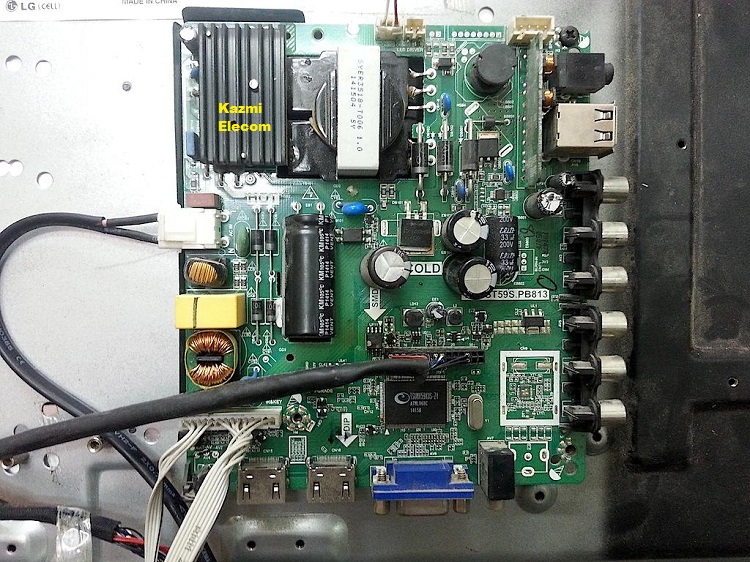
TP.VST59S.PB813 Software Free Download

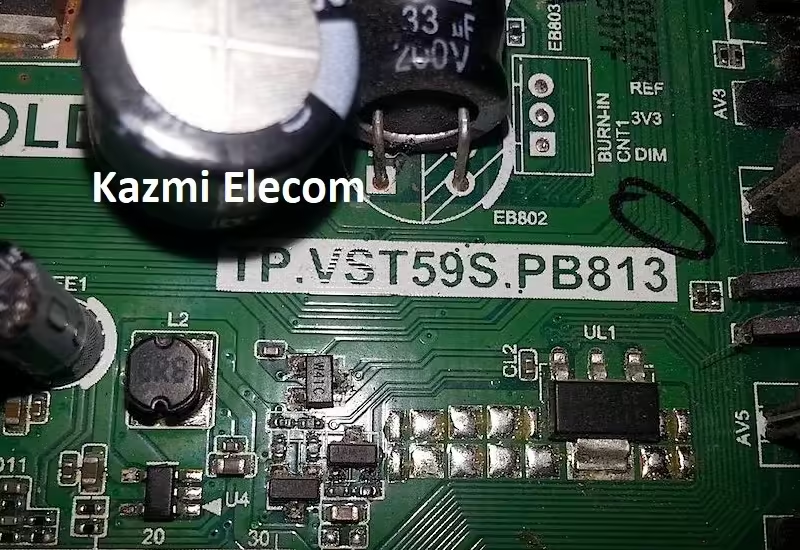
TP.VST59S.PB813

TP.VST59S.PB813 is a simple ATV Driver Motherboard intended for LCD/LED TVs. It can support universal HD and Full HD screen panels. This board is suitable for the Asia Pacific and the Middle East markets. This is a three-in-one Combo Board. The TV tuner, LED backlight driver module, and the power input circuit are built on a single PCB motherboard. This board has all the features and connectivity ports as per the latest user requirements like HDMI input, USB interface, PC input, Component Input, TV, and Scart(optional).

Its USB interface can be used for updating software/firmware and for playing multimedia files as well. It can also support Earphone output. TP.VST59S.PB813 is a Full HD-supported LCD LED TV controller board with a maximum resolution of 1920×1080. It can be fit in 32-inch to 42-inch HD and FHD LED TVs. The main processor is made by Mstar and its graphics are also good. TP.VST59S.PB813 firmware files are given below for the technician’s support.

Tp.vst59S.pb813 Software

General Specifications:

Brand/Mark: China Universal

Model: TP-VST59S-PB813

Product: LED TV

Resolution: Up to 1920×1080

Panel: CMO, Universal, CX315DLEDM

Service Code: Menu+1147

Caution: 

All the pictures and specification details related to TP.VST59S.PB813 in this post is for reference only. If you are a user and do not have any experience of repairing then it is better to visit the nearest technician first without loading the software/firmware. Sometimes, the fault is different as per the visual observations. So, please do not try it at home.

Pros:

There are many advantages to installing the given TP.VST59S.PB813 USB software or backup dump file. A few benefits are described below:

  • The dead board can be recovered and operational by loading the given software backup file
  • Remote and Logo may change at your own choice to satisfy the customer
  • Money saving instead of changing the mainboard
  • Time-saving instead of arranging a new board
  • Customer satisfaction to do an urgent job
  • Skill and confidence improvement

Cons:

There may be some disadvantages to installing the given TP.VST59S.PB813 USB software or backup dump file. But it depends on the technician or user as per his understanding. A few drawbacks are described below:

  • The working board may go to the standby position
  • Remote Control may not work and the Logo may change by writing the given software
  • Panel screen parameters may be changed

TP.VST59S.PB813 Version Upgrade:

Please note that the installed version in this board is the final version. So, no need to upgrade the software if the board is working normally. Only in case the default software is malfunctioning due to some bugs then the manufacturer will provide the software update. Otherwise, no version update is issued.

Tp.vst59S.pb813 Board Jpg

TP.VST59S.PB813 Board Replacement:

If the board is completely dead and no chance to repair then replace the same board as already installed. And if the same board is not available on the market then search for the board that has the same specifications and latest features to avoid any difficulties. If the backlight module is faulty in the combo board then you can install only the backlight module separately then no need to change the whole board.

Note: The following firmware is USB bootable and a backup file that can be loaded by a programming tool. Kazmi Elecom Team is not responsible for any type of damage/loss as a result of uploading/downloading the firmware. First, check and verify the main board then install software. Always keep a backup before writing the flash. If you are new and do not have enough knowledge of loading/installing software/firmware or dump files, or facing any issues during firmware installation then visit and read here first.

How to Download Firmware Files:

Download the following firmware and then extract you will get the folder. Now load the file by a programmer. For More Details about the download, process watch the video Click Here


TP.VST59S.PB813 firmware free download:

Kazmi-Elecom

S.NOBOARD/DESCRIPTIONDOWNLOAD LINK
1TP.VST59S.PB813_General_1366x768Download
2TP.VST59S.PB813_General_1920x1080Download
3TP.VST59S.PB813_1366x768_SonyDownload
4TP.VST59S.PB813_32_SamsungDownload
5TP.VST59S.PB813_32_SonyDownload
6TP.VST59S.PB813_32'' NONHD_Tuner840Download
7TP.VST59S.PB813_EUROSTAR_1366x768Download
8TP.VST59S.PB813_Haier LD32U3100Download
9TP.VST59S.PB813_LED42A01B_Panel-LC420DUGDownload
10TP.VST59S.PB813_Mystery MTV-3217LWDownload
11TP.VST59S.PB813_PAKISTAN_32HD_irSAMSUNG_SiR840_TK_REF46Download
12TP.VST59S.PB813_Panel_ HV320WXC-200-PCB-X0.0Download
13TP.VST59S.PB813_Panel_CX32U535Download
14TP.VST59S.PB813_Panel_CX315DLEDMDownload
15TP.VST59S.PB813_PANEL_LC320EXJ-SEE1_EGLED-32D1Download
16TP.VST59S.PB813_Panel_LC420EUS_1920x1080Download
17TP.VST59S.PB813_Panel_LTF460HF08_1920x1080Download
18TP.VST59S.PB813_Panel_Mt3151a04-1_1366x768Download
19TP.VST59S.PB813_Panel_PT-131101-2461-MDownload
20TP.VST59S.PB813_Panel_T315XW02VL_1366x768Download
21TP.VST59S.PB813_Panel_V320BK1_1366x768Download
22TP.VST59S.PB813_Panel-ST315A05_1366x768_M90_840Download
23TP.VST59S.PB813_Panel-ST2751A01-3 VER2.2Download
24TP.VST59S.PB813_SAMSUNG_32_SeedhaDownload
25TP.VST59S.PB813_SAMSUNG_32_ULTA_DATA10Download
26TP.VST59S.PB813_SAMSUNG_42_20 DataDownload
27TP.VST59S.PB813_SUPRA STV-LC28500WL(V1N07)Download
28TP.VST59S.PB813_T.Con_mt3151a05-3-xc-1Download
29TP.VST59S.PB813_T390XVN01_0_irCX509SONY_SiR840_MO_REF92Download
30TP.VST59S.PB813_Haier LE32B9000Download
31TP.VST59S.PB813_SONY_32_KDL32W600A_UltaDownload
32TP.VST59S.PB813_1920x1080_SonyDownload
33TP.VST59S.PB813_1366x768_Electa_Flip_TestedDownload
34TP.VST59S.PB813_1366x768_Samsung IR_Normal_Seedha_TestedDownload
35TP.VST59S.PB813_1920X1080_Samsung_Seedha_TestedDownload
36TP.VST59.P83_1920x1080_Sony_Flip_TestedDownload
37TP.VST59S.PB813_Dansat DTD40BF_TestedDownload
38TP.VST59S.PB813_Haier-LE43B7000_TestedDownload

TP.HV320.PB801 Software Free Download

TP.HV320.PB801 (Network TV Board)

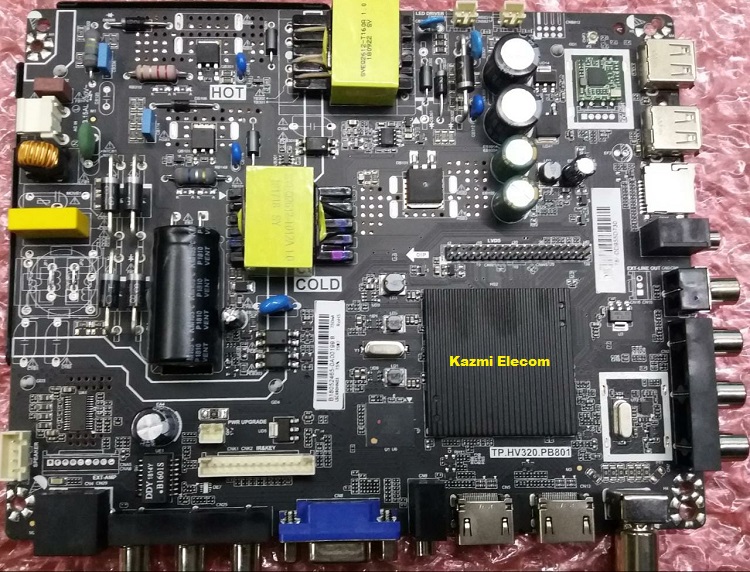
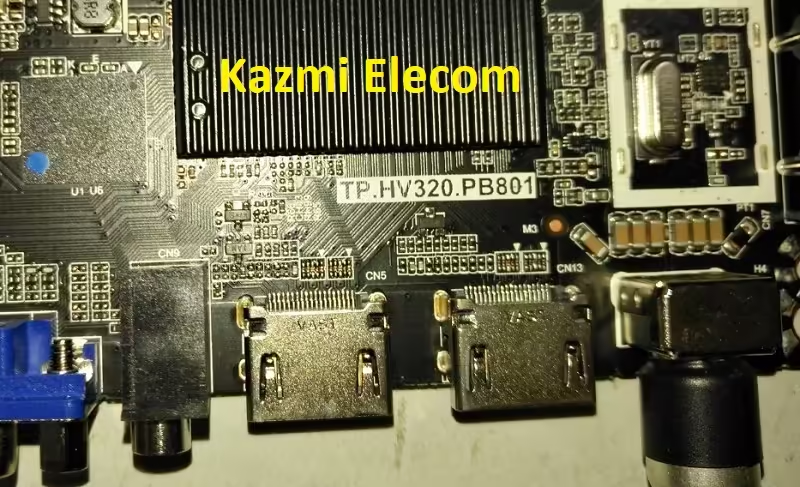
TP.HV320.PB801 is an Android smart LED TV driver controller board. Its software files are shared in this post for the technician’s support. This board is a Chinese smart Android Combo board. The power Input Source circuit, RF tuner, and Backlight driver circuit module are built into a single motherboard PCB. No need to install an extra power board or backlight board to complete a TV setup. just a single PCB motherboard is enough that is All in One. The built quality of this board is very good. Hi-Silicon main processor is used in this board. Android Version is a 4.4 kit. Its picture quality is very excellent and the Sound quality is very good.

TP.HV320.PB801 has multiple input ports. all dual ports make it popular for the best user experience. This board has a VGA interface for PC/Laptops connectivity, RJ45 jack for ethernet or wired internet connectivity, Dual USB input ports for playing multimedia files and software upgrade purposes, dual HDMI inputs for connecting multiple HD devices like Blue-ray players, gaming consoles,s and set-top boxes. It has also a built-in WiFi system. The SD card slot is also available for reading memory cards. Dula RCA input and a Headphone jack is also available for the user’s convenience.

Tp.hv320.Pb801 Firmware

General Specifications:

Brand/Mark: China Universal Smart/Android Combo Board

Main Borad : TP-HV320-PB801

OS: Android 4.4 kitkat

CPU: A7*2

GPU: Mali400*2

Ram: 512 Mb

Rom: 4 Gb eMMC (Internal Memory)

Backlight: 36 to 160v 300ma

Resolution: upto 1920×1080

Service Code: Menu+1147

Caution: 

All the pictures and specification details related to TP.HV320.PB801 in this post are for reference only. If you are a user and do not have any repair experience, it is better to visit the nearest technician first without loading the software/firmware. Sometimes, the fault is different based on the visual observations. So, please do not try it at home. If the LED TV is slow then reset it to Factory Default only.

TP.HV320.PB801 Android Version Upgrade:

Please note that the installed version in this board is the final version and the Android version is not updateable. So, no need to upgrade the software if the board is working normally. Only if, the default software malfunctions due to some bugs will the manufacturer provide the software update. Otherwise, no version update is issued.

TP.HV320.PB801 EMMC Backup:

This board has a 4/8GB eMMC chip. you can read the EMMC backup by Pendrive but for writing a backup of EMMC you should jtag the mainboard TP.HV320.PB801 and write by a programming tool. Be careful while writing emmc backup file, if the board is on standby light due to wrong software or incomplete installation then you can do it, otherwise, it is on standby or red light due to hardware fault. So, first trace the fault. In this case, no need to write emmc backup.

Tp.hv320.Pb801

TP.HV320.PB801 Board Replacement:

If the board is completely dead and no chance to repair then replace the same board as already installed. And if the same board is not available on the market then search for the board that has the same specifications, the newest Android version, and the latest features to avoid any difficulties. If the backlight module is faulty in the combo board then you can install only the backlight module separately then no need to change the whole board.

Note: The following firmware is a USB bootable and EMC backup file. Kazmi Elecom Team is not responsible for any damage/loss caused by uploading/downloading the firmware. First, check and verify the main board then install software. If you are new and do not have enough knowledge of loading/installing software/firmware or dump files, or facing any issues during firmware installation then visit and read here first.

How to Download Firmware Files:

Download all parts of the following firmware and then extract any one of them you will get the folder. Now copy the files to USB. For more Details about the download process watch the video Click Here

TP.HV320.PB801 firmware for free download:

Kazmi-Elecom

S.NO.BOARD/DESCRIPTIONDOWNLOAD LINK
1TP.HV320.PB801_1366x768_China.part1Download
TP.HV320.PB801_1366x768_China.part2Download
TP.HV320.PB801_1366x768_China.part3Download
TP.HV320.PB801_1366x768_China.part4Download
3TP.HV320.PB801_1366x768_Sony_Tested.part1Download
TP.HV320.PB801_1366x768_Sony_Tested.part2Download
TP.HV320.PB801_1366x768_Sony_Tested.part3Download
TP.HV320.PB801_1366x768_Sony_Tested.part4Download
4TP.HV320.PB801_1920×1080_China.part1Download
TP.HV320.PB801_1920×1080_China.part2Download
TP.HV320.PB801_1920×1080_China.part3Download
TP.HV320.PB801_1920×1080_China.part4Download
5TP.HV320.PB801_1366x768_Samsung.part1Download
TP.HV320.PB801_1366x768_Samsung.part2Download
TP.HV320.PB801_1366x768_Samsung.part3Download
TP.HV320.PB801_1366x768_Samsung.part4Download
TP.HV320.PB801_1366x768_Samsung.part5Download
6TP.HV320.PB801_1366X768_Samsung_EMMC.part01Download
TP.HV320.PB801_1366X768_Samsung_EMMC.part02Download
TP.HV320.PB801_1366X768_Samsung_EMMC.part03Download
TP.HV320.PB801_1366X768_Samsung_EMMC.part04Download
TP.HV320.PB801_1366X768_Samsung_EMMC.part05Download
7TP.HV320.PB801_1366x768_512M_4G_REF60.part01Download
TP.HV320.PB801_1366x768_512M_4G_REF60.part02Download
TP.HV320.PB801_1366x768_512M_4G_REF60.part03Download
TP.HV320.PB801_1366x768_512M_4G_REF60.part04Download
TP.HV320.PB801_1366x768_512M_4G_REF60.part05Download
8TP.HV320.PB801_1920x1080_512M_4G_REF60.part01Download
TP.HV320.PB801_1920x1080_512M_4G_REF60.part02Download
TP.HV320.PB801_1920x1080_512M_4G_REF60.part03Download
TP.HV320.PB801_1920x1080_512M_4G_REF60.part04Download
TP.HV320.PB801_1920x1080_512M_4G_REF60.part05Download
9TP.HV320.PB801_1920x1080_China.part01Download
TP.HV320.PB801_1920x1080_China.part02Download
TP.HV320.PB801_1920x1080_China.part03Download
TP.HV320.PB801_1920x1080_China.part04Download
TP.HV320.PB801_1920x1080_China.part05Download
10TP.HV320.PB801_1366x768_M90.part1Download
TP.HV320.PB801_1366x768_M90.part2Download
TP.HV320.PB801_1366x768_M90.part3Download
TP.HV320.PB801_1366x768_M90.part4Download
TP.HV320.PB801_1366x768_M90.part5Download
11TP.HV320.PB801_1920x1080_M90.part1Download
TP.HV320.PB801_1920x1080_M90.part2Download
TP.HV320.PB801_1920x1080_M90.part3Download
TP.HV320.PB801_1920x1080_M90.part4Download
TP.HV320.PB801_1920x1080_M90.part5Download
12TP.HV320.PB801_1920x1080_Samsung.part1Download
TP.HV320.PB801_1920x1080_Samsung.part2Download
TP.HV320.PB801_1920x1080_Samsung.part3Download
TP.HV320.PB801_1920x1080_Samsung.part4Download
TP.HV320.PB801_1920x1080_Samsung.part5Download

ECHOLINK T9 HIGH CLASS Dump File Free Download

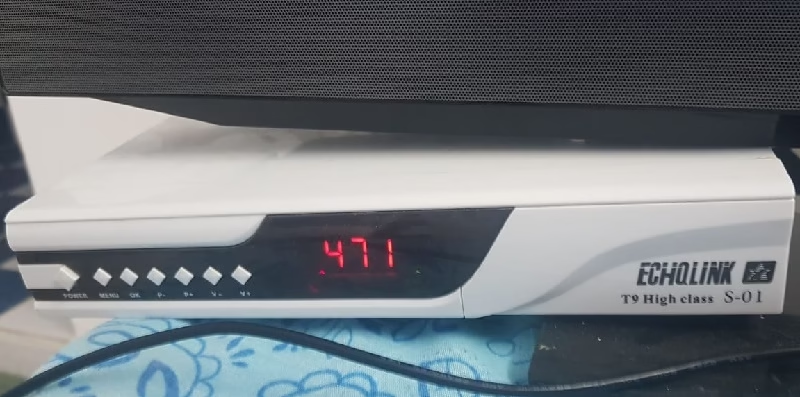
ECHOLINK T9 HIGH CLASS Satellite Receiver

ECHOLINK T9 HIGH CLASS dump file or the flash file is a boot information data with software/program of a satellite receiver, which is located at EEPROM, or Flash IC or Memory IC of ECHOLINK T9 HIGH-CLASS receiver. The main processor/Microcontroller retrieves the information from memory ic when it is powered on to know how to work/boot. For more Flash Dump Files visit here.

If the Flash IC/Memory IC of the ECHOLINK T9 HIGH-CLASS receiver is damaged for any reason or its software/firmware malfunctions due to any reason then the Main controller does not get any boot/basic information and the satellite receiver ECHOLINK T9 HIGH CLASS does not turn on. In this situation, we need to reprogram the flash ic of the ECHOLINK T9 HIGH-CLASS receiver with the matched hardware dump/flash file to get the receiver in normal condition. A dump file of ECHOLINK T9 HIGH CLASS is shared for technician/user support.

Echolink T9 High Class

Information and Specifications of ECHOLINK T9 HIGH-CLASS:

Manufacturer: ECHOLINK

Box Model: T9 HIGH-CLASS S-01

Main Board: SCB_V10.07.25_20180725

Main Controller or Chipset: 1507G

Box Type: Digital Full HD

Flash Type: SPI SOP8/SOIC8

Flash Memory: GD25Q64

Flash Size: 8 MB

Software Type: Backup Dump

Software Size: 6.11 MB

Download File Format: ZIP

Download Type: Free

Note:

Given ECHOLINK T9 HIGH-CLASS receiver software is a backup dump file and can be loaded by a Programmer or with a Loader tool in the dead receiver or can be upgraded/downgraded in the working receiver by the USB Upgrade method or with STB Upgrade Tool. Kazmi Elecom Team is not responsible for any type of damage/loss because of uploading/downloading the software.

Download Button Kazmi Elecom

ECHOLINK T9 HIGH CLASS dump file free download.

STARTREK SR-8880 Dump File Free Download

STARTREK SR-8880 Satellite Receiver

STARTREK SR-8880 dump file or the flash file is a boot information data with software/program of a satellite receiver, which is located at EEPROM, or Flash IC or Memory IC of STARTREK SR-8880 receiver. The main processor/Microcontroller retrieves the information from memory ic when it is powered on to know how to work/boot. If the Flash IC/Memory IC of the STARTREK SR-8880 receiver is damaged for any reason or its software/firmware malfunctions due to any reason then the Main controller does not get any boot/basic information and the satellite receiver STARTREK SR 8880 does not turn on.

In this situation, we need to reprogram the flash ic of the STARTREK SR8880 receiver with the matched hardware dump/flash file to get the receiver in normal condition. A dump file of STARTREK SR8880 is shared for technician/user support. For more Flash Dump Files visit here.

Startrek Sr-8880

Information and Specifications of STARTREK SR-8880:

Manufacturer: STARTREK

Box Model: SR-8880

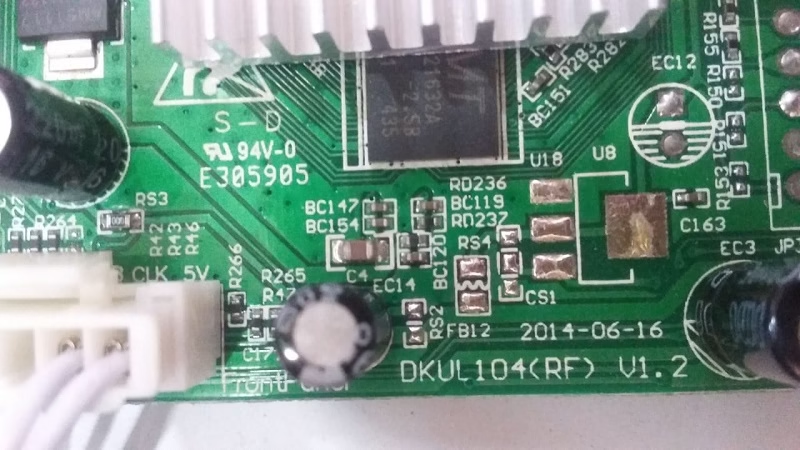
Main Board: DKUL104_RF_V1.2

Main Controller or Chipset:

Box Type: Digital Full HD

Flash Type: SPI SOP8/SOIC8

Flash Memory: GD25Q32B

Flash Size: 4 MB

Software Type: Backup Dump

Software Size: 3.29 MB

Download File Format: ZIP

Download Type: Free

Note:

Given STARTREK SR8880 0receiver software is a backup dump file and can be loaded by a Programmer or with a Loader tool in the dead receiver or can be upgraded/downgraded in the working receiver by the USB Upgrade method or with STB Upgrade Tool. KazmiElecom Team is not responsible for any type of damage/loss because of uploading/downloading the software.

Download Button Kazmi Elecom

STARTREK SR-8880 dump file free download.

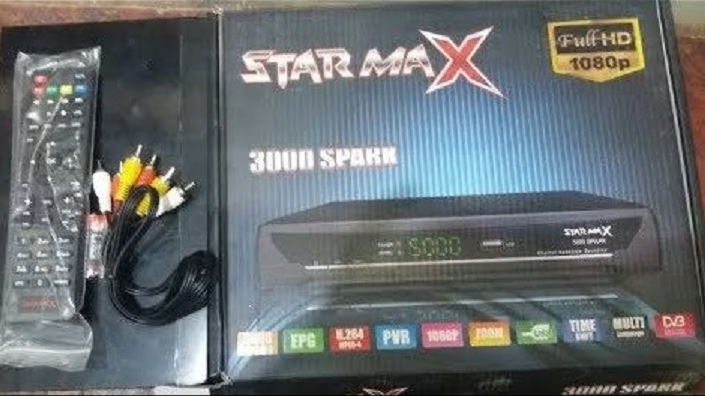
STARMAX 3000 SPARK Dump File Free Download

STARMAX 3000 SPARK Satellite Receiver

STARMAX 3000 SPARK dump file or the flash file is a boot information data with software/program of a satellite receiver, which is located at EEPROM, or Flash IC or Memory IC of STARMAX 3000 SPARK receiver. The main processor/Microcontroller retrieves the information from memory ic when it is powered on to know how to work/boot. For more Flash Dump Files visit here.

If the Flash IC/Memory IC of the STARMAX 3000-SPARK receiver is damaged for any reason or its software/firmware malfunctions due to any reason then the Main controller does not get any boot/basic information and the satellite receiver STARMAX 3000-SPARK does not turn on. In this situation, we need to reprogram the flash ic of the STARMAX 3000-SPARK receiver with the matched hardware dump/flash file to get the receiver in normal condition. A dump file of STARMAX 3000-SPARK is shared for the technician/user support.

Starmax 3000 Spark

Information and Specifications of STARMAX3000 SPARK:

Manufacturer: STARMAX

Box Model: 3000 SPARK

Main Board: ALI3510A-S14064

Main Controller or Chipset: ALI3510A

Box Type: Digital Full HD

Flash Type: SPI SOP8/SOIC8

Flash Memory: 25LQ032

Flash Size: 4 MB

Software Type: Backup Dump

Software Size: 3.17 MB

Download File Format: ZIP

Download Type: Free

Note:

Given STARMAX 3000 SPARK receiver software is a backup dump file and can be loaded by a Programmer or with a Loader tool in the dead receiver or can be upgraded/downgraded in the working receiver by the USB Upgrade method or with STB Upgrade Tool. KazmiElecom Team is not responsible for any type of damage/loss because of uploading/downloading the software.

Download Button Kazmi Elecom

STARMAX 3000 SPARK dump file free download.

STAR TRECK 2070 Dump File Free Download

STAR TRECK 2070 Satellite Receiver

STAR TRECK 2070 dump file or the flash file is a boot information data with software/program of a satellite receiver, which is located at EEPROM, or Flash IC or Memory IC of STAR TRECK 2070 receiver. The main processor/Microcontroller retrieves the information from memory ic when it is powered on to know how to work/boot. If the Flash IC/Memory IC of the STAR TRECK 2070 receiver is damaged for any reason or its software/firmware malfunctions due to any reason then the Main controller does not get any boot/basic information and the satellite receiver STAR TRECK-2070 does not turn on.

In this situation, we need to reprogram the flash ic of the STAR TRECK-2070 receiver with the matched hardware dump/flash file to get the receiver in normal condition. A dump file of STAR TRECK-2070 is shared for technician/user support.

Star Treck 2070

Information and Specifications of STAR TRECK-2070:

Manufacturer: STAR TRECK

Box Model: 2070

Main Board: GX6605-S01-V1.6&V1.7

Main Controller or Chipset: GX6605

Box Type: Digital Full HD

Flash Type: SPI SOP8/SOIC8

Flash Memory: GD25Q32B

Flash Size: 4 MB

Software Type: Backup Dump

Software Size: 2.36 MB

Download File Format: ZIP

Download Type: Free

Note:

Given STAR TRECK 2070 receiver software is a backup dump file and can be loaded by a Programmer or with a Loader tool in the dead receiver or can be upgraded/downgraded in the working receiver by the USB Upgrade method or with STB Upgrade Tool. Kazmi Elecom Team is not responsible for any type of damage/loss because of uploading/downloading the software.

Download Button Kazmi Elecom

STAR TRECK 2070 dump file free download.

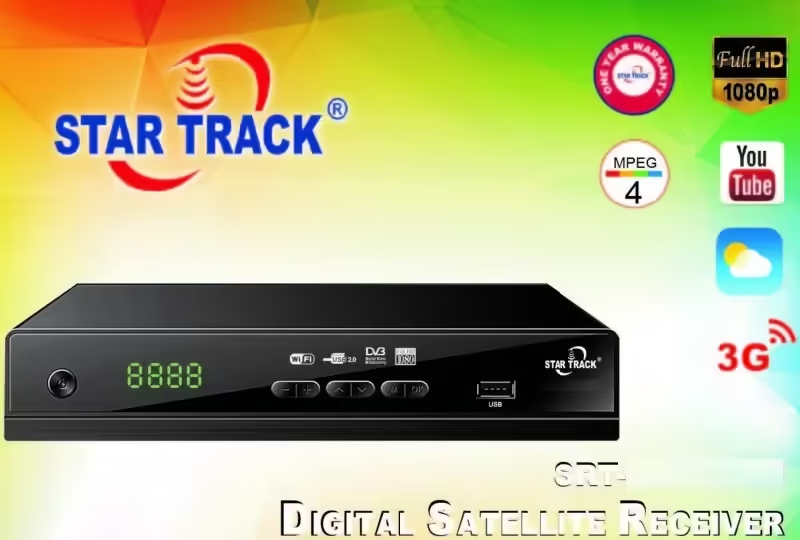
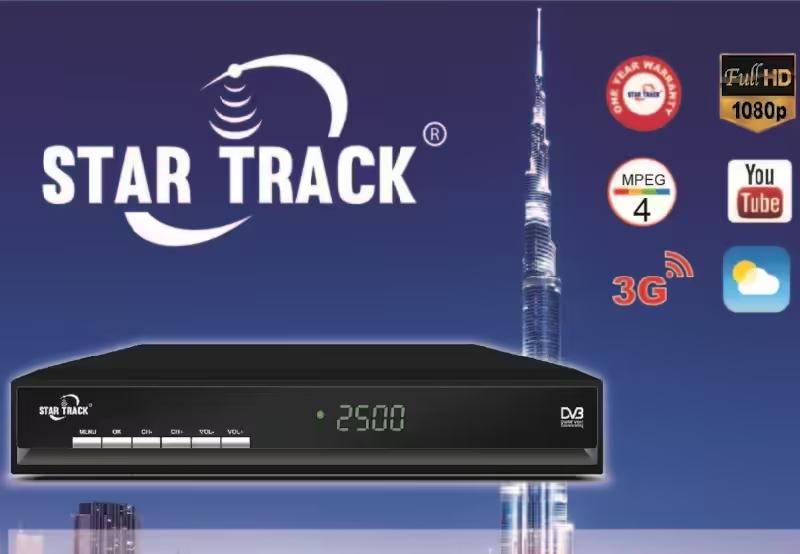
STAR TRACK SUPREME Dump File Free Download

STAR TRACK SUPREME Satellite Receiver

STAR TRACK SUPREME dump file or the flash file is a boot information data with software/program of a satellite receiver, which is located at EEPROM, or Flash IC or Memory IC of STAR TRACK SUPREME receiver. The main processor/Microcontroller retrieves the information from memory ic when it is powered on to know how to work/boot. If the Flash IC/Memory IC of the STAR TRACK-SUPREME receiver is damaged for any reason or its software/firmware malfunctions due to any reason then the Main controller does not get any boot/basic information and the satellite receiver STAR TRACK-SUPREME does not turn on.

In this situation, we need to reprogram the flash ic of the STAR TRACK-SUPREME receiver with the matched hardware dump/flash file to get the receiver in normal condition. A dump file of STAR TRACK SUPREME is shared for the technician/user support.

Star Track Supreme

Information and Specifications of STAR TRACK-SUPREME:

Manufacturer: STAR TRACK

Box Model: SUPREME

Main Board: DZ03-2AHS63

Main Controller or Chipset:

Box Type: Digital Full HD

Flash Type: SPI SOP8/SOIC8

Flash Memory: GD25Q32B

Flash Size: 4 MB

Software Type: Backup Dump

Software Size: 3.17 MB

Download File Format: ZIP

Download Type: Free

Note:

Given STAR TRACK SUPREME receiver software is a backup dump file and can be loaded by a Programmer or with a Loader tool in the dead receiver or can be upgraded/downgraded in the working receiver by the USB Upgrade method or with STB Upgrade Tool. Kazmi Elecom Team is not responsible for any type of damage/loss because of uploading/downloading the software.

Download Button Kazmi Elecom

STAR TRACK SUPREME dump file free download.

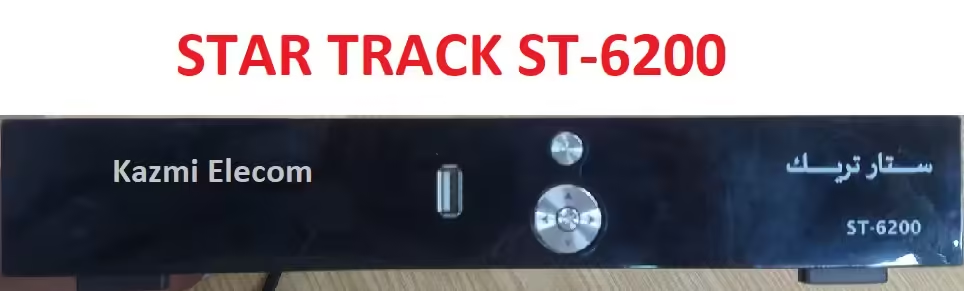
STAR TRACK ST-6200 Dump File Free Download

STAR TRACK ST-6200 Satellite Receiver

STAR TRACK ST-6200 dump file or the flash file is a boot information data with software/program of a satellite receiver, which is located at EEPROM, or Flash IC or Memory IC of STARTRACK ST-6200 receiver. The main processor/Microcontroller retrieves the information from memory ic when it is power on to know how to work/boot. If the Flash IC/Memory IC of the STAR TRACK ST-6200 receiver is damaged for any reason or its software/firmware malfunctions due to any reason then the Main controller does not get any boot/basic information and the satellite receiver STAR TRACK ST-6200 does not turn on.

In this situation, we need to reprogram the flash ic of the STARTRACK ST-6200 receiver with the matched hardware dump/flash file to get the receiver in normal condition. A dump file of STAR TRACK ST-6200 is shared for the technician/user support.

Star Track St-6200

Information and Specifications of STARTRACK ST-6200:

Manufacturer: STAR TRACK

Box Model: ST-6200

Main Board: 1506C_DDR2_AV2018_V1.6

Main Controller or Chipset: 1506C

Box Type: Digital Full HD

Flash Type: SPI SOP8/SOIC8

Flash Memory: GD25Q32B

Flash Size: 4 MB

Software Type: Backup Dump

Software Size: 3.42 MB

Download File Format: ZIP

Download Type: Free

Note:

Given STARTRACK ST-6200 receiver software is a backup dump file and can be loaded by a Programmer or with a Loader tool in the dead receiver or can be upgraded/downgraded in the working receiver by the USB Upgrade method or with STB Upgrade Tool. Kazmi Elecom Team is not responsible for any type of damage/loss because of uploading/downloading the software.

Download Button Kazmi Elecom

STAR TRACK ST-6200 dump file free download.

error: Content is protected !!