TPD.RT2841A.PB782 Smart Android Board
TPD.RT2841A.PB782 is a smart Android Intelligent Network LCD/LED TV Board. It is suitable for the LVDS interface and supports more than 32-46 inches LED panels, maximum resolution of up to 1920×1080 FHD. TPD_RT2841A_PB782 is a three-in-one (combo) board, i.e., a power card, a backlight driver module, and an ATV board are built into it. TPD-RT2841A-PB782 has multiple input interface ports like USB, HDMI, AV, Scart port, and LAN port for wired internet connectivity. It is also built with a Wireless interface.
TPD RT2841A PB782 came with some brand LED TVs like TCL LED TV, Union TV, Thomson LED TV, etc. Its USB interface can be used for loading software as well as for playing multimedia files. TPD.RT2841A.PB782 supports analog TV signals, and digital TV (DVB-C, DVB-S2, DVB-T2). TPD.RT2841A.PB782 firmware file is given below for the technician’s support.
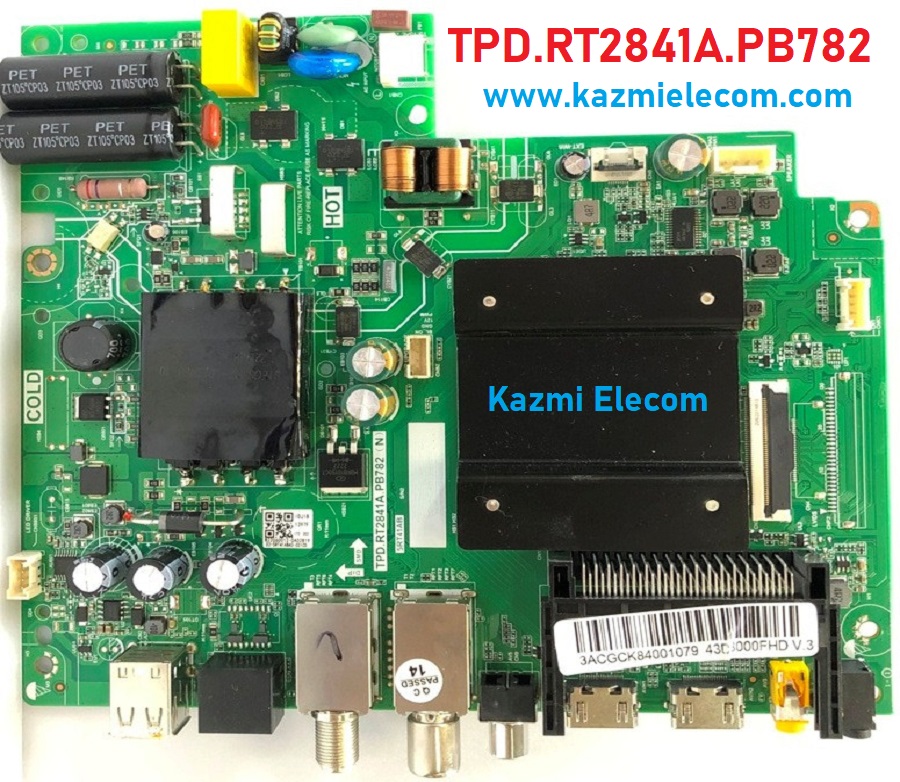
General Specifications:
Model: TPD.RT2841A.PB782 (T), TPD.RT2841A.PB782 (N), 5RT41AB
Main Chipset: RT41K
Resolution Supported: 1920×1080
CPU: CA53*4 64-bit
CPU Frequency: 1.5 Hz
GPU: Mali470x2
OS: Android
Ram: 1G
Rom: 8Gb
Audio Output Power: 2X8 W (8Ω)
Tuner: Auto/PAL/NTSC/SECAM, DK/BG/I/M DTV:DVB-T2/T/C
Backlight: Adjustable
Backlight Power:
Service Code:
Power Input: AC 100V-240V 50/60Hz
Power Consumption: 75W
Firmware File: Install.img
Firmware Type: USB upgradable Firmware,
Firmware Version: V8-T841AGL-0000252-CTS
Product: Casper, Artel, Panasonic, and Multi Brands

Note: The following given software/firmware is USB upgradeable and EMMC backup file. Kazmi Elecom Team is not responsible for any type of damage/loss as a result of uploading/downloading the firmware. First Check the mainboard and then install the software. If you are new and do not have enough knowledge of loading or installing software/firmware or dump files then read here first.
How to Download:
Download all parts of the following firmware/software and then extract any one of them, and you will get the folder. Now copy the files to the USB. For more Details about the download process, watch the video Click Here
TPD.RT2841A.PB782 Firmware file for Free Download:


TPD.RT.2841.PB772
freed download
Me quedo invertida la imagen como entro al menu de servicios
Thank you, sir
I downloaded the file and put it on a USB, but it did not pass through the TV. It does not recognize it.
Is there a way?
https://www.kazmielecom.tech/how-to-load-firmware/
Thank you sir
I tried all
Didn’t pass the TV
Card: TPD.RT2841A.PB782
For your information, the TV is stuck on color mode
Red. Green. Blue
visit to technician
Thank you sir
I am a technician
Thank you for your efforts
The methods did not work for you.
Thank you again for your time
hi sir
after change the code
menu 062598menu007
my tv is blocked end reboot the logo
what i do for repair the problem
thx
https://youtu.be/E3oS3rUuI20
Sir can you share the firmware file tpd.rt2841a.pb782 (t)? May be the stable and older ones will be better and if you can share on drive it will help a lot. Thanks