Tag Archives: kazmi elecom

CV6486H-A42 Firmware Free Download

CV6486H-A42 Smart Android Board

CV6486H-A42 is a 2K FHD Linux TV driver board with a support maximum resolution of 1920×1080 Full HD. CV6486H_A42 is dedicated to 50/60 Hz screens. UHD TV With features to entertain ultra HD Wide-Screen. CV6486H_A42 has the full features of input interface connectivity. It has multiple ports like HDMI, AV, Headphones, VGA interface, Scart, Coaxial Out, USB ports, and RJ45 Ethernet port for wired internet connectivity. Its USB interface can be used for Firmware upgrades and multimedia playback. This is a North American Linux System with a supported screen size of 32-43 Inch LED TVs Analog and Digital TV Control Board SKD TV Mainboard With 800mm Wifi Antenna.

CV6486H.A42 is a digital and analog TV board, it can receive analogtelevision (PAL, NTSC, SECAM) and digital television (DVB-T) signals. The CV6486H_A42 USB Upgrade Firmware file is given below for Technician’s support. CV6486H.A42 Mainboard is used for different Brands of HD LED TVs and FHD TVs as well.
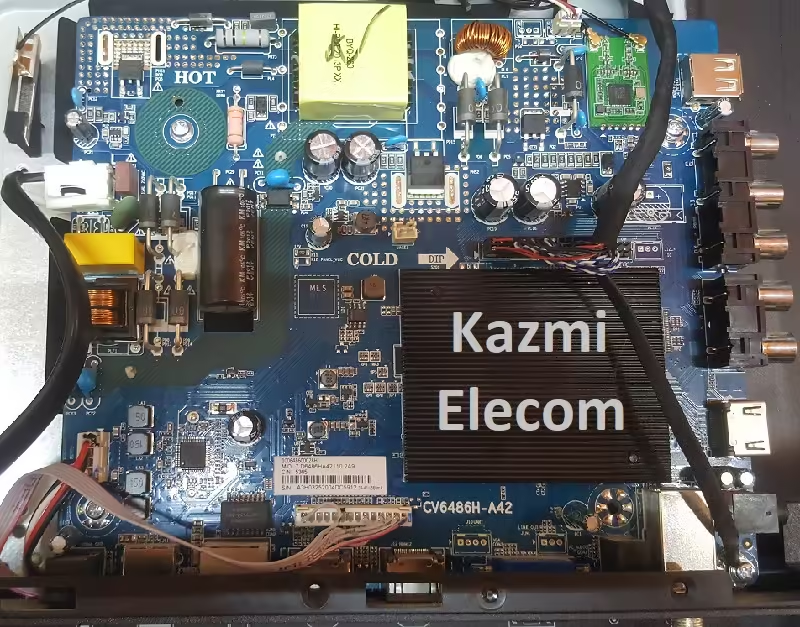
Cv6486H-A42

General Features:

Model Name: CV6586H-A

Resolution: 1920×1080

Processor: Dual Core

RAM: 512M

ROM: 4 GB

Aspect Ratio: 16:09

Audio Power Output: 16w (8×2)

System: PAL//SECAM

Tuner: NA

HDMI: 3

USB Ports: 2

VGA: Yes

SPDIF: Yes

LAN: Yes (RJ45)

Firmware: NA

Firmware Type: EMMC Backup Dump

Service Menu Code:

Input/Source 2580 OR Menu 1147 are common factory codes. For more Service Menu Codes visit Here.

Technical Specifications:

  • Resolution HD(1366*768), HD1080(1920*1080), HD720(1280*720), NTSC(720*480), PAL(768*576)
  • Screen Size 43inches (Max)
  • Display Format 1080p (Full-HD)
  • Interface Type VGA, Toslink, USB, RJ45, HDMI2(ARC), HDMI1, PC Audio, TV, Earphone, HDMI3, AV&YpbPr, USB2
  • Receiving System PAL, NTSC, SECAM
  • Type LCD LED
  • Use Hotel TV
  • Wide Screen Support Yes
  • Place of Origin Guangdong, China
  • Brand Name Creative
  • Model Number CV6486H-A42
  • Product Name Linux TV control board
  • Panel Type LCD
  • Panel Resolution Max.1920*1080
  • Panel Interface LVDS
  • TV Type ATV, DTV
  • Wifi Antenna Length 800mm
  • Backlight Voltage 45-70V
  • AC Input Voltage 90-264V
  • Standby <1W(support wifi wake up)
  • Receiving range
  • CH2~CH69 AIR CH1~CH135 CABLE
  • Input Impedance 75Ω
  • Video System MPEG-2MP@HL
  • Channel Bandwidth 6MHz
  • Modulation ATSC:8VSB QAM:64QAM, 256QAM
  • Sound System AC-3 PC
  • Video Level 0.7Vp-p@75ohm Format Max SXGA@60Hz
  • AV Color system PAL/NTSC/SECAM
  • Video Level 1Vp-p@75ohm
  • Keyboard Power,Menu,Source,CH+,CH-,VOL+,VOL
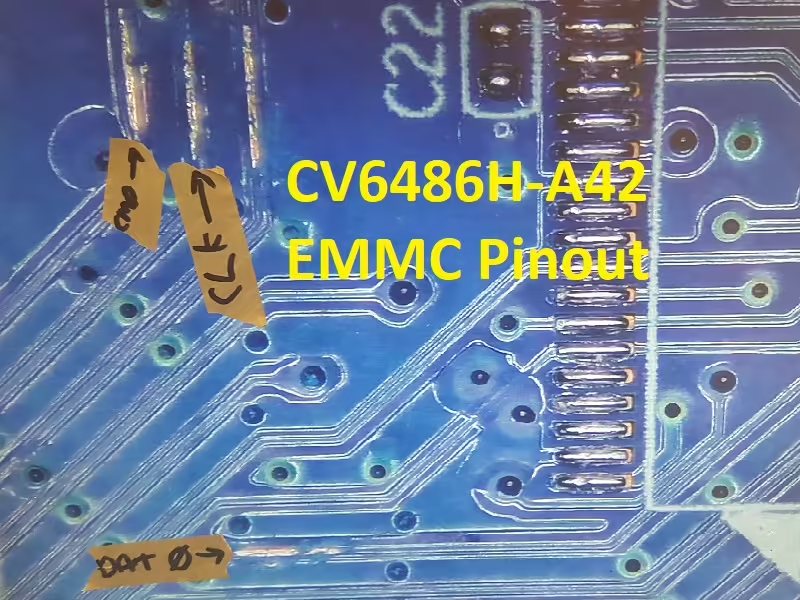
Cv6486H-A42

How to Write EMMC Backup:

  1. Download the given CV6486H-A42 EMMC backup shared in this post below
  2. Note the EMMC Pinouts in the given picture above
  3. Jtag the mainboard with the Programming Tool
  4. Write the EMMC data
  5. Done.

Note: The following firmware is a backup dump file. Kazmi Elecom Team is not responsible for any type of damage/loss as a result of uploading/downloading the firmware. First, check and verify the main board then install software. If you are new and do not have enough knowledge of loading/installing software/firmware or dump files, or facing any issues during firmware installation then visit and read here first.

CV6486H-A42 Firmware files for free download:

Kazmi-Elecom

Geant GN-Optimus Plus Dump File Free Download

Geant GN-Optimus Plus Satellite Receiver

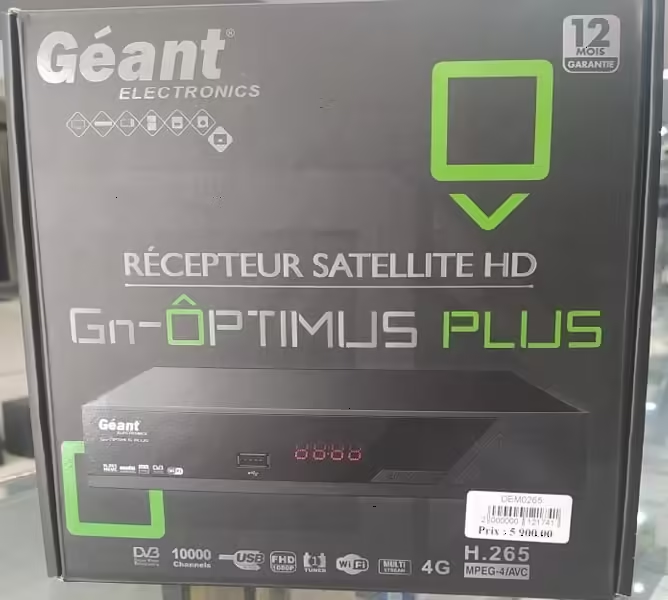
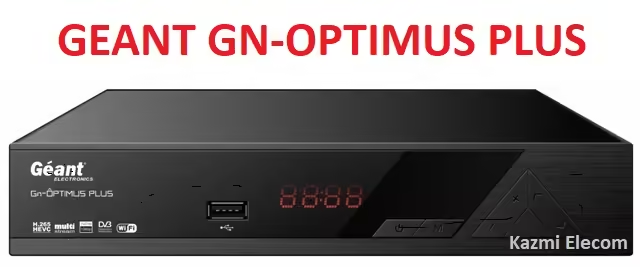
Geant GN-Optimus Plus is a full HD digital satellite receiver. Its Output resolution is 1080P 50 to 60 HZ, 32 BITS. The display screen is a natural on-screen display (OSD)  Storage memory: More than 100 satellites that you can download to the device. Multilingual voice. Multilingual DVB subtitle output. Teletext output through OSD screen. Different sets of the favorites list. It can support the locking and editing of the favorite list. Multilingual menu English, French, Russian, Greek, Italian, Arabic, Persian, Ukrainian, Swedish, Spanish, Turkish, and German. Alpha server holder for 2 years. The device carries SERVEUR ALPHA 24 MOIS V. This type opens the French channels v RMC. It can support SPORT CANAL+ BEIN SPORT IPTV DRAGON 12 MOIS Duration.

Geant GN-Optimus Plus has MULTI STREAM technology And V WIFI. It carries FULL HD. It carries the fourth generation (4G). USB output. The device comes with an Alpha server for 24 months and also comes with an IPTV Dragon server for 12 months. Service Alpha supports 24 months. This is a great device from Geon Server Dragon Iptv 12 mois. The device carries Server VOD for 12 months. It has an IP audio feature. It also supports Timeshift. Auto translation. DVB-52 /DVB S compatible (H265/MPEG-IV+MPEG-LL). Supports reception of eastern and western C+KU satellites. Supports multi-satellite automatic search – network search. Universal Mono S Band C-LNB Wide Band. It supports over 100 satellites, 4000 transponders, and 8000 channels.

Geant Gn-Optimus Plus

Geant GN-Optimus Plus General Information:

Manufacturer: Geant

Box Model: GN-Optimus Plus

Main Board:

Main Controller or Chipset: CS8051

Hardware Version:

Software Version:

Loader:

Box Type: Digital Full HD

Flash Type: SPI SOP8/SOIC8

Flash Size: 8 Mb (ROM)

RAM: 1GB DDR3

Software Type: Backup Dump

Software Size: Mb

Download File Format: ZIP

Download Type: Free

Technical Specifications and Features:

  • OSD: True full color (32bits), 720×576/1280×720(configurable).
  • Storing memory: more than 100 satellites, 4000 transponders, and 8000 channels.
  • 32 and more favorite groups and parental lock supported.
  • Supported program lock and favorite group edit
  • Supported multi-language menu(English, French, Russian, Greek, Italian, Arabic, Persian, UK, Swedish, Spanish, Turkish, German, etc).
  • Multi-language audio.
  • Multi-language DVB Subtitle output (Now/Next Daily, Weekly) Electronic Program Guide (EPG).
  • Teletext output through OSD.
  • DVB-S/DVB-S2 Satellite Compliant (MPEG-II/MPEG-IV/H.265)
  • SCPC & MCPC receivable from KU and C band satellites
  • Universal, Single, Single S & C Band Wideband LNB
  • DiSEqC 1.0/1.1/1.2/1.3(USALS); Unicable Supported
  • Blind Search supported; Multi satellite search, network search, manual search
  • Variable aspect ratio(4:3, 16:9) with PAN&SCAN vector or letter BOX option
  • Output resolution: 480p60Hz 480i60Hz, 576p50Hz & 576i50Hz, 720p50&60Hz, 1080i 50&60Hz, 1080p 50&60Hz
  • LNB IN: antenna connection.
  • HD OUTPUT: HDMI connection.
  • RS232: connect to a computer.
  • S/PDIF: digital audio output (optical output).
  • USB 2.0: connection for external USB storage or will dongle.
  • AV (VIDEO, AUDIO L, AUDIO R): connect to TV video and audio.
  • IR: connect to LED cable.

Geant Gn-Optimus Plus

How to Load with Programmer:

  1. Download the given GEANT GN-OPTIMUS PLUS Dump file
  2. Unzip the file to the folder
  3. Copy the bin file to the USB disk or keep it on the hard disk
  4. Remove the Flash IC from the Receiver PCB board
  5. Connect the programming tool
  6. Put the Flash ic on the Programmer
  7. Write the Flash ic with the required dump file
  8. Resold it back to the receiver motherboard
  9. On the receiver Now it’s working

Note:

The GEANT GN-OPTIMUS PLUS receiver software provided below is a backup dump file. It can be loaded using a programming tool or a loader tool on a non-functional receiver, or it can be used to upgrade or downgrade the SPI Flash Memory of a functioning satellite receiver through the USB upgrade process or the RS232 upgrade tool. Please note that the Kazmi Elecom Team is not liable for any damage or loss that may occur from uploading or downloading the software. Always ensure you have a backup before loading the USB software or writing to the SPI flash memory. For more Dump Files Visit Here.

Download Button Kazmi Elecom

GEANT GN-OPTIMUS PLUS dump file for free download.

5800-A6N83G-0P00 Firmware Free Download

5800-A6N83G-0P00 Smart Android Board

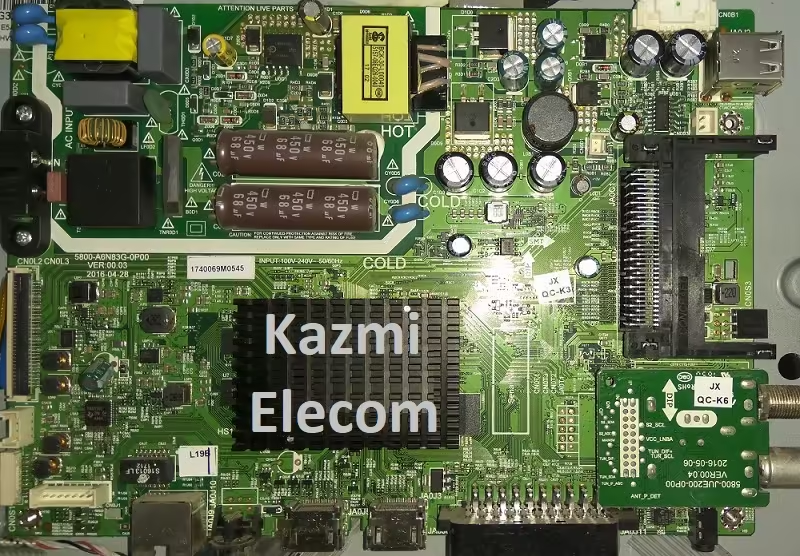
5800-A6N83G-0P00 is a three-in-one non-combo Full HD Smart LED TV motherboard. The maximum resolution of 5800.A6N83G.0P00 is  Full HD 1920×1080 with a Refresh Rate of 50 hertz. 5800.A6N83G.0P00 board has multiple input interfaces for user convenience such as three HDMI ports to connect Full HD devices like set-top boxes, Blu-Ray players, and gaming consoles. This board has two USB ports to connect hard drives and other USB devices and play multimedia files as well. The user can also upgrade the software/firmware by the USB input port. 5800.A6N83G.0P00 has Dolby DTS Support 20 Watts sound output and HDR Display viewing. 5800-A6N83G-0P00 can support Smart TV Features as inbuilt smart applications and the user can also install applications of his own choice.

5800-A6N83G-0P00 has dual tuner ATV and DTV and can support the DVB-T2 signal (DVB-T support, DVB-T MPEG4, DVB-T2 support, DVB-C support, DVB-C MPEG4, DVB-S2 support). 5800-A6N83G-0P00 firmware files and backup of EMMC are given below for free of cost to support the technicians for repairing LED TVs installed with the same board 5800.A6N83G.0P00. This board also has the facility of a VGA interface for connecting laptops and Computer systems. Scart input/output is also embedded. RJ45 (LAN Cable) connectivity for wired internet is available for the user. Headphones Out is also available for audio-out signal amplification.

5800-A6N83G-0P00

General Features & Technical Specifications:

Make: China

Board Model: 5800- A6N83G-0P00 VER:00.03

Display Format: FHD

Screen Type: LED

Features Format: Smart

OS Version: Android

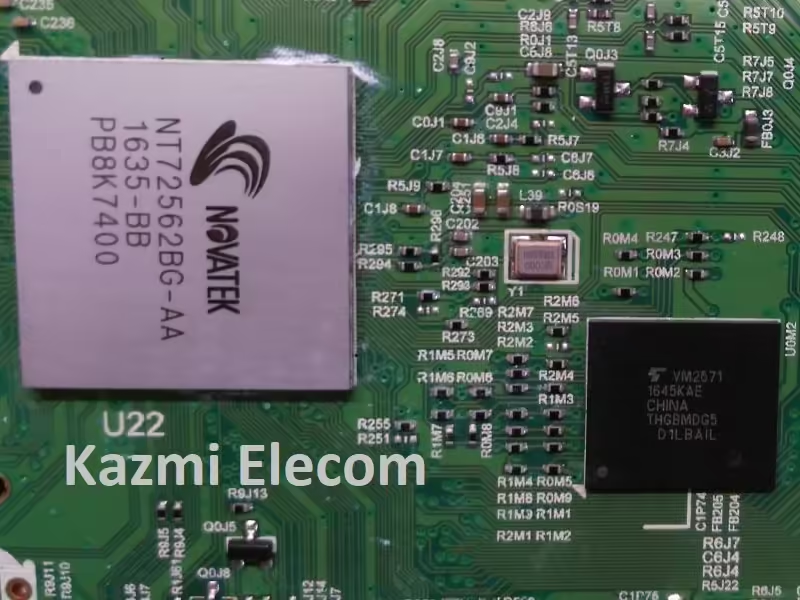
Main Chipset: Novatek NT72562BG-AA

Backlight Driver: MP3398A

Processor: Quad-Core

Graphic Processor: Quad-core

RAM Capacity: GB DDR3

Storage Memory: THGBMDG5D1LBAIL EMMC Flash

SPI Flash: 25L1606E

Screen Resolution: 1920×1080

No of HDMI Ports: 3

No of USB Ports: 2

Wi-Fi Type: Wi-Fi

Built-In Wi-Fi: Yes

Ethernet (RJ45): Yes

Speaker Output RMS: 12 (6W*2)

TV Tuner: Analog/Digital

Power Requirement: AC 110 – 240 V, 50/60 Hz

Power Consumption: 75 W

Firmware Type: EMMC Backup Dump

Firmware Name: NA

Product User: Goldstar

Service Menu Code:

Input/Source 2580 Or Menu 1147 are common. For more Service Menu Codes visit Here.

5800-A6N83G-0P00

How to Write EMMC Backup:

  1. Download the given 5800- A6N83G-0P00 EMMC backup
  2. Jtag the mainboard with the Programming Tool
  3. Write the EMMC data
  4. Done.

Note: The following firmware is a backup dump file. Kazmi Elecom Team is not responsible for any type of damage/loss as a result of uploading/downloading the firmware. First, check and verify the main board then install software. If you are new and do not have enough knowledge of loading/installing software/firmware or dump files, or facing any issues during firmware installation then visit and read here first.

5800-A6N83G-0P00 Firmware for free download:

Kazmi-Elecom

LEG N24 PRO Dump File Free Download

LEG N24 PRO Satellite Receiver

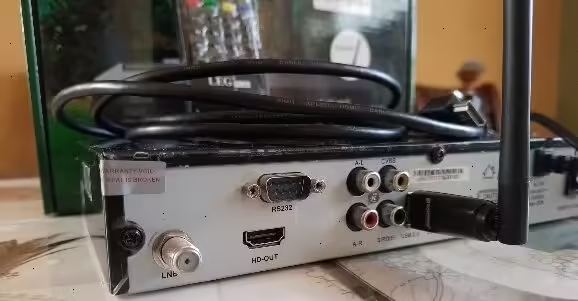
LEG N24 PRO is a Full HD Digital Satellite Receiver with the best performance, outstanding signal reception, and excellent picture quality. The N24-Pro receiver is DVBS/S2 Compliant. The main chipset 1506T is used in this receiver and the RAM capacity is 512 MB while the ROM is 4MB (SPI Flash Memory). N24-Pro receiver has a Single Tuner with Loop-Out. It can Support Mpeg-2, Mpeg-4, and H.264 video formats. The N24-Pro receiver is a Fully HD 1080p compliant box. It can be upgraded with the RS232 interface by the Loader Tool.

LEG N24 PRO can Support the Diseqc switch and RF out modulator. The N24-Pro can Support E-vision IPTV also. The N24-Pro receiver has some extra features such as supporting PowerVU, YouTube application, Cccam, and Newcam. The N24-Pro New receiver launched with a 6-month pre-loaded Tcam Account and a 12-month pre-loaded Dqcam Account. The flash size of The N24-Pro receiver is 4MB and the Dump backup that is shared in this post below is also 4mb that can support the technician to recover the dead or standby N24-Pro receiver.
Leg N24 Pro

General Information:

Manufacturer: LEG

Box Model: N24 PRO

Main Board: 1506T

Main Controller or Chipset: 1506T

Hardware Version: DVBS-1506T-V1.0-OTP

Software Version: SGF1 V11.03.05-2

Loader: Sun-Plus 1506T/F

Box Type: Digital Full HD

Flash Type: SPI SOP8/SOIC8

Flash Size: 4 Mb

Software Type: Backup Dump

Software Size: Mb

Download File Format: ZIP

Download Type: Free

Technical Specifications and Features:

  • DVBS/S2 Compliant
  • Support E-vision IPTV
  • Single Tuner with Loop-Out
  • Support Mpeg-2, Mpeg-4, H.264
  • Fully HD 1080p compliant
  • Support Diseqc switch
  • Support RF Out Modulator
  • Support PowerVU
  • Support YouTube
  • Supports Cccam and Newcam
  • Tcam Account 6-month pre-loaded
  • Dqcam Account 12month pre-loaded
  • Supported RS232

Leg N24 Pro

How to Load with Programmer:

  1. Download the given LEG N24 PRO Dump file
  2. Unzip the file to the folder
  3. Copy the bin file to the USB disk or keep it on the hard disk
  4. Remove the Flash IC from the Receiver PCB board
  5. Connect the programming tool
  6. Put the Flash ic on the Programmer
  7. Write the Flash ic with the required dump file
  8. Resold it back to the receiver motherboard
  9. On the receiver Now it’s working

Note:

The LEG N24 PRO receiver software provided below is a backup dump file. It can be loaded using a programming tool or a loader tool on a non-functional receiver, or it can be used to upgrade or downgrade the SPI Flash Memory of a functioning satellite receiver through the USB upgrade process or the RS232 upgrade tool. Please note that the Kazmi Elecom Team is not liable for any damage or loss that may occur from uploading or downloading the software. Always ensure you have a backup before loading the USB software or writing to the SPI flash memory. For more Dump Files Visit Here.

Download Button Kazmi Elecom

LEG N24 PRO dump file for free download.

TP.VST59S.PB778 MV59PV Software Free Download

TP.VST59S.PB778 LED TV Board

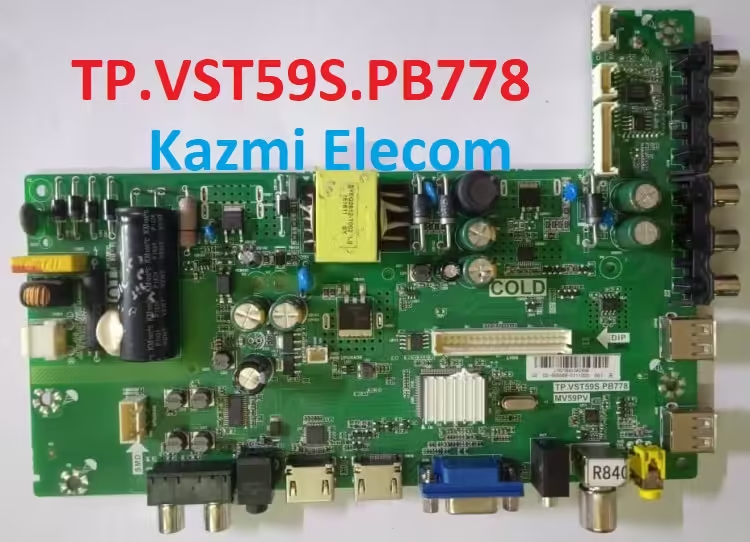
TP.VST59S.PB778 MV59PV is a simple ATV Driver Motherboard intended for LCD/LED TVs. This board is suitable for HD and Full HD LED TV Screen Panels. This board is suitable for the Asia Pacific and the Middle East markets. This is a three-in-one Combo Board. The main power module and LED Backlight Inverter Circuit module and ATV Card are built into this motherboard. This board has all the features and connectivity ports as per the latest user requirements like HDMI input, USB interface, PC input, Component Input, TV, and Scart(optional).

Its USB interface can be used for updating software/firmware and for playing multimedia files as well. It can also support Earphone output. TP-VST59S-PB778-MV59PV is a Full HD-supported LCD LED TV controller board with a maximum resolution of 1920×1080. It can support 32 to 39-inch HD and FHD panel screens. The main processor is made by Mstar and its graphics are also good. TP. VST59S.PB778 MV59PV firmware files are given below for the technician’s support.

Tp.vst59S.pb778

General Features and Technical Specifications:

Brand/Mark: Universal Board

Model: TP. VST59S.PB778 MV59PV

Main Chip: TSUMV59

Product: LCD/LED TV

LED Backlight: mA

Flash IC: 4Mb

Sound Chip:

Tuner IC: R840

HDMI Inputs: 02

USB Input: 02

RCA Inputs: 02

PC Input: VGA Interface

Coaxial Input: Yes

Headphones Out: Yes

Screen supported: 32inch

Resolution: Up to 1920×1080

Panel Voltage: 5V, 12V

Power Input: 220V AC

Firmware Name: bin_v59s.bin

Firmware Type: USB Bootable and Backup Dump

Service Menu Code:

Source/Input 2580 OR Menu 1147 For More Service Menu Codes visit Here.

How To Install USB Firmware:

  1. Download the given file USB bootable (bin_v59s.bin)
  2. Transfer the File into Pen Drive (FAT32 Formated)
  3. Switch OFF the LED TV from Mains
  4. Insert USB Disk into LED TV
  5. Power On the LED TV
  6. It will boot automatically. wait until it’s done.

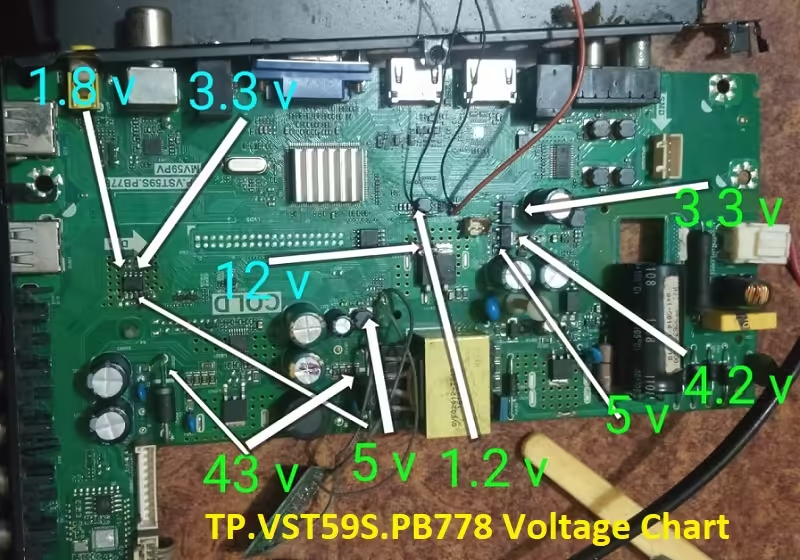
Tp.vst59S.pb778-Voltage-Chart

How to Load Backup Dump:

  1. Download the given backup dump file (.Bin)
  2. Save it on a Hard Disk or transfer it to Pen Drive
  3. Connect the VGA Interface with the programmer and transfer the bin file. If not succeed with VGA then
  4. Remove the Flash IC from the Board or Use a Clip adapter
  5. First of All, Save the Old backup of SPI Flash
  6. Write the SPI Flash Memory with Bin file
  7. Resold it back. Done.

TP.VST59S.PB778 MV59PV firmware for free download:

Download Button Kazmi Elecom

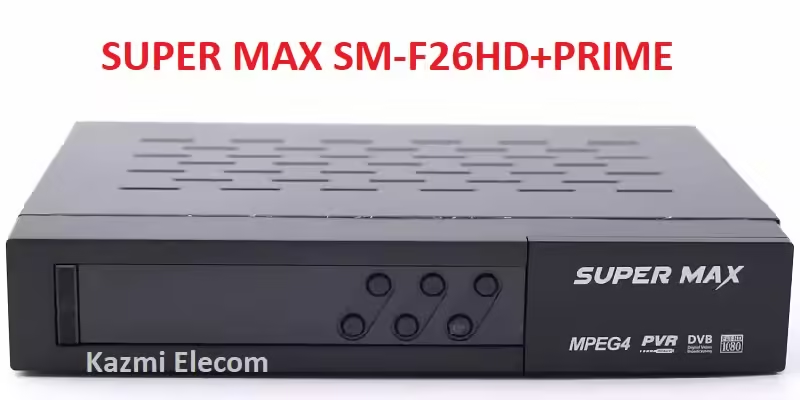
SUPER MAX SM-F26HD+PRIME Dump File Free Download

SUPER MAX SM-F26HD+PRIME Satellite Receiver

The SUPER MAX SM-F26HD+PRIME dump file, also known as the Flash file, contains essential boot instructions and information for the satellite receiver. This software is stored on the EEPROM, Flash IC, or Memory IC of the device. When the receiver is powered on, the main processor or microcontroller accesses this memory to determine how to boot. If it fails to retrieve the necessary boot information, the device may become stuck on a power/red light or the boot logo screen.

In some cases, the Memory IC or SPI Flash of the SUPER MAX SM-F26HD+PRIME satellite receiver may malfunction due to technical issues, or the built-in firmware may crash, preventing the System IC Controller from receiving the required boot instructions. As a result, the satellite receiver may fail to power on. To resolve this issue, it is necessary to reprogram the Flash IC using a compatible hardware dump or Flash file. Below is the dump file for the SUPER MAX SM-F26HD+PRIME, provided for the support of technicians and users.

Super Max Sm-F26Hd+Prime

General Information and Technical Specifications:

Manufacturer: SUPER MAX

Box Model: SM-F26HD+PRIME

Main Board:

Main Controller or Chipset:

Box Type: Digital

Flash Type: SPI SOP8/SOIC8

Flash Size: 4 Mb

Software Type: Backup Dump

Software Size: Mb

Download File Format: ZIP

Download Type: Free

How to Install:

  1. Download the given SUPER MAX SM-F26HD+PRIME Dump file
  2. Unzip the file to folder
  3. Copy the bin file to the USB disk or keep it on the hard disk
  4. Remote the Flash IC from the Receiver PCB board
  5. Connect the programming tool
  6. Put the Flash ic on the Programmer
  7. Write the Flash ic with the required dump file
  8. Resold it back to the receiver motherboard
  9. On the receiver Now its working

Note:

The SUPER MAX SM-F26HD+PRIME receiver software provided below is a backup dump file. It can be loaded using a programming tool or a loader tool on a non-functional receiver, or it can be used to upgrade or downgrade the SPI Flash Memory of a functioning satellite receiver through the USB upgrade process or the RS232 upgrade tool. Please note that the Kazmi Elecom Team is not liable for any damage or loss that may occur from uploading or downloading the software. Always ensure you have a backup before loading the USB software or writing to the SPI flash memory.

Download Button Kazmi Elecom

SUPER MAX SM-F26HD+PRIME dump file for free download.

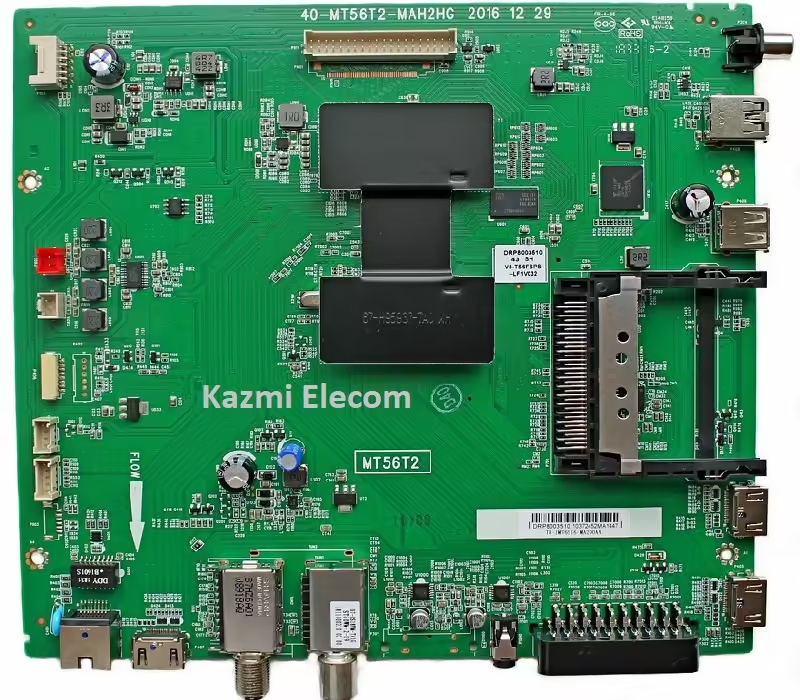
40-MT56T2-MAH2HG Firmware Free Download

40-MT56T2-MAH2HG Smart Android Board

40-MT56T2-MAH2HG is a digital smart Android LED TV motherboard. It is a universal smart board launched into the market with multiple different brands like TCL, ARTEL, GOLDSTAR, etc. This board is the very best in terms of quality, performance, and popularity.  40-MT56T2- MAH2HG has multiple input interfaces for user convenience such as triple HDMI input ports for connecting multiple Full HD external devices easily like Pla-Stations, Gaming Consoles, Blue-Ray players, etc. It has dual USB inputs also by which user can connect external portable Hard Disk Drives or pen drives to play multimedia files and for software/firmware upgrade purposes.

40-MT56T2-MAH2HG board has 4GB ROM storage EMMC memory. Some applications are built in the software but the user can install and uninstall the applications of his own choice. This board has the dual tuner option as ATV and DTV. The main chipset used in this board is MediaTek and the Video Display picture quality is excellent and the sound quality is very good. This is a Non-Combo board which means the backlight driver circuit module and the main power input circuit modules are not embedded into this board so external cards will be required to complete the TV setup. Scart port and RJ45 (LAN) are given on this board.

40-Mt56T2-Mah2Hg

Basic Info:

Main Board: 40-MT56T2-MAH2HG

Chassis: MT56T2

Software Version: V8-MT56552-LF1V

Board Type: Smart Android

Display Format: 1080 (FHD)

Refresh Rate: 60 Hz

File Type: Pkg

Technical Specifications and General Features:

Resolution Supported: 1920×1080

CPU: Dual Core

GPU: Mali

RAM: 512 MB

ROM: 4GB EMMC Toshiba THGBMDG5

Operation System: Smart

Smart Features:

WIFI: Inbuilt

Ethernet: Yes

Audio Output: 16W

Tuner: ATV/DTV

AC Main Input: 220V

Power Consumption: 100W

Firmware Name: pkg

Firmware Type: EMMC Backup Dump

Product Users: TCL, Goldstar, Artel, and many more.

40-MT56T2-MAH2HG Board Replacement:

If the board is absolutely dead and no chance to repair then update the same board as already installed. And if the identical board isn’t always to be had available on the market then look for the board that has the same specifications, the newest Android model, and the latest capabilities to keep away from any problems. If the backlight module is faulty in the combination board then you could deploy only the backlight module separately then no need to trade the complete board.

40-Mt56T2-Mah2Hg

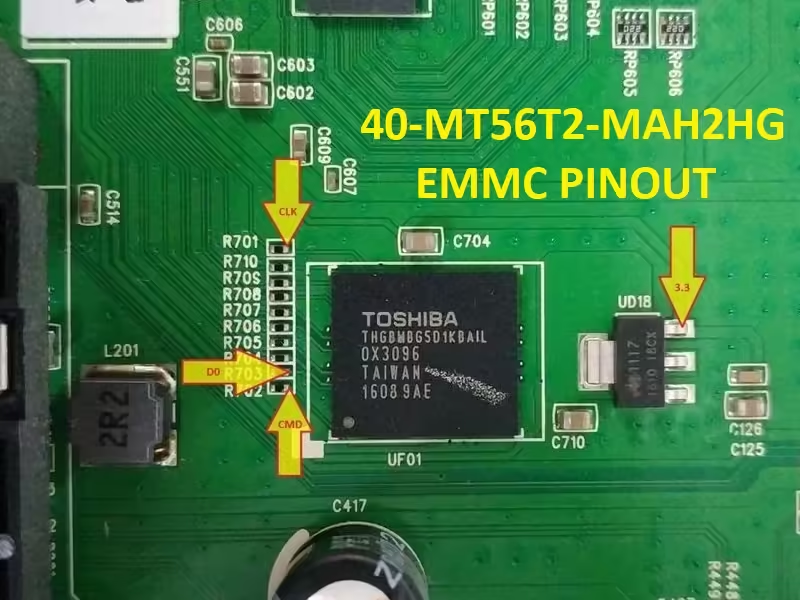
40-MT56T2-MAH2HG EMMC Backup:

This board has a 4GB eMMC chip. you could examine the EMMC backup by way of Pendrive however for writing a backup of EMMC you must jtag the mainboard 40-MT56T2-MAH2HG and write by way of a programming tool. Be cautious while writing emmc backup file, if the board is on standby light due to wrong software or incomplete installation then you can do it, otherwise, it’s far on standby or red light due to hardware fault. So, first, hint the fault. In this situation, no want to put in writing emmc backup.

Note:  The subsequent given software/firmware is EMMC Backup documents. Kazmi Elecom team isn’t always responsible for any sort of harm/loss as a result of loading/installing the firmware. You have to first test the mainboard quantity then the hardware identification then the software model then you could load it by using jtag choice with a programming tool. in case you are new and do no longer have enough expertise of loading or installing software/firmware or dump documents then read here first. No want to uncompress the zip report for an OTA replacement. venture identification can be required in some cases.

How to Download Firmware Files:

Download your required resolution and then extract it you will get the folder. Now copy the .img file to USB or use the compressed file for OTA update from the user factory menu. For more Details about the download process watch the video Click Here

40-MT56T2-MAH2HG Firmware file for free download;

Kazmi-Elecom

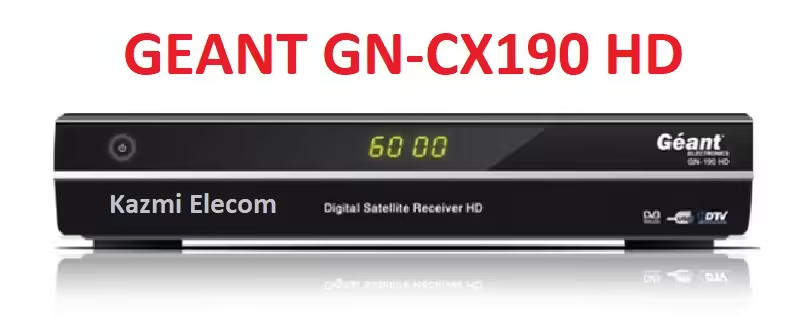
GEANT GN-CX190 HD Dump File Free Download

GEANT GN-CX190 HD Satellite Receiver

GEANT GN-CX190 HD dump report or Flash record is a fundamental boot built-in and statistics software program software for a receiver that is written on EEPROM or Flash IC or memory IC of the satellite TV for pc receiver. while powered on built-in the built-integrated processor/Microcontroller retrieves the facts from memory to recognize the way to paintings/boot if fails to get the boot records integrated then it may caught at the energy/built-integrated light or boot logo screen.

built-in the memory IC or SPI Flash of the GEANT GN-CX190 HD satellite receiver is imperfect because of technical mistakes or Its 7fd5144c552f19a3546408d3b9cfb251 firmware/program crashes due to an error then the gadget IC Controller does now not get any boot built-incommands or primary built integrated and the satellite receiver does now not switch on. In this case, we need to reprogram the flash ic with the matched hardware unload/flash report to get the receiver built-in ord built integrated condition. The dump file of GEANT GN-CX190 HD is given beneath for technician/person aid.

Geant Gn-Cx190 Hd

General Information and Technical Specifications:

Manufacturer: GEANT

Box Model: GN-CX190 HD

Main Board:

Main Controller or Chipset:

Box Type: Digital Satellite Receiver HD

Flash Type: SPI SOP8/SOIC8

Flash Size: 8 Mb

Software Type: Backup Dump

Software Size: Mb

Download File Format: ZIP

Download Type: Free

Note:

underneath given the GEANT GN-CX190 HD receiver software program is a backup unload file and can be loaded with a Programming tool or with a Loader tool in the useless receiver or may be upgraded SPI Flsh reminiscence or downgraded to the older version inside the usually running satellite tv for pc receiver with the USB upgrade manner or by using the RS232 upgrade tool. Kazmi Elecom crew isn’t answerable for any sort of harm/loss because of uploading/downloading the software. always maintain a backup before loading the USB software program or writing SPI flash reminiscence.

Download Button Kazmi Elecom

GEANT GN-CX190 HD dump file for free download.

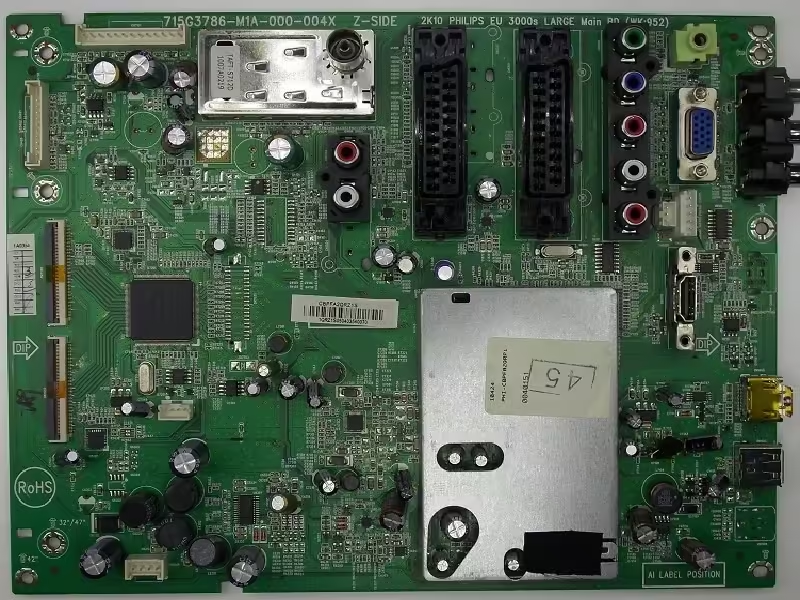
715G3786-M1A-000-004X Software Free Download

715G3786-M1A-000-004X LED TV Board

715G3786-M1A-000-004X is a simple ATV Driver Motherboard intended for LCD/LED TVs. This board is installed with the Philips brands in the market. It is designed to support Full HD LCD/LED Panel Screens. This is a Non-Combo Board. For complete setup, the power input module and LED Backlight Inverter driver Circuit module are required separately but ATV Card is built into this motherboard. This board has all the features and connectivity ports as per the latest requirements like HDMI input, USB interface, PC input, Component Input, TV, and Scart (optional).

Its USB interface can be used to update software/firmware and play multimedia files. It can also support Earphone output. 715G3786- M1A-000-004X is a Full HD-supported LCD LED TV controller board with a maximum resolution of 1920×1080. It can support 32 to 42-inch HD and FHD panel screens. The Sound quality of this board is good and the video graphics are also good. 715G3786-M1A-000-004X firmware files are given below for the technician’s support.

715G3786-M1A-000-004X

General Specifications and Features:

Brand/Mark: Universal Board

Model: 715G3786- M1A-000-004X

Main Chip: MT8222TMMUT

Product: LCD/LED TV

LED Backlight: mA

Flash IC: 4 Mb

Sound Chip: NA

Tuner IC: TDST-H030F

Screen supported: 32-42 inch

Resolution: Up to 1920×1080

Panel Voltage: 5V, 12V

Power Input: 12V DC

Firmware Name: NA

Firmware Type: Backup Dump

Product: Philips

Service Code:

Source/Input

Note: The following firmware is a backup file that can be loaded by a programming tool. Kazmi Elecom Team is not responsible for any type of damage/loss as a result of uploading/downloading the firmware. First, check and verify the main board then install software. If you are new and do not have enough knowledge of loading/installing software/firmware or dump files, or facing any issues during firmware installation then visit and read here first. Always keep a backup before writing the flash.

715G3786-M1A-000-004X firmware for free download:

Kazmi-Elecom

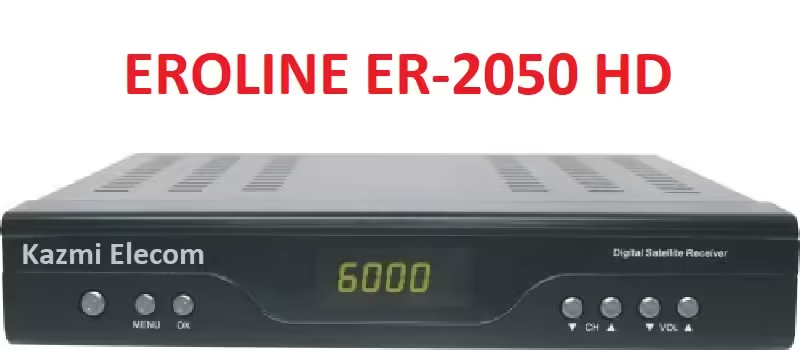
EROLINE ER-2050 HD Dump File Free Download

EROLINE ER-2050 HD Satellite Receiver

EROLINE ER-2050 HD dump file or Flash file is a basic boot instructions and information software program for a receiver that is written on EEPROM or Flash IC or Memory IC of the satellite receiver. When powered on the main processor/Microcontroller retrieves the information from memory to know how to work/boot if fails to get the boot information then it may stuck on the power/red light or boot logo screen.

Sometimes the Memory IC or SPI Flash of the EROLINE ER-2050 HD satellite receiver is imperfect due to technical errors or Its built-in firmware/program crashes because of an error then the System IC Controller does n’t get any charge instructions or introductory information and the satellite receiver does n’t turn on. In this situation, we need to reprogram the flash ic with the matched hardware dump/flash file to get the receiver in normal condition. The dump file of EROLINE ER-2050 HD is given below for technician/user support.

Eroline Er-2050 Hd

General Information and Technical Specifications:

Manufacturer: EROLINE

Box Model: ER-2050 HD

Main Board: NA

Main Controller or Chipset: Na

Box Type: Digital

Flash Type: SPI SOP8/SOIC8

Flash Size: 4 Mb

Software Type: Backup Dump

Software Size: Mb

Download File Format: ZIP

Download Type: Free

Note:

Below given the EROLINE ER-2050 HD receiver software is a backup dump file and can be loaded with a Programming tool or with a Loader tool in the dead receiver or can be upgraded SPI Flsh Memory or downgraded to the older version in the normally working satellite receiver with the USB Upgrade procedure or by the RS232 Upgrade Tool. Kazmi Elecom Team is not responsible for any type of damage/loss as a result of uploading/downloading the software. Always keep a backup before loading the USB software or writing SPI flash memory.

Download Button Kazmi Elecom

EROLINE ER-2050 HD dump file for free download.

error: Content is protected !!