Tag Archives: kazmi elecom

*35022386 Firmware Free Download

*35022386 UHD LED TV Board

*35022386 is an Intelligent smart 4K network driver LED TV board with an Integrated digital terrestrial receiver support resolution of 3840×2160. *35022386 is dedicated to 60 Hz screens. It is not a combo board. Smart UHD TV With Android Platform and great features to entertain ultra HD Wide Screen with better to work SMART. *35022386 has all the features and multiple input interface connectivity. It has multiple ports like HDMI, AV, Headphones, VGA interface, USB ports, and RJ45 Ethernet port for wired internet connectivity. Its USB interface can be used for software upgrades and multimedia file playback.

*35022386 is a digital and analog TV board, it can receive analogtelevision (PAL/SECAM/NTSC) and digital television (DVB-T/T2) signals. *35022386 Firmware file is given below for Technician’s support. It is built with a Mstar chipset that’s why its built quality is very good. Its display picture video quality is excellent may experience the user real Ultra HD pixels. This board is compatible with 4K Ultra HD resolution screen panels. A WiFi Android chipset is also mounted on this board. The sound quality of this board is also very good. This board is Non-Combo, So, the power main circuit module and backlight driver controller will be required separately.

*35022386

Technical Features & Specifications:

Brand/Make: LCD/LED UHD Smart Driver Board

Model: *35022386 REV-03, REV-04

Supported Resolution: 3840×2160 UHD 4K

Screen Format: 16:9

Operating System: Android

CPU: ARM Cortex-A53

GPU: Mali T720 MP2

RAM: 1GB DDR3

ROM: 4/8 Gb

Sound Output: 10Wx2 DOLBY

RF TUNER: DIGITAL TUNER DVB-T/T2

Video System: PAL/SECAM/NTSC

Power Input: 100-240 V AC

Power Consumption: 150W

Standby Power: 0.5W

Firmware: MstarUpgrade.bin

Firmware Type: EMMC Backup

Product: Telstar, Hyundai, Tophouse

Caution: 

All the snaps/pictures/images and specifications/features details related to *35022386 in this post are for reference only. Still, it’s better to visit the nearest technician first without loading the software/ firmware, If you’re a stoner and do n’t have any form experience. occasionally, the fault is different grounded on the visual compliances. So, please do n’t try it at home. If the LED television is slow also reset it to plant dereliction only.

*35022386

*35022386 EMMC Backup:

This board has a 4/8GB eMMC ROM capacity. The user can read the EMMC backup by Pen drive but for writing a backup of EMMC you should jtag the mainboard *35022386 and write by a programming tool. Be careful while writing emmc backup file, if the board is on standby light due to wrong software or incomplete installation then you can do it, otherwise, it is on standby or red light due to hardware fault. So, first trace the fault. In this case, no need to write emmc backup.

Note: The following firmware is a USB bootable and EMC backup file. Kazmi Elecom Team is not responsible for any damage/loss caused by uploading/downloading the firmware. First, check and verify the main board then install software. If you are new and do not have enough knowledge of loading/installing software/firmware or dump files, or facing any issues during firmware installation then visit and read here first.

How to Download:

Download all parts of the following given firmware/software according to your requirement and then extract any one of them you will get the complete folder. Now copy the files to USB and write an EMMC backup with a programmer. For more Details about the download process watch the video Click Here

How to Load Firmware:

  • Transfer the MstarUpgrade.bin file into USB disk
  • Power OFF the TV and Connect the U-Disk
  • Press and hold the VOL+ Key on Remote Control and Switch on the TV

*35022386 firmware file for free download:

Kazmi-Elecom

5800-A9K02T-0P00 Firmware Free Download

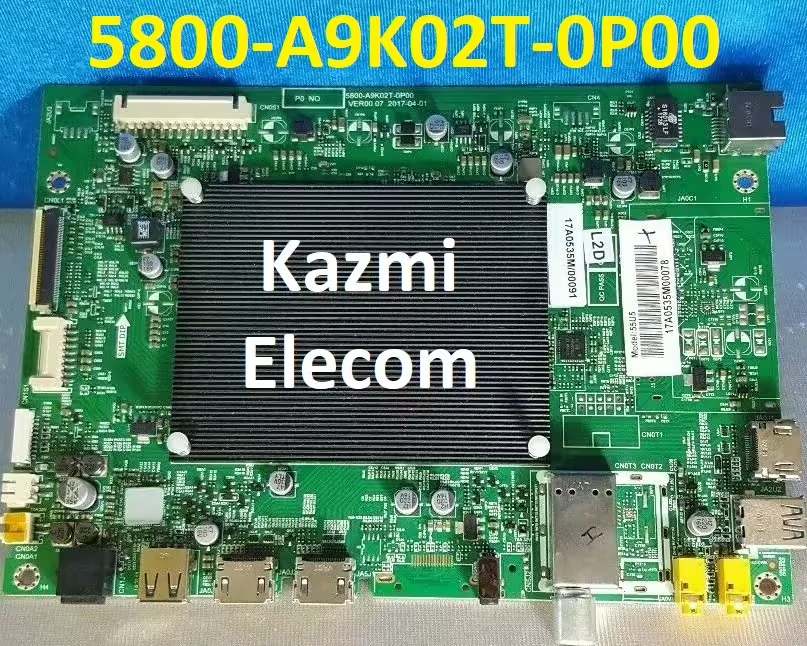
5800-A9K02T-0P00 4K LED TV Board

5800-A9K02T-0P00 is a Smart Android Ultra HD (4K) Certified Android LED TV Board. It has a 4K Ultra HD resolution of 3840×2160 and a Refresh Rate is 60 hertz. It has triple HDMI input ports to connect several HD external devices such as gaming consoles, (STBs) set-top boxes, and Blu-Ray players. It has dual USB ports to connect external hard disk drives and other USB devices. The user can also play multimedia files as well. It has Dolby DTS Support 20 Watts sound output and HDR Display viewing. It has a mini RCA (Composite Input jack) and LAN port for wired internet connectivity.

5800-A9K02T-0P00 is a Non-Combo board. The Backlight driver controller module and the main input power circuit kit will be required for the complete installation of the LED TV. While the RF tuner for cable TV is built on the main PCB board. It can support Google Play Store, and Smart TV Features such as Android, Google Voice Search, and Remote with Voice & Air Mouse. Multiple applications are built into this software. 5800-A9K02T-0P00 firmware files are given below for free of cost download and rectify the problem of LED TVs.

5800-A9K02T-0P00

General Features & Specifications:

Brand: China

Board Model: 5800-A9K02T-0P00 VER00.07

Display Format: UHD

Screen Type: LED

Features Format: Smart

OS Version: 8.0

Chipset:

Processor: Quad-Core

Graphic Processor: Quad-core

RAM Capacity: GB DDR3

Storage Memory: GB ROM

Screen Resolution: 4K 3840×2160 (Ultra Hd)

No of HDMI Ports: 3

No of USB Ports: 2

Wi-Fi Type: Wi-Fi

Built-In Wi-Fi: Yes

Ethernet (RJ45): Yes

Speaker Output RMS: 30W (15W*2)

TV Tuner: Analog/Digital

Power Requirement: AC 110 – 240 V, 50/60 Hz

Power Consumption: 135 W

Firmware Type: USB Update

Firmware Name: upgrade_loader_common_user_globe_ap.pkg

Product: Skyworth, VU

Caution: 

All the images, features, and specification details related to 5800-A9K02T-0P00 in this post are for reference only. Still, it’s better to visit the nearest technician first without loading the software/ firmware, If you’re a stoner and don’t have any form experience. occasionally, the fault is different grounded on the visual compliances. So, please don’t try it at home. If the LED television is slow also reset it to plant dereliction only.

5800-A9K02T-0P00 EMMC Backup:

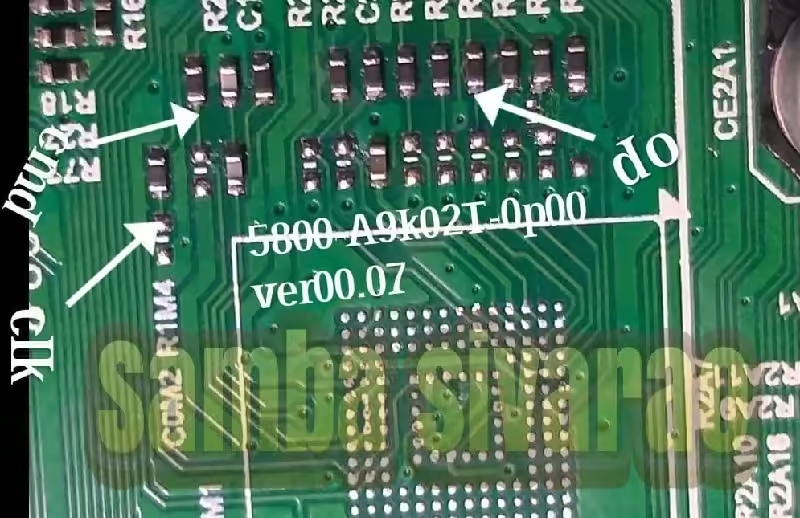
This board has an 8 GB eMMC chip. you can read the EMMC backup by Pendrive but for writing a backup of EMMC you should jtag the mainboard 5800- A9K02T- 0P00 and write by a programming tool. Be careful while writing emmc backup train, if the board is on standby light due to wrong software or deficient installation also you can do it, else, it’s on buttress or red light due to tackle fault. So, first trace the fault. In this case, no need to write emmc backup.

5800-A9K02T-0P00

5800-A9K02T-0P00 Board Replacement:

If the board is completely dead and no chance to repair then replace the same board as already installed. And if the same board is not available on the market then search for the board that has the same specifications, the newest Android version, and the latest features to avoid any difficulties. If the backlight module is defective in the quintet board also you can install only the backlight module independently also no need to change the whole board.

Note: The following firmware is a USB rush and EMC backup train. Kazmi Elecom Team isn’t responsible for any damage/ loss caused by uploading/ downloading the firmware. First, check and corroborate the main board also install software. However, or facing any issues during firmware installation also visit If you’re new and don’t have enough knowledge of lading/ installing software/ firmware or dump lines. and read here first.

How to Download Firmware File:

Download all parts of the following firmware and then extract any one of them you will get the folder. Now copy the files to USB. For more Details about the download process watch the video Click Here

5800-A9K02T-0P00 Firmware for free download:
Download Button Kazmi Elecom

6681M3C1 Firmware Free Download

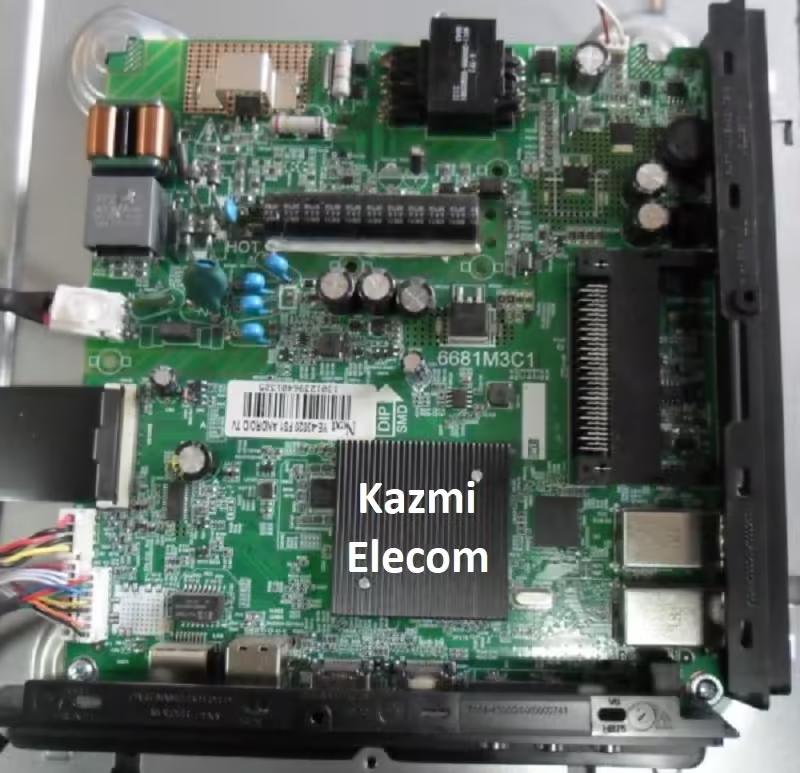
6681M3C1 Smart Android Board

6681M3C1 is a combo three-in-one FHD LED TV Android Board. It has supported a 1920×1080 Full HD resolution and a Refresh Rate of 60 hertz. It has multiple connectivity input interfaces for the user such as dual HDMI input ports to connect external STB (set-top box), Blu-Ray players, and gaming consoles. It has more than one USB port to connect portable hard disk drives and other USB devices and users can play multimedia files as well by these USB input interfaces. RCA interface is available for RGB connectivity. The Scart interface is also available on this board. LAN connection for wired internet connectivity.

It has Dolby Digital DTS Support 20 Watts sound output and HDR Display viewing. 6681M3C1 can support the Smart TV Features as Android, and Google Play Store. 6681M3C1 firmware files are given below for free of cost download to support technicians for rectification of LED TV Software problems. The Backlight driver controller board and Main Power Input Circuit module are built into this board with the addition of dual tuner ATV and DTV. This board has Android version 9.0 with 1GB RAM and 8 GB ROM.

6681M3C1

Technical Features & Specifications:

Brand: China

Board Model: 6681M3C1

Display Format: FHD 1080P

Screen Type: LED

Features Format: Smart

OS Version: Android 9.0

Chipset: MTK6681

Processor: Arm-Cortex

Graphic Processor: Quad-core

RAM Capacity: 1 GB DDR3

Storage Memory: 8 GB ROM

Screen Resolution: 1920×1080

No of HDMI Ports: 2

No of USB Ports: 2

Wi-Fi Type: Wi-Fi

Built-In Wi-Fi: Yes

Ethernet (RJ45): Yes

Speaker Output RMS: 20W (10W*2)

Tuner: ATV & DTV (DVB-T2, DVB-C, DVB-S2)

Power Requirement: AC 110 – 240 V, 50/60 Hz

Power Consumption: 120 W

Service Menu: Source+2580

Firmware Type: USB Update

Firmware Name: 6681_DVBT_8G.bin

Product: Premier, Goldstar, VOX, Dijitsu

Caution:

All the Images, features, and specifications shared in this post related to board 6681M3C1 are for reference only. If the user does not have any repairing knowledge or experience then he should go to the nearest expert technician and not try to repair or install firmware. Sometimes, the user thinks that there is a software issue but maybe it is something else. it may be a hardware issue. If the Android LED TV is on standby mode, it shows the hardware fault, and if hangs on the logo then may be a software/hardware fault. If the Smart LED TV is slow and some applications not performing well then the user can do the factory reset only.

6681M3C1

6681M3C1 EMMC Backup:

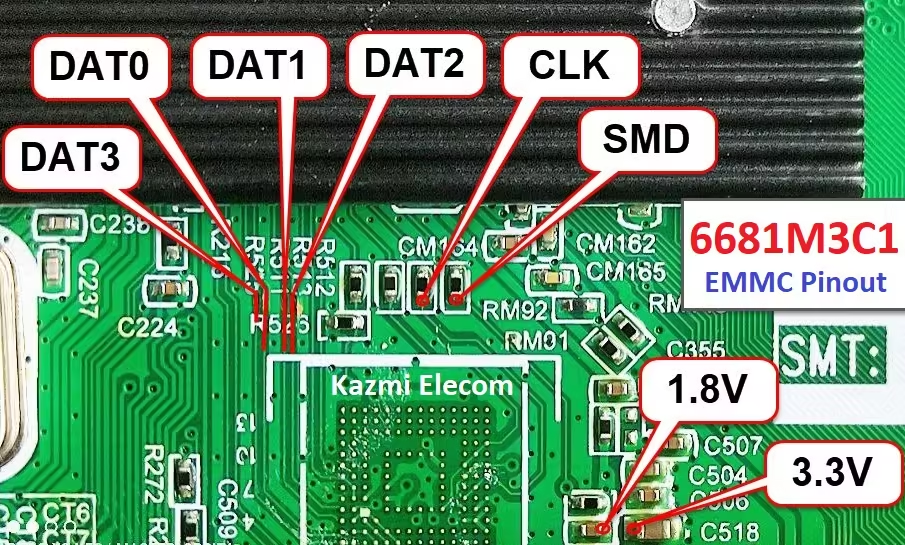
This board has an 8GB eMMC memory capacity. The user can read the EMMC backup files by Pen drive but for rewriting a backup of EMMC the user should jtag the mainboard 6681M3C1 and rewrite by a programmer or special ISP tool. Be careful while writing emmc backup file, if the board is on standby light due to wrong software or incomplete installation then the user can rewrite the backup, otherwise, it is on standby or red light due to hardware issues. So, first, diagnose the fault. In this case, no need to write emmc backup.

Note: The following given software is a USB bootable and EMMC backup file. Kazmi Elecom Team is not responsible for any damage/loss caused by uploading/downloading the firmware. First, check and verify the main board then install software. If you are new and lack knowledge of loading/installing software/firmware or EMMC backup files, or are facing any issues during firmware installation then visit and read here first.

How to Download:

Download all parts of your required firmware and then extract any one of them you will get the folder. Then copy the files to a USB disk or write an EMMC backup with a programmer. For more Details about the download process watch the video Click Here

6681M3C1 Firmware for free download:
Download Button Kazmi Elecom

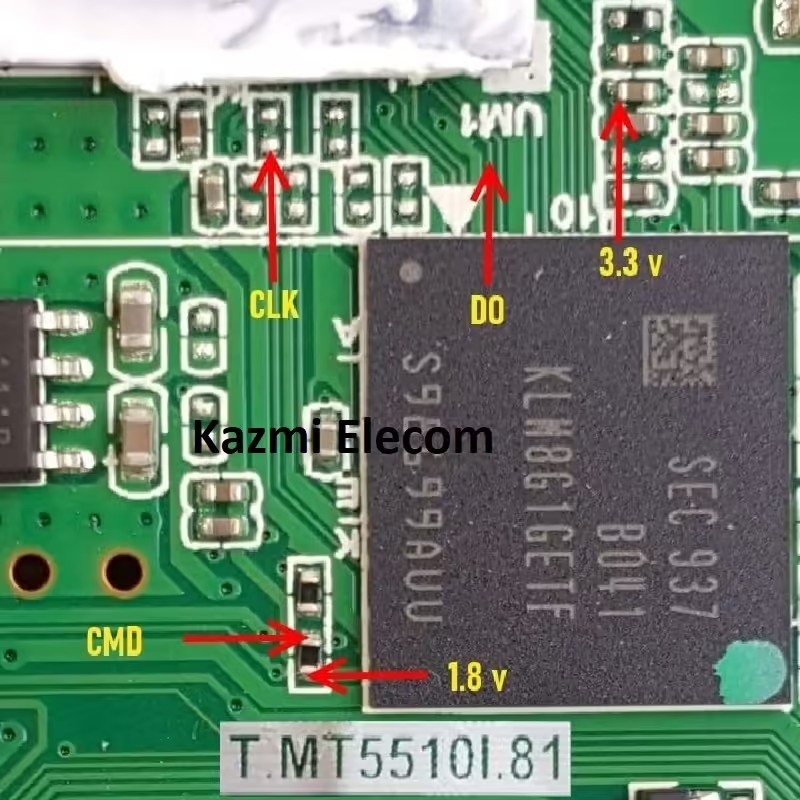
T.MT5510I.81 Firmware Free Download

T.MT5510I.81 Smart Android Board

T.MT5510I.81 is an Android and Intelligent 2K network drive board with a resolution of Full HD 1920×1080. It is dedicated to 60 and 120 Hz screens. T-MT5510I-81 has a powerful wifi system. This is a Non-Cpmbo Board. The power input circuit board and backlight inverter driver module are not built into this board so they are required separately to complete the LED TV setup. While an RF tuner is installed on it. T_MT5510I_81 is a 2K original quad-core Android smart Mainboard. With the MediaTek processor, its display quality is very excellent.

T MT5510I 81 has multiple Input interface ports like USB, HDMI, AV, Earphone out, PC VGA interface, and wifi built-in with an RJ45 ethernet port for wired internet connection and smooth connectivity. The sound quality is also very good with a 16-watt output power speaker system. T.MT5510I.81 is a very popular board mostly used for Haier, RCA, Changhong, and other FHD LED TVs, etc.

T.mt5510I.81

Technical Specifications:

Model Name: T.MT5510I.81  (Smart FHD With Android Platform)

Resolution: 1920×1080

Aspect Ratio: 16:09

OSD language:  English, Others

OS Version: Android 7.0

CPU: Quad-Core

Ram: 1 GB

Rom: 8 GB

Audio Power Output: 16w (8×2)

System: PAL/SECAM/NTSC

WIFI: WIFI-2-M06USA1

PC Compatible: Yes

TV Tuner Input: ATV, DVB-T2, DVB-T, DVB-S2, DVB-C

HDMI: 3

YPbPr: 1 YPBPR (Mini)

AV IN: 1 AV

Video output: CVBS

USB Ports: 2

Power Rating: 100V~240V 50Hz/60Hz

Power Consumption: 108Watt

Factory Mode: Menu 1147

Firmware Name: NA

Firmware Type: EMMC Backup

Caution:

All the filmland and specification details related to T.MT5510I.81 in this post are for reference only. However, it’s better to visit the nearest technician first without loading the software/ firmware, If you’re a stoner and don’t have any form experience. occasionally, the fault is different grounded on the visual compliances. So, please don’t try it at home. If the LED television is slow also reset it to plant dereliction only.

Pros:

There are a few advantages to installing the shared T.MT5510I.81 eMMC backup dump file. A few benefits are described below:

  • The dead board can be recovered and operational by loading the given EMMC backup file
  • Money saving instead of changing the mainboard
  • Time-saving instead of arranging a new board
  • Customer satisfaction to do an urgent job
  • Skill and confidence improvement

Cons:

There may be some disadvantages to installing the given T.MT5510I.81 USB software or backup dump file. But it depends on the technician or user, as per his understanding. A few drawbacks are described below:

  • By installing this EMMC backup, a working board may be dead or go to standby status
  • Remote Control may not work and the Logo may change by writing the given software
  • Panel screen parameters may be changed

T.MT5510I.81 Android Version Upgrade:

Please note that the installed version in this board is the final version and the Android version is not updateable. Do not try to load emmc backup if the board is working normally. Only the firmware may be different according to features and interfaces by different brand with the same version. Otherwise, no version update is issued.

T.t5510I.81

Note:  The following firmware is an EMC backup dump. Kazmi Elecom Team isn’t responsible for any damage/ loss caused by uploading/ downloading the firmware. First, check and corroborate the main board and install install software. However, or facing any issues during firmware installation also visit and read them first, If you’re new and don’t have enough knowledge of lading/ installing software/ firmware or dump lines. read here first.

How to Download Firmware Files:

Download all parts of the given emmc backup firmware and then extract any one of them you will get the folder. Now write the files with a programming tool. For more Details about the download process watch the video Click Here

T.MT5510I.81 Firmware for free download:

Kazmi-Elecom

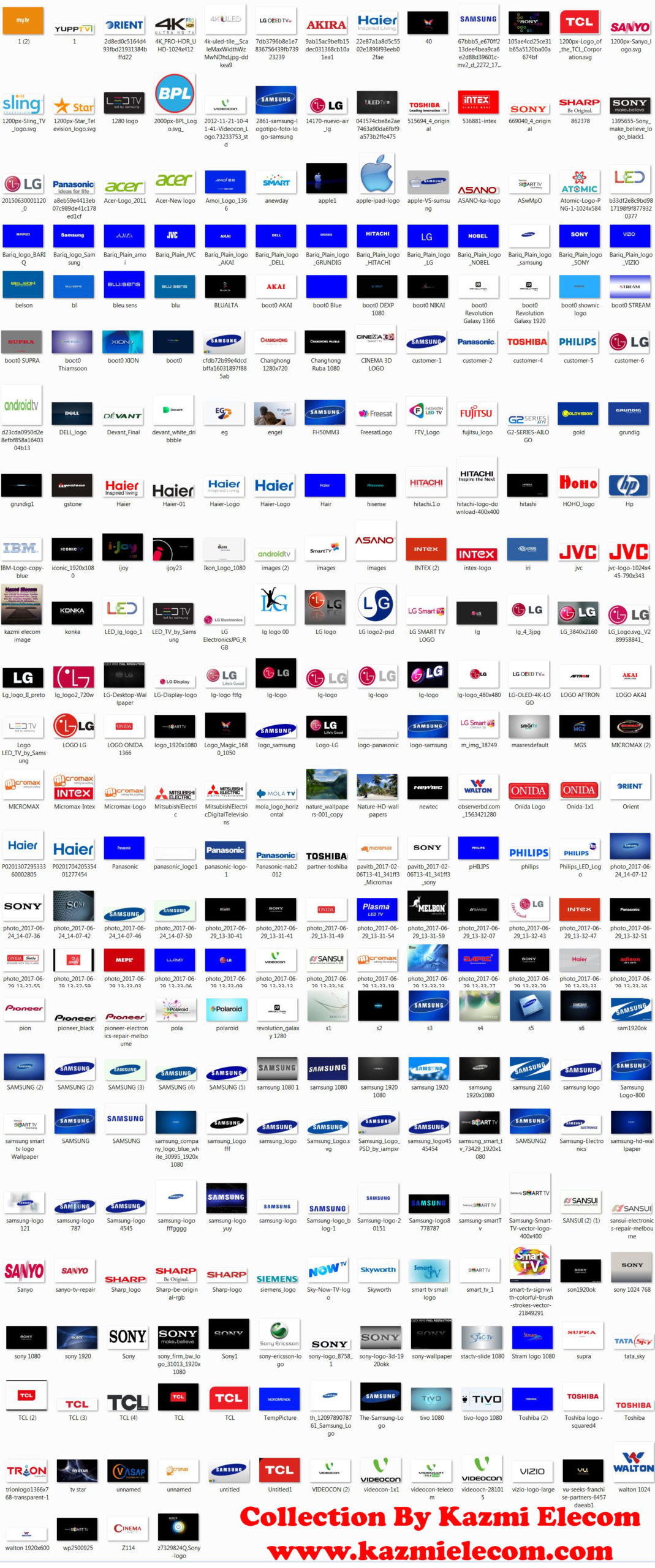
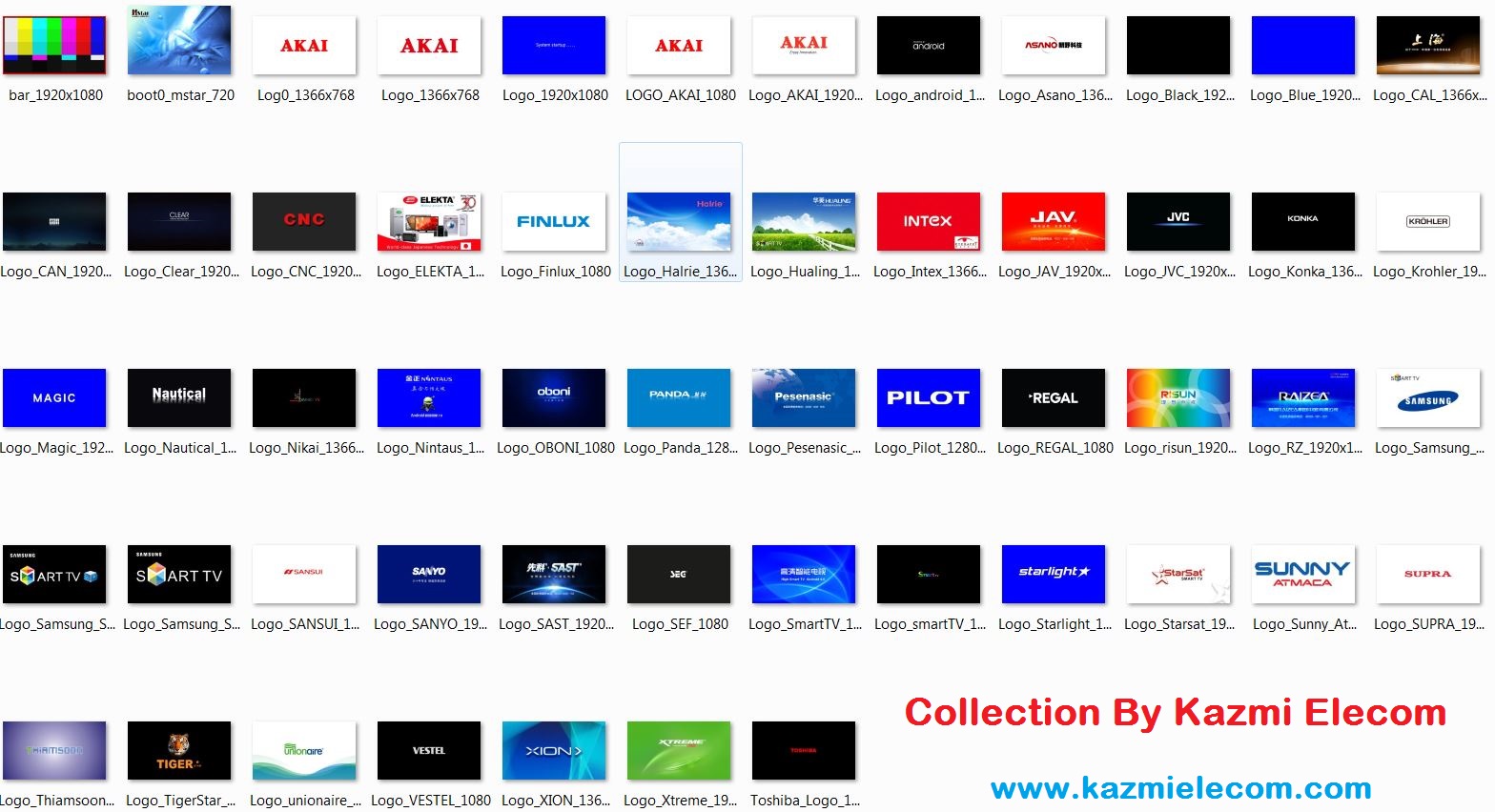
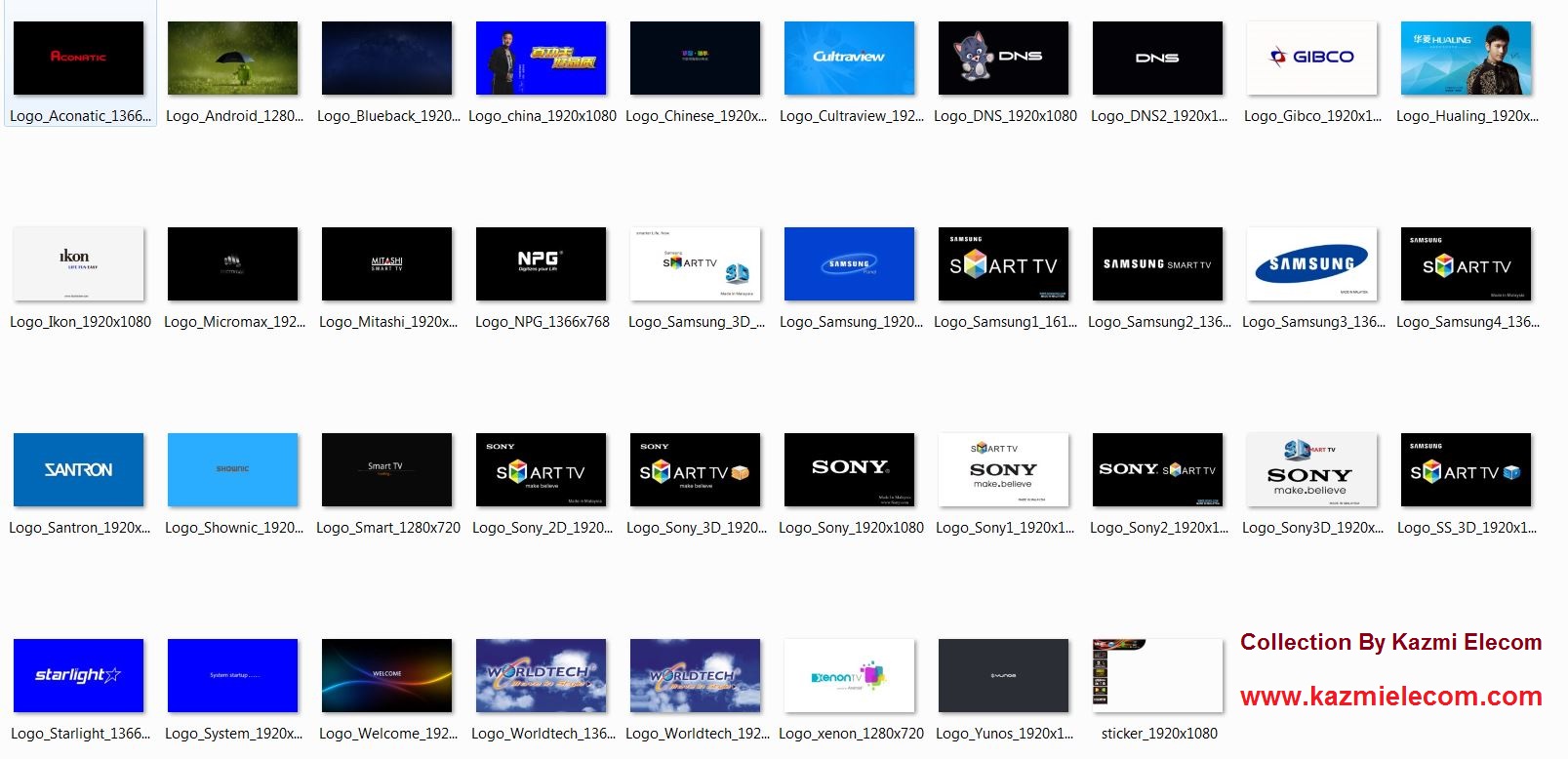
1000+ LED TV LOGO Free Download

All LED TV LOGO

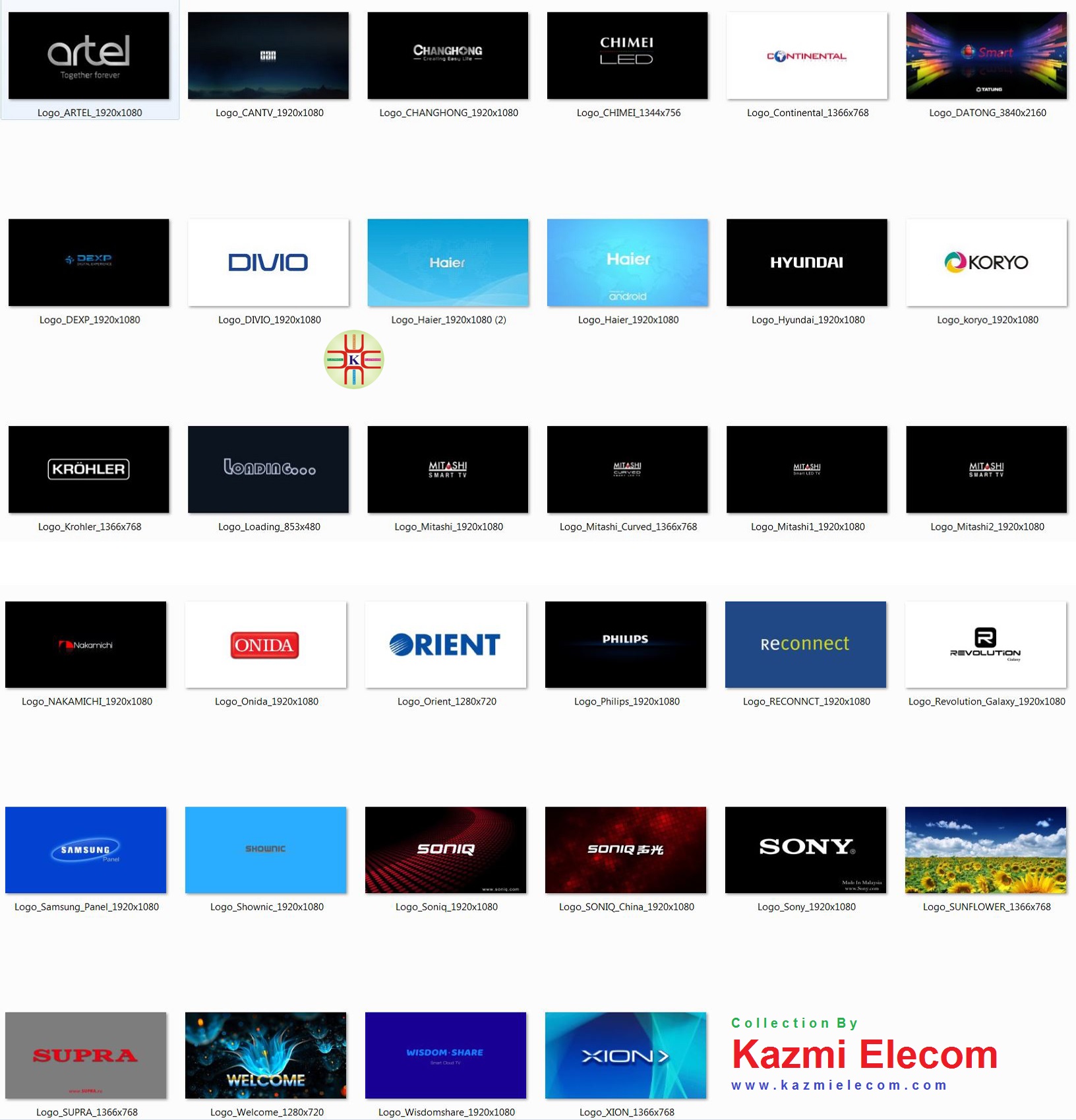
A collection of all LED TV LOGOs available here for you all by Kazmi Elecom. You can download all LCD LED TV LOGOs free of cost. Each TV has different options for changing its logo. All original brands have their built-in software and logo, so we can not change their logo. All Chinese brands have the option to change their welcome screen or logo.

Universal China LCD/LED Board or Jumper Board has the same procedure to capture the logo or welcome screen. You can set your self-created Logo as well. A detailed image of the logo file is attached to this post. Some video tutorials are also shared in the video category menu of this website.

Lcd_Led_Tv_Logo

LED TV LOGO GROUP-1

A Brand LED TV LOGO:

  • 4K PRO-HDR LOGO 1024×768
  • 4K SMART TV LOGO 1920×1080
  • 4K ULED LOGO 1024X768
  • 19 LOGO 1024X576
  • 81 LOGO 1280×800
  • 81 LOGO 1280X1024
  • 81 LOGO 1366×768
  • 81 LOGO 1680×1050
  • A9 LOGO 1280X720
  • A9 LOGO 1920×1080
  • ABAJ LOGO 1366×768
  • ABAJ LOGO 1920×1080
  • ABEST LOGO 1366X768
  • ACE LOGO 1366×768
  • ACONATIC LOGO 1366×768
  • ACONATIC LOGO 1366X768
  • ACONATIC LOGO 1920×1080
  • ADISON LOGO 1280X720
  • ADISON LOGO 1280×723
  • ADLER LOGO 1366×768
  • ADLER LOGO 1920×1080
  • AFTRON LOGO 1366×768
  • AFTRON LOGO 1920×1080
  • AG LOGO 1024X576
  • AGE LOGO 1366×768
  • AHRAM LOGO 1366×768
  • AIFA LOGO 1366×768
  • AIRIS LOGO 1280X720
  • AIWA LOGO 1280X720
  • AIWA LOGO 1366×768
  • AIWA LOGO 1920×1080
  • AKAI BLUE LOGO 1920×1080
  • AKAI LOGO 1280X720
  • AKAI LOGO 1366×768
  • AKAI LOGO 1920×1080
  • AKARI LOGO 1366×768
  • AKIRA LOGO 1920×1080
  • AL-FARIS LOGO 1366×768
  • AL-FARIS WHITE LOGO 1366×768
  • ALHAFIDH LOGO 1920×1080
  • ALPHA LOGO 1920×1080
  • ALTIUS LOGO 1366×768
  • AMERICAN HOME LOGO 1366×768
  • AMOI LOGO 1366×768
  • AMOI LOGO 1920×1080
  • ANDROID LOGO 1280×720
  • ANDROID LOGO 1920×1080
  • Android-Green-LOGO 1920×1080
  • ANDROIDTV LOGO 1920X1080
  • ANSONIC LOGO 1366X768
  • AOC LOGO 1280X720
  • AOC LOGO 1366×768
  • AOC LOGO 1920×1080
  • AP LOGO 1366×768
  • APARNA LOGO 1280×714
  • APEC LOGO 1366×768
  • APPLE TV LOGO 1024×768
  • AQUA LOGO 1366×768
  • AR LOGO 1920×1080
  • ARAGON LOGO 1366×768
  • ARAGON LOGO 1920×1080
  • ARION LOGO 1366×768
  • ARION LOGO 1920×1080
  • ARISE LOGO 1366×768
  • ARRQW LOGO 1366X768
  • ARTEL LOGO 1366×768
  • ARTEL LOGO 1920×1080
  • ASAHI LOGO 720X400
  • ASAHI LOGO 1366X768
  • ASANO LOGO 720X480
  • ASANO LOGO 1366×768
  • ASANZO LOGO 1920×1080
  • ATA BLUE LOGO 1366×768
  • ATA BLUE LOGO 1920×1080
  • ATA LOGO 1366×768
  • ATA LOGO 1920×1080
  • ATC LOGO 1366×768
  • ATC LOGO 1920X1080
  • ATEC LOGO 1366×768
  • ATEC LOGO 2167×1228
  • ATOMIC LOGO 1024×584
  • ATVIO LOGO 1366×768
  • ATVIO LOGO 1920×1080
  • ATVIO LOGO 2732×1536
  • AUDIOSONIC LOGO 1280X720
  • AUDIOSONIC LOGO 1366X768
  • AURORA LOGO 1280×1024
  • AURUS LOGO 1366×768
  • AURUS LOGO 1920×1080
  • AVANGARD LOGO 1366×768
  • AVOIR LOGO 1366×768
  • AVOIR LOGO 1920×1080
  • AZATECH LOGO 1366×768
  • AZATECH LOGO 1920X1080

B Brand LED TV LOGO:

  • BAIRD LOGO 1920×1080
  • BBK LOGO 720X480
  • BBK LOGO 1280×720
  • BBK LOGO 1920×1080
  • BELTEK LOGO 1600×900
  • BENKON LOGO 1366×768
  • BENKON LOGO 1920×1080
  • BESAT LOGO 1024X768
  • BESAT LOGO 1366×768
  • BESAT LOGO-1 1366×768
  • BESTON LOGO 1280×720
  • BESTON LOGO 1366×768
  • BESTON LOGO 1600×900
  • BESTVIEW LOGO 1920×1080
  • BGH BLUE 1366×768
  • BGH LOGO 1366×768
  • BLACK LOGO 1920×1080
  • BLACK&WHITE LOGO 1366×768
  • BLANDY LOGO 1366×768
  • BLANDY LOGO 1920×1080
  • BLAUBERG LOGO 1366X768
  • BLAUPUNKT LOGO 3840×2160
  • BLU SENS LOGO 720X480
  • BLU SENS LOGO 1280×720
  • BLU SENS LOGO 1920×1080
  • BLUALTA LOGO 1366×768
  • BLUE LOGO 1280×1024
  • BLUE LOGO 1920×1080
  • BLUEBLACK LOGO 1920×1080
  • BluSens 1280×720
  • BLUSENS BLUE LOGO 720×480
  • BLUSENS LOGO 720×480
  • BLUSENS LOGO 1280X720
  • BLUX LOGO 1366X768
  • BOSSH LOGO 1366×768
  • BOSSH LOGO 1920×1080
  • BPL BLUE LOGO 1366×768
  • BPL LOGO 1366×768
  • BRANDT LOGO 1280X720
  • BRAVIS LOGO 1366×768
  • BRAVIS LOGO 1920×1080
  • BRAVO LOGO 1920×1080
  • BRIGHT LOGO 1366×768
  • BTC LOGO 1366×768
  • BUSH LOGO 1366X768

C Brand LED TV LOGO:

  • CAIMEN LOGO 1366×768
  • CAL LOGO 1366×768
  • CALL ONE LOGO 1280X1024
  • CAMPOMATIC LOGO 1366×768
  • CAMPOMATIC LOGO 1920×1080
  • CANHOT TB LOGO 1920X1080
  • CANTV LOGO 1920×1080
  • CANYE LOGO 1920X1080
  • CC CROWN LOGO 1366×768
  • CEMEX LOGO 1366×768
  • CENTEK LOGO 1366×768
  • CFIRST LOGO 1920X1080
  • CHALLANGER LOGO 1280×720
  • CHALLENGER LOGO 1366×768
  • Changhong 1280×720
  • CHANGHONG LOGO 1280×720
  • CHANGHONG LOGO 1366×768
  • CHANGHONG LOGO 1920×1080
  • CHANGHONG RUBA LOGO 1280X720
  • CHANGHONG RUBA LOGO 1366×768
  • CHANGHONG RUBA LOGO 1920×1080
  • CHANGHONG RUBA LOGO2 1920×1080
  • CHAOHONG LOGO 1366×768
  • CHAVGHONG LOGO 1366×768
  • CHIBA LOGO 1366×768
  • CHIGO LOGO 1366×768
  • CHINA LOGO 1920×1080
  • CINEMA LOGO 1280X900
  • CLASS LOGO 922×519
  • CLASS LOGO 1366X768
  • CLASS PRO LOGO 1366×768
  • CLASS PRO LOGO 1920×1080
  • CLASSPRO LOGO 1366X768
  • CLEAR LOGO 1920×1080
  • CLOUDWALKER LOGO 1920×1080
  • CNC LOGO 1920×1080
  • COBIA LOGO 1366×768
  • COBY LOGO 1366X768
  • COLOUR LOGO 1280×720
  • CONDOR LOGO 1366×768
  • CONDOR LOGO 1920×1080
  • CONDOR LOGO BLUE 1366×768
  • CONION LOGO 1366×768
  • CONTIENTAL LOGO 1920×1080
  • CONTIENTAL LOGO Kazmi Elecom
  • CONTINENTAL EDISON 1366×768
  • CONTINENTAL EDISON LOGO 1920×1080
  • CONTINENTAL LOGO 1366×768
  • CONTINENTAL LOGO 1920×1080
  • CONTINENTAL LOGO 1920×1080
  • COOCAA LOGO 1920×1080
  • COSCO LOGO 1366×768
  • CRISTOR LOGO 1366×768
  • CRISTOR LOGO 1920×1080
  • CROMA LOGO 1366×768
  • CROMA LOGO 1920×1080
  • CROWN BLACK LOGO 1366×768
  • CROWN LOGO 1366×768
  • CROWN LOGO 1600×900
  • CROWN LOGO 1920×1080
  • CROWN TV LOGO 1366×768
  • CROWN-TV LOGO 1366×768
  • CRYSTAL LOGO 1920×1080
  • CULTRAVIEW LOGO 1920×1080
  • CURVED OLED LOGO 1920×1080
  • CURVED TV LOGO 1920×1080
  • CYBER LOGO 1920×1080

D Brand LED TV LOGO:

  • D MORE LOGO 1920×1080
  • DAEVOO LOGO 1920×1080
  • DAEWOO LOGO 1366X768
  • DAEWOO LOGO 1920×1080
  • DAIKO LOGO 1366×768
  • DAIKO LOGO 1920×1080
  • DANSAT LOGO 1366×768
  • DANSAT LOGO 1920×1080
  • DANSAT LOGO 3226X1814
  • DANSAT LOGO2 1366×768
  • DAPIC LOGO 1280X720
  • DAPIC LOGO 1366X768
  • DAPIC-2 LOGO 1366X768
  • DATONG LOGO 3840×2160
  • DAYTRON LOGO 1920×1080
  • DEKTRON LOGO 1366×768
  • DELIGHT LOGO 1366X768
  • DENKA LOGO 1920×1080
  • DENVEL LOGO 1366×768
  • DEVANT BLUE LOGO 1366×768
  • DEVANT LOGO 1366×768
  • DEXON LOGO 1920×1080
  • DEXP LOGO 1366×768
  • DEXP LOGO 1920×1080
  • DEXP LOGO-2 1366×768
  • DIGGIO LOGO 1920×1080
  • DIGITAL LOGO 1366×768
  • DIGITAL LOGO 3200X1800
  • DIGITAL PLAYER LOGO 1024X768
  • DIGITREX LOGO 1366×768
  • DIGMA LOGO 1920×1080
  • DIJITSU LOGO 1920×1080
  • DIKOM LOGO 1280X720
  • DIVIO LOGO 1920×1080
  • DK LOGO 720X400
  • DNS LOGO 1920×1080
  • DOFFLER LOGO 1366X768
  • DOFFLER LOGO 1920×1080
  • DOLOSTONE LOGO 1366×768
  • DORA LOGO 1366×768
  • DRAKE LOGO 1366×768
  • DSM LOGO 1366×768
  • DYON LOGO 1366×768

E Brand LED TV LOGO:

  • EAGLE LOGO 1280X720
  • EAIRTEC LOGO 1366×768
  • ECASA LOGO 1920×1080
  • ECHOSONIC LOGO 1920×1080
  • ECON LOGO 1366×768
  • ECOSTAR LOGO 1366×768
  • ECOSTAR LOGO 1920×1080
  • EG LOGO 1366×768
  • EGO LOGO 1366X768
  • EIC LOGO 1366×768
  • ELECTROLUX LOGO 1366×768
  • ELECTROSTAR LOGO 1366×768
  • ELEKTA LOGO 1366×768
  • ELEKTA LOGO 1920×1080
  • ELEMENT LOGO 1366×768
  • ELEMENT LOGO 1920×1080
  • ELENBERG LOGO 1366×768
  • ELEXIA LOGO 1366X768
  • ELISTA LOGO 1920×1080
  • ELITE LOGO 1366×768
  • ELRYAN LOGO 1366×768
  • ELRYAN LOGO BLUE 1366×768
  • EMERSON LOGO 1366×768
  • ENFINITY LOGO 1366×768
  • ENGEL LOGO 1280X720
  • ENIE LOGO 1366×768
  • ENIE LOGO 1920×1080
  • ENOX LOGO 3840×2160
  • ERGO LOGO 1280×720
  • ERGO LOGO 1366×768
  • ERGO LOGO 1920×1080
  • ERGO OPTIMA LOGO 1920×1080
  • ERGO VEGA LOGO 1366×768
  • ERGO VEGA LOGO 1920×1080
  • ERISSON BLACK LOGO 1366×768
  • ERISSON LOGO 1280X720
  • ERISSON LOGO 1280X768
  • ERISSON LOGO 1366×768
  • ERISSON LOGO 1920×1080
  • E-TECH LOGO 1366×768
  • ETREME LOGO 1920×1080
  • EUROSTAR LOGO 1024×576
  • EUROSTAR LOGO 1280X720
  • EUROSTAR LOGO 1366×768
  • EVERLINE LOGO 1366X768
  • EVL LOGO 1366X768
  • EVVOLI LOGO 1366×768

F Brand LED TV LOGO:

  • F&D LOGO 1366×768
  • FINLUX LOGO 1920×1080
  • FITCO LOGO 1366×768
  • FLEXY LOGO 1366×768
  • FLOWERS LOGO 1920×1080
  • FLY BALL LOGO 1366×768
  • FORCE LOGO 1366X768
  • FOX LOGO 1920×1080
  • FREESAT LOGO 1024×576
  • FRESH LOGO 1366×768
  • FUJI LED LOGO 1366×768
  • FUJI LOGO 1280X1024
  • FUJI LOGO 1366×768
  • FUJICOM LOGO 1366×768
  • FUSION LOGO 1280X720
  • FUSION LOGO 1366×768
  • FUSION LOGO 1920×1080
  • FUTEC LOGO 1366×768

G Brand LED TV LOGO:

  • G PLUS LOGO 1920×1080
  • GALATEC LOGO 1920×1080
  • GALAXY LOGO 1366×768
  • GASAL LOGO 1920×1080
  • GEEPAS LOGO 1920×1080
  • GENERAL DELUXE LOGO 1920×1080
  • GENERAL KOREA LOGO 1920×1080
  • GENERAL LOGO 1366×768
  • GENERAL LOGO 1920×1080
  • GENERAL MAX LOGO 1366×768
  • GENERAL SUPER LOGO 1366×768
  • GENERAL VIEW LOGO 1366×768
  • GENERALGOLD LOGO 1920×1080
  • GENERNLLUS LOGO 1280X720
  • GENX LOGO 1280X720
  • GETTCO LOGO 1366×768
  • G-GUARD LOGO 1366X768
  • G-GUARD LOGO 1920×1080
  • G-HANZ LOGO 1366×768
  • GIBCO LOGO 1366×768
  • GIBCO LOGO 1920×1080
  • GITEX LOGO 1280X720
  • GITEX LOGO 1366×768
  • GITEX LOGO 1920×1080
  • GITEX-1 LOGO 1920×1080
  • GLOBAL LOGO 1366×768
  • GLOBAL LOGO 1920×1080
  • GOLDER LOGO 1366×768
  • GOLDI LOGO 1366×768
  • GOLDI LOGO 3459×733
  • GOLDRAY LOGO 1920×1080
  • GOLDSKY LOGO 1920×1080
  • GOLDSTAR LOGO 720X405
  • GOLDSTAR LOGO 1366×768
  • GOLDSTAR LOGO 1920×1080
  • GOLDSTAR RED LOGO 1366×768
  • GOLDVISION LOGO 1366×768
  • GOSONIC LOGO 1920×1080
  • GOSONIC LOGO 1366×768
  • GOSONIC LOGO 1920×1080
  • GOSONIC LOGO 1920×1080
  • GRAETZ LOGO 1366×768
  • GREEN HOME LOGO 1920×1080
  • GREEN LOGO 1366×768
  • GROUHY LOGO 1366×768
  • GRUNDIG LOGO 1366×768
  • GRUNKEL LOGO 1920×1080
  • GT MEDIA LOGO 1920×1080

H Brand LED TV LOGO:

  • HAAS LOGO 1366X768
  • HAAS LOGO 1920×1080
  • HAIER LOGO 960×540
  • HAIER LOGO 1280X720
  • HAIER LOGO 1366×768
  • HAIER LOGO 1600X900
  • HAIER LOGO 1920×1080
  • HAIER LOGO 1920×1080
  • HALRIE LOGO 1366×768
  • HALRIE-2 LOGO 1366×768
  • HAMBER LOGO 1366×768
  • HARPER LOGO 1366×768
  • HARPER LOGO 1920×1080
  • HAULING LOGO 1366×768
  • HAULING-2 LOGO 1366×768
  • HCN LOGO 1366×768
  • HDTV LOGO 1366×768
  • HDTV LOGO 1920X1080
  • HELIX LOGO 1366×768
  • HIKEEN LOGO 1920×1080
  • HIMSTAR LOGO 1366×768
  • HIMSTAR LOGO 1920×1080
  • HISENSE LOGO 1280X720
  • HISENSE LOGO 1366×768
  • HITACHI LOGO 1366×768
  • HITACHI LOGO 1920X1080
  • HITECH LOGO 1280X720
  • HIYVINDAL LOGO 1920X1080
  • HKC LOGO 1280X720
  • HKC LOGO 1366×768
  • HKPRO LOGO 1366X768
  • HOC LOGO 1920X1080
  • HOHO LOGO 1366×768
  • HOM LOGO 1366×768
  • HONDA LOGO 1920×1080
  • HORION LOGO 1366×768
  • HORION LOGO 1920×1080
  • HORIZONT LOGO 1366×768
  • HORIZONT LOGO 1920×1080
  • HPC LOGO 960×540
  • HPP LOGO 1280X720
  • HPP LOGO 1366×768
  • HUALING LOGO 1366×768
  • HUALING LOGO 1920×1080
  • HYUNDAI LOGO 1280X720
  • HYUNDAI LOGO Kazmi Elecom
  • HYUNDAI LOGO 1366×768
  • HYUNDAI LOGO 1920×1080
  • HYUNDAI LOGO2 1366×768
  • HYUNDAI LOGO2 1920×1080
  • HYUNDAI WHITE LOGO 1366×768

I Brand LED TV LOGO:

  • ICONIC TV LOGO 1920×1080
  • IBG LOGO 1920×1080
  • ICESA LOGO 1920×1080
  • ICESA LOGO 3840×2160
  • ICONIC LOGO 1366×768
  • ICONIC LOGO 1920×1080
  • ICONIC LOGO2 1366×768
  • IGO LOGO 960X540
  • IGO LOGO 1366×768
  • I-JOY LOGO 720X480
  • IJOY LOGO 1280×720
  • IKON LOGO 1366×768
  • IKON LOGO 1920×1080
  • INFINIT TV LOGO 1920×1080
  • INFINITY LOGO 1920×1080
  • INFOCUS LOGO 1280×720
  • INKEL LOGO 1920X1080
  • INNOVA LOGO 3840X2160
  • INNOVEX LOGO 1366×768
  • INSIGNIA LOGO 1366×768
  • INTEX 2LOGO 1366×768
  • INTEX LOGO 1280X720
  • INTEX LOGO 1366×768
  • INTEX LOGO 1705X957
  • INTEX LOGO 1920×1080
  • IRBIS LOGO 1366×768
  • IRBIS LOGO 1920×1080
  • IRBIS WHITE LOGO 1366×768
  • IRIS LOGO 1366×768
  • IRIS LOGO 1920×1080
  • IRIS SAT LOGO 1366×768
  • ITV LOGO 1920×1080
  • I-VIEW LOGO 1920×1080
  • IZULMI LOGO 1366×768
  • IZUMI LOGO 1920×1080

J Brand LED TV LOGO:

  • JAC LOGO 1366×768
  • JAC WHITE LOGO 1366×768
  • JAGUAR LOGO 1366×768
  • JAV LOGO 1920×1080
  • JEC LOGO 1366×768
  • JOHNBARREL LOGO 1366×768
  • JOINTEK LOGO 1920×1080
  • JOLLY LOGO 1366×768
  • JOYSON LOGO 1366×768
  • JTC LOGO 1280X720
  • JTC LOGO 1366×768
  • JTC LOGO 1920×1080
  • JTC LOGO BLK 1920×1080
  • JVC LOGO 1920×1080
  • JVS LOGO 1920×1080
  • JY LOGO 1024×768

K Brand LED TV LOGO:

  • KAIHONG LOGO 1366×768
  • KAON LOGO 1366×768
  • KELVINATOR LOGO 1366×768
  • KERNAU LOGO 1366×768
  • KIOWA LOGO 1366X768
  • KIVI BLK LOGO 1366X768
  • KIVI LOGO 1366X768
  • KIVI LOGO 1920×1080
  • KMC LOGO 1366×768
  • KODAK LOGO 1366×768
  • KOGAN LOGO 1920×1080
  • KONKA LOGO 1280×720
  • KONKA LOGO 1366×768
  • KONKA LOGO 1920×1080
  • KONKIA LOGO 1366×768
  • KORECHI LOGO 1920X1080
  • KORYO LOGO 1366×768
  • KORYO LOGO 1920×1080
  • KORYO LOGO2 1366×768
  • KRAFT LOGO 1366×768
  • KRIDOR LOGO 1920×1080
  • KROHLER LOGO 1366×768
  • KROHLER LOGO 1920×1080
  • KRUGER&METZ LOGO 1366×768
  • KTC LOGO 1920×1080
  • KU&SI LOGO 1920×1080

L Brand LED TV LOGO:

  • LAXAS LOGO 1920×1080
  • LE TV LOGO 1920×1080
  • LEADER LOGO 1366×768
  • LEADER LOGO 1920×1080
  • LED LOGO 1024×717
  • LED LOGO 1366×768
  • LED TV LOGO 1280×1024
  • LED TV LOGO 1366×768
  • LEECO LOGO 1920×1080
  • LEISA LOGO 1280×1024
  • LENBOO LOGO 1280X1024
  • LENBOO LOGO 1680X1050
  • LENOVO LOGO 1920×1080
  • LENTEL LOGO 1280X720
  • LENTEL LOGO 1366×768
  • LG BLK LOGO 1280X720
  • LG LOGO 960×768
  • LG LOGO 1280×720
  • LG LOGO 1366×768
  • LG LOGO 1920×1080
  • LG LOGO 3840×2160
  • LIAN TONG LOGO 1920X1080
  • LISTO LOGO 1024X768
  • LISTO LOGO 1920×1080
  • LIVE LOGO 1366×768
  • LLOYD LOGO 1280X720
  • LLOYD LOGO 1366×768
  • LLOYD LOGO 1920×1080
  • LOGIK LOGO 1366×768
  • LOGO 1920×1080
  • LUXEON LOGO 1920×1080

M Brand LED TV LOGO:

  • MAGIC LOGO 1920×1080
  • MAGIC LOGO 1920×1080
  • MAGIC LOGO TV 1920X1080
  • MAGNAVOX LOGO 1366×768
  • MAJOR LOGO 1920×1080
  • MAKEININDIA LOGO 1920×1080
  • MAKENA LOGO 1280×720
  • MAKENA LOGO 1920×1080
  • MANTA LOGO 1366×768
  • MANTA LOGO 1920×1080
  • MARCEL LOGO 1366X768
  • MARCHAL LOGO 1366×768
  • MARK LOGO 1280X1024
  • MARK LOGO 1440X900
  • MARKSON LOGO 1024×768
  • MASANO LOGO 1920×1080
  • MASER LOGO 1366×768
  • MASER LOGO 1920×1080
  • MASTER LOGO 1366×768
  • MASTERTECH LOGO 1366X768
  • MAX WELL LOGO 1920X1080
  • MAXIPOWER LOGO 1920×1080
  • MAXWELL LOGO 1366×768
  • MC LOGO 800×450
  • MEDEA VISION LOGO 1366×768
  • MEDIASTAR LOGO 1366×768
  • MEDIATEK LOGO 1280×720
  • MEDION LOGO 1366×768
  • MELBON LOGO 1024X768
  • MELBON LOGO 1280×1024
  • MELBON LOGO 1366×768
  • MEPL LOGO 1280X720
  • METZ LOGO 1366×768
  • METZ LOGO 1920X1080
  • MG LOGO 1366×768
  • MGS LOGO 1366×768
  • MGS LOGO 1920×1080
  • MICROMAX BLK LOGO 1366×768
  • MICROMAX LOGO 1280X720
  • MICROMAX LOGO 1366×768
  • MICROMAX LOGO 1920×1080
  • MICROMAX LOGO-2 1366×768
  • MICROMAX NEW LOGO 1920×1080
  • MICROMAX WIDE LOGO 1366×768
  • MIIA LOGO 1280X720
  • MIIA LOGO 1600X900
  • MITASHI LOGO 1280X720
  • MITASHI LOGO 1366×768
  • MITASHI LOGO 1920×1080
  • MLS LOGO 1280×720
  • MOONX LOGO 1366×768
  • MOONX LOGO 1920×1080
  • MP MAN LOGO 1600X900
  • MSTAR LOGO 1280×720
  • MSTAR LOGO 1366×768
  • MSTAR LOGO 1920×1080
  • MVISION LOGO 1920×1080
  • MY TV LOGO 720X480
  • MYSTERY LOGO 1366×768
  • MYSTIC LOGO 1366X768
  • MZEE LOGO 1920×1080

N Brand LED TV LOGO:

  • NAGPAL LOGO 1366X768
  • NAKAMICHI LOGO 1920×1080
  • NASCO LOGO 1366×768
  • NATIONAL DELUXE LOGO 1366X768
  • NATIONAL ELECTRIC LOGO 1366X768
  • NATIONAL LOGO 1920×1080
  • NATIONAL PRO LOGO 1920×1080
  • NAUTICAL BLK LOGO 1366×768
  • NAUTICAL LOGO 1366×768
  • NAUTICAL LOGO 1920×1080
  • NEI LOGO 1366×768
  • NEKO LOGO 1366×768
  • NEON LOGO 1920×1080
  • NESONS LOGO 1366X768
  • NESONS LOGO 1920X1080
  • NEVIR LOGO 1366×768
  • NEWTEC LOGO 1366×768
  • NHE LOGO 1366×768
  • NIBBAN LOGO 960X540
  • NIBBAN LOGO 1366×768
  • NICE DAY LOGO 1366×768
  • NIKAI LOGO 1280X720
  • NIKAI LOGO 1366×768
  • NIKAI LOGO 1754X1240
  • NIKAI LOGO 1920×1080
  • NIKURA LOGO 1366×768
  • NINTAUS LOGO 1366×768
  • NINTAUS LOGO 1920×1080
  • NINTSUN LOGO 1366×768
  • NOA VISION LOGO 3840×2160
  • NOAVISION LOGO 1920×1080
  • NOBEL LOGO 1366×768
  • NOBEL LOGO 1920×1080
  • NOC LOGO 1920×1080
  • NOKIA EGYPE LOGO 1280X720
  • NOKIA LOGO 1366×768
  • NONTAUS LOGO 1920×1080
  • NORDMENDE LOGO 1366×768
  • NORDMENDE LOGO 1920×1080
  • NORDMENDE LOGO 3840×2160
  • NORDSTAR LOGO 1280×720
  • NORTH TECH LOGO 1920×1080
  • NPG LOGO 1366×768
  • NPG LOGO 1920×1080
  • NPG LOGO 2340X1316
  • NPIC LOGO 1280X1024
  • NPIC LOGO 1366×768

O Brand LED TV LOGO:

  • OBONI LOGO 1920×1080
  • OK LOGO 1135X671
  • OK LOGO 1366×768
  • OLIMPO LOGO 1366×768
  • ONIDA LOGO 1280X720
  • ONIDA LOGO 1280×722
  • ONIDA LOGO 1366×768
  • ONIDA LOGO 1920×1080
  • OPL LOGO 1366×768
  • OPTILINE LOGO 1920×1080
  • ORIENT LOGO 1280×720
  • ORIENT LOGO 1366×768
  • ORION LOGO 1366×768
  • ORION LOGO 1920×1080
  • ORZ LOGO 1366×768
  • OSCAR LOGO 1920×1080
  • OSCAR LOGO 1280X1024
  • OSCAR LOGO 1600×900
  • OSKA LOGO 1366X768

P Brand LED TV LOGO:

  • PANASONIC BLUE LOGO 1920X1080
  • PANASONIC LOGO 1280X720
  • PANASONIC LOGO 1280X1024
  • PANASONIC LOGO 1366×768
  • PANASONIC LOGO 1920×1080
  • PANASONIC LOGO2 1366×768
  • PANDA LOGO 960X540
  • PANDA LOGO 1280×720
  • PANDA LOGO 1366×768
  • PANDA LOGO 1920×1080
  • PANDA LOGO 1920×1080
  • PANSAIUOC LOGO 1366×768
  • PANWOODS LOGO 1280X720
  • PARS LOGO 1920×1080
  • PASNSAIO LOGO 1920X1080
  • PEKOP LOGO 1366×768
  • PENTAGON LOGO 1920×1080
  • PERFECT LOGO 1500X900
  • PHILCO LOGO 1280×720
  • PHILIPS LOGO 1366×768
  • PHILIPS LOGO 1380×728
  • PHILIPS LOGO 1920×1080
  • PICTOEER LOGO 1366×768
  • PILOT LOGO 1280×720
  • PILOT LOGO 1366×768
  • PIONEER LOGO 1920×1080
  • PLASMA LED TV LOGO 1280X720
  • PLUTO LOGO 1920×1080
  • POLARLINE LOGO 1366×768
  • POLAROID LOGO 1366×768
  • POLYTRON LOGO 1366×768
  • POV LOGO 1920×1080
  • PREMIER LOGO 1920×1080
  • PRESINO LOGO 1920X1080
  • PRIFIX LOGO 1366×768
  • PRO MARK LOGO 1366X768
  • PRO VISION LOGO 1366X768
  • PROVISON LOGO 1920×1080
  • PTCL SMART LOGO 1920X1080
  • PUSHBRITE LOGO 1024X768
  • PUSHBRITE LOGO 1366×768
  • PVISION LOGO 720X400

Q Brand LED TV LOGO:

  • Q.BELL BLUE LOGO 1280X720
  • Q.BELL LOGO 1280X720
  • QLED TV LOGO 1366X768
  • QUADRO LOGO 1280X720
  • QUASAR LOGO 1920X1080

R Brand LED TV LOGO:

  • RAINFORD LOGO 1920×1080
  • RAIZEA LOGO 1920×1080
  • RAPITRON LOGO 1920×1080
  • RAYLAN LOGO 1366X768
  • RAYLAN LOGO 1920×1080
  • RCA LOGO 1366×768
  • RCA LOGO 1920×1080
  • REALTEK LOGO 1920×1080
  • RECONNCT LOGO 1920×1080
  • RECONNECT LOGO 1366×768
  • RECSON LOGO 1366×768
  • REGAL LOGO 1920×1080
  • REVOLUTION GALAXY LOGO 1280×720
  • REVOLUTION GALAXY LOGO 1366×768
  • REVOLUTION GALAXY LOGO 1920×1080
  • RISUN LOGO 1366X768
  • RISUN LOGO 1920×1080
  • ROISON LOGO 1280×720
  • ROISON LOGO 1366×768
  • ROISON LOGO 1920×1080
  • ROLLC LOGO 1366×768
  • ROLLER LOGO 3840×2160
  • ROLSEN LOGO 1366×768
  • ROLSEN LOGO 1920×1080
  • ROMSAT LOGO 1920×1080
  • ROSSO LOGO 1366×768
  • ROSSO LOGO 1920×1080
  • ROWA LOGO 1366×768
  • ROWA LOGO 1920×1080
  • ROYALSTAR LOGO 1366×768
  • RTC LOGO 1366X768
  • RUBIN LOGO 1366×768

S Brand LED TV LOGO:

  • S SMART LOGO 1366×768
  • SABA LOGO 1366X768
  • SABA LOGO 1920×1080
  • SALORA LOGO 1366×768
  • SAMBADA LOGO 1920×1080
  • SAMIX LOGO 1920×1080
  • SAMPO LOGO 1366×768
  • SAMSONIC LOGO 1366×768
  • SAMSUNG 4K LOGO 1920×1080
  • SAMSUNG BLACK 1366×768
  • SAMSUNG BLK LOGO 1920×1080
  • SAMSUNG BLK2 1920×1080
  • SAMSUNG BLUE LOGO 1366×768
  • SAMSUNG CRICKET LOGO 1366×768
  • SAMSUNG CURVED LOGO 1366×768
  • SAMSUNG ELECTRONICS LOGO 1366X768
  • SAMSUNG KOREA LOGO 1366×768
  • SAMSUNG LOGO 1024×338
  • SAMSUNG LOGO 1024×768
  • SAMSUNG LOGO 1280X1024
  • SAMSUNG LOGO 1366×768
  • SAMSUNG LOGO 1440X900
  • SAMSUNG LOGO 1614X907
  • SAMSUNG LOGO 1706X976
  • SAMSUNG LOGO 1920×1080
  • SAMSUNG LOGO 3226X1814
  • SAMSUNG LOGO 3840×2160
  • SAMSUNG LOGO BLK 1366×768
  • SAMSUNG LOGO BLK 1920×1080
  • SAMSUNG LOGO BLUE 1366×768
  • SAMSUNG LOGO BLUE 1920×1080
  • SAMSUNG LOGO MALAYSIA 1366×768
  • SAMSUNG MALAYSIA BLK LOGO 1366×768
  • SAMSUNG MALAYSIA BLK LOGO 1920×1080
  • SAMSUNG MALAYSIA LOGO 1366×768
  • SAMSUNG MALAYSIA LOGO 1920×1080
  • SAMSUNG MALYSIA LOGO 1366×768
  • SAMSUNG SERIES LOGO 1920×1080
  • SAMSUNG SERIES8 LOGO 1920×1080
  • SAMSUNG SMART LOGO 1366×768
  • SAMSUNG SMART TV LOGO 1280×720
  • SAMSUNG SMART TV LOGO 1366×768
  • SAMSUNG SMART TV LOGO 1920×1080
  • SAMSUNG SMART_3D LOGO 1920×1080
  • SAMSUNG UHD LOGO 1366×768
  • SAMSUNG WHITE LOGO 1366×768
  • SAMSUNG WHITE LOGO 1614X907
  • SAMSUNG WHITE LOGO 1920×1080
  • SAMSUNG WHITE SIMPLE LOGO 1920×1080
  • SANAM LOGO 1366X768
  • SANKEY LOGO 1366×768
  • SANSUI LOGO 800X450
  • SANSUI LOGO 1280×712
  • SANSUI LOGO 1280X720
  • SANSUI LOGO 1920×1080
  • SANTRON LOGO 1920×1080
  • SANYO LOGO 1280X720
  • SANYO LOGO 1366×768
  • SANYO LOGO 1920×1080
  • SAST LOGO 1366×768
  • SAST LOGO 1920×1080
  • SATURN LOGO 1366×768
  • SATURN LOGO 1920×1080
  • SCEPTRE LOGO 1920×1080
  • SCHAUB LORENZ LOGO 720×480
  • SCHNEIDER LOGO 1280X720
  • SEELTECH LOGO 1366×768
  • SEG LOGO 1920×1080
  • SEIKI LOGO 1366×768
  • SEIKI LOGO 1920×1080
  • SELENVIEW LOGO 1024×576
  • SENCOR LOGO 1280X720
  • SENCOR LOGO 1366×768
  • SETUP LOGO 1920×1080
  • SETUP LOGO 3840X2160
  • SG LOGO 1366X768
  • SG LOGO 1920X1080
  • SGVISION LOGO 1366×768
  • SHARP LOGO 1280X1024
  • SHARP LOGO 1366×768
  • SHARP LOGO 1920X1080
  • SHARP LOGO 3840×2160
  • SHINCO LOGO 1366×768
  • SHINCO LOGO 1920×1080
  • SHINKO LOGO 1366×768
  • SHINON LOGO 1366×768
  • SHIVAKI LOGO 1366×768
  • SHIVAKI LOGO 1920×1080
  • SHOWNIC LOGO 1366×768
  • SHOWNIC LOGO 1920×1080
  • SIMMONS LOGO 1920×1080
  • SIRAGON LOGO 1366X768
  • SKYLINE BLUE LOGO 1366X768
  • SKYLINE LOGO 1280X720
  • SKYLINE LOGO 1366×768
  • SKYLINE LOGO 1920×1080
  • SKYTECH LOGO 1366X768
  • SKYTECH LOGO 1920X1080
  • SKYWAY LOGO 1366X768
  • SKYWORTH BLK LOGO 1366X768
  • SKYWORTH LOGO 1366×768
  • SKYWORTH LOGO 1920×1080
  • SMART 4K LED LOGO 1920×1080
  • SMART LOGO 1920×1080
  • SMART TV LOGO 1280×720
  • SMART TV LOGO 1366×768
  • SMART TV LOGO 1920×1080
  • SMART TV LOGO 1920×1080
  • SMART TV SONY LOGO 1920×1080
  • SMARTBOOK LOGO 1920×1080
  • SMARTEC LOGO 1366×768
  • SNOWA LOGO 1366X768
  • SNOWA LOGO 1920×1080
  • SOKKIA LOGO 1366×768
  • SOLSTAR LOGO 1920×1080
  • SONA LOGO 1920×1080
  • SONEER LOGO 720×580
  • SONGJIA LOGO 1366X768
  • SONIC LOGO 1366×768
  • SONIQ LOGO 1920×1080
  • SONY 3D LOGO 1920×1080
  • SONY 3D WORLD LOGO 1920×1080
  • SONY 4K LOGO 1920×1080
  • SONY 42X LOGO 1366×768
  • SONY BLACK LOGO 1280X720
  • SONY BLK LOGO 1366×768
  • SONY BLUE LOGO 1280X1024
  • SONY BLUE LOGO 1366×768
  • SONY BRAVIA LOGO 1366×768
  • SONY CURVED LOGO 1366×768
  • SONY GREEN LOGO 1280X720
  • SONY GREEN LOGO 1920×1080
  • SONY LOGO 1024×768
  • SONY LOGO 1024×768
  • SONY LOGO 1280X720
  • SONY LOGO 1366×768
  • SONY LOGO 1440X900
  • SONY LOGO 1920×1080
  • SONY LOGO 2834X1594
  • SONY LOGO BLK 1366×768
  • SONY LOGO BLK 1920×1080
  • SONY LOGO BLUE 1366×768
  • SONY LOGO BLUE 1920×1080
  • SONY LOGO MLY 1920×1080
  • SONY M.B LOGO 1920×1080
  • SONY MALAYSIA LOGO 1920×1080
  • SONY SMART TV LOGO 1920×1080
  • SONY SMART_3D LOGO 1920×1080
  • SONY UHD LOGO 1366×768
  • SONY WHITE LOGO 1366×768
  • SONY WHITE LOGO 1920×1080
  • SOURCE LOGO 1366×768
  • SOUVENIR LOGO 1366×768
  • SOYAR LOGO 1280X1024
  • SOYEA LOGO 720×480
  • SOYEA LOGO 1366×768
  • SPARC LOGO 1920×1080
  • SPEEDCON LOGO 1366×768
  • SPELER LOGO 1366×768
  • SPL LOGO 1366×768
  • SQ LOGO 1366×768
  • ST LOGO 1366X768
  • STAC TV LOGO 1920×1080
  • STAR LOGO 1366X768
  • STAR TRACK LOGO 1366×768
  • STAR TRACK LOGO 1920×1080
  • STARLIGHT LOGO 1366×768
  • STARLIGHT LOGO 1920×1080
  • STARLIGHT LOGO BLUE 1366X768
  • STARSAT BLUE 1366×768
  • STARSAT BLUE LOGO 1920×1080
  • STARSAT LOGO 1366×768
  • STARSAT LOGO 1920×1080
  • STARSAT LOGO-1 1366×768
  • STARWAY LOGO 1366×768
  • STAR-X LOGO 1366×768
  • STAR-X LOGO 1920×1080
  • STICKER LOGO 1920×1080
  • STRAM LOGO 1920×1080
  • STREAM LOGO 1366×768
  • STREAM LOGO 1920×1080
  • STRONG LOGO 1280X720
  • SUN GADGET LOGO 1366×768
  • SUNFLOWER LOGO 1366×768
  • SUNGADGET LOGO 1366×768
  • SUNIYA LOGO 1366×768
  • SUNTEK LOGO 1366×768
  • SUNY ATMACA LOGO 1366×768
  • SUPER GENERAL LOGO 1366×768
  • SUPERMAX 2350 POWER
  • SUPRA LOGO 1366×768
  • SUPRA LOGO 1920×1080
  • SURIO LOGO 1920×1080
  • SUZUKI LOGO 1366×768
  • SVL LOGO 1366×768
  • SWEDX LOGO 1280×720
  • SWEDX LOGO 1920X1080
  • SYINIX LOGO 1366×768
  • SYMPHONY LOGO 1366×768
  • SYMPHONY LOGO 1920×1080
  • SYNCO LOGO 1920×1080
  • SYSTEM LOGO 1920×1080

T Brand LED TV LOGO:

  • TANPO LOGO 1920×1080
  • TCL LOGO 720×480
  • TCL LOGO 1280X720
  • TCL LOGO 1366×768
  • TCL LOGO 1440X900
  • TCL LOGO 1920×1080
  • TD SYSTEMS LOGO 1920×1080
  • TECHNOSAT LOGO 1366×768
  • TECNO ONE LOGO 1366×768
  • TECNOONE LOGO 1366×768
  • TEKNAS LOGO 1366×768
  • TELEFUNKEN BLUE LOGO 1366×768
  • TELEFUNKEN LOGO 1366×768
  • TELEFUNKEN LOGO 1920×1080
  • TELESONIC LOGO 1366×768
  • TELEVISTA LOGO 1024×768
  • TELEVISTA LOGO 1366×768
  • TELEZONE LOGO 1366×768
  • TELSTAR LOGO 1920×1080
  • TEXLA LOGO 1024X768
  • TEXLA VISION LOGO 1366×768
  • TGL LOGO 1366X768
  • THIAMSOON LOGO 1920×1080
  • THOME LOGO 1920×1080
  • THOMSON BLK LOGO 1366×768
  • THOMSON BLK LOGO 1920X1080
  • THOMSON LOGO 1366×768
  • THOMSON LOGO 1920×1080
  • THOMSON LOGO2 1366×768
  • THOMSON LOGO3 1366×768
  • TIANFU LOGO 1366×768
  • TIGER LOGO 1920×1080
  • TIGERSTAR LOGO 1366×768
  • TIT LOGO 1366×768
  • TITANIUMPRO LOGO 1366×768
  • TIVO LOGO 1920×1080
  • TLK LOGO 1366×768
  • TOCOLI LOGO 1920X1080
  • TOKKMA LOGO 1920X1080
  • TOKYO LOGO 1366X768
  • TOL LOGO 1366×768
  • TONGFANG LOGO 1280X720
  • TONYMAX LOGO 1280X1024
  • TONYMAX LOGO 1366×768
  • TONYMAX LOGO 1440X900
  • TOPHOUSE LOGO 1920×1080
  • TORNADO LOGO 1280X720
  • TORNADO LOGO 1366×768
  • TORNADO LOGO 1920×1080
  • TORNADO LOGO Kazmi Elecom
  • TORNADO WHITE LOGO 1366×768
  • TORUS LOGO 1366×768
  • TOSHIBA LOGO 1280X720
  • TOSHIBA LOGO 1366×768
  • TOSHIBA LOGO 1920×1080
  • TOSHIBA LOGO1 1920×1080
  • TPAHCNOPT LOGO 1024X768
  • TPAHCNOPT LOGO 1280X1024
  • TPAHCNOPT LOGO 1680X1050
  • TPAHCNOPT LOGO 1920X1080
  • TRANSFARMERS LOGO 1366×768
  • TRION LOGO 1366×768
  • TRIVIEW LOGO 1280X720
  • TSD LOGO 1366×768
  • T-SERIES LOGO 1280×720
  • T-SERIES LOGO 1366×768
  • TURBOX LOGO 1366X768
  • TV STAR LOGO 1366×768

U Brand LED TV LOGO:

  • UKA LOGO 1366X768
  • ULED TV LOGO 1920×1080
  • ULTRA LOGO 1366×768
  • UNIOAIRE LOGO 1366×768
  • UNIOAIRE LOGO 1920×1080
  • UNION TECH LOGO 1366×768
  • UNIONAIRE LOGO 1280×720
  • UNIONAIRE LOGO 1366×768
  • UNIONAIRE LOGO 1920×1080
  • UNIONAIRE LOGO2 1366×768
  • UNIONTECH CRYSTAL LOGO 1366×768
  • UPTRON LOGO 1366×768
  • UPTRON LOGO 1920×1080
  • UTEC LOGO 1920×1080

V Brand LED TV LOGO:

  • VCL LOGO 1920×1080
  • VD TECH LOGO 1366X768
  • VD TECH LOGO 1920×1080
  • VEGA LOGO 1366×768
  • VELAR LOGO 1366×768
  • VESTA LOGO 1366×768
  • VESTEL LOGO 1920×1080
  • VIDEOCON LOGO 1366×768
  • VIDEOSONIC LOGO 853X480
  • VIDEOTEX LOGO 1366×768
  • VIOS LOGO 1366×768
  • VIOS LOGO 1920×1080
  • VIOS SMART LOGO 1366×768
  • VISE LOGO 1366×768
  • VISIO LOGO 1366×768
  • VISION LOGO 1366×768
  • VISION LOGO 1920×1080
  • VISON LOGO 1366×768
  • VISTA LOGO 1366×768
  • VIVAX LOGO 1366×768
  • VORTEX LOGO 1920×1080
  • VORTEX LOGO 2846X1600
  • VOX LOGO 1366×768
  • VR LOGO 1920×1080
  • VTONE LOGO 1366×768
  • VU LOGO 720X400
  • VU LOGO 1366×768
  • VU LOGO 1920×1080
  • VUSTA LOGO 1280×1024

W Brand LED TV LOGO:

  • WALTON LOGO 1024×636
  • WALTON LOGO 1024×768
  • WALTON LOGO 1920×1080
  • WANSA LOGO 1280X720
  • WANSA LOGO 1366X768
  • WANSA LOGO 1920×1080
  • WANSA LOGO 1920×1080
  • WAVE LOGO 1366×768
  • WELCOME CAR LOGO 1366×768
  • WELCOME LOGO 1024×576
  • WELCOME LOGO 1280X720
  • WELCOME LOGO 1366×768
  • WELCOME LOGO 1920×1080
  • WELCOME NATURE LOGO 1366×768
  • WELCOME RED LOGO 1920X1080
  • WELCOME USE LOGO 1366X768
  • WESTINGHOUSE LOGO 1366×768
  • WESTINGHOUSE LOGO 1920×1080
  • WESTON BLK LOGO 1366×768
  • WESTON LOGO 1024×768
  • WESTON LOGO 1366×768
  • WESTON LOGO 1920×1080
  • WESTWAY LOGO 1920×1080
  • WISDOM LOGO 1920×1080
  • WISDOM.SHARE LOGO 1920×1080
  • WORLDTECH LOGO 1366×768
  • WORLDTECH LOGO 1920×1080

X Brand LED TV LOGO:

  • X.VISION LOGO 1280X720
  • X.VISION LOGO 1366×768
  • XENFEI BLUE LOGO 1366×768
  • XENFEI GREEN LOGO 1366×768
  • XENON LOGO 1280×720
  • XENON LOGO 1920×1080
  • XION LOGO 1366×768
  • XTREME LOGO 1920×1080
  • XVISION LOGO 1280×720
  • XVISION LOGO 1920×1080

Y Brand LED TV LOGO:

  • Y.M.H LOGO 1366×768
  • YASIN 168 LOGO 1366×768
  • YASIN LOGO 1366×768
  • YASIN LOGO 1920×1080
  • YUNO LOGO 1366X768
  • YUNOS LOGO 1920×1080

Z Brand LED TV LOGO:

  • ZENTALITY LOGO 1366×768
  • ZENYTH LOGO 1920×1080
  • ZEPHIR LOGO 1920×1080
  • ZTE LOGO 1280X720

Tv_Logo

LED TV LOGO

Lcd_Led_Tv_Logo

LED TV LOGO

Kazmi_Elecom_Lcd_Led_Tv_Logo

LED TV LOGO

Kazmi_Elecom

Note: All the given LED TV LOGO are for educational purposes only and the requirement of technicians. Kazmi elecom team is not responsible for any damage or loss in case of downloading the data or replacing the logo of your TV. If you are not a technician then do not try to change the logo.

How to Download LED TV Logo:

Download all parts of the following given LCD LED TV LOGO and then extract any one of them you will get the folder. Now copy the files to USB. For more Details about the download process watch the video Click Here

ALL LED TV LOGO files for free download:
Download Button Kazmi Elecom

P75-348V6.0 Firmware Free Download

P75-348V6.0 Android Smart Board

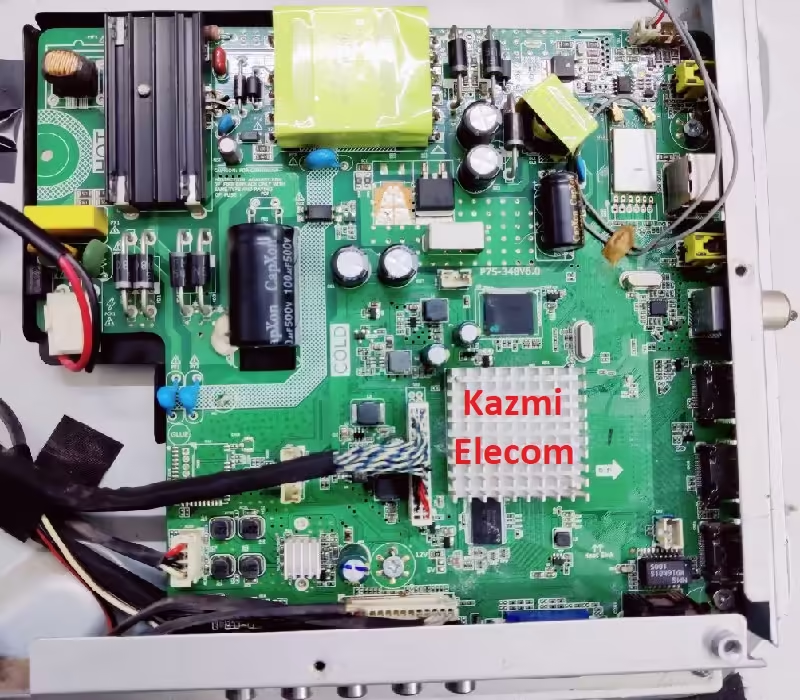
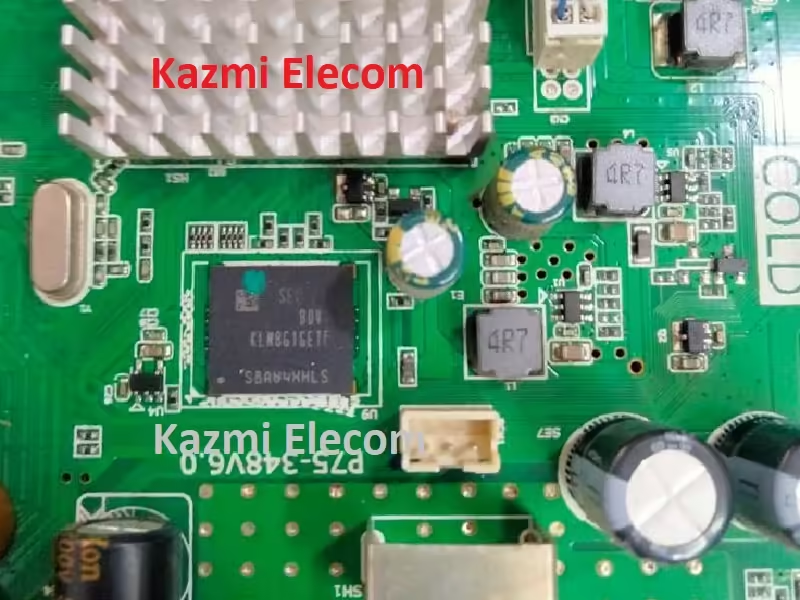
P75-348V6.0 is a high-speed network universal driver board with an FHD resolution of 1920×1080. It is dedicated to 32″ to 49″ screens. has a powerful wifi system. Smart FHD TV features With Android Platform and great features to entertain Full HD Wide Screen with better to work SMART feature. P75-348-V6.0 Smart Board has multiple ports as per the current requirements of the users such as triple HDMI input interface, Dual USB interface Ports, RCA input, VGA connectivity for laptops and computers, and Headphones.

P75_348_V6.0 has a LAN/RJ45 Ethernet Connector interface port also for the wired/cable internet network. P75 348V6.0 is a Combo high-speed Network triple-play motherboard with a built-in ATV, Backlight Driver Board, and Power Supply Module. The Video and Sound quality of the P75-348-V6.0 Android board are excellent and the Response rate is very efficient. P75.348.V6.0 China smart network board has an Android 6.0 version.

P75-348V6.0

General Specifications & Features:

Brand/Mark: FHD Smart LED TV Main Board

Main Board Model: P75-348V6.0

Main Chipset: MSD6A348

OSD Language: Chinese, English

Interface: Single/Dual LVDS

VIDEO INPUT:  ATV&DTV

Analog TV Signal Reception: PAL/NTSC/SECAM) (PAL /SECAM

Digital TV Signal Reception: DVB-T/T2/C/S2 ATSC ISDB DMBT

Cable/Arial port: 1
HDMI/Audio port: 3
Component Video Port (YPbPr/YCbCr): 1
Composite video port: 1

Audio port (LR): 1
PC port (D-sub): 1
Computer audio port (mini port): 1

Headphone port: 1
USB port: 2
SPDIF port: 1
Ethernet (LAN) port: Yes

Operating System: Android 6.0

CPU: 4 Core A7

CPU Frequency: 1.2 GHz

GPU: Mali400*2

GPU Frequency: 500MHz

Ram: 1 Gb

Rom: 8Gb eMMC

Audio Output: 2x8w

Resolution: up to 1920×1080 (32” to 65″)

Panel Power: 12V

Power Input: 110-240V AC

Product: Universal

Remote: Onida

Firmware Name:

Firmware Type: EMMC Backup

P75-348V6.0 Android Version Upgrade:

Please note that the installed version Android 6.0 in this board is the final version and the Android version is not updateable. So, no need to upgrade the software if the board is working normally. Only if, the default software malfunctions due to some bugs will the manufacturer provide the software update. Otherwise, no version update is issued.

P75-348V6.0

P75-348V6.0 EMMC Backup:

This board has an 8GB eMMC chip. You can read the EMMC backup by Pendrive but for writing a backup of EMMC you should jtag the mainboard P75-348V6.0 and write by a programming tool. Be careful while writing emmc backup file, if the board is on standby light due to wrong software or incomplete installation then you can do it, otherwise, it is on standby or red light due to hardware fault. So, first trace the fault. In this case, no need to write emmc backup.

P75-348V6.0 Board Replacement:

If the board is completely dead and no chance to repair then replace the same board as already installed. And if the same board is not available on the market then search for the board that has the same specifications, the newest Android version, and the latest features to avoid any difficulties. If the backlight module is faulty in the combo board then you can install only the backlight module separately then no need to change the whole board.

Note: The following firmware is a backup file read from the EMMC chip. Kazmi Elecom Team is not responsible for any damage/loss caused by uploading/downloading the firmware. First, check and verify the main board then install software. If you are new and do not have enough knowledge of loading/installing software/firmware or dump files, or facing any issues during firmware installation then visit and read here first.

How to Download Firmware Files:

Download all parts of your required resolution and then extract any one of them you will get the folder. Now copy the files to USB. For more Details about the download process watch the video Click Here

P75-348V6.0 firmware for free download:
Kazmi-Elecom

STARSAT SR-5080HD EXTREME Dump File Free Download

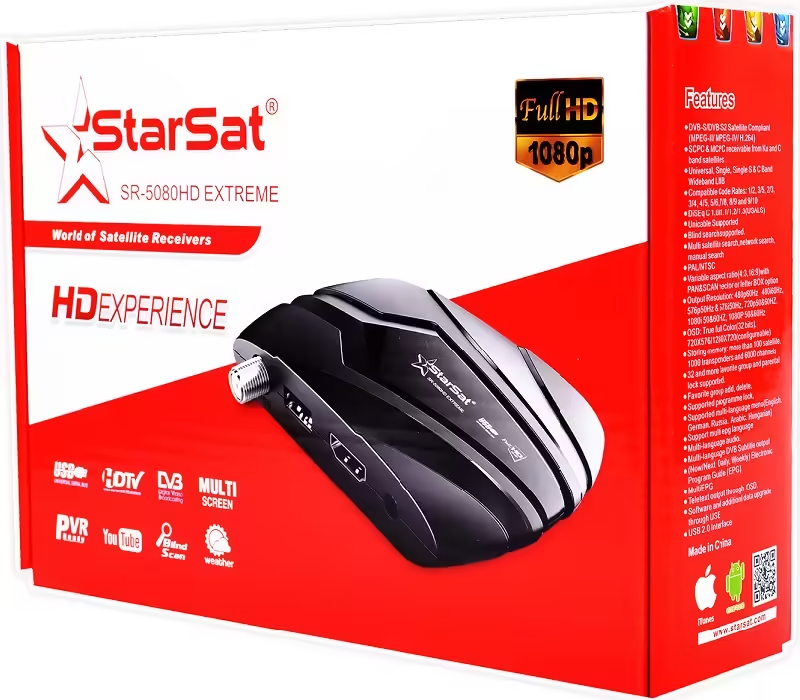
STARSAT SR-5080HD EXTREME Satellite Receiver

STARSAT SR-5080HD EXTREME dump file or Flash file is a basic boot instructions and information software program for a receiver that is written on EEPROM or Flash IC or Memory IC of the satellite receiver. When powered on the main processor/Microcontroller retrieves the information from memory to know how to work/boot if fails to get the boot information then it may stuck on the power/red light or boot logo screen.

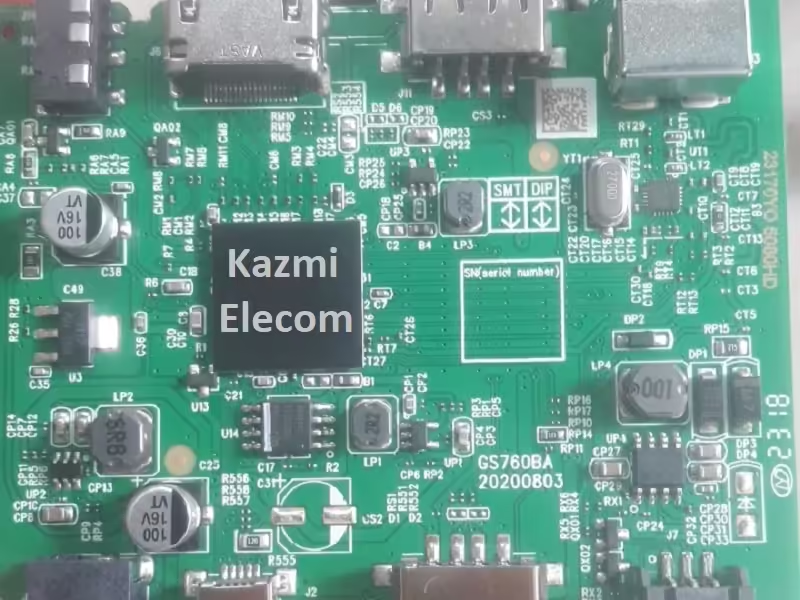
Sometimes the Memory IC or SPI Flash of the STARSAT SR-5080HD EXTREME satellite receiver is imperfect due to technical errors or Its built-in firmware/program crashes because of an error then the System IC Controller does not get any boot instructions or basic information and the satellite receiver does not turn on. So, download the given flash dump file and write the SPI flash with it to get the receiver back to working condition. The dump file of STARSAT SR-5080HD EXTREME is given below for technician/user support.

Starsat Sr-5080Hd Extreme

Information and Specifications:

Manufacturer: STARSAT

Box Model: SR-5080HD EXTREME

Main Board: GS760BA 20200803

Main Controller or Chipset: GX6605S

Box Type: Digital Full HD 1080P

Flash Type: SPI SOP8/SOIC8

Flash Size: 4 Mb

Software Type: Backup Dump

Software Size: Mb

Download File Format: ZIP

Download Type: Free

STARSAT SR-5080HD EXTREME Receiver Version Upgrade:

Please note that the installed version in this board is the final version to operate the receiver normally. Mostly the manufacturer releases updates to fix the bugs in the previous version or adds some new features and applications for customer satisfaction and smooth working of the receiver. So, keep in mind to always save the backup of channels and TPs first. Keep the receiver connected with UPS while updating the new software version. Always follow the given instructions while upgrading to avoid any issues:

  1. First of all, choose the appropriate version of the matching software upgrade
  2. Connect the receiver or STB box with an Uninterrupted Power Supply
  3. Save the backup of the flash file first to use it later if necessary
  4. Keep the customized channel data
  5. Get all the TPs or satellite list backup data

Pros:

There are many advantages to installing the given STARSAT SR-5080HD EXTREME receiver USB software or flash dump file. A few benefits are described below:

  1. The dead receiver can be recovered and operational by loading the given Flash Dump File
  2. STB Remote and Logo may change at your own choice
  3. Money saving instead of changing the mainboard
  4. Time-saving instead of arranging a new board
  5. The customer satisfaction to do an urgent job by installing the flash file

Starsat Sr-5080Hd Extreme

Cons:

There may be some disadvantages to installing the given STARSAT SR-5080HD EXTREME receiver USB software or flash dump file. A few drawbacks are described below:

  1. The working receiver may go to the standby position or dead
  2. The Original Remote Control may not work and the Logo may change by writing the given Flash File
  3. All the channel data and TPs data may washed

Note:

Below given the STARSAT SR-5080HD EXTREME receiver software is a backup dump file and can be loaded with a Programming tool or with a Loader tool in the dead receiver or can be upgraded SPI Flsh Memory or downgraded to the older version in the normally working satellite receiver with the USB Upgrade procedure or by the RS232 Upgrade Tool. Kazmi Elecom Team is not responsible for any type of damage/loss as a result of uploading/downloading the software. Always keep a backup before loading the USB software or writing SPI flash memory.

Download Button Kazmi Elecom

STARSAT SR-5080HD EXTREME dump file for free download.

STB Upgrade Loader Tools Free Download

 STB Upgrade Loader Tools

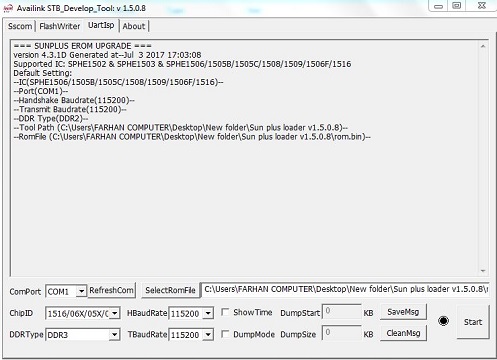
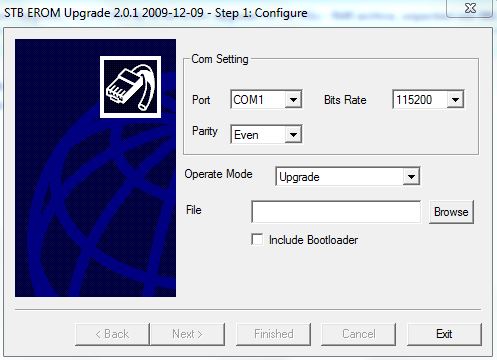
STB Upgrade Loader Tools is a Windows application for loading software/firmware of set-top boxes or satellite dish receiver boxes with the help of an RS232 serial cable. There are different types of upgrade tools or loader tools for various types of Manufacturers. These tools are best for loading software or Dump Files and you can load much software through this tool. For upgrading STB EEPROM you should first know its proper upgrade tool specially developed according to the STB chipset by the manufacturer or developer.

First, you need a data cable called RS232 cable for data transfer and receive. Then connect the cable on one side with STB or satellite receiver and on the other end with a Computer. Now use the STB Upgrade Loader tool to make a connection between sender (Computer) and receiver (STB).

Stb Upgrade Loader Tool

Description:

Each chipset used in different Boards has a different loading application tool. So, we have to check the main chip of the STB first to match the appropriate loader application. this application communicates between two devices one is a PC/Laptop and the other is a Receiver Device. For this connectivity, we have to use RS232 Serial Cable. you can watch a video tutorial that how to make an rs232 cable by yourself.

List of STB Upgrade Loader Tools:

  • 20_Upgrade_tool
  • 3612 Upgrade Tool 1.1.08
  • A16-Loader_Tool
  • ALI_Bootloader_Tiger T8 High Class
  • ALI3328 Loader
  • ALI3329 Loader
  • ALI3510 Important Tools
  • ALIMUPG70
  • ALIMUPG610
  • All In One %2835xx %26 36xx%29 Channel Editor FULL HD Ver 7.95
  • Background Changing Tools ALI35XX-ALI36XX
  • Erom Upgrade For Ali 3601 3606
  • Gx 6605 ToolBox By IK-MR
  • GXDownloader_boot_V1.0.3.2
  • GXDownloader_boot_V1.1.1.2
  • GXDownloader_boot_v1.008
  • Loader AZFOX S3S Recovery
  • Loader HD 6699E 6199E 3058E 3158E
  • Loader Starsat SR-8989 and SR-6969 Vega
  • Loader_TIGER-T800 PLUS
  • Loader-SR-8989HD_Prime upgrade-tool
  • LOGO Changer & Back Viewer
  • Microbox Default Loader for Flash programming
  • Neosat 550 HD Loader
  • NEOSAT BOOT LOGO CHANGER
  • New 3510D
  • New AliUpgrade
  • RS232 Upgrade Loader Tool M3510
  • Sky 19 Scorpion Loader
  • SR-8989HD_PRIME_loader
  • Star Track Platnum1 HD Loader
  • StarMax 35xx RS232 Upgrade Tool V4.0.0
  • Starsat Flash Tool
  • Starsat Hyper Tool
  • StarTrack GALAXY II HD_Loader
  • StarTrack HD BOX 1000_Upgrade Loader
  • StarTrack SRT-150 HD_Loader
  • StarTrack SRT-2015 HD PLUS_Loader
  • SX2010_Upgrade tool_3.98a
  • TIGER G550 HD_ Loader
  • Tiger_i400pro_Loader
  • TIGER-T3000-EXTRA-LOADER
  • Universal loader 2.0.0b
  • Universal Loader For Ali Chip Upgrade
  • Upgrade Tool Ali3612 By Irshadjan
  • Upgrade Ver 4.0.1
  • Upgrade_1.1.05 ALI3606
  • GX6628 2TUNER_1Gb_DownloadTool
  • Sunplus Loader 1.5.8 with Urdu Guide
  • Dump Protocol.1506C-DDR2.AV2018.V1.6 Ikram_dirujii
  • Erom Upgrade For Ali 3511 By Azhar
  • Erom Upgrade For Ali 3511 By IR
  • GX6621 loader
  • GXDownloader_boot_V1.1.1.2
  • GXDownloader_boot_v1.008
  • Loader SR-2000HD HYPER
  • Loader SR-C10HD-B10HD-S10HD-M20HD & Clon
  • Loader Starsat 2000HD HYPER
  • M3510C-LOADER-BY-IKRAM_DIRUJII
  • Sami.maan Loader Starsat 2000HD HYPER
  • SR-2000_HYPER-Loader
  • SR-2000HD EXTREME LOADER By IR
  • SR-2000HD EXTREME Loader
  • SR-90000 HD EXTREME Loader
  • SR-90000HD EXTREME LOADER By IR
  • Starsat 2000 Extreme Loader
  • Sun Plus Loader 1.5.1 & 1.5.8 By Ikram Dirujii
  • Sun Plus Loader 1.5.1 & 1.5.8 By solangi
  • Sun plus loader v1.5.0.8
  • Sunplus 1506G_C_Upgrade Tool By Irshadjan
  • Sunplus Loader 1.5.8 with Urdu Guide
  • SUNPLUS LOADER CREATE BY www.mr-dish.com
  • SUNPLUS LOADER
  • UART Upgrade Tool v2.2.3.113 By Ikram dirujii
  • Upgrade_Twin

    Erom Upgrade Tool

Note:

Below are STB Upgrade Loader Tools collected by reliable resources and not all tested. You can upgrade SPI Flsh Memory or downgrade to the older version in the normally working satellite receiver by the RS232 Upgrade Tool. Kazmi Elecom Team is not responsible for any type of damage/loss as a result of uploading/downloading the software. Always keep a backup before loading or writing SPI flash memory. You should first check the appropriate loader tool for your box then try it.

How to Download:

Download your required STB Upgrade Loader tool and then extract it you will get the folder. In some cases, you should first disable Windows Security Defender to prevent the loader file. For More Details about the download process, watch the video Click Here

STB Upgrade Loader Tools for Free Download:

Download Button Kazmi Elecom

SR. No.Name of Loader Tool
Version
Download Link
Description
1
Sunplus Loader
v 1.5.0.1
Download1506, 1507
2Sunplus Loader
v 1.5.0.8
Download1506, 1507
3ALI 3510c Loader
v 2.2.0
DownloadALI3510C
4ALI 3511 Loader
v 2.0.1 12.2009
DownloadSR-2000HD Hyper
5GX6621 Loader+Dump
v 1.00
DownloadSR-2000HD Extreme
6ALI3606 Loaderv 1.1.0.5 11.2010Download
7GX6628 Loader+Dump
v 1.00
DownloadSR90000HD Extreme
8ALI RS232 Upgrade Tool
v 1.2.0 03.2012
DownloadSR-2000HD Hyper
9GXD Loader
v 1.010
DownloadSR-8989HD
10Multi Tool Box 2018
By Azhar&Shahid
Download
11
Ali Upgrade Tool

V3.1.1
Download
12UART Upgrade Tool
v 2.2.3.113
Download
13STB EROM Upgrade
v 2.0.0c 05.2009
DownloadSRT-2016 Extra
14ALI3602 Loaderv 1.1.08Download
15GX Multi Loader V1.117Download
16SR-B10-C10-S10-M20HDv 2.1.0 02-2013DownloadStarsat & Clone
17GXDownloaderv 1.0.3.2DownloadGX6605S
18ALI3510 Logo ChangerBy IKDownload
19Starmax 35xx Loaderv4.0.0 03-2015DownloadA100-A20-X20
20Universal Toolbox By Shahid AliDownload
21Background Changing Tools ALI35XX-ALI36XXDownload
22GXDownloader_bootV1.0.3.2Download
23GXDownloader_bootV1.1.1.2Download
24GXDownloader_bootV1.008Download
25Hex WorksopDownload
26Loader Starsat SR-8989 and SR-6969 VegaDownloadSR-8989 and SR-6969 Vega
27LOGO Changer & Back ViewerDownload
28NEOSAT BOOT LOGO CHANGERDownload
29RS232 Upgrade Loader Tool M3510Download M3510
30SR-8989HD_PRIME_loaderDownloadSR-8989HD
31Tiger_i400pro_LoaderDownloadTiger_i400pro
3220_Upgrade_toolDownload
333612 Upgrade Tool 1.1.08Download
34A16-Loader_ToolDownload
35ALI_Bootloader_Tiger T8 High ClassDownload
36ALI3328 LoaderDownload
37ALI3329 LoaderDownload
38ALIMUPG70Download
39ALIMUPG610Download
40All In One %2835xx %26 36xx%29 Channel Editor FULL HD Ver 7.95Download
41Erom Upgrade For Ali 3601 3606Download
42Multi Toolbox by IKV2.0Download
43STB_Toolbox3.0V3.0Download
44Loader AZFOX S3S RecoveryDownload
45Loader HD 6699E 6199E 3058E 3158EDownload
46Loader_TIGER-T800 PLUSDownload
47Starmax RS232 LoaderV7Download
48Microbox Default Loader for Flash programmingDownload
49Neosat 550 HD LoaderDownload
50New Ali UpgradeDownload
51Sky 19 Scorpion LoaderDownload
52Star Track Platinum1 HD LoaderDownload
53Starsat Flash ToolDownload
54StarTrack GALAXY II HD_LoaderDownload
55StarTrack HD BOX 1000_Upgrade LoaderDownload
56StarTrack SRT-2015 HD PLUS_LoaderDownload
57SX2010_Upgrade tool_3.98aDownload
58Universal Loader 2.0.0bDownload
59Universal Loader For Ali Chip UpgradeDownload
60Upgrade 2.0.0b MPG4DownloadALI M3105D
61Upgrade Tool Ali3612Download
62Upgrade Ver 4.0.1Download
63Upgrade_1.1.05 ALI3606Download
64Upgrade_TwinDownload
65StarTrack SRT-150 HD_LoaderDownload
66TIGER G550 HD_ LoaderDownload
67ALI3510 EROM UpgradeV 2.2.1.0DownloadALI3510D
68Tiger T3000 Extra 4KDownloadTiger 4k
69Gx6605 Tool BoxBy Ikram DirujiiDownloadGX6605
70Starsat Hyper ToolBy Ikram DirujiiDownloadSR-2000HD Hyper
71ALI3510 Important ToolsBy Ikram DirujiiDownloadALI3510
72SR-M20-LoaderDownload
73Stb Loader All In OneBy Ikram DirujiiDownload
74SUNPLUS 4Mb&8MbBy X TeamDownload
75TELE_Tool_Hi37xx.V1.00V1.0Download
76Sunplus Loader v 1.05.09V1.05.09Download
77Sunplus Loader V 1.5.2.04V1.5.2.04Download
78SR-2100 HYPER LoaderDownload
79SR-3020 HD LOADERDownload
80SR-90000 HD EXTREME LoaderDownload
811506TV Loader V1.6.3.9Download1506TV
82Ali 36xxx_RS232_Upgrade_ToolV1.2.0Download
83ALI Mini Upgrade Ali3602V7.0DownloadAli3602
84StarSat_SR-98HD Prime_M3510CDownloadM3510C
85StarSat SR-X95 USB MEGADownload
86Starsat SR-2200HD LoaderDownload
87Starsat SR-2000 HD ACE LoaderDownload
88Starsat Extreme 2000 loaderV 1.0.3.2Download
89Star Track Platnum1 HD LoaderDownload
90All Mediastar LoaderV2.3Download
91MediaStar ALI Loader V2.0Download
92Starsat-SR-M10-LoaderDownload
93ALL STARSAT 2TUNER ALIUP_V1.2.0Download
94GX6605s Loader With New BootV1.031Download
95Gx6605s Loader V1.21Download
96Gx Loader V 1.32V1.32Download

Video Tutorial:

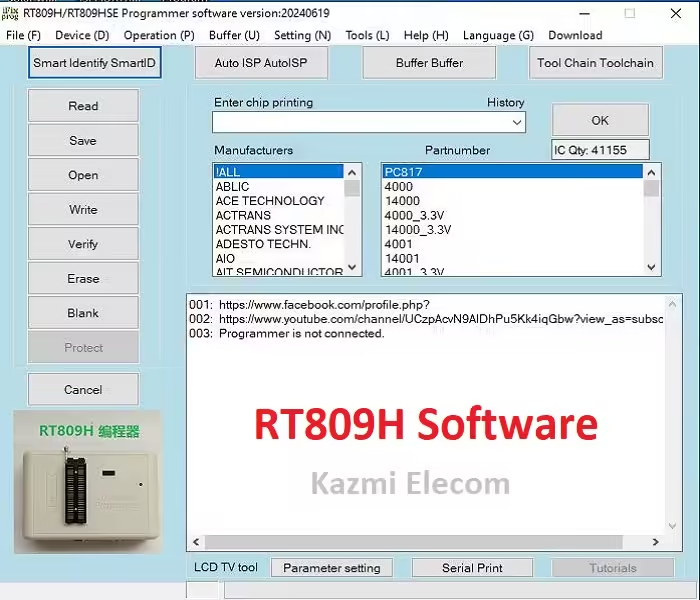
RT809H Software Free Download

RT809H EMMC-NAND Flash Programmer

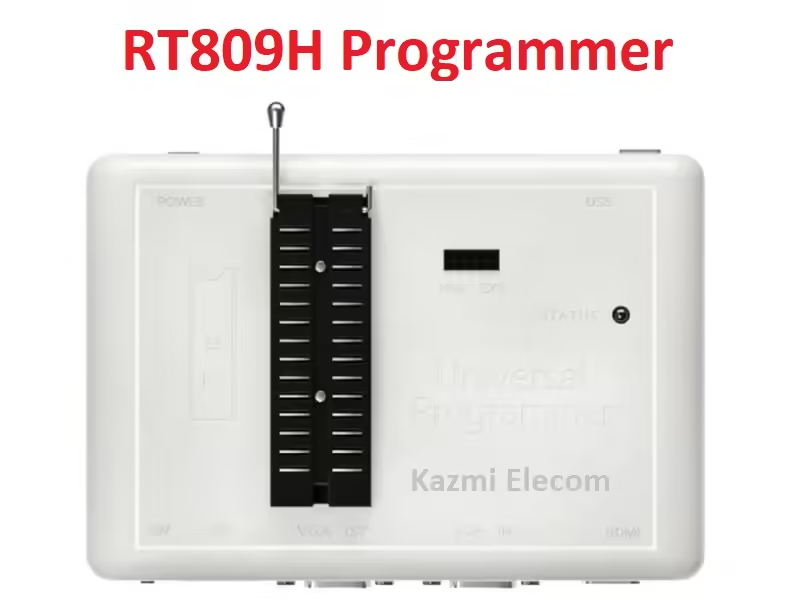
Rt809H is an extremely fast EMMC NAND Flash universal programming tool that can read and write unlimited capacity TSOP 8-16 Pin, TSOP48, TSOP 56, EMMC, and NAND Flash. It can support LCD/LED Smart TVs, PC motherboards, CARs, DVDs, Laptop Boards, Routers, DVRs, Home appliances, and many other types of electronic equipment. It can support up to 64 GB of NAND Flash. It can easily read and write programming flash without removing it from the motherboard. Via VGA and HDMI ports, supports mostly Smart LED-LCD TVs to read and write the Program.

RT809H programmer is the best tool for beginners or technicians as it can automatically detect the chip number of all chips. Users can also add new chip numbers if not available in the list. This universal programmer can self-test on any LED TV and give diagnostic results to the user in the form of serial print information, due to which he can easily identify the fault area. Different types of BGA and Socket adapters are required to connect the different sizes of memory chips or EMMCs with this programmer.

Rt809H


Features:

  • No adapter is required for any DIL devices due to its 48-pins powerful 48-pin driver
  • ISP connector for in-circuit programming
  • VGA port to read and write LED LCD TV and MONITORS without disassembly
  • HDMI port to read and write LCD LED TV and MONITORS without disassembly
  • Connection to PC: USB 2.0 (up to 480 Mbit/s, high speed/full speed) and 1.1
  • Comfortable and easy to use control program, works with all versions of MS Windows
  • Support all types of flash and very easy to add new flash
  • Extremely Fast programming speed
  • Advanced and powerful software functions


Rt809H

RT809H and RT809-HSE programmer regular updates are issued by the manufacturer after adding some extra or new SPI memory data and fixing bugs reported by the users. Ne need to uninstall the old version when you are updating the new version update. If you find any bugs or face some issues by installing a new software update then you can go to the previous version easily by installing the old version again and wait for the next update or patch file. The latest RT809-H & RT809-HSE software update is given below.

Note: Please note that the Kazmi Elecom team is not responsible for any damage or loss as a result of installing the RT809-H & RT809-HSE software updates. The software updates given in this post are provided by the manufacturer.

RT809H & RT809HSE Software update 23-04-2025 Download Here:


Kazmi_Elecom

List of Previous Versions:

  • RT809-H_RT809-HSE Software update 25-11-2024
  • RT809-H_RT809-HSE Software update 19-06-2024
  • RT809-H_RT809-HSE Software update 23-03-2023
  • RT809-H_RT809-HSE Software update 19-09-2022
  • RT809-H_RT809-HSE Software update 19-09-2022
  • RT809-H_RT809-HSE Software update 21-05-2022
  • RT809-H_RT809-HSE Software update 08-03-2022
  • RT809-H Software update 12-10-2021
  • RT809-H Software update 12-08-2021
  • RT809-H Software update 01-07-2021
  • RT809-H Software update 20-04-2021
  • RT809-H Software update 22-02-2021
  • RT809-H Software update 01-01-2021
  • RT809-H-20201229-Patch
  • RT809-H Software update 16-12-2020
  • RT809-H-20201111-Patch
  • RT809-H Software update 06-11-2020
  • RT809-H-20201023-Patch
  • RT809-H Software update 30-09-2020
  • RT809-H Software update 10-09-2020
  • RT809-H Software update 01-08-2020
  • RT809-H Software update 28-06-2020
  • RT809-H-20200603-Patch
  • RT809-H Software update 05-04-2020
  • RT809-H Software update 27-12-2019
  • RT809-H Software update 17-12-2019

Download RT809H Toolchain and other software versions:

Download Button Kazmi Elecom

S.NO.PROGRAMMER NAME/DESCRIPTIONDOWNLOAD LINK
1RT809H programmer instructionDownload
2ToolChain_RT809H_EnglishDownload
3RT809H_Bluetooth_AppDownload
4RT809H Software update 17-12-2019Download
5RT809H Software update 27-12-2019Download
6RT809H Software update 05-04-2020Download
7RT809H-20200603-PatchDownload
8RT809H Software update 28-06-2020Download
9RT809H Software update 01-08-2020Download
10RT809H Software update 10-09-2020Download
11RT809H Software update 10-09-2020Download
12RT809H Software update 30-09-2020Download
13RT809H-20201023-PatchDownload
14RT809H Software update 06-11-2020Download
15RT809H-20201111-PatchDownload
16RT809H Software update 16-12-2020Download
17RT809H-20201229-PatchDownload
18RT809H Software update 01-01-2021Download
19RT809H Software update 22-02-2021Download
20RT809H Software update 20-04-2021Download
21RT809H Software update 01-07-2021Download
22RT809H Software update 12-08-2021Download
23RT809H Software update 12-10-2021Download
24RT809H_RT809HSE Software update 08-03-2022Download
25RT809H_RT809HSE Software update 21-05-2022Download
26RT809H_RT809HSE Software update 19-09-2022Download
27RT809H_RT809HSE Software update 12-12-2022Download
28RT809H_RT809HSE_20230323_ENGDownload
29RT809H_RT809HSE_20230323_ENGDownload
30RT809H_RT809HSE_20240116_ENGDownload
31RT809H_RT809HSE_20240619_ENGDownload
32RT809H_RT809HSE_20241125_ENGDownload

RT809F Software Free Download

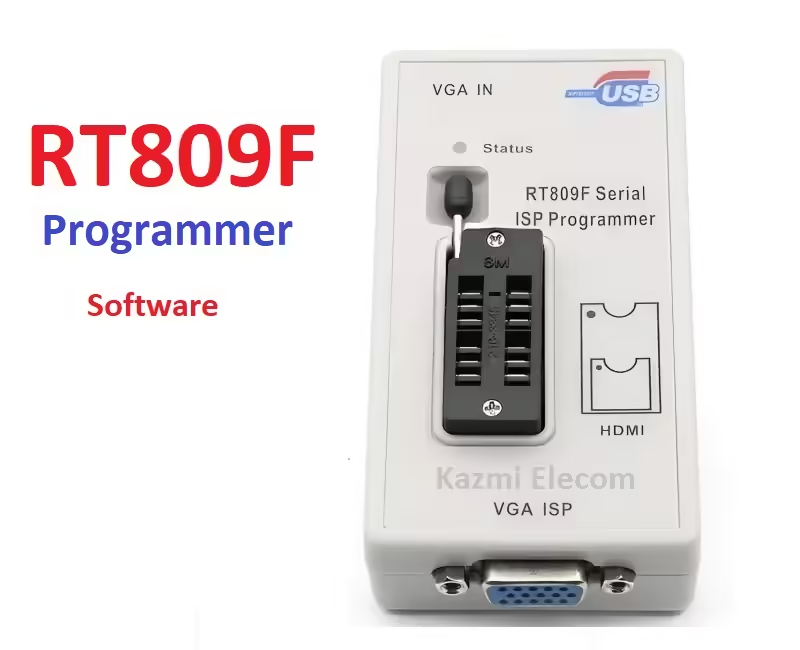
 RT809F Serial ISP Programmer:

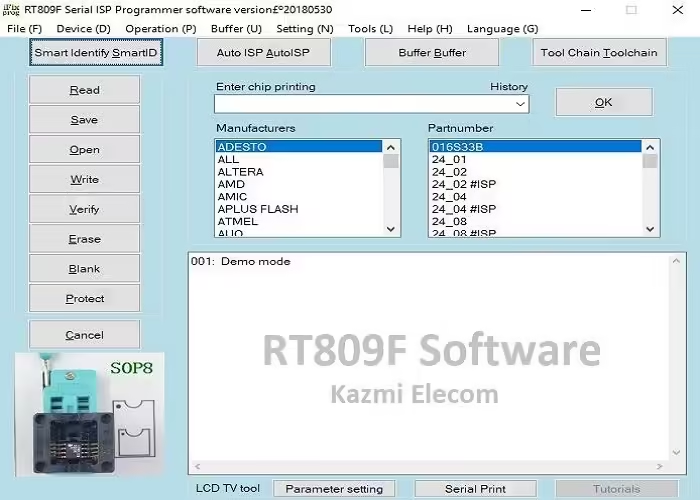
Rt809F is an excellent high-speed programming tool that programs (read and write) all equipment like LCD/LED TVs, laptops, PC motherboards, DVDs, Routers, DVRs, Home appliances, and many other electronic types of equipment. Its VGA ISP is specially designed to program LCD/LED monitors and TVs without opening them with the help of a VGA cable. It can also save a backup of programs. HDMI port supports bigger LED/LCD TVs to Program and backup the software.

RT809F programmer is the best tool for beginners or technicians. It makes the work easy to rewrite the SPI flash memory IC. Different types of socket adapters are required to connect the various sizes of memory chips or EEPROMs with this programmer.

Rt809F

Features:

  • Read and Write commonly used 8 pins and 16 pins EEPROM chips
  • Can read and write SPD memory DDR1, DDR2, and DDR3 chips
  • Especially support 34C02 chips and many other special part numbers
  • Support all series of 24, 25, 26, and 93 SPI Flash Memory Chips
  • Support Online and Offline reading and write
  • High-speed USB port, USB driver, the reading and writing speed can be 25 MB/S
  • Can read and write NAND/NOR chips

Rt809F

RT809F programmer regular updates are issued by the manufacturer after adding some extra or new SPI memory data and fixing bugs reported by the users. No need to uninstall the old version when you are updating the new version update. If you find any bugs or face some issues by installing a new software update then you can go to the previous version easily by installing the old version again and wait for the next update or patch file. The latest RT809F software update is given below.

Note: Please note that the Kazmi Elecom team is not responsible for any damage or loss as a result of installing the RT809F software update. The software updates given in this post are provided by the manufacturer.

RT809F Software update 03-09-2025 Download Here:


Kazmi_Elecom

List of Previous Versions:

  • RT809-F Software update 25-11-2024
  • RT809-F Software update 09-06-2024
  • RT809-F Software update 16-01-2024
  • RT809-F Software update 30-08-2022
  • RT809-F Software update 10-05-2022
  • RT809-F Software update 01-03-2022
  • RT809-F Software update 12-10-2021
  • RT809-F Software update 10-04-2021
  • RT809-F Software update 22-02-2021
  • RT809-F Software update 16-12-2020
  • RT809-F Software update 06-11-2020
  • RT809-F Software update 26-09-2020
  • RT809-F Software update 01-08-2020
  • RT809-F Software update 21-06-2020
  • RT809-F Software update 05-04-2020
  • RT809-F-20200111-Patch
  • RT809-F Software update 16-12-2019
  • RT809-F Software update 01-07-2019
  • RT809-F-20191115-Patch

Download RT809F Toolchain and other software versions:

Download Button Kazmi Elecom

S.NO.PROGRAMMER NAME/DESCRIPTIONDOWNLOAD LINK
1ToolChain_RT809F_EnglishDownload
2RT809F Programmer InstructionDownload
3RT809F_Bluetooth_AppDownload
4RT809F-20191115-PatchDownload
5RT809F Software update 01-07-2019Download
6RT809F Software update 16-12-2019Download
7RT809F-20200111-PatchDownload
8RT809F Software update 05-04-2020Download
9RT809F Software update 21-06-2020Download
10RT809F Software update 01-08-2020Download
11RT809F Software update 26-09-2020Download
12RT809F Software update 06-11-2020Download
13RT809F Software update 16-12-2020Download
14RT809F Software update 22-02-2021Download
15RT809F Software update 10-04-2021Download
16RT809F Software update 12-10-2021Download
17RT809F Software update 01-03-2022Download
18RT809F Software update 10-05-2022Download
19RT809F Software update 30-08-2022Download
20RT809F Software update 12-12-2022Download
21RT809F_20221212_ENGDownload
22RT809F_20240116_ENGDownload
23RT809F_20240609_ENGDownload
24RT809F_20241125_ENGDownload
error: Content is protected !!