TP.MT5510S.PB803 Firmware
TP.MT5510S.PB803 is an Android network driver smart LED TV board with an FHD resolution of 1920×1080. TP_MT5510S_PB803 has a powerful wifi system. Smart FHD TV With Android Platform and great features to entertain Full HD Wide Screen with better-to-work SMART. TP MT5510S PB803 Smart Board has multiple ports of A/V, SCART, USB interface Port, and Dual HDMI ports as well. TP-MT5510S-PB803 has a LAN/RJ45 Connector interface port also for the wired internet network.
TP.MT5510S.PB803 is a Combo Network Triple play board. The Graphics and Sound quality of the TP_MT5510S_PB803 Android board are very good and the Response rate is very efficient. TP.MT5510S.PB802 China’s smart network board can support up to 40″ LED Panels. TP.MT5510S.PB803 firmware file is available for the technician’s support.
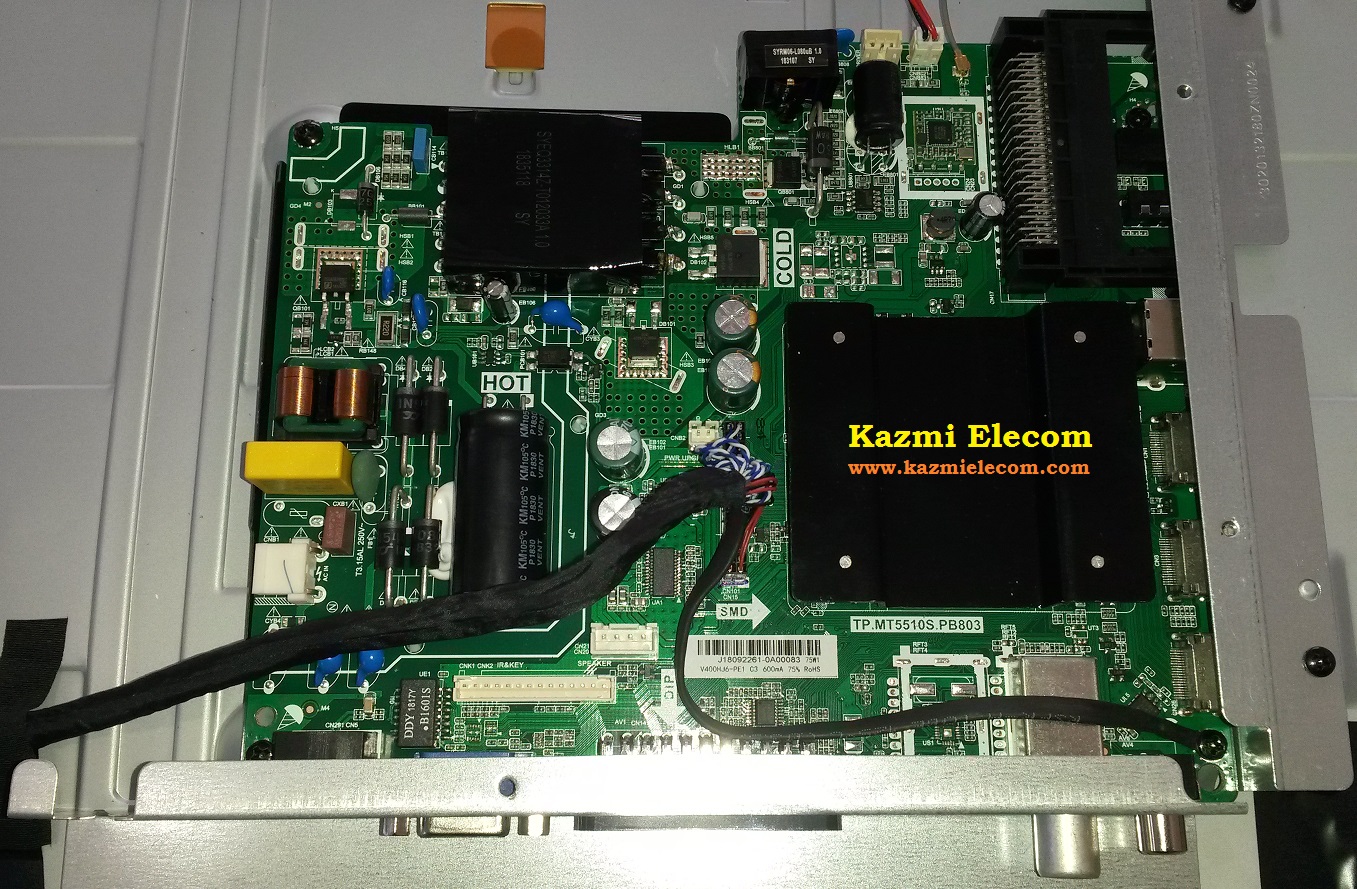
General Specifications:
Brand/Mark: Main Board (Android WIFI Network Drive Smart Board)
Main Board: TP.MT5510S.PB803
Main Chipset: MT5659DHMT or MT5659DHNT
Operating System: Android 7.0
CPU: ARM Cortex-A53 quad-core 804MHz
GPU: Mali-450 Dual-Core 432MHZ
RAM: 1Gb
ROM: 8Gb
Back Light: 45w-75w 600mA
Resolution: up to 1920×1080
Screen Size supported: 24 to 40 Inch
Audio Output power: 2x8W
Video System: PAL, SECAM, NTSC
DTV Transmission: DVB-T/C/T2/S/S2
Input Voltage: 100-240V AC
Firmware Name: allupgrade_5510_8G_1G_refxx.pkg
Firmware Type: USB Updateable Firmware, TP.MT5510S.PB803 Program Data USB Upgradeable
Note: The following Software/firmware is USB upgradeable. Kazmi Elecom Team is not responsible for any damage/loss caused by uploading/downloading the firmware. If you are new and do not have enough knowledge of loading or installing software/firmware or dump files, then read here first.
How to Download:
Download all parts of the following given Software/firmware and then extract any one of them you will get the folder. Now copy the files to USB. For more Details about the download process watch the video Click Here
TP.MT5510S.PB803 firmware file for free download:

| S.NO. | BOARD/DESCRIPTION | DOWNLOAD LINK |
|---|---|---|
| 1 | TP.MT5510S.PB803-1366x768-8G-1G-VIVAX-REF60.part1 | Download |
| TP.MT5510S.PB803-1366x768-8G-1G-VIVAX-REF60.part2 | Download | |
| 2 | T.MT5510S.PB803-1366x768-1G-8G-AKAI AKTV3227H-REF56.part1 | Download |
| T.MT5510S.PB803-1366x768-1G-8G-AKAI AKTV3227H-REF56.part2 | Download | |
| 3 | T.MT5510S.PB803-1920x1080-1G-8G-AKAI AKTV2415-REF50.part1 | Download |
| T.MT5510S.PB803-1920x1080-1G-8G-AKAI AKTV2415-REF50.part2 | Download | |
| 4 | T.MT5510S.PB803-1920x1080-1G-8G-AKAI AKTV4030S-REF75.part1 | Download |
| T.MT5510S.PB803-1920x1080-1G-8G-AKAI AKTV4030S-REF75.part2 | Download | |
| 5 | T.MT5510S.PB803-1920x1080-1G-8G-AKAI AKTV4621-REF66.part1 | Download |
| T.MT5510S.PB803-1920x1080-1G-8G-AKAI AKTV4621-REF66.part2 | Download | |
| 6 | TP.MT5510S.PB803-1920x1080-1G-8G-Skyline-REF70.part1 | Download |
| TP.MT5510S.PB803-1920x1080-1G-8G-Skyline-REF70.part2 | Download | |
| 7 | TP.MT5510S.PB803-1920x1080-Polarine 43PL51STC-SM.part1 | Download |
| TP.MT5510S.PB803-1920x1080-Polarine 43PL51STC-SM.part2 | Download | |
| 8 | TP.MT5510S.PB803_1920X1080_8G_VELAR_EMMC.part1 | Download |
| TP.MT5510S.PB803_1920X1080_8G_VELAR_EMMC.part2 | Download | |
| TP.MT5510S.PB803_1920X1080_8G_VELAR_EMMC.part3 | Download | |
| TP.MT5510S.PB803_1920X1080_8G_VELAR_EMMC.part4 | Download | |
| 9 | TP.MT5510S.PB803_32_SAMSUNG_EMMC.part1 | Download |
| TP.MT5510S.PB803_32_SAMSUNG_EMMC.part2 | Download | |
| TP.MT5510S.PB803_32_SAMSUNG_EMMC.part3 | Download | |
| TP.MT5510S.PB803_32_SAMSUNG_EMMC.part4 | Download | |
| 10 | TP.MT5510S.PB803-1366x766-1G-8G-SUPRA-32-REF60.part1 | Download |
| TP.MT5510S.PB803-1366x766-1G-8G-SUPRA-32-REF60.part2 | Download |
Firmware Files:
TP-MT5510S.PB803_1366x768_8G_1G_VIVAX_REF60\CP397916_MACC18_0597XXXX_MT5510S_PB803_E1_CBU_CROATIA_LC320DXJ_SFE1_IR_MX_EU_YC52_046_VIVAX_DD_R.zip
T-MT5510S.PB803_1366x768_1G_8G_AKAI AKTV3227H_REF56\AKAI AKTV3227H_REF56\allupgrade_5510_8G_1G_ref56.pkg
T-MT5510S.PB803_1920x1080_1G_8G_AKAI AKTV2415_REF50\AKAI AKTV2415_REF50\allupgrade_5510_8G_1G_ref50.pkg
T-MT5510S.PB803_1920x1080_1G_8G_AKAI AKTV4030S_REF75\AKTV4030S.zipD09120219意大利\JE400D3HE2N\CP483353_D091202_19_MTK5510S_PB803_JE400D3HE2N_ITALY_AKAI_DD_REF75_8G_1G_V1_4_1_6f867697_20190930_093504.zip
T-MT5510S.PB803_1920x1080_1G_8G_AKAI AKTV4621_REF66\AKAI AKTV4621_REF66\allupgrade_5510_8G_1G_ref66.pkg
For video tutorials, visit “Kazmi Elecom” on my YouTube channel.


Hello,
I am trying to download TP.MT5510S.PB803_1366x768_8G_1G_VIVAX_REF60.part09 and shows me file not found.
Can you help me with this?
Thank you!
Noted
Thank you in advance 🙂
TP.MT5510S.PB803_1366x768_8G_1G_VIVAX_REF60.part05 seems to be empty file, 0 bit dimension, so we cannot use the whole file extracted.
Many thanks.
the file is ok and size is85 mb. try again
Thanks for your work.
I’v tried to download de firmware TP.MT5510S.PB803 but all options have an error. I cant download all parts in any option. Can you put another link where we can download.Many Thanks
mention which one you required.
salve ho un nordmend ND39S3100 S SMART MAIN TP.MT5510S.PB803 PANEL T390XVN02.0 E BLOCCATO SULLA SCRITTA ANDROID NON SI SPEGNE SE NON TIRO LA SPINA VORREI IL FIRMWARE PE AGGIORNARLO USB HO PROVATO QUALCOSA IN RETE MA NON ERA QUELLO GIUSTO LAMPEGGIAVA ROSSO E BLU POI RIACCENDENDO TUTTO UGUALE SE PUO ANCHE EMAIL [email protected] O WHATSAPP +393384754009
https://s2salvadorigroup.it/ftp/?dir=NORDMENDE%2FAGGIORNAMENTI%20TV%20NORDMEDNE%20%2FND39S3100%20V2.0%20copiare%20i%20file%20contenuti%20nella%20cartella%20in%20una%20chiavetta%20USB%20vuota%20%2C%20staccare%20la%20corrente%20del%20tv%2C%20tenere%20premuto%20il%20polsante%20accensione%20sul%20tv%20senza%20lasciarlo%20e%20riattaccare%20la%20spina%20della%20corrente.
hi. can u explazing which of this is for me tv 32 inc abod becose am woried about 1366×768
Akai and Vivax are 1366×768
Hello dear I can not download the file T.MT5510S.PB803_1366X768_1G_8G_AKAI AKTV3227H_REF56 Part 4 and 5 writes file not found help please
Noted
TP.MT5510S.PB803_1366x768_8G_1G_VIVAX_REF60.part05 0 bytes
download again
File TP.MT5510S.PB803_1366x768_8G_1G_VIVAX_REF60.part05 is 0 byte. Can you help me?
the file size is 85MB try to download again
I`m tried download from different browsers , i`m tried download with vpn, but this file downloaded 0 kb .rar archive. I bought premium account in up-4ever , but it didn’t help. Can you download this part of file again to up-4ever? Thank You very much!
ok
Thank you!!! File downloaded.
Happy new year and good work. Akai 4035S part 01-05 and Skyline part 07-10 don’t download (the link is missing). I’ve tried it several time but I still can’t. Is it possible to update the link of download!
Thank you.
Noted
Skyline is ok, but Akai AKTV4035S no
PLEASE FIX AKAY 1366 X 768 PART 4 AND 5 AS STILL NOT WORKING!
fixed
Part 4 and 5 at AKAI AKTV3227H don’t work. Please reset again. Thanks Alqi.
fixed
File VIVAX.. 1366-768 ref/60, part 5. don’t work.
fixed
Hi ser.
I download this TP.MT5510S.PB803_1920x1080_Polarine 43PL51STC-SM and when i extact it i found this 43PL51STC-SM – CS482726_CX_TS1909_057_MT5510S_PB803_RUSSIA_ST4251B01_1_IR513EUSS_LOGO_POLARLINE_ but cant’ be extracted give error
would you like pls correct it ser?
no issue found. try with 7zip
Hi ser.
Thanks for reply first.
Have a look https://ibb.co/pjGcz73
regards:)
which part is creating the issue?? try some other one
Hi ser.
how many file must be in usb key?
must i press some keys like vol+ vol- or just insert usb key and power on tv?
becouse a lof time try but prossec not started tv stock at WISDOM SHARE LOGO
enjoy:)
first, try to hard reset. otherwise, load firmware
What is procedure for hard reset for tp.mt5510s.pb803.
Thanks for your time
https://www.kazmielecom.tech/2020/03/21/how-to-reset-smart-tv.html
Bonjour je n’arrive pas a telecharge TP.MT5510S.PB803
links updated
bonjour merci
Hello dear moderators Kazmi Elecom. I need firmware “allupgrade_5510_8g_1g_ref73_6022.pkg”
I ask you to help me, thanks in advance to everyone.
Note. MAIN BOARD: TP.MT5510S.PB803 / MATRIX: LC390TA2A
you can load any software according to panel resolution by renaming ref to sos. remote and logo may change
HELLO GOOD DAY SIR
ALL THE FILES IV BEEN DOWNLOADING FROM KAZMIELECOM IV NOT BEEN ABLE TO EXTRACT IT WHY?
what is the error message?
Hello, I downloaded the software from your site, but I don’t know how to install it on the TV. The TV remains on the Android logo. However, I upload the files to USB.
https://www.kazmielecom.tech/how-to-load-firmware/
Need to upgrade my smart wisdom led 40” its so slow and YouTube and more latest apps is not working plz advise
No solution
Assalomu alaykum kazmi elecom team. I have a Chinese TV and it hasn’t been on for a long time. I want to get the firmware for it but the firmware files on your sites are in pkg format. Can this file be installed on a TV? As far as I know only bin files can be installed. How to convert pkg files to bin format?
w.salam
if tv is in standby mode then no need to load firmware. if stuck on the logo then first try to reset. otherwise, load firmware
.pkg file is ok
Dear sir
i don’t know why my TV coilt not upgrade
in fact i have downloaded the file in .JPK and my tv didnt found the file
please could you help me ?
do not try to update. installed version is final
I want a firemware for MAX-E43CH-S TP.MT5510S.PB.803 PANEL HV430FHB-N10 Rev1.1
I need HK.T.RT2841P638 1gb ram 4gb rom
NA
I have a TV ST has a card that burned TP. MT5510S. Pb803, I got a new one and I don’t know how my son did a factory reset, and now the picture is in lines of 6, 7 colors I can’t possibly restore the old setup. What happened I don’t know. If you know how to help…
https://forum.kazmielecom.com/showthread.php?tid=1916&highlight=burn+mode
boss my netflix does not work on this board since its an old android 7.0 how do i upgrade and fix this to a higher android version
can not upgrade TP.MT5510S.PB803. change the mainboard
I have a Nikai NTV4516SLED with TP.5510S.PB803 board. Which package should I download? Is it ok to download any brand firmware?
what is the issue with TV?
HI! am trying to download TP.MT5510S.PB803 but is keeps pushing me to diffrent sites!!!! kindly assist.
use ad blocker
TPD.MT9602.PB801 (T)
pliz softwar goldray tv led 43gr5080 tp.mt5510s.pb803
model D43M30
NA
profilo 43pa315 e tp.mt5510s pb803 yazılım lazım