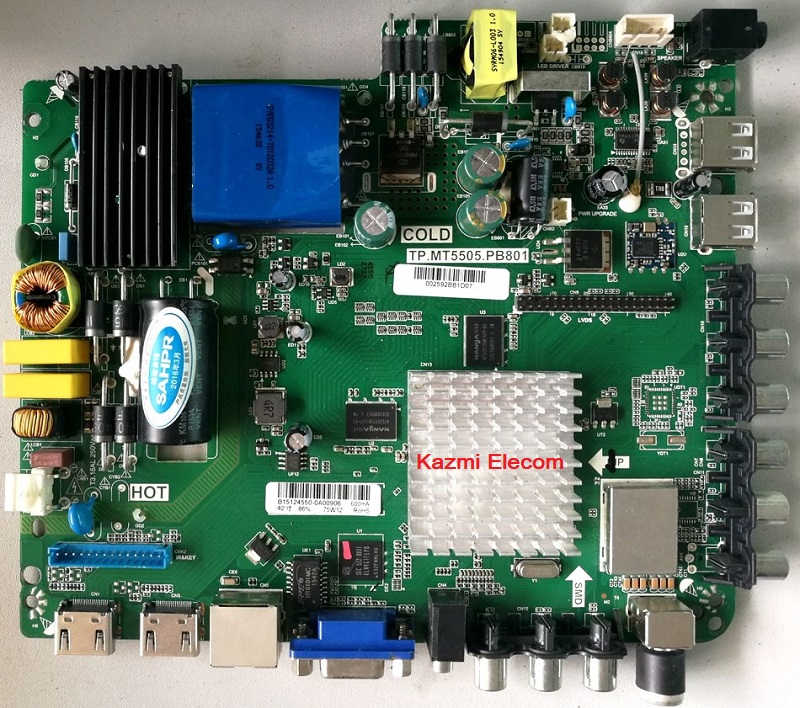
TP.MT5505.PB801 Smart WIFI Board
TP.MT5505.PB801 is a high-speed network universal driver board with an FHD resolution of 1920×1080. It is dedicated to 32″ to 46″ screens. has a powerful wifi system. Smart FHD TV features With Android Platform and great features to entertain Full HD Wide Screen with better to work SMART. TP-MT5505-PB801 Smart Board has multiple ports A/V, USB interface Ports, and many HDMI ports as well in addition to VGA and Headphones also. TP.MT5505.PB801 has a LAN/RJ45 Ethernet Connector interface port also for the wired/cable internet network.
TP MT5505 PB801 is a Combo high-speed Network Triple play motherboard that has the ATV, Backlight Driver Board, and Power Supply Module built-in in it. The Video and Sound quality of TP-MT5505-PB801 Android board is very good and the Response rate is very efficient. TP.MT5505.PB801 China smart network board has an Android 4.4 version.
Specifications & Features:
Brand/Mark: FHD Smart LED TV Main Board
Main Board Model: TP.MT5505.PB801
Main Chipset:
OSD Language: Chinese, English
Interface: Single/Dual LVDS
VIDEO INPUT: TV(Details in 3.1) ATV(PAL)
Operating System: Android 4.4
CPU: 4 Core A7
CPU Frequency: 1.2 GHz
GPU: Mali400*2
GPU Frequency: 500MHz
Ram: 512 Mb DDR SD-Ram
Rom: 4Gb eMMC
Backlight Power/Voltage: 36V-94V/75W
Backlight Current: 600mA
Audio Output: 2x8w
Resolution: up to 1920×1080 (32” to 46″)
Panel Power: 12V
Power Input: 100-240V AC
Service Code: Menu+1147
Note: The following given Software/firmware is USB upgradeable. Kazmi Elecom Team is not responsible for any type of damage/loss as a result of uploading/downloading the firmware. If you are new and do not have enough knowledge of loading or installing software/firmware or dump files then read here first.
How to Download:
Download all parts of your required resolution and then extract any one of them you will get the folder. Now copy the files to USB. For more Details about the download process watch the video Click Here
How to Install:
- Copy the required file into the USB disk
- Connect the U-Disk to the TV
- Keep Pressing the Power/standby button and Switch on the TV
- Standby lights start flashing. wait to stop. Done
TP.MT5505.PB801 firmware file for free download:



Pls uplode lg 22ince m/no 22LN4055TB resolution softwere.
https://www.up-4ever.org/5wd4d9hd94sp
yeh download kar k try karen meri tested nai hy old flash ka backup rakh lena
Assalamoalyqoom sir tp rt2982.pc821 is bord my backlight supplay nahi mil rahi hai alg sy lagany sy sab thik hai mager is bord my sirf backlight volt nahi mil rahi hai
dear backlight driver ic ya FET ka fault hoga
salam ksy hay ap sir maeriy tv ( tp.mt5505.pb801 ) softwaer updet mag raha hay na youtube insttal hoti hay na na hi kuch or
w.salam dear is software ka update to hy nai. albata youtube app update mang rahi hogi per woh hoga nai. ap video dekhen mene shae ki hui hy youtube topic pe
sir is ka koi hal nahi hay kya or apsy cal par bat ho sakti hay agar ap mind na karye tu
whatsapp number youtube channel pe share kia hua hy
Sir, File not found. Please do some solution about this issues.
Thanks.
Noted. Download from Link 2